
BOXPUT X98H PRO
X98H PRO Android 12 Akıllı TV Kutusu Kullanım Kılavuzu
Model: X98H PRO
giriiş
This manual provides comprehensive instructions for setting up, operating, and maintaining your BOXPUT X98H PRO Android 12 Smart TV Box. Please read this manual thoroughly before using the device to ensure proper functionality and to maximize your user experience.

Image: The X98H PRO Android 12 Smart TV Box, a black rectangular device with a hexagonal pattern on top and a digital display on the front showing time and Wi-Fi status.
Paket İçeriği
Aşağıda listelenen tüm öğelerin paketinizde bulunduğunu doğrulayın:
- X98H PRO Smart TV Box
- Uzaktan kumanda
- HDMI External Cable
- Güç Adaptörü
- Kullanım Kılavuzu (bu belge)

Image: A visual representation of the X98H PRO TV Box package contents, including the TV box, remote control, HDMI cable, power adapter, and user manual.
Ürün Bittiview
The X98H PRO is a high-performance smart TV box designed for home entertainment. It features the Android 12.0 operating system and is powered by the Allwinner H618 Quad-Core Cortex-A53 CPU and Mali G31 MP2 GPU, ensuring smooth operation and excellent multimedia capabilities.
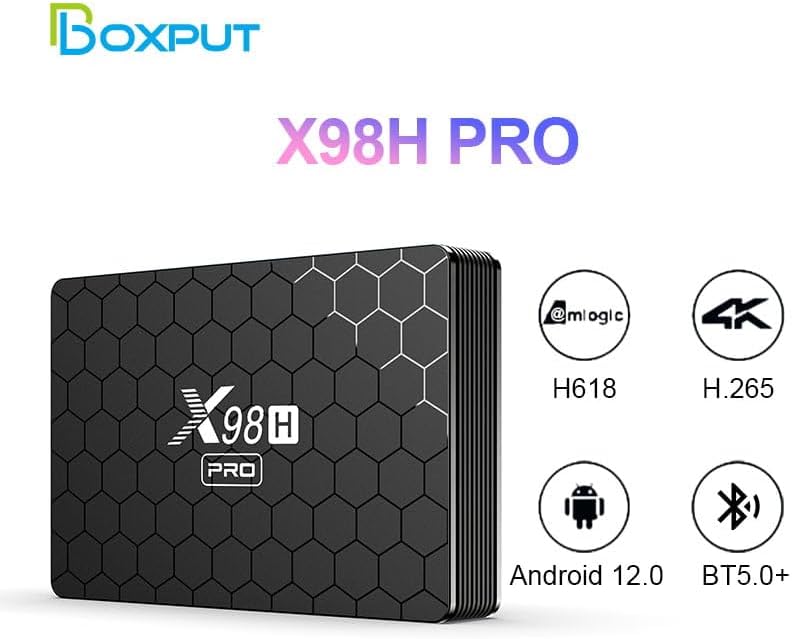
Image: The X98H PRO TV Box alongside icons highlighting its key features: Allwinner H618 chipset, H.265 decoding, Android 12.0 OS, and Bluetooth 5.0+ connectivity.
Bağlantı Noktaları ve Arayüzler
Familiarize yourself with the various ports on your X98H PRO device:

Resim: Ayrıntılı views of the X98H PRO TV Box showing its various ports. The rear panel includes DC power input, Optical audio output, HDMI In, HDMI Out, Ethernet, AV, and USB. The side panel shows two additional USB ports and a TF/MicroSD card slot.
- DC Connector (5V 2A): Güç girişi için.
- HDMI Out (2.0a): Connects to your TV or display for video and audio output (up to 4K@60fps).
- HDMI In (2.0): Allows input from another HDMI source (supports 4K@60fps).
- Ethernet (LAN): For wired network connection (1000Mbps).
- USB 2.0 Bağlantı Noktaları (x3): For connecting external storage devices, keyboards, mice, or other USB peripherals.
- TF/MicroSD Kart Yuvası: Genişletilebilir depolama alanı için (128 GB'a kadar).
- AV Bağlantı Noktası: For older analog video and audio connections (supports PAL/NTSC).
- Optik Ses Çıkışı: Dijital ses çıkışı için.
Kurulum Kılavuzu
1. Cihazın Bağlanması
- Connect one end of the HDMI cable to the HDMI Çıkışı port on the X98H PRO and the other end to an HDMI input port on your television or display.
- Güç adaptörünü prize takın. Doğru Akım 5V port on the X98H PRO and then plug the adapter into a power outlet.
- Televizyonunuzu açın ve doğru HDMI giriş kaynağını seçin.
2. Ağ Bağlantısı
The X98H PRO supports both Wi-Fi and wired Ethernet connections.
Wi-Fi Bağlantısı:
- From the main screen, navigate to Ayarlar.
- Seçme Ağ ve İnternet.
- Aç Wifi ve listeden istediğiniz ağı seçin.
- İstenirse Wi-Fi şifresini girin ve seçin. Bağlamak.
Ethernet Bağlantısı:
- Connect an Ethernet cable from your router or modem to the Ethernet (LAN) port on the X98H PRO.
- Cihaz, kablolu ağı otomatik olarak algılayacak ve ona bağlanacaktır.
3. Çevre Birimlerini Bağlama
You can connect various peripherals to your TV box:
- USB Cihazları: Plug USB flash drives, external hard drives, keyboards, or mice into the USB 2.0 ports.
- Bluetooth Cihazları:
- Git Ayarlar > Bağlı cihazlar > Yeni cihazı eşleştir.
- Bluetooth cihazınızı eşleştirme moduna alın.
- Eşleştirmek istediğiniz cihazı listeden seçin.
Kullanım Talimatları
Navigating the Android 12 OS
The X98H PRO runs on Android 12, providing a user-friendly interface. Use the included remote control to navigate through menus and applications.
- Ok tuşları: Navigate up, down, left, and right.
- Tamam Düğmesi: Bir öğeyi seçin veya bir eylemi onaylayın.
- Geri Düğmesi: Önceki ekrana dön.
- Ana menü tuşu: Ana ekrana dönün.
- Menü Düğmesi: Access context-sensitive options (if available).
Medya Oynatma
The device supports various multimedia formats:
- Video: H265 Main10@L5.1 (up to 4K@60fps or 6K@30fps), VP9 Profile 2 (up to 4K@60fps), AVS2 Jizhun 10bit (up to 4K@60fps), H.264 BP/MP/HP@L4.2 (up to 4K@30fps).
- Ses: MP3, AAC, WMA, FLAC, Ogg.
- Resim: HD JPEG, BMP, GIF, PNG, TIF.
You can play media from connected USB storage devices or through installed streaming applications.
Uygulama Yönetimi
Install new applications from the Google Play Store or other trusted sources. You can manage installed apps through the Android settings.
HDMI Input Switching
The X98H PRO features an HDMI input port, allowing you to connect another HDMI source (e.g., a game console or Blu-ray player) and switch between the TV box's output and the external HDMI input.

Image: A diagram illustrating the HDMI input and output functionality. The X98H PRO can display its own content or switch to an external HDMI source connected to its HDMI In port, controlled by a switch button on the device.
Bakım
- Temizlik: Cihazı temizlemek için yumuşak ve kuru bir bez kullanın. Sıvı temizleyiciler veya aerosoller kullanmayın.
- Havalandırma: Cihazın aşırı ısınmasını önlemek için iyi havalandırılan bir alana yerleştirildiğinden emin olun. Havalandırma açıklıklarını kapatmayın.
- Kapat: Uzun süre kullanılmayacaksa güç adaptörünün fişinin çekilmesi önerilir.
- Yazılım Güncellemeleri: En iyi performans ve güvenliği sağlamak için cihaz ayarlarından düzenli olarak sistem güncellemelerini kontrol edin.
Sorun giderme
| Sorun | Olası Çözüm |
|---|---|
| Güç yok |
|
| Televizyonda görüntü yok. |
|
| Wi-Fi bağlantı sorunları |
|
| Uzaktan kumanda yanıt vermiyor |
|
| Applications freezing or crashing |
|
Özellikler
| Özellik | Detay |
|---|---|
| Örnek | X98H PRO |
| İşletim Sistemi | Android 12.0 |
| İşlemci | Allwinner H618 Quad-core ARM Cortex A53 |
| Grafik işlemcisi | Mali G31 MP2 |
| RAM Kapasitesi | 2 GB / 4 GB (İsteğe bağlı) |
| ROM Capacity | 16GB / 32GB / 64GB (Optional) |
| Harici Depolama | USB Storage Devices, MicroSD (up to 128GB) |
| Wifi | IEEE 802.11 a/b/g/n/ac (2.4G & 5G Dual Band) |
| Bluetooth | BT5.0+ |
| Video Çıkışı | HDMI 2.0a (up to 4K@60fps), CVBS (PAL/NTSC) |
| Video Girişi | HDMI 2.0 (supports 4K@60fps) |
| USB Bağlantı Noktaları | 3 adet USB 2.0 |
| Boyutlar | 135 x 90 x 23 mm (5.31 x 3.54 x 0.91 inç) |
| Ağırlık | 0.15 Kg (0.33 lbs) |
| Renk | Siyah |
Garanti ve Destek
Garanti Bilgileri
This product comes with a standard manufacturer's warranty. Please refer to the warranty card included in your package or contact the seller for specific warranty terms and conditions.
Müşteri Desteği
For technical assistance, troubleshooting, or any inquiries regarding your X98H PRO Smart TV Box, please contact BOXPUT customer support or visit the official BOXPUT store on Amazon:
Visit the BOXPUT Store on Amazon

Image: A person using a computer, symbolizing customer support and online resources available for BOXPUT products.
Ask a question about this manual
Ask about setup, troubleshooting, compatibility, parts, safety, or missing instructions. Manuals+ will review the question and use this page’s manual context to help answer it.