
giriiş
This manual provides comprehensive instructions for the setup, operation, and maintenance of your BOXPUT X96 MAX Ultra Smart TV Box. Please read this manual carefully before using the device to ensure optimal performance and longevity.
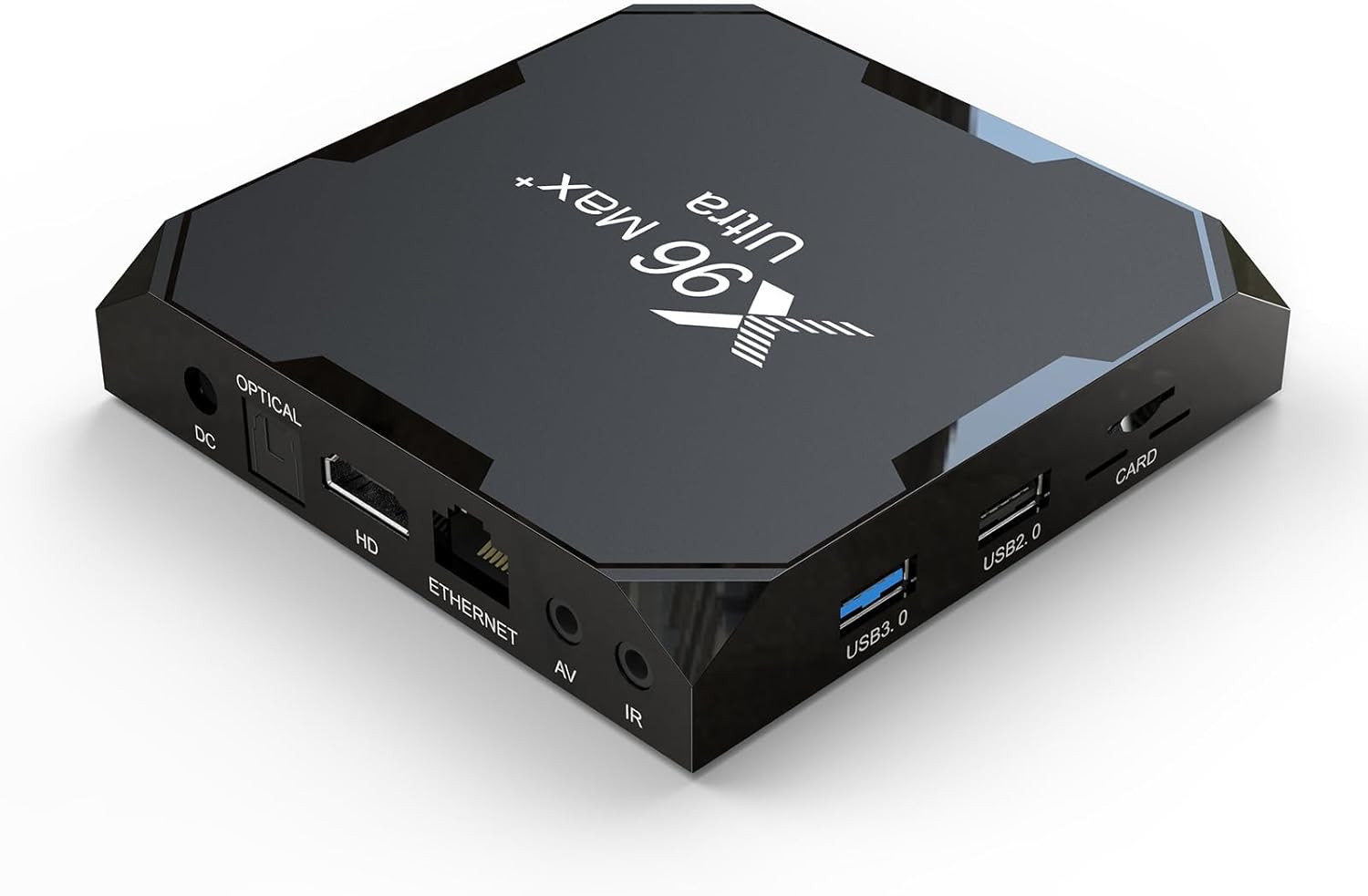
Resim: Ön view of the X96 MAX Ultra Smart TV Box, showcasing its sleek black design and various ports on the side.
Paket İçeriği
İşleme başlamadan önce, paketin içinde tüm öğelerin mevcut olduğundan emin olun:
- X96 MAX Ultra Smart TV Box
- Uzaktan kumanda
- HDMI External Cable
- Güç Adaptörü
- Kullanım Kılavuzu (bu belge)

Image: The X96 MAX Ultra TV Box, its remote control, power adapter, and HDMI cable, illustrating the complete package contents.
Kurulum Kılavuzu
1. Cihazın Bağlanması
- Güç Bağlantısı: Connect the power adapter to the "DC IN" port on the TV Box and then plug it into a wall outlet.
- HDMI Bağlantısı: Use the provided HDMI cable to connect the "HD" port on the TV Box to an HDMI input port on your television or monitor.
- Ağ Bağlantısı (Opsiyonel): For a wired internet connection, connect an Ethernet cable from your router to the "ETHERNET" port on the TV Box. Alternatively, you can use Wi-Fi after initial setup.
- Audio/Video Connection (Optional): If connecting to an older TV, use an AV cable (not included) to connect the "AV" port on the TV Box to your TV's AV input.
- IR Uzantısı (İsteğe bağlı): If using an external IR receiver, connect it to the "IR" port.

Image: Diagram illustrating the various input and output ports on the X96 MAX Ultra TV Box, including DC IN, Optical, HD (HDMI), Ethernet, AV, IR, USB 3.0, USB 2.0, and Card slot.
2. İlk Güç Açma ve Kurulum
Once all connections are made, the device should power on automatically or can be powered on using the remote control. Follow the on-screen prompts for initial setup, including language selection, display resolution, and Wi-Fi network configuration.
Kullanım Talimatları
Uzaktan Kumandaview
The included remote control allows you to navigate the Android TV interface and control media playback.

Image: The X96 MAX Ultra TV Box alongside its dedicated remote control, highlighting the device's compact size and the remote's button layout.
Navigating the Android 11.0 OS
The X96 MAX Ultra runs on Android 11.0, offering a user-friendly interface. Use the directional buttons on the remote to move between apps and settings. The "OK" button selects items, and the "Back" button returns to the previous screen.
Ağlara Bağlanma
- Wifi: Git Ayarlar > Ağ ve İnternet > Wi-Fi, select your network, and enter the password. The device supports 2.4G and 5G Wi-Fi for stable connections.
- Ethernet: If an Ethernet cable is connected, the device will automatically detect and use the wired connection.
Using USB and Card Slots
The device features one USB 3.0 port, one USB 2.0 port, and a TF card slot. These can be used to connect external storage devices (USB drives, hard drives) or memory cards for media playback or file yönetmek.

Image: A visual comparison of data transfer speeds between USB 2.0 and USB 3.0, demonstrating the faster read speed of USB 3.0 for smooth playback of local videos and sharing content.
Bluetooth Bağlantısı
The X96 MAX Ultra supports BT4.X, allowing you to connect various Bluetooth devices such as headphones, speakers, or a mouse for enhanced usability.

Image: An illustration showing the X96 MAX Ultra TV Box wirelessly connected via Bluetooth to a headset, speaker, and mouse, demonstrating its multi-device connection capability.
Gelişmiş Özellikler
8K HDR Media Playback
The X96 MAX Ultra supports multi-video decoder up to 8K resolution and features HDR (High Dynamic Range) for superior image quality. It also supports AV1 decoding, ensuring compatibility with modern video formats and efficient streaming.

Image: A split screen showing the difference between 4K SDR and 8K HDR, with the X96 MAX Ultra TV Box in the foreground, emphasizing its ultra-high quality video decoding capabilities.
Powerful Hardware
Equipped with an Amlogic S905X4 Quad Core ARM Cortex A55 chipset and ARM Mali-G31 MP2 GPU, the device delivers fast performance and excellent graphics processing. The 4GB RAM ensures smooth multitasking, while the 64GB ROM provides ampUygulamalar ve medya için alan.
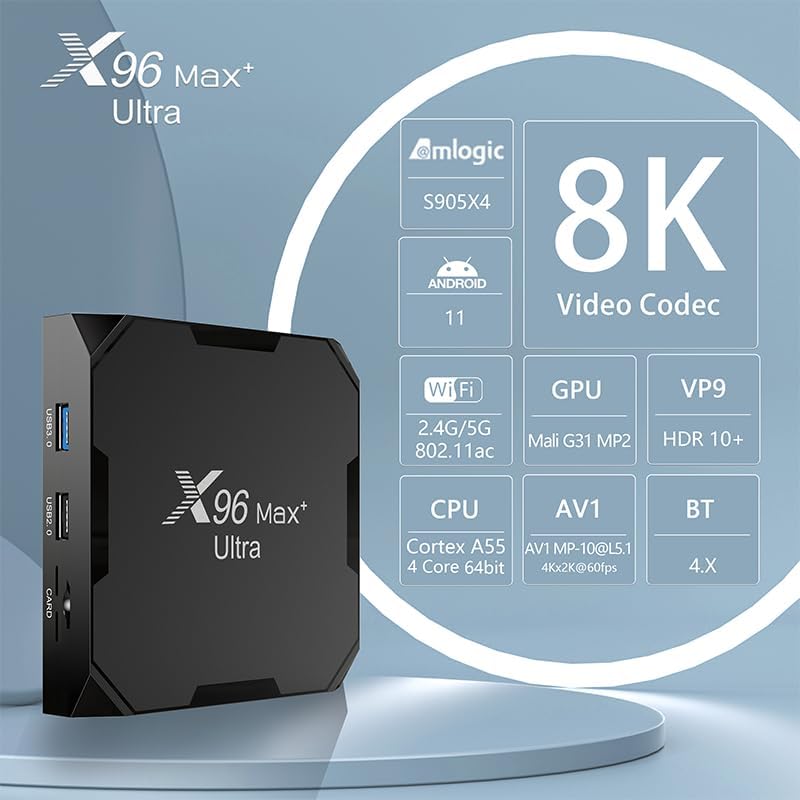
Image: An infographic detailing the core specifications of the X96 MAX Ultra TV Box, including Amlogic S905X4 chipset, Android 11, 8K video codec, 2.4G/5G WiFi, Mali G31 MP2 GPU, VP9, HDR10+, Cortex A55 CPU, AV1 decoding, and BT 4.X.
Bakım
- Temizlik: Cihazın dışını temizlemek için yumuşak ve kuru bir bez kullanın. Sıvı temizleyiciler veya aerosoller kullanmayın.
- Havalandırma: Cihazın aşırı ısınmasını önlemek için iyi havalandırılan bir alana yerleştirildiğinden emin olun. Havalandırma açıklıklarını kapatmayın.
- Kapat: Uzun süre kullanılmayacaksa güç adaptörünün fişinin çekilmesi önerilir.
- Yazılım Güncellemeleri: En iyi performans ve güvenliği sağlamak için cihaz ayarlarından düzenli olarak sistem güncellemelerini kontrol edin.
Sorun giderme
| Sorun | Olası Neden | Çözüm |
|---|---|---|
| Güç yok | Güç adaptörü bağlı değil veya arızalı. | Güç adaptörünün cihaza ve çalışan bir elektrik prizine güvenli bir şekilde bağlı olduğundan emin olun. |
| Televizyonda görüntü yok. | HDMI cable loose or connected to wrong input. TV input not set correctly. | Check HDMI cable connection. Ensure TV input source matches the HDMI port used. Try a different HDMI port or cable. |
| Wi-Fi bağlantı sorunları | Incorrect password. Router too far or signal interference. | Verify Wi-Fi password. Move device closer to router or reduce interference. Restart router and TV Box. |
| Uzaktan kumanda çalışmıyor | Batteries low or inserted incorrectly. Obstruction between remote and device. | Replace batteries. Ensure clear line of sight to the TV Box's IR receiver. |
| Uygulamaların çökmesi veya yavaş performans | Too many apps running in background. Insufficient storage. | Close unused applications. Clear app caches. Consider uninstalling unnecessary apps. Restart the device. |
Özellikler
| Özellik | Detay |
|---|---|
| Örnek | X96 MAX Ultra |
| İşletim Sistemi | Android 11.0 |
| Yonga seti | Amlogic S905X4 Quad Core ARM Cortex A55 |
| Grafik işlemcisi | ARM Mali-G31 MP2 |
| Veri deposu | 4 GB |
| ROM | 64 GB |
| Wifi | 2.4G ve 5G Çift Bant |
| Ethernet | 100M |
| Bluetooth | BT4.X |
| USB Bağlantı Noktaları | 1x USB 3.0, 1x USB 2.0 |
| Video Kod Çözme | Up to 8K, AV1 decoding, HDR |
| Güç Kaynağı | DC 5V/2A |
| Boyutlar | 105x105x19 mm (Product Size) |
| Ağırlık | 0.394 Kg (Unit packing Weight) |
Garanti ve Destek
For specific warranty information, please refer to the documentation provided at the time of purchase or contact your retailer. BOXPUT products are designed for reliability and performance.
If you encounter any issues not covered in the troubleshooting section, or require further assistance, please contact BOXPUT customer support through their official channels or the retailer from whom you purchased the product. You can often find support contact information on the product packaging or the brand's official webalan.