
giriiş
This manual provides essential information for the safe and efficient operation of your Philips Multi-Region DVD Player. Please read these instructions thoroughly before using the device and retain them for future reference.
Güvenlik Bilgileri
- Güç Kaynağı: Güç kaynağı hacmini sağlayıntage değeri, cihazın arkasındaki etikette belirtilen değerle eşleşir.
- Havalandırma: Do not block ventilation openings. Allow adequate space around the player for proper airflow.
- Su ve Nem: Do not expose the player to rain or moisture. Do not place objects filled with liquids, such as vases, on the apparatus.
- Sıcaklık: Do not place the player near heat sources such as radiators, heat registers, stoves, or other apparatus (including amp(ısı üreten)
- Temizlik: Unplug the player from the wall outlet before cleaning. Use a dry cloth only.
- Servis: Bu ürüne kendiniz servis vermeye çalışmayın. Tüm servis işlemleri için kalifiye servis personeline başvurun.
Paket İçeriği
Paketin içinde tüm öğelerin mevcut olduğundan emin olun:
- Philips Multi-Region DVD Player
- Uzaktan kumanda
- RCA Cable (Red, White, Yellow)
- HDMI Kablosu
- Kullanım Kılavuzu (bu belge)

Image: The Philips DVD Player, its remote control, and the included RCA and HDMI cables.
Kurmak
1. Connecting to a TV (HDMI)
For optimal video and audio quality, connect the DVD player to your TV using the included HDMI cable.
- Connect one end of the HDMI cable to the HDMI OUT port on the back of the DVD player.
- HDMI kablosunun diğer ucunu televizyonunuzdaki kullanılabilir bir HDMI IN bağlantı noktasına bağlayın.
- Televizyonunuzun uzaktan kumandasını kullanarak ilgili HDMI girişini seçin.
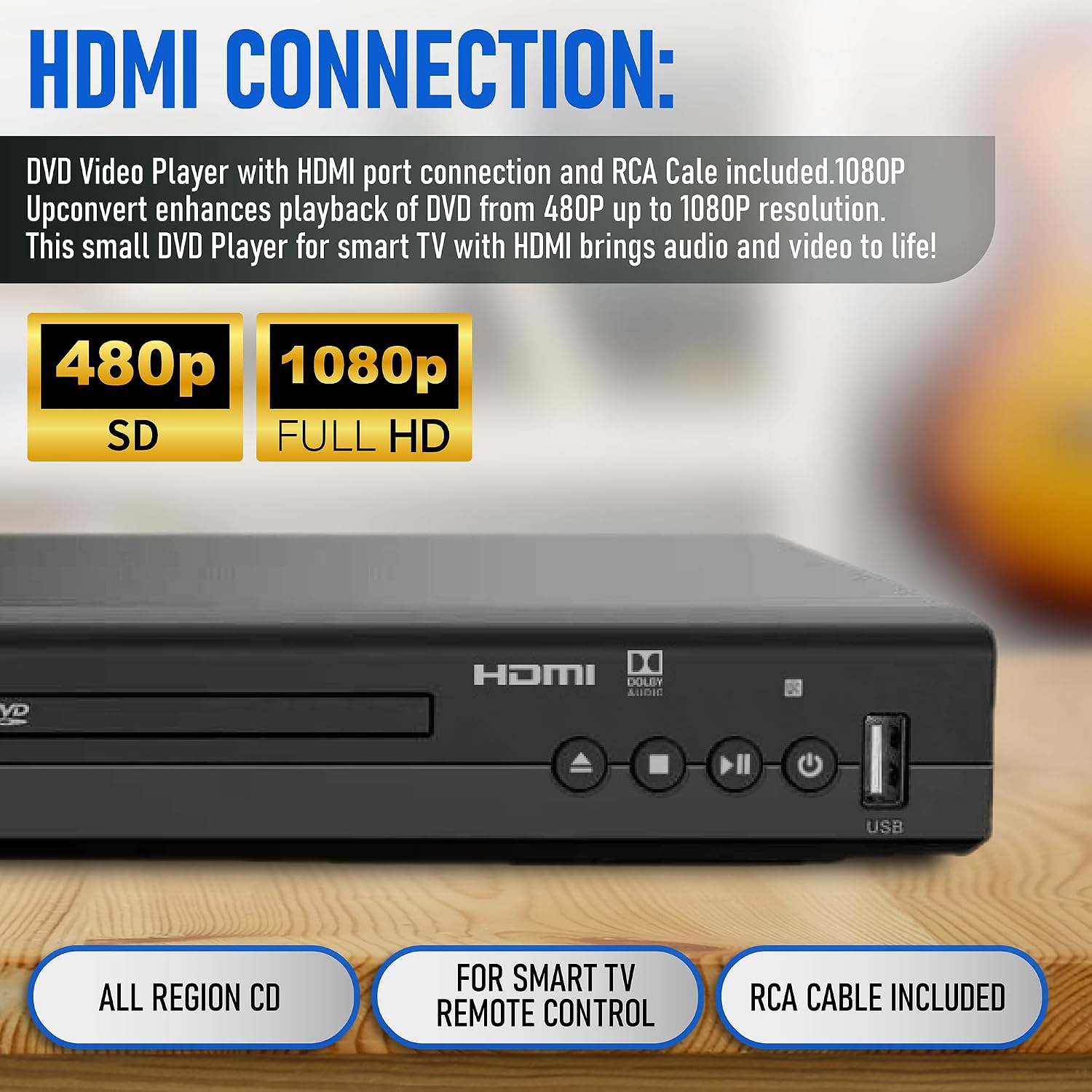
Image: Detail of the DVD player's rear panel showing the HDMI output, capable of 1080p upconversion.
2. Connecting to a TV (RCA)
If your TV does not have an HDMI port, use the included RCA cable for standard definition video and stereo audio.
- Connect the yellow plug of the RCA cable to the VIDEO OUT (yellow) port on the DVD player.
- Connect the red and white plugs to the AUDIO OUT R (red) and AUDIO OUT L (white) ports on the DVD player, respectively.
- Connect the other ends of the RCA cable to the corresponding VIDEO IN and AUDIO IN ports on your television.
- Select the corresponding AV input on your TV using its remote control.

Image: Connection diagram showing HDMI and RCA options for various devices.
3. Güç Bağlantısı
- Plug the power cord into the AC IN socket on the back of the DVD player.
- Güç kablosunun diğer ucunu bir duvar prizine takın.
Kullanım Talimatları
1. Temel Disk Oynatma
- Basın GÜÇ button on the player or remote control to turn on the unit.
- Basın AÇIK/KAPALI Disk tepsisini açmak için düğmesine basın.
- DVD veya CD diskini, etiket yüzü yukarı bakacak şekilde tepsiye nazikçe yerleştirin.
- Basın AÇIK/KAPALI Tepsiyi kapatmak için düğmeye tekrar basın. Oynatıcı otomatik olarak oynatmaya başlayacak veya disk menüsünü gösterecektir.
- Kullanın OYNAT/DURDUR, DURMAK, HIZLI İLERLEME, Ve GERİ SARMA Oynatmayı yönetmek için uzaktan kumanda üzerindeki düğmeler.
2. USB Medya Oynatma
The player supports playback of media files bir USB depolama aygıtından.
- USB flash sürücünüzü DVD oynatıcının ön tarafındaki USB bağlantı noktasına takın.
- The player should automatically detect the USB device and display a menu. If not, press the USB Uzaktan kumandadaki düğmeye basın.
- Gezinmenizi sağlayın files using the arrow buttons on the remote and press GİRMEK to select and play.
Desteklenen Formatlar: AVI, DIVX, MPG, MPEG, VOB for video; MP3 for audio; JPG for images.

Image: Demonstrating USB input for playing various media types.
3. Uzaktan Kumanda İşlevleri
The included remote control provides full functionality for operating your DVD player. Familiarize yourself with the button layout for easy navigation and control.
- Güç: Oynatıcıyı açar veya kapatır.
- Aç kapa: Disk tepsisini açar ve kapatır.
- Oynat/Duraklat: Oynatmayı başlatır veya duraklatır.
- Durdur: Oynatmayı durdurur.
- Gezinti Düğmeleri (Yukarı, Aşağı, Sol, Sağ, Enter): Menüde gezinme ve seçim için kullanılır.
- Hacim +/-: Ses çıkış ses seviyesini ayarlar.
- Ekrana Uygunluk: Adjusts the aspect ratio to fill the screen.
- USB BAĞLANTI: Switches input to USB media.
4. Screen Fit Feature
The Screen Fit feature allows you to adjust the picture to fill your entire screen, regardless of the original aspect ratio of the content.
- Oynatma sırasında, SCREEN FIT Uzaktan kumandadaki düğmeye basın.
- The player will cycle through available aspect ratio options. Select the one that best fits your screen.

Image: The Screen Fit feature ensures the picture fills the entire screen.
5. Multi-Region Playback
This Philips DVD player is designed to play DVDs from all regions (Region 1, 2, 3, 4, 5, 6) and supports both PAL and NTSC video standards. No special settings are required for multi-region playback; simply insert the disc, and the player will adjust automatically.
Bakım
1. Oynatıcının Temizlenmesi
- Unplug the player before cleaning.
- Dış yüzeyleri silmek için yumuşak, kuru bir bez kullanın. Aşındırıcı temizleyiciler veya çözücüler kullanmayın.
- Disk tepsisini toz ve kirden temiz tutun.
2. Temizleme Diskleri
- Wipe discs gently from the center outwards using a soft, lint-free cloth.
- Do not use harsh chemicals or abrasive materials on discs.
Sorun giderme
| Sorun | Olası Neden | Çözüm |
|---|---|---|
| Güç yok | Güç kablosu bağlı değil; elektrik prizi aktif değil. | Ensure power cord is securely plugged into the player and a working wall outlet. |
| Görüntü/ses yok | Televizyonda yanlış giriş seçildi; kablolar düzgün bağlanmamış. | Select the correct HDMI or AV input on your TV. Check all cable connections. |
| Disk oynatılmıyor | Disk kirli, çizik veya yanlış takılmış; desteklenmeyen disk formatı. | Clean the disc. Ensure the disc is inserted label-side up. Verify the disc is a supported format (DVD, CD, VCD). Note: This player does not support Blu-ray discs. |
| USB aygıtı tanınmadı | USB device not properly inserted; unsupported file sistem veya format. | Ensure the USB device is fully inserted. Check if the USB device is formatted to FAT32. Verify media files are supported (AVI, DIVX, MPG, MPEG, VOB, MP3, JPG). |
| Uzaktan kumanda çalışmıyor | Batteries are depleted or inserted incorrectly; obstruction between remote and player. | Replace batteries with new ones, ensuring correct polarity. Remove any obstructions and point the remote directly at the player's sensor. |
Özellikler
- Marka: PHILIPS
- Modeli: B0C9RY2D7S
- Medya Türleri: CD, DVD, VCD
- Özel Özellikler: Compact design, Progressive Scan, Multi-Region Playback
- Çözünürlük: 1920x1080 (1080P Upconvert from 480P)
- Bağlantı Tipi: HDMI, RCA, USB
- Bağlantı Teknolojisi: HDMI
- Renk: Siyah
- Ürün Ağırlığı: 2.2 Pound (yaklaşık 1 kg)
- Ses Çıkış Modu: Stereo
- Paket Boyutları: 10.47 x 10.35 x 2.87 inç (yaklaşık 26.6 x 26.3 x 7.3 cm)
- Üretici: Philips

Image: The compact dimensions of the Philips DVD player.
Garanti ve Destek
This Philips DVD Player comes with a standard manufacturer's warranty. Please refer to the warranty card included in your package for specific terms and conditions, including coverage duration and claim procedures.
For technical support, troubleshooting assistance, or warranty inquiries, please visit the official Philips support webPhilips'in web sitesini ziyaret edebilir veya müşteri hizmetleri departmanıyla iletişime geçebilirsiniz. İletişim bilgileri genellikle Philips'in web sitesinde bulunabilir. webSitede veya ürün ambalajında.


