
symcode B0C2PP844M
symcode 2D Bluetooth Endüstriyel Barkod Tarayıcı Kullanım Kılavuzu
Model: B0C2PP844M
1. Giriş
This manual provides detailed instructions for the setup, operation, maintenance, and troubleshooting of your symcode 2D Bluetooth Industrial Barcode Scanner, Model B0C2PP844M. This device is designed for efficient and reliable barcode scanning in various industrial and commercial environments, including warehouses, retail, logistics, and medical institutions. It supports both 1D and 2D barcodes and offers multiple connectivity options for versatile use.

Image 1.1: The symcode 2D Bluetooth Industrial Barcode Scanner resting in its charging cradle, ready for use or charging.
2. Güvenlik Bilgileri
Lütfen cihazı çalıştırmadan önce tüm güvenlik talimatlarını okuyun ve anlayın. Bu kılavuzu ileride başvurmak üzere saklayın.
- Tarayıcıyı aşırı sıcaklıklara, neme veya aşındırıcı maddelere maruz bırakmayın.
- Tarama ışığına doğrudan göz temasından kaçının.
- Use only the provided charging cradle and USB cable for charging to prevent damage.
- Do not attempt to disassemble or repair the scanner yourself. Contact customer support for assistance.
3. Ürün Bittiview ve Bileşenler
The symcode 2D Bluetooth Industrial Barcode Scanner features a rugged design suitable for demanding environments. Key components include:
- Tarayıcı Ünitesi: Handheld device with scanning engine and trigger button.
- Şarj yuvası: Serves as a charging station and houses the 433MHz wireless receiver. It also functions as a stand for hands-free operation.
- USB kablosu: For connecting the cradle to a computer for data transmission and charging.

Image 3.1: The scanner's robust construction, designed to withstand multiple drops from up to 2.5 meters, highlighting its IP67 anti-drop grade material.
4. Kurulum
4.1 Pilin Şarj Edilmesi
The scanner is equipped with a built-in rechargeable battery. Place the scanner into its charging cradle. Connect the cradle to a power source or a computer's USB port using the provided USB cable. Charging begins automatically. A full charge provides approximately 30 hours of continuous scanning or 720 hours of standby time.

Image 4.1: Battery specifications, including 1800mAh capacity, 30 hours scanning time, 720 hours standby time, and 4 hours charging time.
4.2 Connecting the Cradle (USB Wired)
For wired operation, connect the charging cradle to your computer via the USB cable. The cradle houses the 433MHz wireless receiver, making the scanner ready for use once connected. This mode also allows the scanner to charge while in operation.
4.3 Wireless Connectivity (433MHz and Bluetooth)
The scanner supports both 433MHz wireless and Bluetooth connectivity. The 433MHz receiver is integrated into the cradle, providing a transmission distance of up to 800m (2600ft) with barriers or 1500m (4900ft) in a barrier-free environment. Bluetooth connectivity offers a range of up to 15m (49ft) with barriers or 50m (164ft) in a barrier-free environment.

Image 4.2: The scanner offers flexible connectivity via USB wired connection, 433MHz wireless, and Bluetooth wireless transmission.

Image 4.3: Transmission range comparison for 433MHz wireless (up to 1500m barrier-free) and Bluetooth (up to 50m barrier-free).
4.4 İşletim Sistemi Uyumluluğu
The scanner is compatible with various operating systems, including iOS, Android, Windows, Mac OS, and Linux, making it suitable for use with desktops, laptops, smartphones, and tablets.

Image 4.4: The scanner supports a wide range of operating systems and device types for broad compatibility.
5. Kullanım Talimatları
5.1 Tarama Modları
The scanner offers three primary scanning modes:
- Anahtar Tetikleme Modu: Taramayı başlatmak için tetik düğmesine basın.
- Sürekli Tarama Modu: The scanner continuously emits light and scans.
- Automatic Sensing Mode: The scanner activates when it detects a barcode in its field of view.
To switch between these modes, refer to the configuration barcodes provided in the scanner's accompanying quick start guide or full manual. These barcodes are essential for customizing scanner behavior.
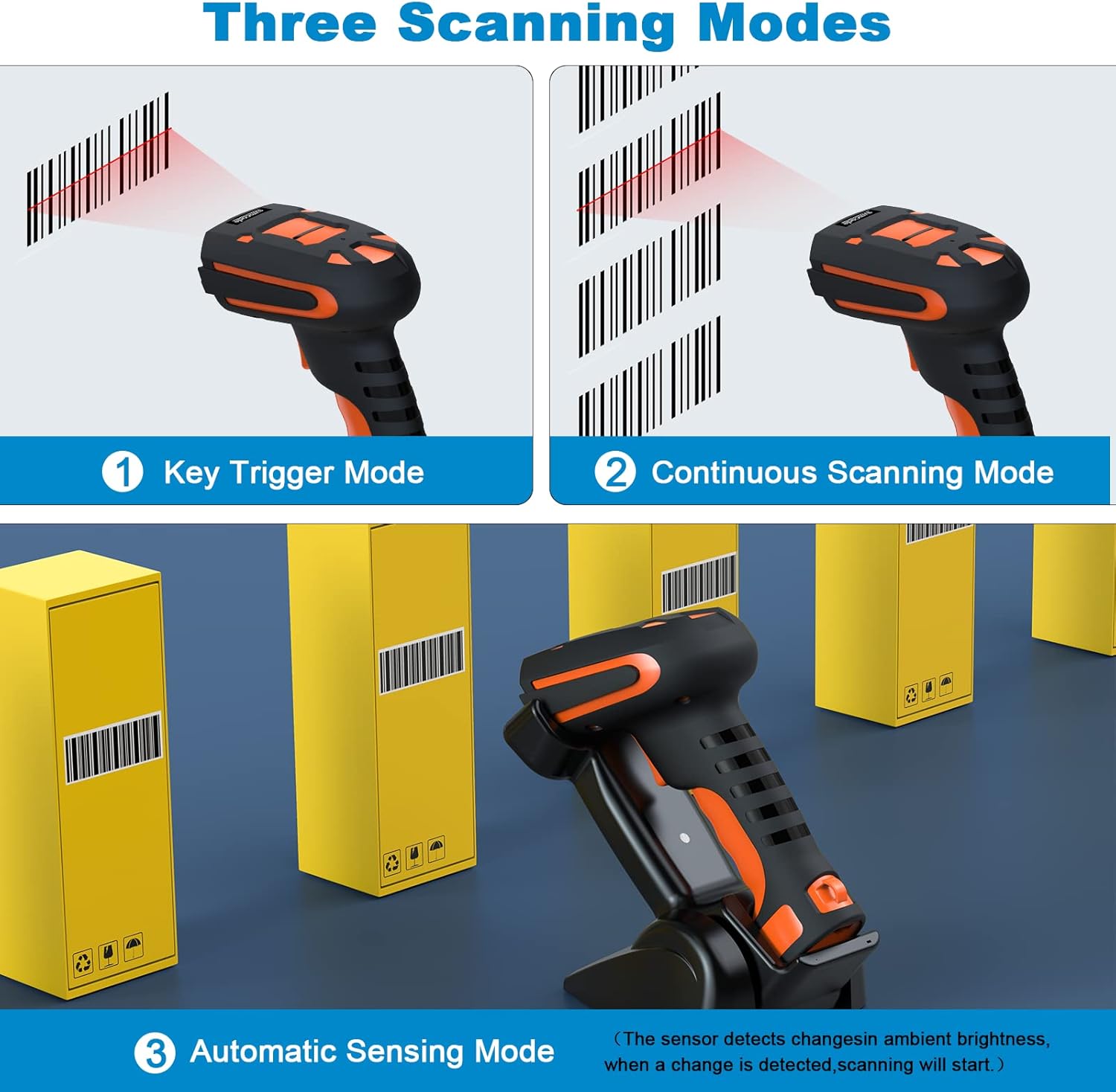
Image 5.1: Visual representation of the three available scanning modes for different operational needs.
5.2 Barcode Recognition Capabilities
The scanner features a German-manufactured camera with superior recognition ability, capable of reading various barcode types, including smudged, damaged, fuzzy, reflective, and color barcodes. It supports both 1D and 2D barcode formats.

Image 5.2: The scanner's ability to decode various barcode conditions and types, including 1D (EAN, UPC, Code 39, Code 128, etc.) and 2D (QR Code, Data Matrix, PDF417, etc.).
5.3 Hafıza Modu
The scanner includes a memory mode for storing barcodes when out of range or not connected. To activate memory mode, scan the corresponding barcode from your manual. To export stored data, scan the 'Export Data' barcode. To clear the memory, scan the 'Clear Memory' barcode. Note that exporting data does not automatically clear the memory.
5.4 Ses ve Titreşim Ayarları
The scanner may emit a loud beep when entering sleep mode or performing certain actions. Configuration barcodes are available in the manual to enable or disable sound and vibration feedback according to user preference.
6. Bakım
6.1 Temizlik
Tarayıcıyı temizlemek için yumuşak bir bez kullanın.amp cloth. Avoid abrasive cleaners or solvents that could damage the device. Ensure the scanning window is clean for optimal performance.
6.2 Pil Bakımı
To prolong battery life, avoid fully discharging the battery frequently. Store the scanner in a cool, dry place when not in use for extended periods. Charge the battery regularly, even if the scanner is not in active use.
6.3 Cradle Adjustment
The scanner's cradle can be manually adjusted to a 45-degree angle. To do this, carefully remove the side parts of the cradle, adjust the angle, and reattach the side parts. Exercise caution as these parts may be delicate.
7. Sorun Giderme
- Tarayıcı bağlanmıyor: Ensure the cradle is properly connected to the computer via USB. For wireless connections, verify the scanner is paired via 433MHz or Bluetooth. If using Bluetooth, check your device's Bluetooth settings.
- Tarayıcı veri iletmiyor: Confirm the scanner is in the correct operating mode (e.g., not in memory mode if direct transmission is desired). Check for any specific configuration barcodes that might affect data output.
- Zayıf tarama performansı: Clean the scanning window. Ensure the barcode is not excessively damaged, smudged, or reflective. Adjust scanning distance.
- No response from scanner: Check battery level. Recharge if necessary. If the issue persists, attempt a factory reset by scanning the appropriate barcode from your manual.
- Donanım Yazılımı Güncellemeleri: The manufacturer may release firmware updates. Always refer to the official product support website for instructions and reliable download sources. Be cautious of third-party websites for firmware downloads.
8. Özellikler
| Özellik | Şartname |
|---|---|
| Ürün Boyutları | 3 x 4 x 7 inç |
| Ürün Ağırlığı | 14.1 ons |
| Pil Türü | 1 Lityum Polimer pil gerekli |
| Pil Kapasitesi | 1800mAh |
| Sürekli Tarama Süresi | 30 saate kadar |
| Bekleme Süresi | 720 saate kadar |
| Şarj Süresi | Yaklaşık 4 saat |
| Bağlantı Teknolojisi | Bluetooth, 433MHz Wireless, USB Wired |
| 433MHz Wireless Range (Barrier-Free) | 1500 m'ye (4900 ft) kadar |
| 433MHz Wireless Range (With Barriers) | 800 m'ye (2600 ft) kadar |
| Bluetooth Wireless Range (Barrier-Free) | 50 m'ye (164 ft) kadar |
| Bluetooth Wireless Range (With Barriers) | 15 m'ye (49 ft) kadar |
| Uyumlu Cihazlar | Masaüstü, Dizüstü, Akıllı Telefon, Tablet |
| İşletim Sistemi Uyumluluğu | iOS, Android, Windows, Mac OS, Linux |
| Düşme Direnci | Withstands drops of up to 9.84ft (3m) to concrete floor |
| Giriş Koruması (IP) Derecesi | IP67 (toza ve suya dayanıklı) |
9. Garanti ve Destek
9.1 Garanti Bilgileri
Your symcode 2D Bluetooth Industrial Barcode Scanner is covered by a manufacturer's warranty. Please refer to the warranty card included with your product for specific terms and conditions. Keep your proof of purchase for warranty claims.
9.2 Müşteri Desteği
For technical assistance, troubleshooting, or warranty inquiries, please contact symcode customer support. Contact details can typically be found on the manufacturer's official website or on the product packaging. When contacting support, please have your product model (B0C2PP844M) and purchase information ready.
Ask a question about this manual
Ask about setup, troubleshooting, compatibility, parts, safety, or missing instructions. Manuals+ will review the question and use this page’s manual context to help answer it.