
Intel 21P02J00BA
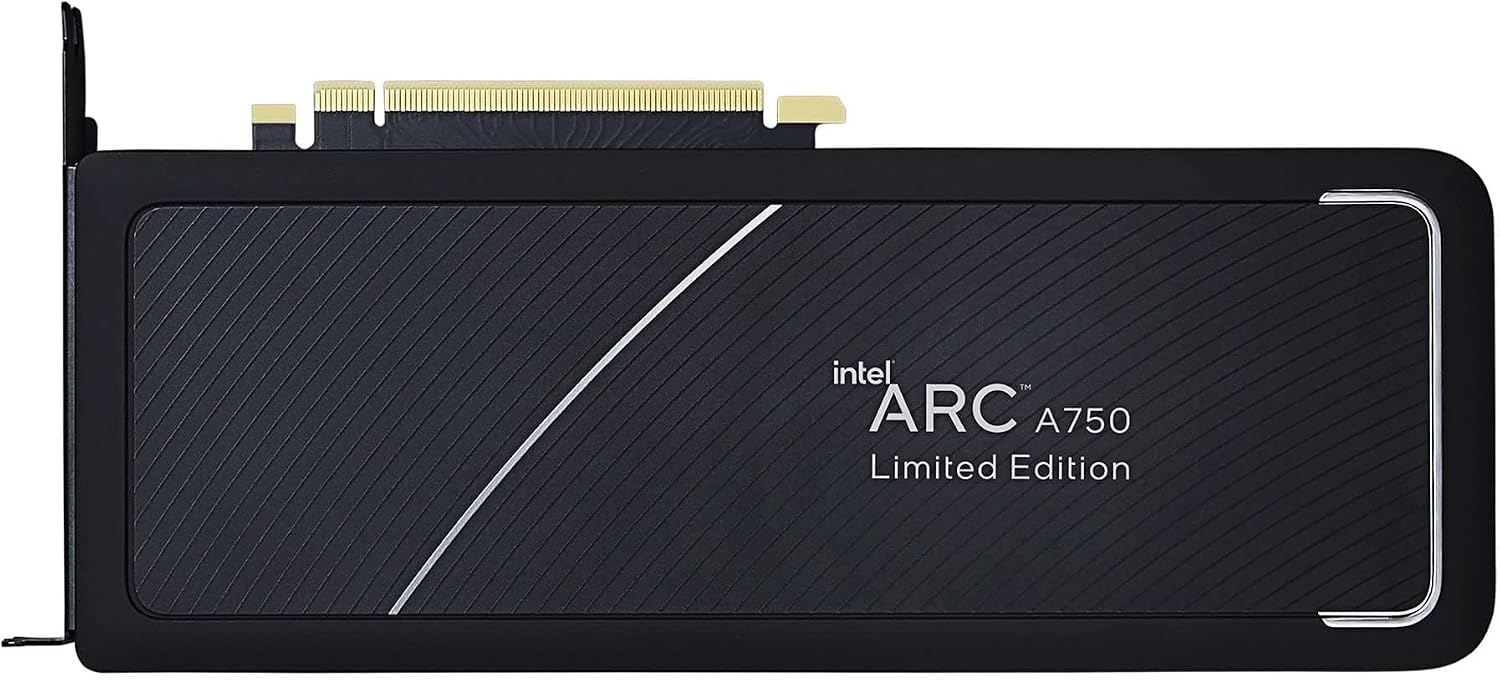
Intel Arc A750 Limited Edition Grafik Kartı Kullanım Kılavuzu
Model: 21P02J00BA
giriiş
This manual provides essential information for the installation, operation, maintenance, and troubleshooting of your Intel Arc A750 Limited Edition 8GB PCI Express 4.0 Graphics Card. Please read this manual thoroughly before using the product to ensure optimal performance and longevity.
Paket İçeriği
Ürün ambalajınızda tüm öğelerin mevcut olduğundan emin olun:
- Intel Arc A750 Limited Edition 8GB PCI Express 4.0 Graphics Card
- Belgeler (bu kullanıcı kılavuzu)

Sistem Gereksinimleri
Kurulumdan önce sisteminizin aşağıdaki minimum gereksinimleri karşıladığından emin olun:
- PCI Express 4.0 Slot: A motherboard with an available PCI Express 4.0 x16 slot is required for optimal performance. While compatible with PCIe 3.0, performance may be reduced.
- Resizable BAR (ReBAR) Support: For best performance, your system's motherboard and CPU should support and have Resizable BAR enabled in the BIOS/UEFI.
- Güç Kaynağı Ünitesi (PSU): A minimum 700W power supply is recommended, especially for 4K gaming or demanding workloads, to ensure stable operation.
- İşletim Sistemi: Windows 10 (64-bit) or Windows 11 (64-bit).
- İşlemci: Compatible Intel or AMD processor.
- Bellek (RAM): 8GB system memory or more.
Kurmak
1. Fiziksel Kurulum
- Sisteminizi Hazırlayın: Bilgisayarınızı kapatın ve tüm kabloları çıkarın. Bilgisayar kasasını açın.
- PCIe Yuvasını Bulun: Identify an available PCI Express 4.0 x16 slot on your motherboard. Remove any expansion slot covers that block the slot.
- Grafik Kartını Takın: Carefully align the graphics card with the PCIe slot. Press down firmly and evenly until the card is securely seated in the slot and the retention clip engages.
- Kartı Güvenceye Alın: Secure the graphics card to the computer case using the screws from the expansion slot covers.
- Güç Kablolarını Bağlayın: Connect the necessary PCIe power cables from your power supply to the graphics card. The Intel Arc A750 typically requires one 8-pin and one 6-pin PCIe power connector. Ensure they are fully seated.
- Davayı Kapatın ve Çevre Birimlerini Bağlayın: Close your computer case, reconnect all cables (monitor, keyboard, mouse, power), and power on your system.

2. Sürücü Kurulumu
After physical installation, you must install the latest graphics drivers for your Intel Arc A750 card. This is crucial for proper functionality and performance.
- Sürücüleri İndirin: Resmi Intel desteğini ziyaret edin webalan (www.intel.com/support/arc) to download the latest drivers for your Intel Arc A750.
- Sürücüleri Yükle: Run the downloaded installer and follow the on-screen instructions. It is recommended to perform a clean installation if prompted.
- Sistemi Yeniden Başlat: Sürücü kurulumu tamamlandıktan sonra bilgisayarınızı yeniden başlatın.
- Intel Arc Control Software: The driver package typically includes the Intel Arc Control software, which allows you to monitor performance, update drivers, and customize settings.
Grafik Kartını Çalıştırma
The Intel Arc A750 is designed to deliver strong performance for gaming and content creation. Key features include:
Intel Xe Super Sampling (XeSS)
XeSS is an AI-enhanced upscaling technology that leverages machine learning to deliver high-performance, high-fidelity gaming experiences. It reconstructs images with sub-pixel details, enabling higher frame rates while maintaining visual quality.
Real-time Ray Tracing Support
The Intel Arc A750 supports hardware-accelerated ray tracing, allowing for more realistic lighting, shadows, and reflections in supported games and applications. This technology enhances visual immersion by simulating the physical behavior of light.
Intel Arc Control Yazılımı
The Intel Arc Control software provides a centralized hub for managing your graphics card. Features include:
- Performans İzleme: View real-time statistics such as GPU utilization, temperature, and clock speeds.
- Sürücü Güncellemeleri: Easily check for and install the latest graphics drivers.
- Game Optimization: Optimize game settings for the best balance of performance and visual quality.
- Creator Features: Access tools for streaming and content creation, including virtual camera setup.
Bakım
Proper maintenance ensures the longevity and stable performance of your graphics card:
- Sürücüleri Güncel Tutun: Regularly check for and install the latest graphics drivers from the Intel support website. Driver updates often include performance improvements, bug fixes, and compatibility enhancements.
- Toz Giderimi: Periodically clean dust from the graphics card fans and heatsink using compressed air. Ensure the system is powered off and unplugged before cleaning. Dust buildup can impede cooling and lead to overheating.
- Uygun Hava Akışını Sağlayın: Make sure your computer case has adequate airflow to prevent heat buildup. Ensure no cables or other components are obstructing the graphics card's fans.
Sorun giderme
Bu bölümde, Intel Arc A750 grafik kartınızla karşılaşabileceğiniz yaygın sorunlar ele alınmaktadır.
| Sorun | Olası Neden / Çözüm |
|---|---|
| No display or black screen after installation. |
|
| Low frame rates or poor performance in games. |
|
| Screen flickering or intermittent black screens. |
|
| Fans are excessively loud or vibrating. |
|
Özellikler
| Özellik | Detay |
|---|---|
| Marka | Akıllı |
| Model Numarası | 21P02J00BA |
| Grafik Eş İşlemcisi | Intel Arc A750 |
| Grafik Kartı RAM Boyutu | 8 GB |
| GPU Saat Hızı | 2050 MHz |
| Video Çıkış Arayüzü | Ekran Bağlantı Noktası |
| Ürün Ağırlığı | 2 pound |
| Ürün Boyutları (UxGxY) | 17.3 x 11.1 x 0.1 inç |
| PCI Express Sürümü | 4.0 |
Garanti ve Destek
The Intel Arc A750 Limited Edition Graphics Card typically comes with a 1-year limited warranty. For detailed warranty information, technical support, or to register your product, please visit the official Intel support webalan:
You can also find frequently asked questions (FAQs) and community forums on the Intel support page, which can be valuable resources for troubleshooting and optimizing your experience.
Ask a question about this manual
Ask about setup, troubleshooting, compatibility, parts, safety, or missing instructions. Manuals+ will review the question and use this page’s manual context to help answer it.