
Global Industrial B0BHTGHKS5
Global Industrial Heavy-Duty LED Digital Crane Scale User Manual
Model: B0BHTGHKS5
1. Giriş
This manual provides essential information for the safe and effective operation, maintenance, and troubleshooting of the Global Industrial Heavy-Duty LED Digital Crane Scale. This robust scale is designed for accurate weighing of oversized loads in various industrial and warehousing environments.
Key features include a durable cast aluminum housing, an easy-to-read LED display, a remote control for operation from a distance, and the ability to switch between pounds and kilograms. The scale has a maximum capacity of 20,000 lb (approximately 9,072 kg) with a 10 lb increment.
2. Güvenlik Bilgileri
Yaralanmayı veya ekipmana gelebilecek zararı önlemek için her zaman aşağıdaki güvenlik talimatlarına uyun:
- Ensure the crane scale is securely attached to a suitable lifting mechanism with adequate load capacity.
- Do not exceed the maximum weight capacity of 20,000 lb (9,072 kg). Overloading can cause severe damage to the scale and pose a safety risk.
- Regularly inspect the hooks, shackles, and housing for any signs of wear, damage, or deformation before each use.
- Keep hands and body clear of suspended loads.
- Operate the remote control from a safe distance, ensuring clear line of sight to the scale display if possible.
- Do not attempt to repair or modify the scale yourself. Refer all servicing to qualified personnel.
- Protect the scale from extreme temperatures, moisture, and corrosive substances.
3. Paket İçeriği
Paket açıldığında tüm eşyaların mevcut ve hasarsız olduğundan emin olun:
- Global Industrial Heavy-Duty LED Digital Crane Scale (1 unit)
- Uzaktan Kumanda (1 adet)
- Kullanım Kılavuzu (bu belge)

Figure 3.1: The Global Industrial Heavy-Duty LED Digital Crane Scale, showing the main unit with its display, upper shackle, and lower hook. A remote control is included for operation.
4. Kurulum
Follow these steps to prepare your crane scale for operation:
- Paketin açılması: Carefully remove the crane scale and remote control from their packaging. Retain packaging for future storage or transport.
- İlk Muayene: Visually inspect the scale for any signs of shipping damage. Check the integrity of the housing, hooks, and display.
- Pil Takma/Şarj Etme: The scale's internal battery provides up to 100 hours of operation. Ensure the battery is fully charged before first use. Connect the provided charger to the scale's charging port and to a suitable power outlet. The display will indicate charging status.
- Montaj: Securely attach the upper shackle of the crane scale to your lifting equipment (e.g., crane hook, hoist). Ensure the connection point has a load capacity greater than the scale's maximum capacity and the expected load.
- Uzaktan Kumanda Kurulumu: The remote control is pre-paired with the scale. Ensure batteries are installed in the remote control (if applicable, typically AAA or AA batteries).
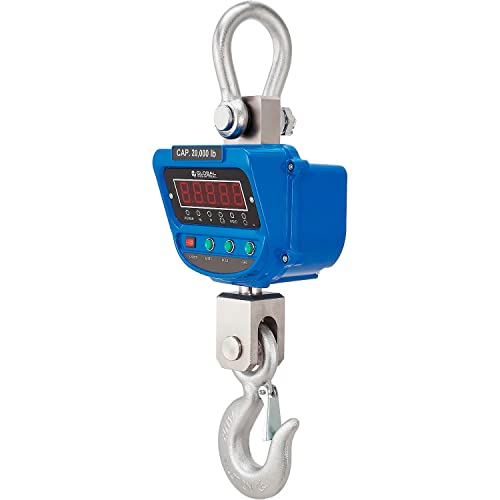
Şekil 4.1: Ayrıntılı view of the crane scale's control panel, showing the LED display and buttons for Power, Units, Hold, and Tare functions.
5. Kullanım Talimatları
This section details the basic operation of your crane scale.
5.1 Güç Açma/Kapatma
- Açmak İçin: Basın GÜÇ button on the scale or the remote control. The LED display will illuminate and perform a self-test before showing "0.0" or the last measured value.
- Kapatmak İçin: Basılı tutun GÜÇ Ekran kapanana kadar düğmeye birkaç saniye basılı tutun.
5.2 Weighing a Load
- Terazinin açık olduğundan ve "0.0" değerini gösterdiğinden emin olun.
- Carefully attach the load to the lower hook of the crane scale.
- Allow the load to stabilize. The weight will be displayed on the LED screen.
- Tutma İşlevi: To lock the displayed weight value even after the load is removed, press the TUTMAK button on the scale or remote. Press again to release the hold.
5.3 Unit Conversion (Pounds/Kilograms)
The scale can display weight in both pounds (lb) and kilograms (kg).
- Basın BİRİMLER button on the scale or remote control to toggle between "lb" and "kg" display modes.
5.4 Dara İşlevi
The Tare function allows you to zero out the weight of a container or lifting accessory, so only the net weight of the item is measured.
- Attach the empty container or accessory to the scale's hook.
- Ağırlığın sabitlenmesini bekleyin.
- Basın DARA button on the scale or remote. The display will reset to "0.0".
- Now, place the item to be weighed inside the container. The display will show only the weight of the item.
- To clear the Tare, remove the load and press the DARA button again, or power cycle the scale.
6. Bakım
Proper maintenance ensures the longevity and accuracy of your crane scale.
- Temizlik: Terazi yüzeyini yumuşak bir bezle silin.amp cloth. Do not use abrasive cleaners or solvents. Ensure no liquid enters the display or button areas.
- Pil Bakım: Recharge the battery when the low battery indicator appears. For long-term storage, charge the battery to approximately 50% and store in a cool, dry place. Recharge every 3-6 months to maintain battery health.
- Denetleme: Regularly inspect the hooks, shackles, and housing for any signs of wear, cracks, corrosion, or deformation. Pay close attention to load-bearing points.
- Kalibrasyon: While the scale is factory calibrated, professional recalibration may be required periodically, especially after heavy use or if accuracy issues are suspected. Contact Global Industrial support for calibration services.
- Depolamak: When not in use, store the scale in a dry, protected environment, away from direct sunlight, extreme temperatures, and excessive dust.
7. Sorun Giderme
Yaygın sorunlar ve çözümleri için aşağıdaki tabloya bakın.
| Sorun | Olası Neden | Çözüm |
|---|---|---|
| Tartı açılmıyor. | Pil bitmiş. | Charge the scale's battery using the provided charger. |
| Yanlış ağırlık ölçümleri. | Scale not properly zeroed; Scale needs calibration; Environmental factors (wind, vibration). | Ensure scale is stable and zeroed before weighing. Perform Tare function. If issues persist, contact support for calibration. |
| Uzaktan kumanda çalışmıyor. | Remote batteries depleted; Obstruction between remote and scale; Remote out of range. | Replace remote batteries. Ensure clear line of sight. Operate within 100 feet (30 meters) range. |
| Ekranda "OL" veya "Err" yazısı görünür. | Aşırı yük durumu. | Remove the load immediately. Do not exceed the 20,000 lb capacity. |
8. Özellikler
Detailed technical specifications for the Global Industrial Heavy-Duty LED Digital Crane Scale:
- Modeli: B0BHTGHKS5
- Marka: Küresel Endüstriyel
- Kapasite: 20,000 lb (9,072 kg)
- Artış: 10 kilo
- Malzeme: Durable Cast Aluminum Housing
- Renk: Mavi
- Ürün Ağırlığı: 70 Pound (31.75 kg)
- Ürün Ölçüleri (U x G x Y): 10.16" x 7.52" x 32.95" (25.8 cm x 19.1 cm x 83.7 cm)
- Uzaktan Kumanda Menzili: 100 feet'e (30 metre) kadar
- Pil Ömrü: 100 saate kadar (şarj edilebilir)
- Menşei ülke: Çin
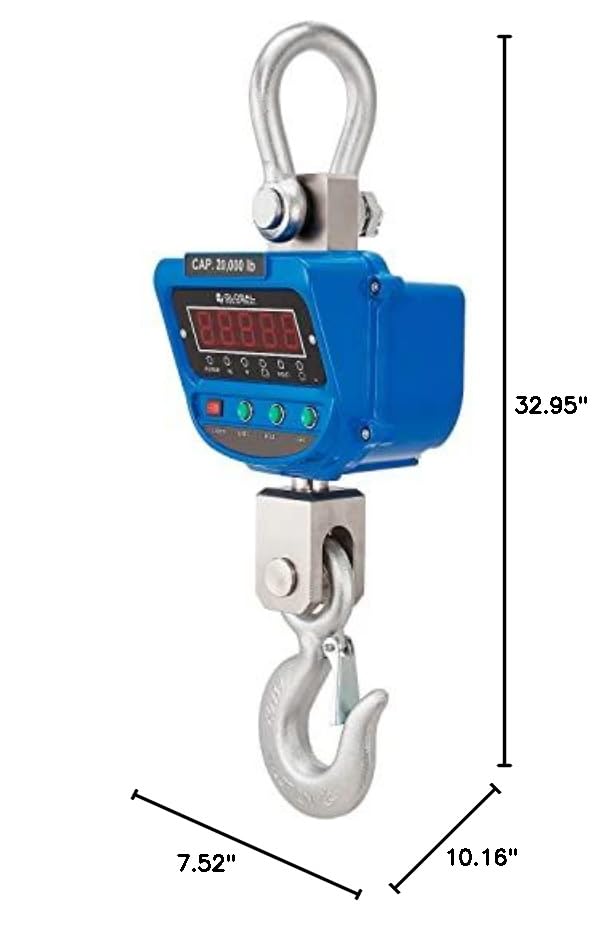
Figure 8.1: Dimensional drawing of the crane scale, indicating a width of 7.52 inches, a length of 10.16 inches, and a total height of 32.95 inches.
9. Garanti ve Destek
The Global Industrial Heavy-Duty LED Digital Crane Scale is covered by a 1 Yıllık Sınırlı Garanti satın alma tarihinden itibaren.
This warranty covers defects in materials and workmanship under normal use. It does not cover damage resulting from misuse, accident, unauthorized modification, or improper maintenance.
For warranty claims, technical support, or service inquiries, please contact Global Industrial customer service. Refer to the official Global Industrial webGüncel iletişim bilgileri için siteye veya satın alma belgelerinize bakın.
Ask a question about this manual
Ask about setup, troubleshooting, compatibility, parts, safety, or missing instructions. Manuals+ will review the question and use this page’s manual context to help answer it.