
Bisofice D1003
BISOFICE D1003 Expandable Cordless Phone System User Manual
Model: D1003
giriiş
This manual provides comprehensive instructions for the setup, operation, and maintenance of your BISOFICE D1003 Expandable Cordless Phone System. Please read this manual thoroughly before using the device to ensure proper functionality and to familiarize yourself with all features.
The BISOFICE D1003 is designed for clear communication and offers features such as a 3-line LCD display, caller ID, phone book memory, hands-free calling, intercom, and conference call capabilities. It supports connection for up to 5 handsets and offers 16 interface languages.
Paket İçeriği
Paketinizde tüm öğelerin mevcut olduğundan emin olun:
- 1 x Ahize
- 1 x Cradle (Base Unit)
- 1 x Telephone Line Cable
- 2 x Rechargeable Batteries (1.2V AAA 400 mAh)
- 1 x Power Cord (US Plug, 100-240V)
- 1 x Kullanım Kılavuzu (İngilizce)

Image: Contents of the BISOFICE D1003 Cordless Phone System package, including the handset, base unit, power adapter, and telephone line cable.
Kurulum Talimatları
- Pilleri Takın: Open the battery compartment on the back of the handset. Insert the two provided 1.2V AAA rechargeable batteries, ensuring correct polarity. Close the compartment.
- Ana üniteye güç bağlantısı yapın: Plug the power cord into the DC 6V port on the back of the base unit. Connect the other end of the power cord to a standard electrical outlet (100-240V).
- Telefon Hattını Bağlayın: Plug one end of the telephone line cable into the TEL LINE port on the back of the base unit. Connect the other end to your telephone wall jack.
- İlk Şarj: Place the handset on the base unit cradle. The "IN USE/CHARGE LED" indicator on the base unit should illuminate. For the first use, charge the handset for at least 12 hours to ensure optimal battery performance. Subsequent charging time is approximately 8 hours.
- Handset Registration (if necessary): The handset is typically pre-registered to the base unit. If not, or if adding additional handsets (up to 5 total), refer to the "Handset Registration" section under Operating Instructions.

Image: Detailed diagram showing the various components and ports of the BISOFICE D1003 handset and base unit for setup and operation.
Kullanım Talimatları
Ahize Bittiview
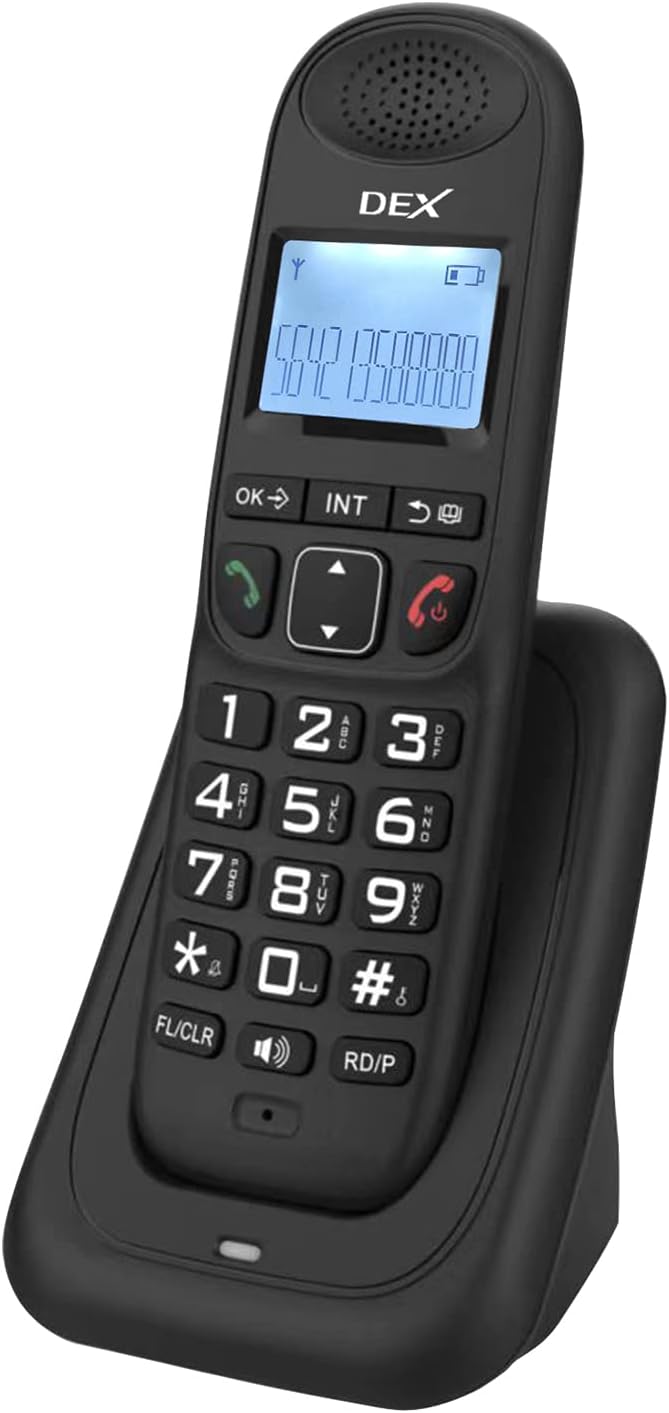
Image: The BISOFICE D1003 cordless phone handset resting in its charging cradle, displaying the LCD screen and keypad.
- LCD Ekran: 3-line display for caller ID, menu navigation, and call information.
- Klavye: Standard numeric keypad (0-9, *, #) for dialing.
- Gezinme Tuşları: Up/Down arrows for menu navigation and volume control.
- Tamam/Menü Tuşu: Seçimleri onaylar ve ana menüye erişim sağlar.
- Talk/Speaker Key (Green): Initiates or answers a call, activates speakerphone.
- Hang Up/Power Off Key (Red): Ends a call, exits menus, or powers the handset on/off (long press).
- Redial/Pause (RD/P): Redials the last number or inserts a pause during dialing.
- Flash/Clear (FL/CLR): Used for call waiting or clearing input.
- Intercom (INT): Initiates an intercom call between registered handsets.
- Telefon Defteri: Accesses stored contacts.
Temel Çağrı Fonksiyonları
- Arama yapmak:
- Tuş takımını kullanarak telefon numarasını girin.
- Basın Konuşmak anahtar.
- Bir Aramayı Cevaplama:
- Telefon çaldığında, tuşuna basın Konuşmak anahtar.
- The phone also supports auto-answering (if enabled in settings).
- Aramayı Bitirme: Basın Telefonu kapatmak anahtar.
- Tekrar arama: Basın RD/P key to redial the last outgoing number.
- Hands-Free Calling (Speakerphone): Bir arama sırasında tuşuna basın. Konuşmak key again to activate/deactivate the speakerphone.
- Sessiz İşlevi: Bir arama sırasında tuşuna basın. Sesini kapatmak key (often combined with OK/Menu or a dedicated button) to mute your microphone. Press again to unmute.
Gelişmiş Özellikler
- Arayan Kimliği: The LCD displays the incoming caller's number (if available from your service provider). The phone stores 30 incoming numbers and 10 outgoing numbers.

Image: The BISOFICE D1003 handset showing its Caller ID feature, along with indicators for 30 incoming and 10 outgoing call memories, and the redial/pause function.
- Telefon rehberi: Store up to 50 contacts with 12 characters for names and 32 digits for numbers.

Image: The BISOFICE D1003 handset with an overlay indicating its capacity for 50 phone book memories, each supporting up to 12 characters and 32 digits.
- İnterkom: Make internal calls between registered handsets. Press the İÇ key and select the desired handset number.
- Çağrı Aktarımı: Transfer an external call to another registered handset. During an active call, press İÇ, select the handset, and then hang up once the other handset answers.
- Konferans Görüşmesi: Conduct a three-way conference call between an external call and two handsets.
- Telefon Kaydı: The system supports a maximum of 5 handsets per base unit. To register a new handset:
- Ana ünitede, basılı tutun. Çağrı cihazı button (usually on the side or back) until the registration indicator lights up.
- On the handset, access the menu, navigate to "Registration" or "Register Handset," and follow the on-screen prompts. You may need to enter a PIN (default is usually 0000).
- Dil Ayarları: The phone supports 16 interface languages including Portuguese, Spanish, English, French, German, Italian, Dutch, Hungarian, Greek, Polish, Danish, Norwegian, Swedish, Turkish, Russian, and Ukrainian. Access this setting via the main menu.

Image: The BISOFICE D1003 handset with an overlay listing the 16 supported interface languages, demonstrating its multilingual capability.
- Ringing Tones: Choose from 10 different ringing tones. Adjust ringing tone, earpiece, and hands-free volume in 5 levels. Different melodies can be set for different call types.
- Çalar Saat: Set an alarm via the handset menu.
- Çevirme modu: Select Tone or Pulse dialing mode in the settings.
- Flash Time: Adjustable flash time (100/300/600/1000ms) for network services like call waiting.
- LCD Arka Aydınlatma: The LCD features a backlight for improved visibility.
- Dialing Barring: Function to restrict certain outgoing calls.
- Tuş takımı kilidi: Yanlışlıkla tuşlama yapılmasını önlemek için tuş takımını kilitleyin.
Bakım
- Temizlik: El cihazını ve baz ünitesini yumuşak bir bezle silin.amp bezle silin. Aşındırıcı temizleyiciler veya çözücüler kullanmayın.
- Pil Bakım: Use only the specified rechargeable batteries. If the phone will not be used for an extended period, remove the batteries to prevent leakage. Replace batteries when their performance significantly degrades.

Image: The BISOFICE D1003 handset in its cradle, accompanied by an illustration of two rechargeable batteries, highlighting their inclusion and importance for operation.
- Çevre: Telefonu aşırı ısıdan, doğrudan güneş ışığından ve nemden uzak tutun.
Sorun giderme
| Sorun | Olası Neden | Çözüm |
|---|---|---|
| Telefon açılmıyor. | Batteries are not installed correctly or are depleted. Handset not charged. | Ensure batteries are inserted with correct polarity. Place handset on the base unit for charging. Verify the power cord is securely connected to the base and outlet. Allow 12 hours for initial charge. |
| Çevir sesi yok. | Telephone line cable is disconnected or faulty. Service issue. | Check that the telephone line cable is securely connected to both the base unit and the wall jack. Test with another phone if possible to rule out service provider issues. |
| Arama yapılamaz veya alınamaz. | Handset out of range. Handset not registered. Line busy. | Move closer to the base unit. Ensure the handset is properly registered (see "Handset Registration"). Check if another phone on the same line is in use. |
| Kötü ses kalitesi veya cızırtı. | Interference from other electronic devices. Handset too far from base. | Move the base unit away from other electronic devices (Wi-Fi routers, microwaves). Ensure the handset is within operational range of the base. |
| LCD screen is difficult to read. | Low contrast or small font size. | Adjust contrast settings if available in the menu. Ensure adequate lighting. The screen has a backlight for improved visibility. |
Özellikler
- Modeli: D1003
- Marka: Bisofis
- Malzeme: ABS Plastik
- Sıklık: 1.8/1.9 GHz
- Cilttage: 100-240V US Plug
- Giriş Frekansı: 50/60Hz
- Çıkış Hacmitage: 6V – 500mA
- Şarj Edilebilir Pil: 2 x 1.2V AAA 400 mAh (included)
- Konuşma Süresi: 10 saate kadar
- Bekleme Süresi: 120 saate kadar
- Şarj Süresi: Yaklaşık 8 saat (ilk kullanımda 12 saat)
- Görüntüleme Türü: LCD (3 lines)
- Phone Book Memory: 50 entries (12 characters, 32 digits max)
- Incoming Call Memory: 30 sayı
- Outgoing Call Memory: 10 sayı
- Telefon Bağlantısı: Supports up to 5 handsets per base unit
- Interface Languages: 16 (Portuguese, Spanish, English, French, German, Italian, Dutch, Hungarian, Greek, Polish, Danish, Norwegian, Swedish, Turkish, Russian, Ukrainian)
- Handset Dimensions: 170x24x50 mm
- Ana Ünite Boyutları: 117.5x72x75.5 mm
- Paket Ağırlığı: 450 gr
- Üretici Parça Numarası: NRJ9291754765276HC
Garanti ve Destek
For warranty information and technical support, please refer to the documentation provided at the point of purchase or contact your retailer. Specific warranty terms may vary by region and retailer.
Ask a question about this manual
Ask about setup, troubleshooting, compatibility, parts, safety, or missing instructions. Manuals+ will review the question and use this page’s manual context to help answer it.