
OPPO ETE41
OPPO Enco Buds2 Kablosuz Kulaklık Kullanım Kılavuzu
Modeli: ETE41
1. Giriş
This manual provides detailed instructions for the OPPO Enco Buds2 wireless headphones, model ETE41. Please read this manual thoroughly before using the product to ensure proper operation and to maximize its lifespan.

Image 1.1: OPPO Enco Buds2 earbuds in their open charging case.
2. Paket İçeriği
Ürün ambalajında tüm öğelerin mevcut olduğunu doğrulayın:
- OPPO Enco Buds2 Wireless Earbuds (Left and Right)
- Şarj Kutusu
- USB-C Şarj Kablosu
- Çeşitli boyutlarda kulaklık uçları (S, M, L)
- Kullanıcı Kılavuzu

Resim 2.1: Üzeriview of the OPPO Enco Buds2 package contents.
3. Kurulum
3.1. Cihazın Şarj Edilmesi
To charge the OPPO Enco Buds2, place both earbuds into the charging case and close the lid. Connect the USB-C charging cable to the charging port on the case and to a power source. The indicator light on the charging case will illuminate to show charging status.
- Gösterge Durumu:
- White and flashing: Charging in progress.
- White (solid): Charging complete.
- Red and flashing: Low battery, charge immediately.

Image 3.1: Charging instructions for the earbuds and case (refer to the right side of the manual page).
3.2. İlk Eşleştirme
Follow these steps to pair your OPPO Enco Buds2 with a new device:
- Kulaklıkların şarj kutusunda olduğundan ve kapağın açık olduğundan emin olun.
- Cihazınızda (örneğin, akıllı telefonunuzda) Bluetooth'u etkinleştirin.
- The earbuds will automatically enter pairing mode when the case is opened for the first time.
- Select "OPPO Enco Buds2" from the list of available Bluetooth devices on your phone.
- For subsequent pairing with a new device, press and hold the function button on the charging case for 4 seconds until the indicator light flashes white, then select the earbuds on your device.
Image 3.2: Pairing instructions (refer to the top right section of the manual page).
4. Cihazı Çalıştırma
4.1. Dokunmatik Kontroller
The OPPO Enco Buds2 feature touch-sensitive areas on each earbud for control. The default functions are:
| İşlev | Sol Kulaklık | Sağ Kulaklık |
|---|---|---|
| Önceki Parça | Çift dokunma | |
| Sonraki Parça | Çift dokunma | |
| Çağrıları Cevapla/Sonlandır | Çift dokunma | Çift dokunma |
| Oynat/Duraklat | Çift dokunma | Çift dokunma |
| Sesi Azalt | Dokun ve Tut | |
| Sesi Aç | Dokun ve Tut |
Note: Play/Pause function may be disabled by default. Customize touch controls via the HeyMelody app.
Image 4.1: Touch control diagram (refer to the left side of the manual page).
4.2. Kamera Kontrolü
The earbuds support remote camera control. Double-tap either earbud to take photos remotely. This feature requires OPPO ColorOS 11.3 or later phones and updated Wireless Earphones app (V3.7.200 or later).
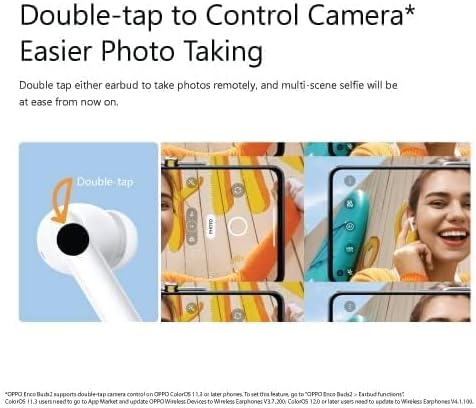
Image 4.2: Double-tap to control camera function.
4.3. Ses Özellikleri
The OPPO Enco Buds2 incorporate several audio enhancements:
- 10mm Large Titanized Driver: Designed to deliver stronger bass.
- Enco Live Stereo Sound Effects: Provides various sound effects for an enhanced listening experience.
- AI Deep Noise Cancellation for Calls: Utilizes artificial intelligence to reduce background noise during phone calls, ensuring clearer communication.
- Binaural Low-latency with Bluetooth 5.2 Transmission: Offers faster and more stable connectivity with reduced audio delay.

Image 4.3: Key features of the OPPO Enco Buds2.
5. Bakım
5.1. Suya Dayanıklılık
The OPPO Enco Buds2 are rated IPX4 for water resistance. This means they are protected against splashing water from any direction, making them suitable for daily use and light workouts. They are not designed for submersion in water or exposure to heavy rain.

Image 5.1: IPX4 Water Resistance feature.
5.2. Temizlik ve Bakım
Optimum performans ve hijyeni korumak için:
- Kulaklıklarınızı ve şarj kutusunu yumuşak, kuru ve tiftiksiz bir bezle düzenli olarak temizleyin.
- Gerekirse kulak uçlarını çıkarın ve su ve hafif sabunla temizleyin, tekrar takmadan önce tamamen kuruduğundan emin olun.
- Aşındırıcı maddeler, alkol veya kimyasal temizleyiciler kullanmaktan kaçının.
- Hem kulaklıkların hem de şarj kutusunun şarj temas noktalarını temiz ve tozdan arındırılmış halde tutun.
6. Sorun Giderme
If you encounter issues with your OPPO Enco Buds2, refer to the following common solutions:
- Kulaklıklar eşleşmiyor: Ensure Bluetooth is enabled on your device and the earbuds are in pairing mode. Try turning Bluetooth off and on again on your device.
- Bir veya iki kulaklıktan ses gelmiyor: Check the battery level of the earbuds and charging case. Ensure the earbuds are properly connected to your device.
- Şarj sorunları: Verify the charging cable and adapter are working correctly. Ensure the charging contacts are clean.
- Yanıt vermeyen dokunmatik kontroller: Ensure your fingers are clean and dry. If the issue persists, try resetting the device.
6.1. Cihazı Sıfırlama
To reset your OPPO Enco Buds2 to factory settings:
- Her iki kulakiçi de şarj kutusuna yerleştirin.
- Şarj kutusu kapağını açın.
- Touch and hold the touch control areas on both earbuds simultaneously for 15 seconds until you hear an alert tone. This indicates the factory reset is complete.
7. Özellikler
Detailed technical specifications for the OPPO Enco Buds2 (Model ETE41):
| Özellik | Detay |
|---|---|
| Model Adı | KULAKLIKLAR |
| Ürün Model Numarası | ETE41 |
| Bağlantı Teknolojisi | Kablosuz |
| Kulaklık Form Faktörü | Kulakta |
| Kulaklık Kulak Yerleşimi | Kulakta |
| Gürültü Kontrolü | Ses Yalıtımı |
| Empedans | 32 Ohm |
| Hassasiyet | 101 dB |
| Kulaklık Girişi | 3.5 mm Jack (Note: This specification might refer to the charging case input or a general headphone jack type, as the earbuds are wireless.) |
| Paket Boyutları | 12.7x10x3.2 cm |
| Ürün Ağırlığı | 10 gr |
| Piller | 1 adet AA pil gereklidir (Note: This is likely a generic placeholder; the device uses integrated rechargeable batteries.) |
| Üretici | Karşıt |
| İlk Mevcut Tarih | 10 Eylül 2022 |
8. Garanti ve Destek
For warranty information, technical support, or service inquiries, please refer to the warranty card included in your product packaging or visit the official OPPO webSite. Satın alma belgenizi garanti talepleriniz için saklayın.
Ask a question about this manual
Ask about setup, troubleshooting, compatibility, parts, safety, or missing instructions. Manuals+ will review the question and use this page’s manual context to help answer it.