
1. Ürün Bittiview
The XTAR VC4H is a smart LCD display universal battery charger designed for efficient and safe charging of various rechargeable batteries. It features four independent charging slots and supports both 3.6V/3.7V Li-ion (IMR/INR/ICR) and 1.2V Ni-MH/Ni-CD battery types. The charger provides fast charging capabilities and a clear LCD screen to monitor charging status.
2. Temel Özellikler
- Geniş Uyumluluk: Supports 3.6V/3.7V Li-ion/IMR/INR/ICR batteries (10440, 14500, 14650, 16340, 17335, 17500, 17670, 18350, 18490, 18500, 18650, 18700, 20700, 21700, 22650, 25500, 26650, 32650) and 1.2V Ni-MH/Ni-CD batteries (AAAA, AAA, AA, A, SC, C, D). Note: Can charge protected 21700 batteries.
- Akıllı LCD Ekran: 170 ° view angle colorful VA LCD screen provides real-time information on charging current, voltage, capacity, battery type, and channel.
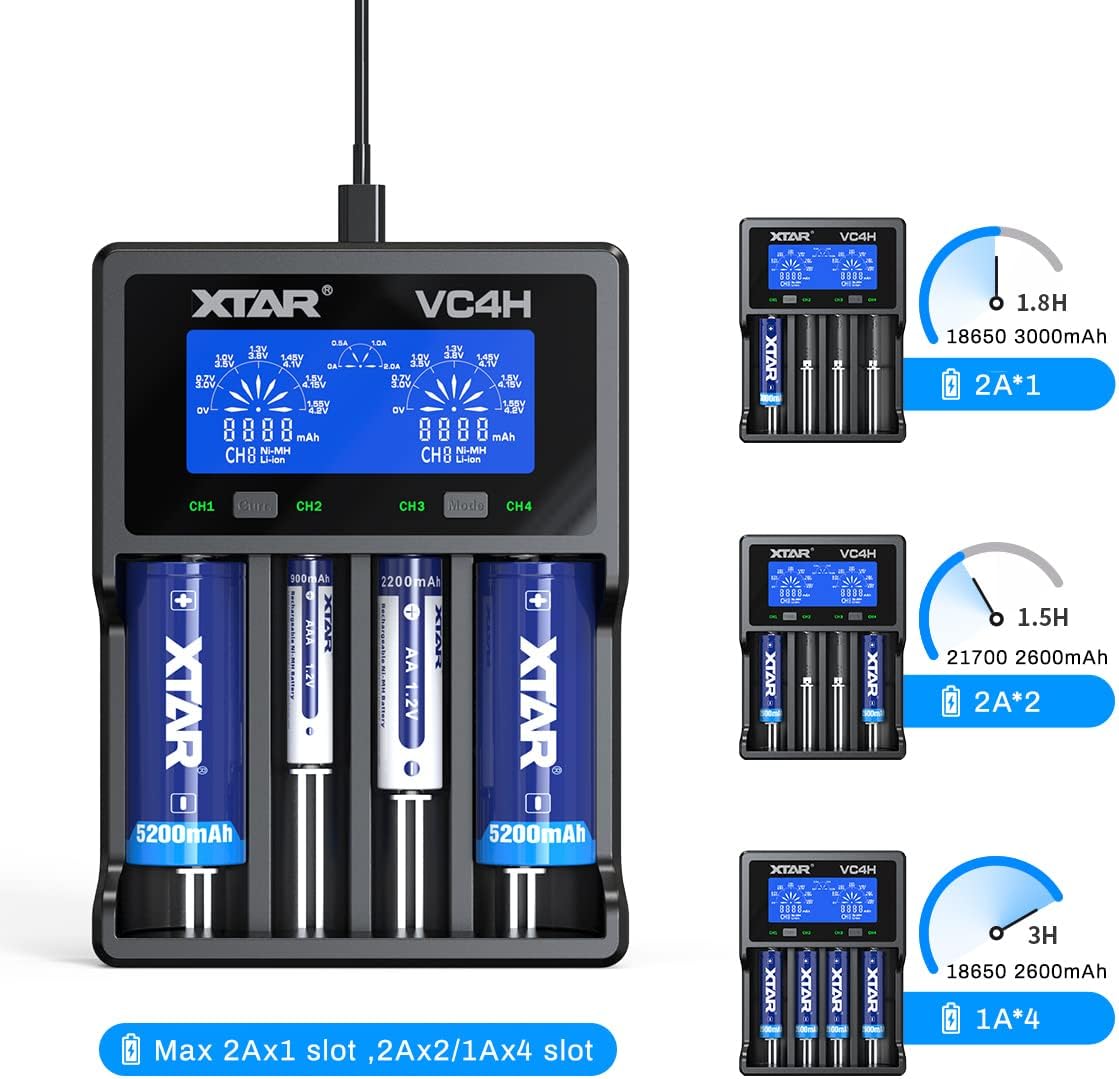
- Hızlı Şarj Teknolojisi: Features Type-C QC3.0 input (5V/3A, 9V/2A) and offers optional charging currents (2A/1A/0.5A/0.25A). Can charge up to 2A in two slots simultaneously.
- Çoklu Korumalar: Includes overcharge protection, overvoltage protection, overcurrent protection, short-circuit protection, overheating protection, and reverse polarity protection.
- Temperature Monitoring Design: Integrated design for effective heat dissipation during charging.

Image: The XTAR VC4H charger's display showing its compatibility with a wide range of Li-ion and Ni-MH/Ni-CD batteries.

Image: Visual representation of the XTAR VC4H's multiple protection features, including overcharge, overvoltage, overcurrent, short-circuit, overheating, and reverse polarity protection.
3. Kurulum Talimatları
3.1 Paket İçeriği
Before using the charger, ensure all items are present in the package:
- XTAR VC4H Charger Unit
- Type-C Güç Kablosu
- Kullanım Kılavuzu
- Depolama Çantası

Image: The XTAR VC4H package contents, showing the charger, Type-C power cord, manual, and storage bag.
3.2 Gücün Bağlanması
- Connect the provided Type-C power cord to the charger's Type-C input port.
- Connect the other end of the USB cable to a compatible power source (e.g., a QC3.0 USB wall adapter, car charger, power bank, or computer USB port). The charger requires a 5V/3A or 9V/2A input for optimal performance.
- The LCD screen will illuminate, indicating the charger is powered on and in standby mode.

Image: The XTAR VC4H charger connected to a laptop, illustrating its versatility with different power sources like car chargers, USB adapters, mobile power banks, and notebooks.
4. Kullanım Talimatları
4.1 Pillerin Takılması
Carefully insert rechargeable batteries into the charging slots, ensuring correct polarity (+/-). The charger can accommodate up to four batteries simultaneously. The LCD screen will automatically detect the battery type and begin charging.
Video: This video demonstrates the XTAR VC4H charger's features, including its ABS fire-retardant material, Type-C port, 170° view angle LCD screen, temperature monitoring design, and compatibility with various battery sizes. It also shows how to adjust charging current and switch display content between channels, highlighting its ability to charge four 21700 batteries simultaneously.
4.2 LCD Ekranı Anlama
The LCD screen provides detailed information for each charging channel:
- Charging Current Gear: Displays the selected charging current (e.g., 0.5A, 1.0A, 2.0A).
- Gerçek zamanlı Cilttage: Mevcut hacmi gösterirtagPilin e'si.
- Şarj Kapasitesi: Indicates the accumulated mAh charged into the battery.
- Pil Tipi: Pilin Li-ion mu yoksa Ni-MH mi olduğunu belirler.
- Battery Channel: Shows the active charging slot (CH1, CH2, CH3, CH4).
Resim: Ayrıntılı view of the XTAR VC4H's LCD screen, illustrating the display of charging current, real-time voltage, charging capacity, battery type, and channel. It also highlights the 'Curr' button for current adjustment and 'Mode' button for switching display content.
4.3 Şarj Akımının Ayarlanması
To adjust the charging current for a specific channel:
- Basın 'Curr' button (Current Button) to cycle through available charging currents (2A/1A/0.5A/0.25A).
- The selected current will be applied to the active channel.
4.4 Switching Display Content
İle view details for different channels:
- In charging mode, press the 'Mode' button (Slot Button) to switch the display content between CH1, CH2, CH3, and CH4.

Image: The XTAR VC4H charger demonstrating various charging scenarios, including charging two 18650 3000mAh batteries at 2A, two 21700 2600mAh batteries at 2A, and four 18650 2600mAh batteries at 1A, with estimated charging times.
5. Bakım
- Temizlik: Regularly clean the charger's slots and contacts with a dry, soft cloth to ensure optimal conductivity. Do not use liquid cleaners.
- Depolamak: Şarj cihazını doğrudan güneş ışığından ve aşırı sıcaklıklardan uzak, serin ve kuru bir yerde saklayın.
- İşleme: Şarj cihazınızı düşürmekten veya sert darbelere maruz bırakmaktan kaçının.
- Güç Bağlantısının Kesilmesi: Always disconnect the power cord when the charger is not in use or during cleaning.
6. Sorun Giderme
6.1 Şarj Cihazı Açılmıyor
- Ensure the Type-C power cord is securely connected to both the charger and the power source.
- Verify that the power source (e.g., wall adapter, USB port) is functional and providing adequate power (5V/3A or 9V/2A recommended).
- Farklı bir Type-C kablosu veya güç adaptörü deneyin.
6.2 Pil Şarj Olmuyor
- Pilinin doğru kutuplara (+/-) dikkat ederek takıldığından emin olun.
- Ensure the battery contacts are clean and free from debris.
- Confirm the battery type is compatible with the charger (refer to specifications).
- If the battery is deeply discharged, it may take a few minutes for the charger to detect and initiate charging.
- If the charger displays an error, remove and reinsert the battery. If the error persists, the battery may be faulty.
6.3 Inaccurate Display Readings
- Ensure the charger is on a stable, flat surface.
- If readings seem inconsistent, try removing and reinserting the battery.
- Environmental factors like extreme temperature can affect sensor accuracy. Use the charger within its specified operating temperature range.
7. Ürün Özellikleri
| Özellik | Detay |
|---|---|
| Örnek | VC4H |
| Uyumlu Piller | 3.6V/3.7V Li-ion/IMR/INR/ICR (10440-32650), 1.2V Ni-MH/Ni-CD (AAAA, AAA, AA, A, SC, C, D) |
| Giriş | QC3.0 (5V/3A, 9V/2A) |
| Constant Current (Li-ion) | 4.2V === 2Ax1 / 1Ax2 / 0.5Ax2 |
| Constant Current (Ni-MH/Ni-CD) | 1.45V === 1Ax1 / 1Ax2 / 1Ax4 / 0.5Ax4 |
| Kesme Hacmitage | 4.2 ± 0.05V (Li-ion), 1.45 ± 0.1V (Ni-MH/Ni-CD) |
| Kesme Akımı | ≤150mA |
| Çalışma Sıcaklığı | 0-40°C |
| Üretici | XTAR |

Image: A detailed table outlining the XTAR VC4H's compatibility with various battery models and its technical specifications, including input, constant current, cut-off voltage, cut-off current, and operating temperature.
8. Garanti ve Destek
Garanti bilgileri ve müşteri desteği için lütfen resmi XTAR web sitesine başvurun. webÜrünü satın aldığınız satıcıyla iletişime geçin veya siteyi ziyaret edin. Satın alma belgenizi olası garanti talepleri için saklayın.
İletişim Bilgileri:
- Resmi XTAR Webalan: www.xtar.cc
- Customer Service Email: Refer to the product packaging or official webEn güncel iletişim bilgileri için sitemizi ziyaret edin.