
Ürün Bittiview
The Anker PowerConf C200 is a high-resolution 2K webcam designed for professional video conferencing and streaming. It features advanced audio clarity with AI noise cancellation, superior low-light performance, and customizable viewaçıları.

Ön tarafa bakan view of the Anker PowerConf C200 webkamera, gösteriasing its compact design and adjustable stand. The lens is prominent, indicating its 2K HD image capability and 95° adjustable field of view.
Kutuda Neler Var?
- Anker PowerConf C200 Webkam
- USB-C Kablosu

The retail packaging for the Anker PowerConf C200, displaying the product name, model number A3369, and a UPC barcode (194644088194).
Kurmak
Bağlanma Webkam
- Connect the provided USB-C cable to the USB-C port on the back of the Anker PowerConf C200 webkam.
- Plug the other end of the USB-C cable into an available USB-A port on your computer (PC, laptop, or Mac).
- The webcam is plug-and-play and should be automatically recognized by your operating system (Windows 7 or later, macOS 10.11 or later).
Montajı Webkam
The webcam features a built-in clip for secure mounting on top of your monitor or laptop screen. It also includes a standard tripod mount for alternative placement.
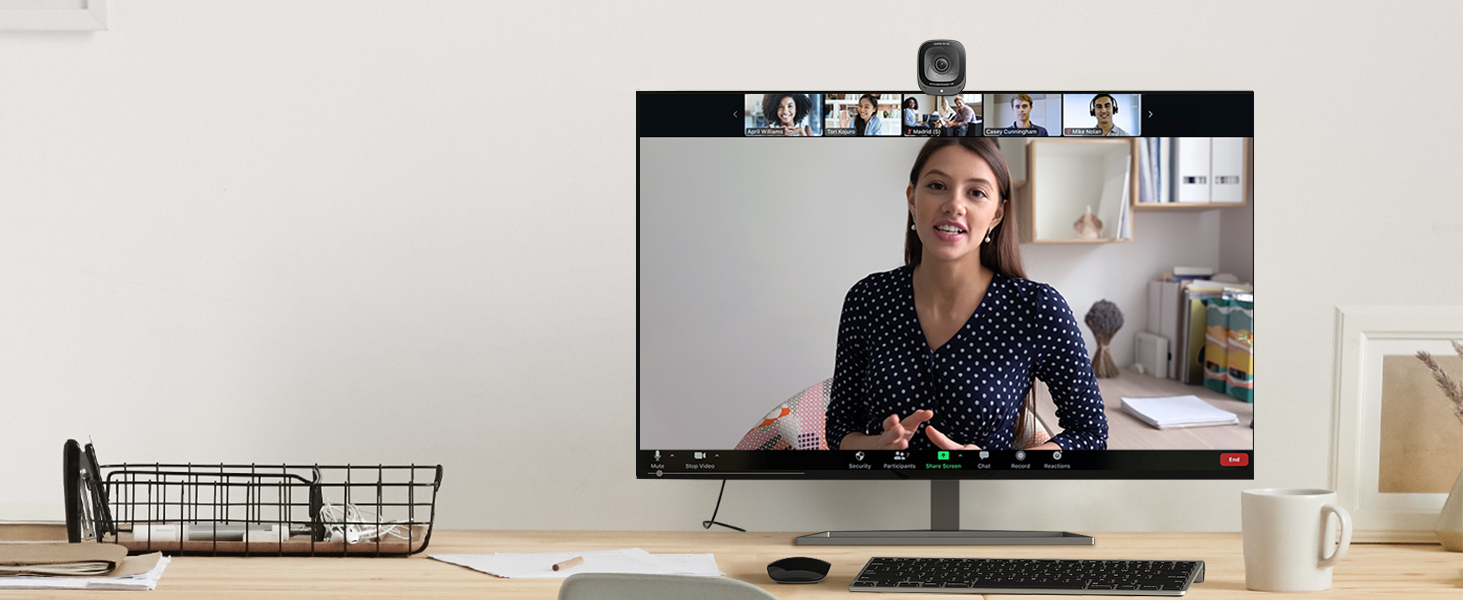
The Anker PowerConf C200 webcam is shown securely clipped onto the top edge of a computer monitor, demonstrating its stable mounting mechanism.
Yazılım Kurulumu (İsteğe bağlı)
For advanced settings and customization, download the AnkerWork software from the official AnkerWork website. This software allows you to adjust resolution, field of view, image settings (brightness, sharpness, saturation, contrast), and anti-flicker settings.

The back of the Anker PowerConf C200 product box, highlighting the "Download the AnkerWork Software from software.ankerwork.com" link and the serial number.
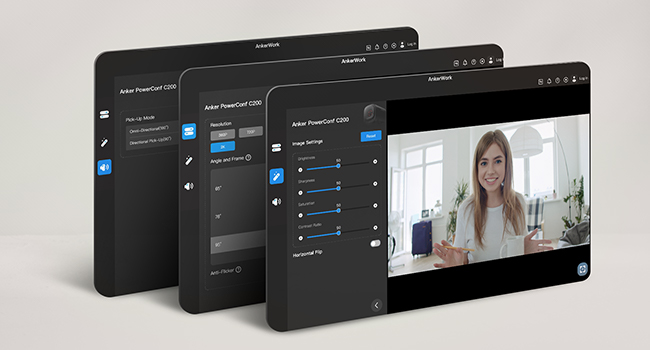
A screenshot of the AnkerWork software interface, showing various adjustable settings for the webcam, including resolution, angle, and image adjustments like brightness, sharpness, and saturation.
Çalıştırma Webkam
Gizlilik Kapağı
The Anker PowerConf C200 features an integrated privacy cover. Slide the cover to the left to block the lens for privacy when the webcam is not in use. Slide it to the right to open the lens for use.

A close-up image of the Anker PowerConf C200 webcam showing its built-in privacy cover slid over the lens, indicated by a red circle, ensuring privacy.
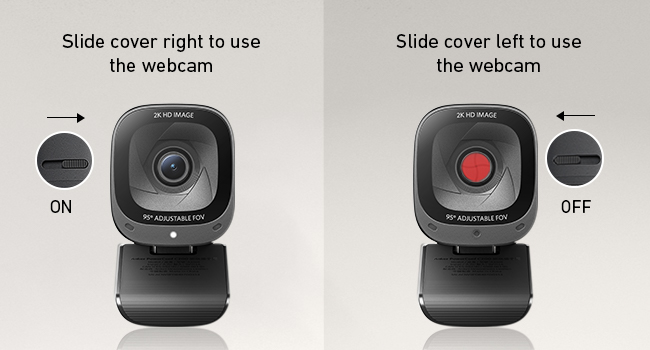
A visual guide illustrating the operation of the webcam's privacy cover, showing arrows for sliding it left to close (OFF) and right to open (ON).
Ayarlanabilir Alan View (Görüş açısı)
The webcam offers customizable viewing angles of 65°, 78°, or 95°. These settings can be adjusted via the AnkerWork software to frame your perfect shot, whether for a solo presentation or a group meeting.

A top-down diagram showing the different field of view options (65°, 78°, 95°) available for the webcam, demonstrating how much of the surrounding area can be captured.
Ses Özellikleri
The PowerConf C200 is equipped with dual AI noise-canceling microphones to ensure your voice is crystal clear, even in noisy environments.

An image of the webcam with visual sound waves emanating from it, emphasizing its high-sensitivity noise-canceling dual AI stereo microphones for clear audio.
Düşük Işık Performansı
The webcam features superior low-light performance, capturing crisp images in dim settings without requiring additional lighting. This is achieved through Automatic AWB (Auto White Balance) and BSI (Backside Illumination) sensors, along with an f/2.0 aperture.

A side-by-side comparison showing the Anker PowerConf C200's superior performance in low-light conditions compared to other webcams, resulting in a brighter and clearer image.
Bakım
Lensin Temizlenmesi
Temizlemek için webcam lens, use a soft, lint-free cloth. For stubborn smudges, slightly dampBezi lens temizleme solüsyonuyla silin. Sert kimyasallar veya aşındırıcı malzemeler kullanmaktan kaçının.
Yazılım Güncellemeleri
Periodically check for software and firmware updates via the AnkerWork application to ensure optimal performance and access to new features.
Sorun giderme
WebKamera algılanmadı
- USB-C kablosunun her iki tarafa da güvenli bir şekilde bağlı olduğundan emin olun. webKameranız ve bilgisayarınız.
- Bağlantı kurmayı deneyin. webKamerayı bilgisayarınızdaki farklı bir USB bağlantı noktasına bağlayın.
- Bilgisayarınızı yeniden başlatın.
- İşletim sisteminizin aygıt yöneticisini veya sistem bilgilerini kontrol ederek sorunun olup olmadığını görebilirsiniz. webkamera listelenmiştir.
Kötü Görüntü Kalitesi
- Ensure the privacy cover is fully open.
- Check the lighting conditions in your environment. While the webcam has good low-light performance, extreme darkness or overly bright backlighting can affect quality. Adjust your lighting or position if necessary.
- Open the AnkerWork software and adjust image settings such as brightness, sharpness, and contrast.
- En iyi yayın kalitesi için internet bağlantınızın istikrarlı olduğundan emin olun.
Ses sorunları
- Verify that the Anker PowerConf C200 is selected as the default microphone in your communication application (e.g., Zoom, Microsoft Teams) and your operating system's sound settings.
- Ensure there are no obstructions blocking the microphones on the webkam.
- Check for any background noise that the AI noise cancellation might be struggling with.
Özellikler
| Özellik | Detay |
|---|---|
| Model Numarası | A3369 |
| Max Çözünürlük | 2K (2560x1440) |
| Alanı View | Adjustable (65°, 78°, 95°) |
| Mikrofonlar | Dual AI Noise-Canceling Stereo Mics |
| Bağlantı | USB-C |
| Düşük Işık Düzeltmesi | Automatic AWB, BSI Sensors, f/2.0 |
| Uyumluluk | Windows 7 veya üzeri, macOS 10.11 veya üzeri |
| Ürün Ağırlığı | 7 ons |
| Ürün Boyutları | 1.97 x 1.57 x 2.17 inç |
Garanti ve Destek
Garanti bilgileri ve müşteri desteği için lütfen resmi Anker mağazasına başvurun. webSitenize veya ürününüzle birlikte gelen belgelere bakın.
Kullanım kılavuzunu (PDF) internetten de bulabilirsiniz: Anker PowerConf C200 User Manual (PDF)