
giriiş
This instruction manual provides comprehensive guidance for the SOAR NFL True Wireless Earbuds V.4. These earbuds feature Bluetooth 5.0 technology, a built-in microphone, and touch controls, offering 3-4 hours of playtime per charge. The included charging case ensures portability and extended use. Please read this manual thoroughly before using your earbuds to ensure proper operation and longevity.
Kutuda Neler Var?
Upon opening your SOAR NFL True Wireless Earbuds V.4 package, you should find the following items:
- One (1) Pair of True Wireless Earbuds
- Bir (1) Şarj Kutusu
- Bir (1) Mikro-USB Şarj Kablosu

The image above displays the SOAR NFL True Wireless Earbuds V.4 in their retail packaging. The package includes the earbuds, the charging case, and a micro-USB charging cable.
Ürün Bittiview
The SOAR NFL True Wireless Earbuds V.4 consist of two individual earbuds and a portable charging case. Each earbud features a touch-sensitive area for controls and an LED indicator. The charging case has a lid, charging ports for the earbuds, and LED indicators to show its battery status.

This image shows the earbuds outside their charging case, which is open and connected to a charging cable. The charging case has designated slots for each earbud (Left and Right) and LED indicators for charging status.
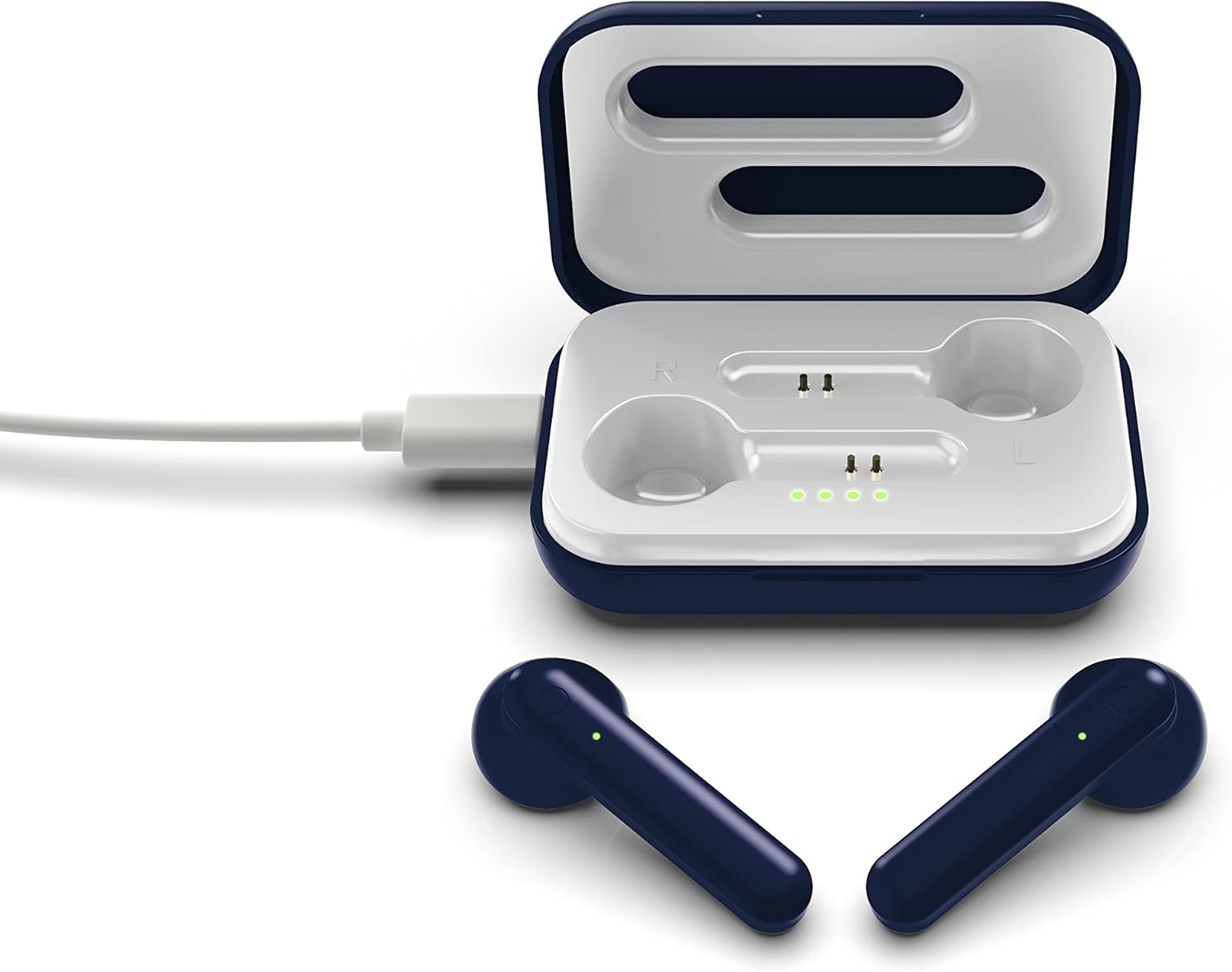
The image above illustrates the earbuds securely placed within their charging case. The illuminated LED lights on the case indicate the charging status of both the case and the earbuds.
Kurmak
1. Kulaklıkları ve Kutuyu Şarj Etme
İlk kullanımdan önce hem kulaklığınızı hem de şarj kutusunu tamamen şarj edin.
- Kasanın Şarj Edilmesi: Connect the provided Micro-USB cable to the charging port on the case and the other end to a USB power source (e.g., computer, wall adapter). The LED indicators on the case will illuminate to show charging progress.
- Kulaklıkların Şarj Edilmesi: Place the earbuds into their respective slots in the charging case. Ensure they are correctly seated. The earbuds will begin charging automatically from the case's internal battery. The LED indicators on the earbuds will show their charging status.
- Tam şarj yaklaşık 3-4 saatlik kullanım süresi sağlar.
2. Bluetooth Eşleştirme
Kulaklığınızı bir cihaza bağlamak için:
- Kulaklıkların şarj edildiğinden emin olun.
- Open the charging case. The earbuds will automatically power on and enter pairing mode. The LED indicator on one earbud will flash, indicating it is ready to pair.
- Cihazınızda (akıllı telefon, tablet vb.) Bluetooth’u etkinleştirin.
- Arama available Bluetooth devices and select "SOAR TWS4" from the list.
- Bağlantı kurulduktan sonra, kulaklığın LED göstergesi yanıp sönmeyi durduracaktır. Sesli bir onay duyacaksınız.
- Kulaklıklar, cihazda Bluetooth etkinse, kutudan çıkarıldığında son eşleştirilen cihaza otomatik olarak yeniden bağlanacaktır.
Kullanım Talimatları
The SOAR NFL True Wireless Earbuds V.4 feature touch controls for easy management of audio and calls.
Güç Açık/Kapalı
- Güç Açık: Şarj kutusunu açın veya her iki kulaklığın dokunmatik alanına 3 saniye boyunca uzun süre basın.
- Kapat: Kulaklıkları şarj kutusuna geri yerleştirin ve kapağı kapatın veya her iki kulaklığın dokunmatik alanına 5 saniye boyunca uzun süre basın.
Müzik Çalma
- Oynat/Duraklat: Her iki kulaklığa da bir kez dokunun.
- Sonraki Parça: Sağ kulaklığa iki kez dokunun.
- Önceki parça: Sol kulaklığa iki kez dokunun.
Yönetim Çağrı
- Çağrıyı Cevapla/Sonlandır: Gelen veya aktif bir arama sırasında kulaklığınızın herhangi birine tek dokunuşla dokunun.
- Çağrıyı Reddet: Long-press on either earbud for 2 seconds during an incoming call.
Sesli asistan
- Voice Assistant'ı etkinleştirin: Her iki kulaklığa da üç kez dokunun.
Bakım
Doğru bakım, kulaklıklarınızın ömrünü uzatacaktır.
- Temizlik: Kulaklıkları ve şarj kutusunu temizlemek için yumuşak, kuru bir bez kullanın. Sert kimyasallar veya aşındırıcı malzemeler kullanmayın.
- Depolamak: Kullanmadığınız zamanlarda kulaklıklarınızı şarj kutusunda saklayarak hem koruyun hem de şarjlı kalmasını sağlayın.
- Suya Dayanıklılık: Bu kulaklıklar suya dayanıklı değil. Avoid exposure to liquids, moisture, and extreme temperatures.
- Şarj: Use only the provided Micro-USB cable or a certified equivalent for charging.
Sorun giderme
Kulaklığınızla ilgili sorunlar yaşıyorsanız aşağıdaki yaygın çözümlere başvurun:
| Sorun | Çözüm |
|---|---|
| One earbud is not connecting or producing sound. |
|
| Earbuds are not pairing with my device. |
|
| Kulaklıklar şarj olmuyor. |
|
Özellikler
| Özellik | Detay |
|---|---|
| Model Adı | Gerçek Kablosuz Kulaklık V.4 |
| Ürün Model Numarası | NFL-TWS4-SHKS |
| Bağlantı Teknolojisi | Bluetooth, Kablosuz |
| Kablosuz İletişim Teknolojisi | Bluetooth 5.0 |
| Bluetooth Menzili | 30 feet'e (9.14 metre) kadar |
| Pil Ömrü (Oynatma Süresi) | 3-4 saat şarj başına |
| Kontrol Türü | Dokunmatik, Medya Kontrolü |
| Özel Özellik | Mikrofon Dahil |
| Kulak Yerleşimi | Kulakta |
| Su Direnç Seviyesi | Suya dayanıklı değil |
| Malzeme | Plastik |
| Ürün Boyutları | 1.25 x 4.5 x 6.5 inç |
| Ürün Ağırlığı | 3.52 ons |
| Üretici | Prime Brands Group, Inc. |
| UPC | 192129070757 |
Resmi Ürün Videosu
Bu video görsel bir açıklama sağlarview of the SOAR TWS4 True Wireless Earbuds V.4, highlighting key features such as the wireless charging case, touch controls, and Bluetooth 5.0 technology. It demonstrates the product's design and functionality.
Garanti ve Destek
Your SOAR NFL True Wireless Earbuds V.4 are covered by a 1 Yıllık Sınırlı Garanti. This warranty covers manufacturing defects and issues arising from normal use. It does not cover damage caused by misuse, accidents, unauthorized modifications, or exposure to liquids.
For warranty claims, technical support, or further assistance, please contact the manufacturer, Prime Brands Group, Inc., or visit their official webSite. Garanti geçerliliği için satın alma belgenizi saklayın.