
Arovec AV-P152B-R1
Arovec H13 Gerçek HEPA Hava Temizleyici Kullanım Kılavuzu
Model: AV-P152B-R1
giriiş
Thank you for choosing the Arovec H13 True HEPA Air Purifier. This manual provides important information regarding the safe operation, maintenance, and troubleshooting of your air purifier. Please read it thoroughly before use and retain it for future reference.
The Arovec H13 True HEPA Air Purifier is designed to improve indoor air quality by filtering out harmful airborne pollutants, including dust, pollen, odors, allergens, pet dander, and smoke. Its 3-stage filtration system ensures a cleaner and healthier environment for you and your family.
Güvenlik Talimatları
Yangın, elektrik çarpması veya yaralanma riskini azaltmak için lütfen aşağıdaki güvenlik önlemlerine uyun:
- Always unplug the air purifier before moving it, cleaning it, or performing any maintenance.
- Do not operate the air purifier if the cord or plug is damaged.
- Keep the air purifier away from water or other liquids. Do not immerse it in water.
- Hava giriş ve çıkışlarını engellemeyin. Uygun hava akışı için ünitenin etrafında yeterli boşluk olduğundan emin olun.
- Bu cihaz, fiziksel, duyusal veya zihinsel yetenekleri kısıtlı olan veya deneyim ve bilgi eksikliği bulunan kişiler (çocuklar dahil) tarafından, güvenliklerinden sorumlu bir kişi tarafından cihazın kullanımıyla ilgili olarak gözetim veya talimat sağlanmadığı sürece kullanılmak üzere tasarlanmamıştır.
- Do not use the air purifier in environments with high humidity, such as bathrooms.
- Do not use abrasive cleaners or flammable liquids to clean the unit.
- Only use genuine Arovec replacement filters.
Ürün Bittiview
Bileşenler
The Arovec H13 True HEPA Air Purifier consists of the main unit, a power cord, and a multi-stage filtre sistemi.
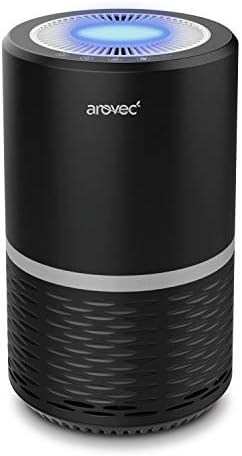
Figure 1: Arovec H13 True HEPA Air Purifier. This image shows the compact black cylindrical air purifier with a blue light emanating from the top air outlet, indicating operation.
Kontrol Paneli ve Göstergeler
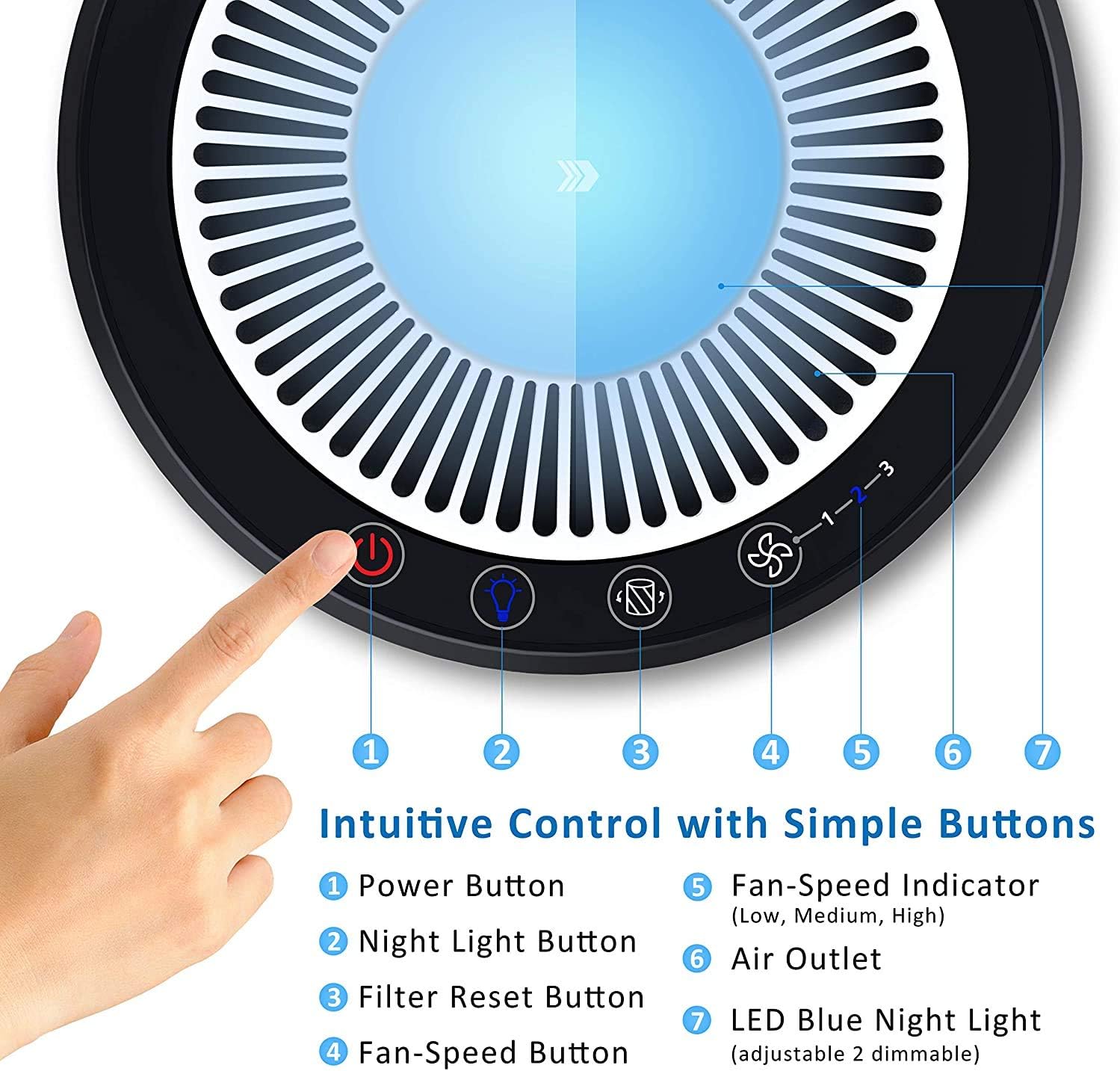
Figure 2: Intuitive Control Panel. This image details the top control panel of the air purifier, showing the power button, night light button, filter reset button, fan speed button, fan speed indicator (1-3), air outlet, and LED blue night light.
- Güç Düğmesi: Üniteyi açar veya kapatır.
- Gece Işığı Düğmesi: Gece lambası fonksiyonunu etkinleştirir veya devre dışı bırakır.
- Filtre Sıfırlama Düğmesi: Resets the filter replacement indicator after a new filter is installed.
- Fan-Speed Button: Fan hızları arasında geçiş yapar (Düşük, Orta, Yüksek).
- Fan-Speed Indicator: Displays the current fan speed setting (1, 2, or 3).
- Hava çıkışı: Arıtılmış havanın salındığı yer.
- LED Blue Night Light: Ortam aydınlatması sağlar.
3-Stage Filtrasyon Sistemi

Şekil 3: 3-Stage Filtration System. This diagram illustrates the layers of the filter: a Fine Preliminary Filter at the bottom, followed by a True HEPA Filter, and an Activated Carbon Filter at the top, demonstrating how air passes through each stage for purification.
- İnce Ön Filtre: Captures large particles such as dust, lint, fibers, and pet fur, extending the life of the other filters.
- Gerçek HEPA Filtre: Traps 99.97% of airborne particles as small as 0.3 microns, including pollen, dust mites, mold spores, and pet dander.
- Aktif karbon filtresi: Absorbs odors from pets, cooking, smoke, and harmful VOCs (Volatile Organic Compounds).
Kurmak
- Paketi aç: Hava temizleyicinizi ve tüm ambalaj malzemelerini kutudan dikkatlice çıkarın.
- Filtre Kurulumu: Before first use, ensure the filter is properly installed and any plastic packaging around it is removed. Refer to the "Maintenance" section for detailed filter installation instructions.
- Atama: Place the air purifier on a firm, level surface. Ensure there is at least 15 cm (6 inches) of space around all sides of the unit for optimal airflow. Avoid placing it near heat sources or in direct sunlight.
- Güç Bağlantısı: Güç kablosunu standart bir elektrik prizine takın.
Kullanım Talimatları
- Güç Açma/Kapatma: Basın Güç Düğmesi (1) to turn the air purifier on or off. The unit will start at the lowest fan speed.
- Fan Hızını Ayarlayın: Basın Fan-Speed Button (4) repeatedly to cycle through the fan speeds: Low (1), Medium (2), High (3). The corresponding indicator light (5) will illuminate.
- Gece Işığı İşlevi: Basın Gece Lambası Düğmesi (2) to turn the LED blue night light (7) on or off. This function operates independently of the air purification.
- Optimum Kullanım: For best results, operate the air purifier in an enclosed room. Keep windows and doors closed while the unit is running.
Bakım
Düzenli bakım, hava temizleyicinizin optimum performansını sağlar ve kullanım ömrünü uzatır.
Filtre Değişimi
The filter should be replaced every 4 to 6 months, depending on usage and air quality. A filter replacement indicator light may illuminate when replacement is due.
- Fişi çekin: Always unplug the air purifier from the power outlet before replacing the filter.
- Tabanı Kaldır: Cihazı ters çevirin. Taban kapağını kilidini açmak ve çıkarmak için saat yönünün tersine çevirin.
- Eski Filtreyi Kaldır: Eski filtreyi dikkatlice çıkarın.
- Yeni Filtre Yükle: Insert the new Arovec replacement filter into the unit, ensuring it is seated correctly.
- Replace Base: Place the base cover back on and twist clockwise to lock it securely.
- Filtre Göstergesini Sıfırla: Plug the unit back in. With the unit powered on, press and hold the Filtre Sıfırlama Düğmesi (3) for 3-5 seconds until the indicator light turns off.
Hava Temizleyicinin Temizlenmesi
- Dış: Hava temizleyicinin dış yüzeyini yumuşak, kuru bir bezle silin. Aşındırıcı temizleyiciler veya çözücüler kullanmayın.
- Hava Girişleri/Çıkışları: Hava giriş ve çıkışlarındaki tozu nazikçe temizlemek için yumuşak bir fırça veya fırça aparatı takılmış bir elektrikli süpürge kullanın.
- Ön filtre: The preliminary filter can be gently vacuumed to remove larger particles between full filter replacements. Do not wash the filter.
Sorun giderme
| Sorun | Olası Neden | Çözüm |
|---|---|---|
| Hava temizleyici açılmıyor. | Fişe takılı değil; Güç yoktage; Damaged power cord. | Ensure the power cord is securely plugged into a working outlet. Check the circuit breaker. Contact customer support if the cord is damaged. |
| Weak airflow or no air coming out. | Blocked air inlets/outlets; Clogged filter; Incorrect filter installation. | Check for obstructions around the unit. Clean the pre-filter. Ensure the filter is installed correctly and remove any plastic packaging. Replace filter if heavily soiled. |
| Olağandışı gürültü. | Filter not seated properly; Foreign object inside; Unit not on a level surface. | Ensure the filter is securely in place. Unplug and check for any foreign objects. Place the unit on a stable, flat surface. |
| Odor persists or air quality not improving. | Filter needs replacement; Room size too large; Strong odor source. | Replace the filter. Ensure the room size is within the recommended effective area (up to 15 square meters). Identify and remove the source of the strong odor if possible. |
Özellikler
| Özellik | Detay |
|---|---|
| Marka | Arovec |
| Model Numarası | AV-P152B-R1 |
| Renk | Siyah |
| Ürün Boyutları | 20 x 20 x 32 cm (Derinlik x Genişlik x Yükseklik) |
| Ürün Ağırlığı | 2.5 kilo |
| Gürültü Seviyesi | 30 dB (at lowest setting) |
| Filtre Türü | H13 True HEPA, Activated Carbon, Fine Preliminary |
| Etkili Oda Boyutu | 15 metrekareye kadar |
| Güç Kaynağı | Kablolu Elektrik |
Garanti ve Destek
Arovec offers a 6 Ay Garanti for this product, ensuring quality and peace of mind. For any inquiries, technical assistance, or warranty claims, please contact Arovec customer support.
Arovec is proudly Australian owned and operated, committed to providing helpful customer support services for the lifetime of your product.
For support, please refer to the contact information provided on the product packaging or the official Arovec webalan.