
1. Giriş
This manual provides detailed instructions for the installation, operation, and maintenance of your Cooler Master MasterFan MF200R ARGB 200mm fan. This fan is designed to provide efficient cooling for your PC system while offering customizable Addressable RGB lighting effects.

Resim 1.1: Ön view of the Cooler Master MasterFan MF200R ARGB 200mm fan, showcasing its customizable lighting.
2. Ürün Özellikleri
- Adreslenebilir RGB Aydınlatma: Experience full color customization with Addressable RGB (ARGB) technology. Compatible with popular motherboard ARGB software such as Asus Aura Sync, ASRock Polychrome Sync, and MSI Mystic Light Sync. Note: Requires a +5V, 3-pin ARGB header.
- Sessiz Soğutma Teknolojisi: Engineered with noise reduction technologies and sound-absorbing materials to ensure quiet operation, even under heavy workloads. Features a durable rifle bearing for an extended lifespan.
- Hybrid Blade Design: A unique combination of jet engine and helicopter blade designs provides optimal static air pressure without compromising airflow, ensuring effective heat dissipation.
- Smart Fan Sensor for Jam Protection: Integrated sensors protect your cables and internal components by automatically stopping the fan rotation if an obstruction is detected, preventing damage.

Image 2.1: Multiple MasterFan MF200R ARGB fans demonstrating various lighting effects.

Image 2.2: Illustration of the fan's hybrid blade design, combining jet engine and helicopter blade elements.
3. Paket İçeriği
Lütfen paketinizde tüm öğelerin mevcut olduğundan emin olun:
- 1 x Cooler Master MasterFan MF200R ARGB Cooling Fan
- 4 x Montaj Vidaları
- Small mounting accessories (e.g., additional screws, 3-pin to 4-pin adapter, small instruction sheet)
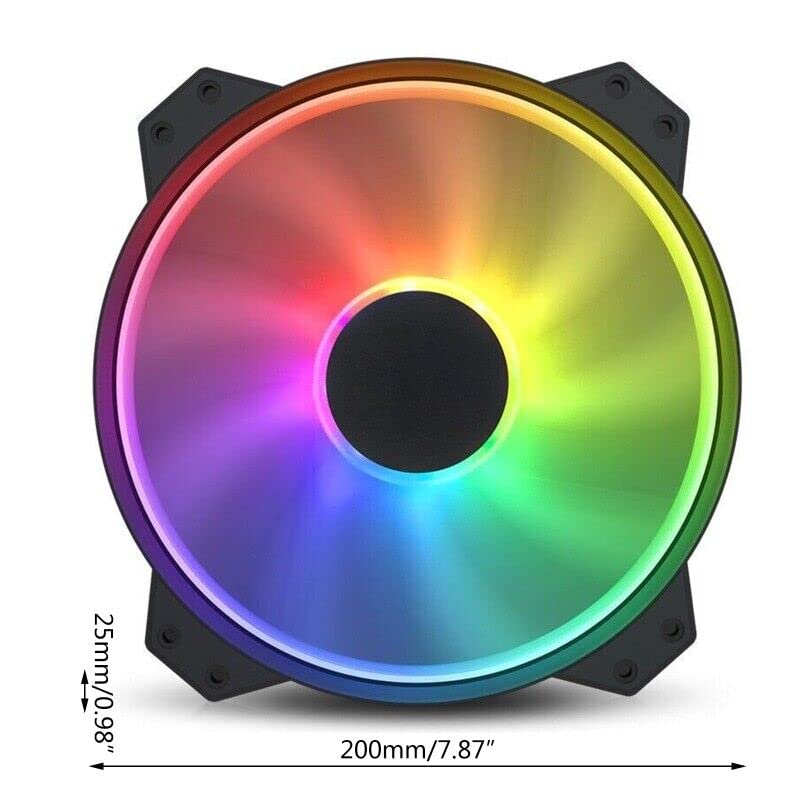
Image 3.1: Included accessories with the MasterFan MF200R ARGB fan.
4. Özellikler
| RGB Profile | Addressable RGB (+5V, 3-pin) |
| Fan boyutları | 200 x 200 x 25 mm (7.9 x 7.9 x 1 inç) |
| Fan Ağırlığı | 259g (0.57 lb) |
| Fan Hızı | 800 ± 150 dev/dak |
| Fan Hava Akışı | 90.3 CFM ± %10 |
| Fan Hava Basıncı | 0.88mm H2O |
| Fan Gürültü Seviyesi | 28 dBA |
| MTTF (Ortalama Arıza Süresi) | 160,000 saat |
| Rulman Tipi | Tüfek Rulman |
| Güç Bağlantısı | 3-Pin (4-pin with 3rd pin blocked) |
| Hayranların Derecelendirdiği Hacimtage | 12V doğru akım |
| Fan Anma Akımı | 0.3A |
| Güç Tüketimi | 4.08 ± 0.2W |

Image 4.1: Technical specifications of the MasterFan MF200R ARGB.
5. Önemli Uyumluluk Notları
- The Addressable RGB (ARGB) lighting function MUTLAK be connected to an Addressable RGB (+5V, 3-pin) capable motherboard header or a compatible Addressable RGB (+5V, 3-pin) controller.
- Bu fan OLUMSUZ compatible with 4-pin RGB or standard RGB+12V headers. Connecting to an incompatible header may cause damage to the fan or motherboard.
- For Gigabyte RGB Fusion Addressable RGB capable motherboards, an additional Gigabyte Adapter Cable may be required. This adapter is AYRI SATILIR.
- Bu fan OLUMSUZ compatible with the Cooler Master HAF XB EVO chassis.
6. Kurulum ve Kurulum
6.1 Fiziksel Kurulum
- Identify the desired mounting location for the 200mm fan within your PC case. Ensure adequate clearance.
- Align the fan's mounting holes with the corresponding screw holes on your PC case.
- Secure the fan using the four provided mounting screws. Do not overtighten.
6.2 Elektrik Bağlantısı
- Güç Bağlantısı: Locate the 3-pin fan power connector on the MasterFan MF200R. Connect this to an available 3-pin or 4-pin fan header on your motherboard. If connecting to a 4-pin header, ensure the 3rd pin on the fan connector is blocked as indicated in the specifications.
- ARGB Lighting Connection: Locate the 3-pin ARGB connector on the MasterFan MF200R. Connect this to a +5V, 3-pin Addressable RGB header on your motherboard or a compatible ARGB controller. Refer to your motherboard manual for the exact location of the ARGB header.

Image 6.1: Identification of the 3-pin power and 5V 3-pin ARGB connectors.

Image 6.2: Connecting the 5V 3-pin ARGB connector to a motherboard header.

Resim 6.3: Ayrıntılı view of a 5V 3-pin ARGB header on a motherboard.
7. Kullanım Talimatları
7.1 Fanın Çalıştırılması
Once connected, the fan will operate at its rated speed of 800 ± 150 RPM, providing consistent airflow for cooling your system.
7.2 ARGB Aydınlatma Kontrolü
To customize the Addressable RGB lighting effects, install and use the appropriate software provided by your motherboard manufacturer. ExampBunlar şunları içerir:
- Asus Aura Senkronizasyonu
- ASRock Çok Renkli Senkronizasyon
- MSI Mystic Light Senkronizasyonu
These software applications allow you to select various lighting modes, colors, and synchronization options for your ARGB components.
8. Bakım
Regular maintenance helps ensure optimal performance and longevity of your fan.
- Temizlik: Periodically inspect the fan blades and housing for dust buildup. With the PC powered off and unplugged, use compressed air or a soft, dry cloth to gently remove any dust. Avoid using liquid cleaners directly on the fan.
- Denetleme: Check mounting screws periodically to ensure they remain secure.
9. Sorun Giderme
If you encounter issues with your MasterFan MF200R ARGB, refer to the following common solutions:
- Fan Dönmüyor:
- Ensure the 3-pin power connector is securely plugged into a functional fan header on your motherboard.
- Anakartınızın BIOS/UEFI ayarlarını kontrol ederek fan başlığının etkinleştirildiğinden ve doğru şekilde yapılandırıldığından emin olun.
- ARGB Aydınlatma Çalışmıyor:
- Verify that the 3-pin ARGB connector is securely plugged into a +5V, 3-pin ARGB header on your motherboard or controller.
- Confirm that you are using compatible motherboard ARGB software and that it is correctly installed and configured.
- Ensure the fan is not connected to a 4-pin RGB or +12V RGB header, as this is incompatible and can prevent lighting from functioning.
- Aşırı Gürültü:
- Check for any cables or obstructions that might be interfering with the fan blades.
- Ensure the fan is securely mounted and that all mounting screws are tightened appropriately.
- Dust buildup can cause noise; clean the fan as described in the Maintenance section.
10. Garanti ve Destek
For warranty information and technical support regarding your Cooler Master MasterFan MF200R ARGB fan, please refer to the official Cooler Master websiteye gidin veya doğrudan müşteri destekleriyle iletişime geçin.
For purchase-related inquiries or issues, please contact the seller, Toptekits, through your original point of purchase.