
1. Giriş
This manual provides essential information for setting up, operating, and maintaining your VIZIO 32-inch D-Series Full HD 1080p Smart TV (Model D32f). Please read this manual thoroughly before using your television to ensure proper and safe operation. Keep this manual for future reference.
2. Güvenlik Bilgileri
Yangın, elektrik çarpması ve yaralanma riskini azaltmak için bu televizyonu kullanırken her zaman temel güvenlik önlemlerine uyun.
- Güç Kaynağı: Televizyonu yalnızca etikette belirtilen güç kaynağına bağlayın.
- Havalandırma: Uygun havalandırmayı sağlayın. Havalandırma açıklıklarını kapatmayın.
- Sıvılar: Do not expose the TV to dripping or splashing liquids. Do not place objects filled with liquids, such as vases, on the TV.
- Temizlik: Temizlemeden önce televizyonun fişini çekin. Yumuşak ve kuru bir bez kullanın. Sıvı veya aerosol temizleyiciler kullanmayın.
- Atama: Televizyonunuzu sabit ve düz bir yüzeye yerleştirin. Doğrudan güneş ışığına veya ısı kaynaklarının yakınına yerleştirmekten kaçının.
- Kablolar: Takılma tehlikesini önlemek için tüm kabloları güvenli bir şekilde döşeyin.
3. Kutuda Neler Var?
Kutuyu dikkatlice açın ve tüm eşyaların mevcut olduğundan emin olun:
- VIZIO 32-inch D-Series Full HD 1080p Smart TV (D32f)
- XRT140 Uzaktan Kumanda
- TV Sehpası (2 adet)
- Güç kablosu
- Kullanım Kılavuzu (bu belge)
- Mophead Cable Ties (bundle item)
- Microfiber Cleaning Cloth (bundle item)

Image: The VIZIO D-Series Smart TV, its remote control, stand components, and the bundled Mophead cable ties and microfiber cleaning cloth.
4. Kurulum
4.1. Standın Takılması
- Çizilmeleri önlemek için televizyonunuzu ekranı aşağı bakacak şekilde yumuşak ve temiz bir yüzeye yerleştirin.
- Her bir stand parçasını televizyonun alt kısmındaki ilgili yuvalara hizalayın.
- Birlikte verilen vidaları kullanarak ayakları sabitleyin. Sağlam bir şekilde takıldıklarından emin olun.
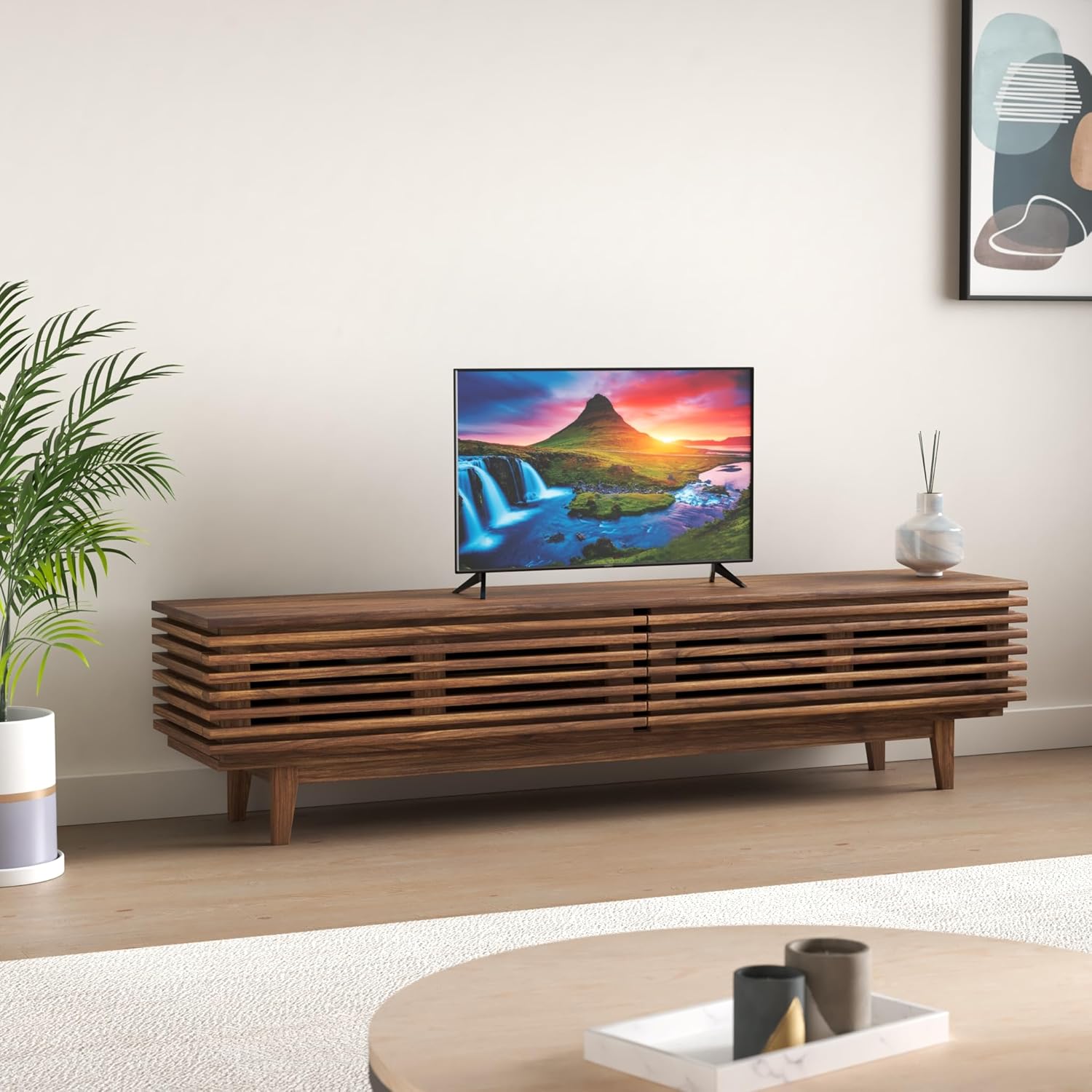
Image: The VIZIO D-Series Smart TV positioned on a media console, demonstrating its appearance with the stand attached in a typical home environment.
4.2. Duvara Montaj (Opsiyonel)
If you choose to wall mount your TV, ensure you use a VESA-compatible wall mount kit (sold separately) that supports the TV's weight and size. Follow the instructions provided with your wall mount kit. Always consult a professional for wall mounting if you are unsure.
4.3. Gücü Bağlama
Plug the power cable into the TV's power input, then plug the other end into a working electrical outlet. Do not plug the TV into an outlet controlled by a wall switch.
4.4. Harici Cihazları Bağlama
Your VIZIO D-Series TV offers various ports for connecting external devices:
- HDMI: For high-definition devices like Blu-ray players, game consoles, and cable/satellite boxes. Your TV has multiple HDMI ports.
- Composite Input (AV): For older devices using red, white, and yellow RCA cables.
- USB 2.0: USB depolama aygıtlarını bağlamak için view Fotoğraflar veya medya oynatın.
- Anten/Kablo Girişi: Havadan yayınlar veya kablolu TV bağlantısı için anten bağlamak amacıyla kullanılır.
- Digital Audio Out (SPDIF): For connecting to a soundbar or audio receiver using an optical cable.

Resim: Ayrıntılı view of the rear input panel on the VIZIO D-Series TV, showing various connectivity options.

Resim: Yan profile of the VIZIO D-Series TV, highlighting the accessible side input ports for convenience.
5. Kullanım Talimatları
5.1. İlk Kurulum ve İlk Kullanım
- After connecting power, press the Power button on the remote or TV.
- Follow the on-screen prompts to select your language, connect to your Wi-Fi network, and complete the initial setup.
- Anten bağlıysa, televizyon sizi kanal taraması konusunda yönlendirecektir.
5.2. SmartCast Mobile™
The VIZIO SmartCast Mobile app transforms your smartphone into a powerful remote control for your TV. Download it from the App Store (iOS) or Google Play Store (Android).
- Gözat: Discover and launch content directly from your phone.
- Uzak: Control TV functions like volume, input, and settings.
- Ses: Use voice commands to search for content or control your TV.

Image: Screenshots of the VIZIO SmartCast Mobile app, illustrating its capabilities for content browsing, remote control, and voice interaction.

Image: A smartphone screen showing the VIZIO SmartCast remote control layout, providing touch-based control over the television.
5.3. Ses Kontrolü Entegrasyonu
Your VIZIO D-Series TV is compatible with popular voice assistants, allowing you to control your TV and connected smart home devices using voice commands.
- Alexa ile çalışır: Connect your Amazon Alexa-enabled devices.
- Works with Apple HomeKit: Integrate with your Apple ecosystem.
- Hey Google ile çalışır: Use Google Assistant for control.

Image: The VIZIO Smart TV shown with smart speakers, illustrating its compatibility with Amazon Alexa, Apple HomeKit, and Google Assistant for voice control.
5.4. Streaming Channels with WatchFree+
Access over 150 free streaming channels with VIZIO WatchFree+. This feature provides a wide range of movies, TV shows, news, sports, and more, available on demand and completely free.

Image: The VIZIO Smart TV screen showing the WatchFree+ interface, highlighting the variety of free streaming content available.
5.5. Oyun Özellikleri
The D-Series TV is equipped with features to enhance your gaming experience:
- IQ Processor: Provides enhanced picture processing for vibrant visuals.
- V-Gaming Engine: Optimizes settings for responsive gameplay.
- Otomatik Oyun Modu: Oyun konsolunun bağlandığını otomatik olarak algılar ve düşük gecikme moduna geçer.
- HDMI: Supports high-definition gaming connections.

Image: The VIZIO Smart TV displaying a high-quality video game, showcasing its gaming engine and processor capabilities.

Image: A graphic promoting 'NEXT-GEN GAMING with AMD FreeSync', indicating advanced gaming capabilities of the TV.
5.6. AirPlay and Chromecast Built-in
Easily stream content from your mobile devices or computer directly to your VIZIO TV:
- Apple AirPlay: Mirror content from your Apple devices (iPhone, iPad, Mac) or stream videos, photos, and music directly to the TV.
- Chromecast Yerleşik: Cast your favorite entertainment apps from your phone, tablet, or laptop directly to the TV.
5.7. Uzaktan Kumanda
The included XRT140 remote control provides full functionality for your VIZIO TV. Familiarize yourself with the button layout for power, volume, channel, input selection, and smart TV navigation.
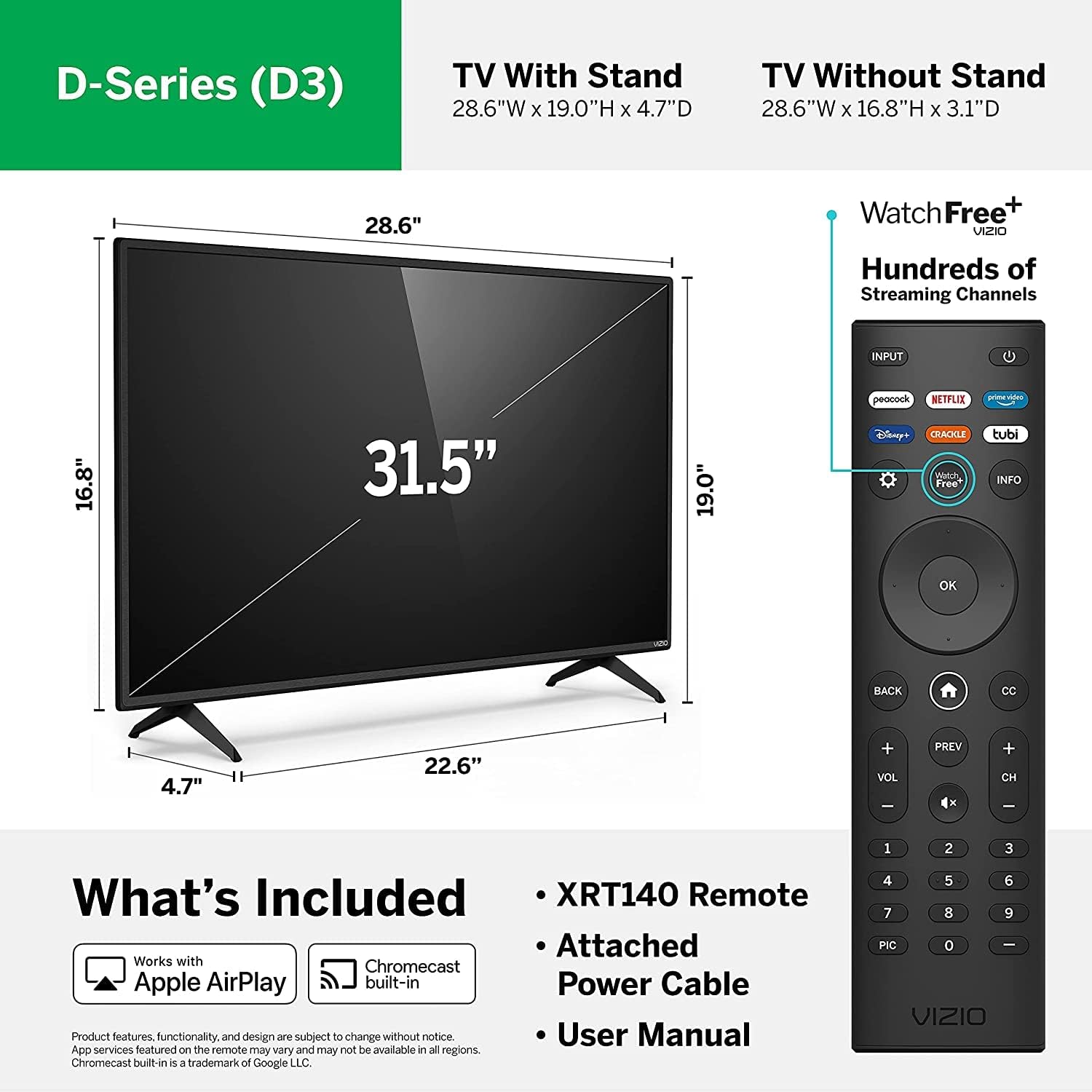
Image: A visual guide detailing the physical dimensions of the VIZIO D-Series TV and the button layout of the XRT140 remote control.
6. Bakım
6.1. Televizyonun Temizlenmesi
- Ekran: Gently wipe the screen with the provided microfiber cleaning cloth. For stubborn marks, lightly dampBezi suyla nemlendirin (doğrudan ekrana püskürtmeyin).
- TV Gövdesi: Use a soft, dry cloth to wipe the frame and back of the TV.
- Sert kimyasallar, aşındırıcı temizleyiciler veya çözücüler kullanmaktan kaçının.

Image: Demonstrations of using the microfiber cleaning cloth for screen maintenance and Mophead cable ties for organizing TV cables.
6.2. Kablo Yönetimi
Use the included Mophead cable ties to organize and secure cables behind your TV. This helps prevent tangles, improves airflow, and creates a neater setup.
7. Sorun Giderme
If you encounter issues with your VIZIO D-Series TV, try the following common troubleshooting steps:
| Sorun | Olası Çözüm |
|---|---|
| Güç Yok | Güç kablosunun televizyona ve çalışan bir elektrik prizine sağlam bir şekilde takılı olduğundan emin olun. Farklı bir priz deneyin. |
| Görüntü yok, ama ses var. | Check the input source. Press the INPUT button on your remote to cycle through inputs. Ensure external devices are powered on. |
| Ses Yok | Check the volume level. Ensure Mute is not activated. If using external audio, check connections and settings on your sound system. |
| Uzaktan Çalışmıyor | Uzaktan kumandanın pillerini değiştirin. Uzaktan kumanda ile televizyonun kızılötesi sensörü arasında herhangi bir engel olmadığından emin olun. |
| Ağ Bağlantı Sorunları | Restart your Wi-Fi router and modem. Re-enter your Wi-Fi password on the TV. Ensure the TV is within range of your router. |
| Görüntü Kalitesi Sorunları | Adjust picture settings (brightness, contrast, color) in the TV menu. Ensure the source content is high quality. |
If problems persist, perform a factory reset (refer to the TV's on-screen menu for instructions) or contact VIZIO customer support.
8. Özellikler
Key specifications for the VIZIO 32-inch D-Series Full HD 1080p Smart TV (D32f):
| Özellik | Detay |
|---|---|
| Model Adı | D Series (D32f) |
| Ekran Boyutu | 32 inç (31.5 inç diyagonal) |
| Çözünürlük | 1080p Full HD |
| Ekran Teknolojisi | NEDEN OLMUŞ |
| En Boy Oranı | 16:9 |
| Ürün Boyutları (standlı) | 28.64 x 2.46 x 16.98 inç (G x D x Y) |
| Ürün Ağırlığı | 13.14 pound |
| Bağlantı Teknolojisi | HDMI, USB, Composite, Antenna |
| Desteklenen İnternet Hizmetleri | Amazon Instant Video, Netflix, Vudu, YouTube, and more via SmartCast |
| Özel Özellikler | Flat Panel, SmartCast, AirPlay, Chromecast Built-in, Voice Control Compatibility |
9. Garanti ve Destek
Your VIZIO D-Series TV comes with a limited warranty. For detailed warranty information, including terms and conditions, please refer to the warranty card included with your product or visit the official VIZIO support webalan.
For technical support, troubleshooting assistance, or to register your product, please visit support.vizio.com or contact VIZIO customer service directly.