
giriiş
This manual provides comprehensive instructions for the Doro 6040 Senior Mobile Phone, model 7826. Designed for ease of use, this phone features a clear display, large buttons, and essential functions to keep you connected. Please read this manual carefully to ensure proper operation and maintenance of your device.
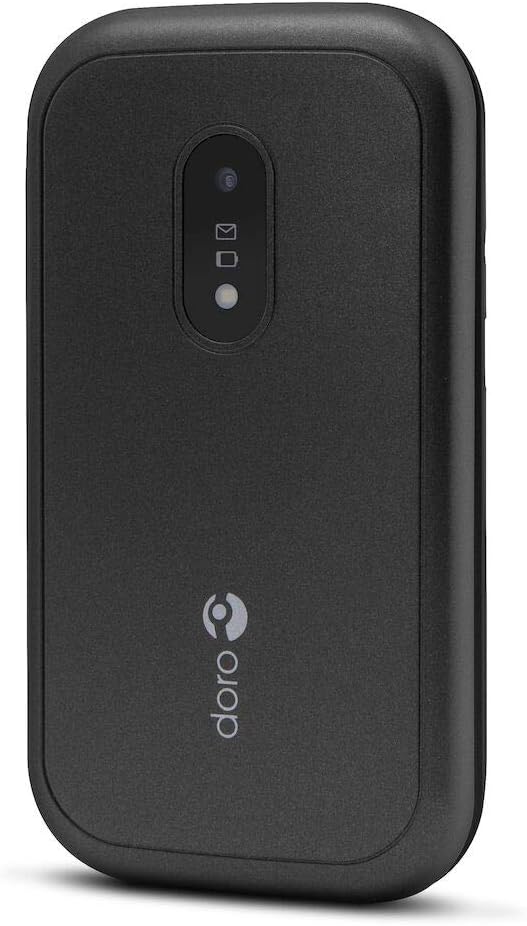
Figure 1: Doro 6040 Senior Mobile Phone (Rear View)
This image displays the rear of the Doro 6040 mobile phone, featuring its black casing. Visible elements include the rear camera lens, indicators for messages and notifications, and the Doro brand logo positioned vertically on the lower part of the phone's back.
Kutuda Neler Var?
Paketi açtıktan sonra, lütfen tüm bileşenlerin eksiksiz olduğundan emin olun:
- Doro 6040 Mobile Phone
- Pil (Lityum İyon)
- Adaptör (Şarj Cihazı)
- Hızlı Kurulum Kılavuzu
Kurmak
1. Pil Kurulumu
- Telefonun arka kapağını dikkatlice çıkarın.
- Insert the Lithium Ion battery into the battery compartment, ensuring the gold contacts align with those in the phone.
- Arka kapağı yerine tam oturana kadar takın.
2. SIM Kart Kurulumu
The Doro 6040 uses a MicroSIM card.
- Pili çıkardıktan sonra SIM kart yuvasını bulun.
- Insert your MicroSIM card into the designated slot, ensuring the cut corner aligns correctly.
- Pili ve arka kapağı tekrar takın.
3. Telefonu Şarj Etme
İlk kullanımdan önce telefonun pilini tamamen şarj edin.
- Adaptörü bir elektrik prizine bağlayın.
- Plug the charging cable into the phone's charging port.
- The battery indicator on the screen will show charging progress. Disconnect the charger once the battery is full.
4. Açma/Kapama
- Açmak için: Ekran ışığı yanana kadar Güç düğmesini basılı tutun.
- Kapatmak için: Güç düğmesini basılı tutun, ardından seçeneklerden "Kapat"ı seçin.
Kullanım Talimatları
Çağrı Yapma ve Alma
- Aramak için: Tuş takımını kullanarak telefon numarasını girin ve yeşil arama düğmesine basın.
- Cevaplamak: Telefon çaldığında yeşil arama düğmesine basın.
- Çağrıyı sonlandırmak için: Kırmızı renkli aramayı sonlandırma düğmesine basın.
- Answering by opening: The phone supports answering calls by simply opening the flip.
Contacts (Phonebook)
- Navigate to the "Contacts" menu.
- Use the navigation keys to scroll through your contacts.
- To call a contact, select their name and press the green call button.
Messaging (SMS/MMS)
- Go to the "Messages" menu to read or compose new messages.
- The phone supports both Short Message Services (SMS) and Multimedia Messaging System (MMS).
Kamera
- Ana menüden kameraya erişin.
- Point the camera at your subject and press the capture button to take a photo.
- The phone features a 2 MP rear camera with a built-in flash.
Acil Durum Butonu
The Doro 6040 is equipped with an emergency button on the back, which can be activated if configured. Refer to the Quick Setup Guide for instructions on setting up emergency contacts and functions.
Ek Özellikler
- El feneri: An integrated flashlight is available for convenience.
- Alarm Fonksiyonu: Hatırlatıcılar veya uyandırma çağrıları için alarmlar ayarlayın.
- Hesaplama: A basic calculator is included for simple arithmetic.
- Takvim: Keep track of dates and appointments.
- Bluetooth: Connect to compatible Bluetooth devices (version 3.0).
Bakım
- Temizlik: Use a soft, dry cloth to clean the phone's exterior. Avoid using liquid cleaners or aerosols.
- Pil Bakım: Pil ömrünü uzatmak için telefonu aşırı sıcaklıklara maruz bırakmaktan kaçının. Pili düzenli olarak şarj edin, ancak aşırı şarjdan kaçının.
- Depolamak: Telefonu uzun süre saklayacaksanız, pilin kısmen şarjlı olduğundan (yaklaşık %50) emin olun ve serin, kuru bir yerde saklayın.
- Yazılım Güncellemeleri: Keep your phone's software updated if prompted, to ensure optimal performance and security.
Sorun giderme
If you encounter issues with your Doro 6040, refer to the following common problems and solutions:
| Sorun | Olası Neden / Çözüm |
|---|---|
| Telefon açılmıyor. | Battery may be depleted. Charge the phone for at least 30 minutes. Ensure battery is correctly installed. |
| Arama yapılamaz veya alınamaz. | Check if the SIM card is properly inserted. Ensure you have network coverage. Contact your service provider. |
| Audio quality is poor during calls. | Adjust the call volume. Move to an area with better network signal. Ensure the speaker/microphone is not obstructed. |
| Difficulty finding contacts in phonebook. | Scrolling through contacts using only up/down keys can be slow. Ensure contacts are saved correctly. |
| Ringtone volume is low (custom tones). | Custom ringtones via microSD or Bluetooth may have lower volume than pre-installed tones. Adjust phone volume settings. |
| Telefon donuyor veya yanıt vermez hale geliyor. | Yazılım sıfırlaması yapmak için pili çıkarıp tekrar takın. |
Özellikler
| Özellik | Detay |
|---|---|
| Model Adı | Doro 6040 (Model 7826) |
| Ürün Boyutları | 2.24 x 0.79 x 4.17 inç (57 x 20 x 106.7 mm) |
| Ürün Ağırlığı | 4.2 ons (118 gr) |
| Görüntülemek | 2.8 Inches, 320 x 240 pixels resolution |
| Pil Kapasitesi | 1000 mAh Lityum İyon |
| Konuşma Süresi (2G) | 6.8 saat |
| Standby Time (2G) | 420 saat |
| Arka Kamera | 2 MP with built-in flash |
| SIM Kart Türü | MicroSIM (Single SIM capacity) |
| Bağlantı | Bluetooth 3.0, 2G Cellular Technology |
| Kulaklık girişi | 3.5 mm |
| İşletim Sistemi | Android (Note: This is from the product data, but for a feature phone, it's likely a highly customized or simplified version, not full Android OS as on smartphones.) |
| Bellek Depolama Kapasitesi | 1.58 MB |
| Renk | Siyah |
| Özellikler | Calculator, Calendar, Alarm function, Integrated flashlight, SMS, MMS, Emergency button. |
Garanti ve Destek
Garanti Bilgileri
The Doro 6040 Senior Mobile Phone comes with a İki yıl garanti Fabrika hatalarına karşı garantilidir. Garanti talepleri için lütfen satın alma belgenizi saklayın.
Müşteri Desteği
For further assistance, technical support, or warranty inquiries, please contact Doro customer service. Refer to the contact information provided in your Quick Setup Guide or visit the official Doro webalan.
For online resources and frequently asked questions, you may visit the Doro Support Page.