
Garmin 010-02258-00
Garmin GPSMAP 64x El Tipi GPS Kullanım Kılavuzu
Model: 010-02258-00
Marka: Garmin
giriiş
This manual provides comprehensive instructions for the operation, maintenance, and troubleshooting of your Garmin GPSMAP 64x handheld navigator. The GPSMAP 64x series is designed for outdoor activities such as hiking, cycling, geocaching, and climbing, offering reliable navigation with multi-GNSS support and preloaded TopoActive maps.
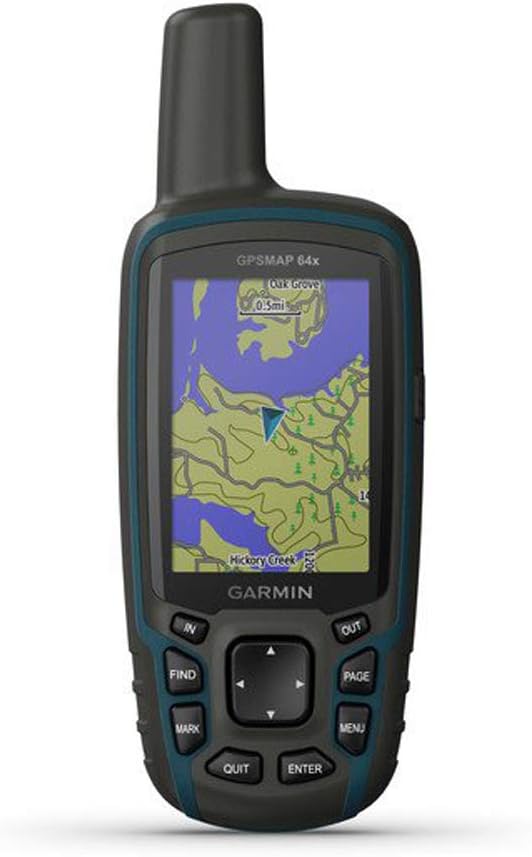
Figure 1: Garmin GPSMAP 64x Handheld GPS Unit. This image shows the front view of the device, highlighting its screen with a topographical map, and the physical buttons for navigation and control.
Başlarken
Kutuda Neler Var?
- Garmin GPSMAP 64x device
- USB kablosu
- Dokümantasyon (Kullanım Kılavuzu, Hızlı Başlangıç Kılavuzu)
Pil Kurulumu
The GPSMAP 64x requires 1 Lithium Polymer battery. To install batteries:
- Cihazın arkasındaki pil bölmesi kapağını bulun.
- Twist the D-ring counter-clockwise and remove the cover.
- Insert the batteries according to the polarity diagram inside the compartment.
- Kapağı yerine takın ve D halkasını saat yönünde çevirerek sabitleyin.
Açma/Kapatma
Cihazı açmak için, tuşuna basın ve basılı tutun Güç button located on the top right side. To power off, press and hold the Güç button again until the power-off prompt appears, then select Kapalı.
Cihazın Çalıştırılması
Basic Navigation and Buttons
The GPSMAP 64x features a button-operated interface for reliable use in various conditions.
- IN/OUT Buttons: Used to zoom in and out on the map.
- FIND Button: Accesses the search menu to find waypoints, geocaches, tracks, and other saved locations.
- İŞARET Düğmesi: Creates a new waypoint at your current location.
- SAYFA Düğmesi: Cycles through the main pages (Map, Compass, Trip Computer, etc.).
- MENÜ Düğmesi: Opens the options menu for the current page. Press twice to open the main menu.
- QUIT Button: Cancels an action or returns to the previous page.
- GİRİŞ Düğmesi: Confirms selections or opens an item.
- Yön Tuşu: Navigates through menus and pans the map.
Using TopoActive Maps
The device comes preloaded with TopoActive maps, providing detailed topographical information, routable roads, and trails. Use the directional pad to pan the map and the IN/OUT buttons to adjust the zoom level. Your current position is indicated by a triangular pointer.
Çoklu GNSS Desteği
The GPSMAP 64x supports multiple Global Navigation Satellite Systems (GNSS), including GPS, GLONASS, and Galileo. This multi-GNSS capability enhances positioning accuracy and provides faster satellite acquisition, especially in challenging environments like deep canyons or dense forests.
Bakım
Cihazın Temizlenmesi
To clean the device, use a cloth dampened with a mild detergent solution. Wipe the exterior gently. Avoid using abrasive cleaners or solvents that could damage the plastic components or screen.
Yazılım Güncellemeleri
Garmin periodically releases software updates to improve performance and add new features. Connect your device to a computer using the supplied USB cable and use Garmin Express software to check for and install updates. Ensure your device is sufficiently charged before starting an update.
Pil Bakımı
For optimal battery life, store the device in a cool, dry place when not in use. Remove batteries if the device will be stored for an extended period to prevent leakage. Use high-quality batteries for best performance.
Sorun giderme
| Sorun | Çözüm |
|---|---|
| Cihaz açılmıyor. | Ensure batteries are correctly installed and fully charged. Try new batteries. |
| Poor satellite reception. | Net bir bilgiye sahip olduğunuzdan emin olun view of the sky. Move away from tall buildings or dense tree cover. Allow more time for satellite acquisition. |
| Ekran tepkisiz veya donmuş. | Perform a soft reset by removing and reinserting the batteries. If the issue persists, contact Garmin Support. |
| Aygıt bilgisayar tarafından tanınmıyor. | Ensure the USB cable is securely connected to both the device and the computer. Try a different USB port or cable. Install Garmin Express software. |
Özellikler
| Özellik | Detay |
|---|---|
| Model Numarası | 010-02258-00 |
| Ürün Boyutları | 6.3 x 2.4 x 1.4 inç |
| Ürün Ağırlığı | 8 ons |
| Ekran Boyutu | 2.6 inç |
| Ekran Çözünürlüğü | 160 x 240 piksel |
| Pil Türü | 1 Lityum Polimer pil gerekli |
| Pil Ömrü | GPS modunda 16 saate kadar |
| GPS Alıcısı | High-sensitivity receiver with quad helix antenna |
| GNSS Desteği | GPS, GLONASS, Galileo |
| Önceden Yüklenmiş Haritalar | TopoActive maps (U.S. and Australia only) |
| Bağlantı | USB, Bluetooth (for some features) |
| Suya Dayanıklılık | Rugged and water-resistant design |
| Özel Özellikler | Ability to Add Maps, Automatic Routing, Wireless Compatibility, Picture Viewer, Area Calculation, Live Tracking, Custom Maps, Sun and Moon Information, Hunt/Fish Calendar, Flashlight |
Garanti ve Destek
For warranty information, please refer to the documentation included with your device or visit the official Garmin website. Garmin provides product support, software updates, and additional resources through their website ve müşteri hizmetleri kanalları.
Garmin Desteği Webalan: www.garmin.com/support