
WeMo WLS0403
WeMo WLS0403 WIFI Işık Anahtarı Kullanım Kılavuzu
Model: WLS0403 | Brand: WeMo
giriiş
The WeMo Smart Light Switch (Model WLS0403) provides comprehensive control over your home lighting. This device allows you to manage lights from the wall switch, through a dedicated mobile application, or using voice commands via compatible smart assistants. Designed for both single-pole and 3-way lighting circuits, it offers enhanced convenience and security features without requiring a separate hub or subscription.
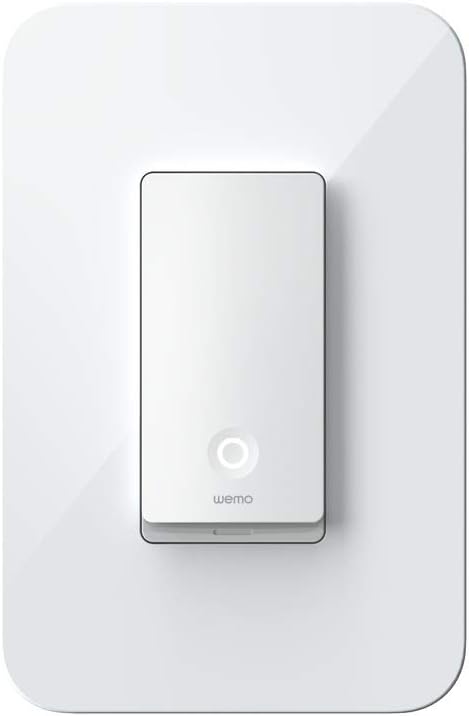
Resim: Ön view of the WeMo WLS0403 Smart Light Switch.
Kutuda Neler Var?
Upon opening your WeMo Smart Light Switch package, you should find the following items:
- WeMo Light Switch (Model WLS0403)
- Hızlı Başlangıç Kılavuzu

Image: WeMo WLS0403 Smart Light Switch and its retail packaging.
Temel Özellikler
The WeMo WLS0403 Smart Light Switch offers a range of features designed to enhance your home's convenience and security:
- Çok Yönlü Kontrol: Control single pole and 3-way lights directly from the wall switch, the WeMo app, or using voice commands.
- Sesli Asistan Uyumluluğu: Seamlessly integrates with Apple HomeKit, Google Assistant, and Amazon Alexa for hands-free voice control.
- Uzakta Modu: Randomize lights to simulate occupancy, enhancing home security when you are away.
- Planlama ve Zamanlayıcılar: Set custom schedules and timers for your lights, such as turning on porch lights at sunset or syncing with sunrise and sunset.
- 3-Way Circuit Compatibility: Only one smart light switch is required per 3-way circuit for full functionality.
- Nötr Tel Gereksinimi: Requires a neutral wire for installation.

Image: WeMo WLS0403 showing compatibility with Apple HomeKit, Amazon Alexa, Google Assistant, Nest, and IFTTT.
Kurulum ve Yükleme
Installing the WeMo Smart Light Switch requires basic electrical knowledge. If you are unsure about any steps, it is recommended to consult a qualified electrician. Montaj için nötr kabloya ihtiyaç vardır.
Kurulum Adımları:
- Önce Güvenlik: Before beginning any electrical work, turn off the power to the light switch circuit at your circuit breaker. Verify the power is off using a voltage test cihazı.
- Eski Anahtarı Kaldır: Carefully remove your existing light switch from the wall box. Disconnect the wires, noting their connections (line, load, neutral, ground).
- Connect WeMo Switch: Connect the wires from your wall box to the corresponding terminals on the WeMo Smart Light Switch. Ensure the neutral wire is connected.
- Montaj Anahtarı: Secure the WeMo Smart Light Switch into the wall box. Ensure all wires are neatly tucked away to allow the switch to fit snugly.
- Gücü Geri Yükle: Turn the power back on at your circuit breaker.
- İndir uygulaması: Download the free WeMo app from your device's app store.
- Wi-Fi'ye bağlanın: Follow the in-app instructions to connect your WeMo Smart Light Switch to your home Wi-Fi network.
- Kurulumu Tamamla: Once connected, you can name your switch and configure it for use with voice assistants or scheduling.

Image: Visual representation of the three main setup steps: Download app, Install and connect, Control from anywhere.

Image: Diagram illustrating 3-way compatibility, showing only one smart switch is required per circuit.
Kullanım Talimatları
The WeMo Smart Light Switch offers multiple ways to control your lighting:
- Manuel kontrol: Press the rocker switch directly to turn lights on or off, just like a traditional light switch.
- WeMo App Control: Use the WeMo mobile application on your smartphone or tablet to remotely turn lights on/off, set schedules, and manage other WeMo devices.
- Ses Kontrolü: Integrate with Amazon Alexa, Google Assistant, or Apple HomeKit to control your lights using simple voice commands. For exampAlexa'ya "Alexa, oturma odasının ışıklarını aç." dedi.
- Planlama: Create custom schedules within the WeMo app to automate your lighting. You can set lights to turn on/off at specific times, or sync with sunrise and sunset.
- Uzakta Modu: Activate Away Mode in the WeMo app to randomly turn your lights on and off, giving the impression that someone is home even when you're away.
- Gruplama: Group multiple WeMo-controlled devices together in the app to control them simultaneously with a single command or tap.

Image: A hand holding a smartphone displaying the WeMo app interface, highlighting control, schedule, protect (away mode), and group features.
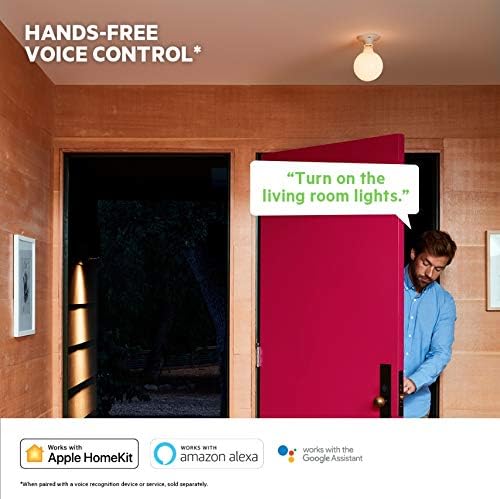
Image: A person entering a room, demonstrating hands-free voice control with the WeMo Smart Light Switch.
Ürün Bittiview Video:
Video: An official product video demonstrating the features and benefits of the WeMo Smart Light Switch, including manual control, app control, voice control, scheduling, grouping, and Away Mode.
Bakım
The WeMo Smart Light Switch is designed for minimal maintenance. To ensure optimal performance and longevity:
- Temizlik: Gently wipe the surface of the switch with a soft, dry cloth. Avoid using abrasive cleaners or solvents, as these may damage the finish.
- Donanım Yazılımı Güncellemeleri: Periodically check the WeMo app for available firmware updates. Keeping your device's firmware up-to-date ensures you have the latest features and security enhancements.
Sorun giderme
If you encounter issues with your WeMo Smart Light Switch, try the following troubleshooting steps:
- No Power/Light Not Responding:
- Ensure the circuit breaker for the switch is in the ON position.
- Verify that the neutral wire is correctly connected during installation. A neutral wire is essential for the WeMo Smart Light Switch to function.
- Check all wire connections in the wall box to ensure they are secure. Loose connections can prevent proper operation.
- Connectivity Issues (Losing Wi-Fi Connection):
- Ensure your Wi-Fi router is working correctly and within range of the switch.
- Restart your Wi-Fi router and the WeMo Smart Light Switch (by turning off and on the circuit breaker).
- Confirm your Wi-Fi network is 2.4 GHz, as the WeMo switch operates on this frequency.
- If the issue persists, try resetting the switch to factory defaults (refer to the Quick Start Guide for specific instructions) and re-pairing it with the WeMo app.
- Ses Kontrolü Çalışmıyor:
- Ensure your WeMo switch is properly linked to your Amazon Alexa, Google Assistant, or Apple HomeKit account.
- Check that your voice assistant device is online and functioning correctly.
- Verify the name of your WeMo switch in the WeMo app matches the name used in your voice commands.
Özellikler
| Bağlanmak | Değer |
|---|---|
| Marka | WeMo |
| Model Numarası | WLS0403 |
| Çalışma Modu | AÇIK KAPALI |
| Güncel Derecelendirme | 2 Amps |
| İletişim Türü | Normalde Açık |
| Bağlayıcı Türü | Tak ve Çalıştır |
| terminal | SPST |
| Ürün Boyutları (U x G x Y) | 1.64 x 1.72 x 4.1 inç |
| Devre tipi | 3 yollu |
| Montaj Tipi | Duvara Montaj |
| Aktüatör Tipi | Salıncakçı |
| İletişim Malzemesi | Bakır |
| Uluslararası Koruma Derecelendirmesi | IP00 |
| Denetleyici Türü | Amazon Alexa, Google Assistant, HomeKit, Vera |
| Kontrol Yöntemi | Ses |
| Bağlantı Protokolü | Wifi |
| Renk | Beyaz |
| Birim Sayısı | 1 Sayım |
| Öğe Sayısı | 1 |
| UPC | 745883768059 |
| Üretici | WeMo |
| Ürün Ağırlığı | 9.6 ons |
| İlk Mevcut Tarih | 9 Mayıs 2019 |
Garanti ve Destek
The WeMo WLS0403 Smart Light Switch typically comes with a 3 yıllık donanım garantisi. For detailed warranty information, technical support, or to report any issues, please refer to the official WeMo webSiteyi ziyaret edin veya doğrudan müşteri hizmetleriyle iletişime geçin. Satın alma belgenizi garanti talepleriniz için saklayın.
You can visit the official WeMo Store for more information and support resources: WeMo Store