
HANWHA HCV-6070R
Hanwha Techwin HCV-6070R 2MP Outdoor Vandal-Resistant Dome Camera User Manual
Model: HCV-6070R
giriiş
This manual provides detailed instructions for the installation, operation, and maintenance of the Hanwha Techwin HCV-6070R 2MP Outdoor Vandal-Resistant Dome Camera. This camera is designed for outdoor security surveillance, offering 2-megapixel resolution, a 2.8-12mm manual varifocal lens, and night vision capabilities with a BNC connection.
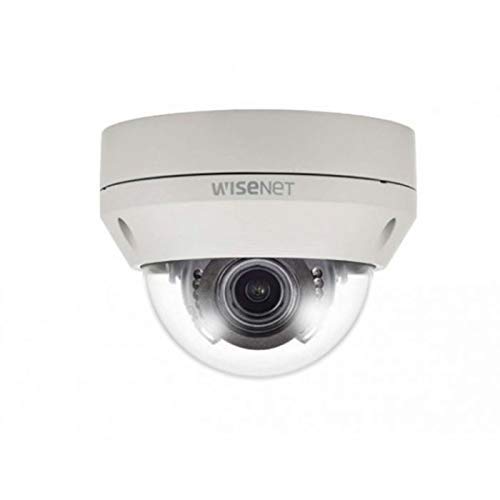
Figure 1: Hanwha Techwin HCV-6070R 2MP Outdoor Vandal-Resistant Dome Camera.
Güvenlik Bilgileri
Please read all safety instructions carefully before installing or operating the camera. Keep this manual for future reference.
- Ensure the power supply matches the camera's requirements to prevent electrical shock or fire.
- Fotoğraf makinesini aşırı sıcaklıklara, neme veya aşındırıcı ortamlara maruz bırakmayın.
- Kurulum, yerel elektrik yönetmeliklerine uygun olarak yetkili personel tarafından yapılmalıdır.
- Avoid direct exposure of the lens to strong light sources for extended periods.
- Kamerayı sökmeye veya üzerinde değişiklik yapmaya çalışmayın. Bu, garantiyi geçersiz kılacaktır.
Paket İçeriği
Paketin içinde tüm öğelerin mevcut olduğundan emin olun:
- Hanwha Techwin HCV-6070R Dome Camera (1 unit)
- Montaj Vidaları ve Ankrajları
- Kurulum Şablonu
- Hızlı Başlangıç Kılavuzu
- Waterproof Cap (if applicable)
Kurmak
1. Kameranın Montajı
The HCV-6070R is designed for wall mounting. Choose a suitable outdoor location that provides the desired surveillance coverage and is protected from direct impact.
- Use the provided installation template to mark the drilling holes on the wall.
- Drill holes according to the template and insert the wall anchors.
- Kamera tabanını montaj vidalarını kullanarak duvara sabitleyin.
- Kameranın ayarlarını yapın. viewing angle as needed before tightening all screws.
2. Kablolama ve Bağlantılar
The camera utilizes a BNC connection for video output and requires a separate power supply. Ensure all connections are secure and weatherproof for outdoor use.
- Video Bağlantısı: Connect a BNC cable from the camera's BNC port to the video input of your DVR (Digital Video Recorder).
- Güç Bağlantısı: Connect a 12V DC power adapter (not included) to the camera's power input. The camera operates at 8 watts.
- Kablosuz bağlantı: The camera supports Wi-Fi for remote control and monitoring. Refer to the operating section for initial Wi-Fi setup.

Şekil 2: Ör.ample of a BNC coaxial cable for video connection. Ensure a secure connection to the camera and DVR.
3. İlk Yapılandırma
After physical installation and power-up, access the camera settings via your connected DVR or a compatible mobile application (Android controller type specified).
- Tarih ve saati ayarlayın.
- Configure network settings for Wi-Fi connectivity.
- Adjust video quality and recording preferences.
Kameranın Çalıştırılması
1. Video İzleme ve Kayıt
The camera provides 2MP effective video resolution, capturing video at 1080p and a frame rate of 30 fps. Video is typically recorded in MPEG-4 format.
- Canlı erişim view ve kaydedilen yiyeceklertage through your connected DVR or the remote control application.
- Ensure your DVR is configured to record from the correct channel.
2. Adjusting Focus and Zoom
The HCV-6070R features a 2.8-12mm manual varifocal lens with optical zoom. Adjustments are made manually on the camera body.
- Loosen the focus and zoom locking screws on the camera lens assembly.
- Adjust the zoom ring to achieve the desired field of view.
- Adjust the focus ring until the image is clear and sharp.
- Tighten the locking screws to secure the settings.
3. Night Vision and Low Light Performance
Equipped with night vision and "Night Color" low light technology, the camera automatically switches to infrared mode in low light conditions to provide clear surveillance footage. The light source type is LED.
- Ensure no obstructions block the infrared LEDs on the camera.
- The camera will automatically activate its infrared illuminators when ambient light levels drop.
4. Hareket Algılama
The camera supports motion-only alerts. Configure motion detection zones and sensitivity settings through your DVR or the remote control application.
- Kameranın görüş alanı içinde belirli alanları tanımlayın view hareket algılama için.
- Set the sensitivity level to minimize false alarms.
- Configure alert notifications (e.g., email, push notifications) via your DVR or application.
5. Uzaktan Kumanda
The camera can be controlled remotely using a compatible Android application. Ensure the camera is connected to your Wi-Fi network.
- Download and install the Hanwha Techwin mobile application on your Android device.
- Follow the in-app instructions to add and connect to your HCV-6070R camera.
- Uygulama aracılığıyla şunları yapabilirsiniz: view canlı footage, access recordings, and adjust certain camera settings.
Bakım
Düzenli bakım, kameranızın en iyi performansını ve uzun ömrünü sağlar.
- Lensin Temizlenmesi: Gently wipe the camera lens with a soft, clean, lint-free cloth. For stubborn dirt, use a lens cleaning solution specifically designed for optical surfaces.
- Muhafazanın Temizlenmesi: Kameranın dış gövdesini ad ile temizleyin.amp bez. Sert kimyasallar veya aşındırıcı temizleyiciler kullanmayın.
- Kablo Denetimi: Periodically check all cables and connections for signs of wear, damage, or corrosion, especially for outdoor installations.
- Donanım Yazılımı Güncellemeleri: Check the Hanwha Techwin website for any available firmware updates to ensure your camera has the latest features and security patches.
Sorun giderme
| Sorun | Olası Neden | Çözüm |
|---|---|---|
| Video çıkışı yok | No power; Loose BNC connection; Incorrect DVR input selected. | Check power supply; Secure BNC cable; Select correct channel on DVR. |
| Bulanık veya net olmayan görüntü | Lens out of focus; Dirty lens. | Manually adjust focus (refer to Operating section); Clean the lens. |
| Gece görüşü çalışmıyor | IR LEDs blocked; Insufficient power; Camera stuck in day mode. | Clear obstructions; Verify power supply; Restart camera. |
| Hareket algılama tetiklenmiyor | Incorrect sensitivity settings; Motion detection zone not configured. | Adjust sensitivity; Configure motion detection zones in DVR/app. |
| Cannot connect via Wi-Fi | Incorrect Wi-Fi password; Camera out of range; Network issues. | Verify Wi-Fi credentials; Move camera closer to router; Check network status. |
Özellikler
| Örnek | HCV-6070R |
| Marka | HANWHA Techwin |
| Etkili Video Çözünürlüğü | 2 MP (1080p) |
| Kare Hızı | 30 kare/saniye |
| Lens Türü | 2.8-12mm Manuel Değişken Odaklı Lens |
| Odak Türü | Manuel Odaklama |
| Yakınlaştırma Türü | Optik Yakınlaştırma |
| Bağlantı Teknolojisi | Wireless (Wi-Fi), BNC Connection |
| Güç Kaynağı | Manual (requires external 12V DC power adapter) |
| Netage | 8 watt |
| İç/Dış Mekan Kullanımı | Dış mekan |
| Özel Özellik | Night Vision (Night Color low light technology) |
| Form Faktörü | Kubbe |
| Montaj Tipi | Duvara Montaj |
| Uyumlu Cihazlar | DVR |
| Kontrol Yöntemi | Remote (Android Controller Type) |
| Uluslararası Koruma Derecelendirmesi | IP54 |
| Fotoğraf Sensörü Teknolojisi | CMOS |
| Video Yakalama Formatı | MPEG-4 |
| Uyarı Tipi | Yalnızca Hareket |
Garanti ve Destek
For warranty information and technical support, please refer to the official Hanwha Techwin website veya doğrudan müşteri hizmetleriyle iletişime geçin. Garanti talepleri için satın alma kanıtı olarak satın alma makbuzunuzu saklayın.
Üretici: Hanwha
İlk Mevcut Tarih: 19 Şubat 2019