
giriiş
The VIZIO SB36512-F6 Home Theater Sound System delivers a premium audio experience with Dolby Atmos technology, creating immersive sound that moves all around you, including from above. This 5.1.2 channel system features unique upward-firing speakers, a wireless subwoofer, and rear surround sound speakers to provide crystal-clear audio and powerful bass. Designed for easy plug-and-play installation, it integrates seamlessly with your home entertainment setup, offering cinematic sound within minutes. Beyond movies, it supports music streaming via Chromecast built-in and works with Google Assistant for convenient voice control.
Kutuda Neler Var?
- VIZIO 36" 5.1.2 Channel Sound Bar
- Kablosuz Subwoofer
- Rear Surround Sound Speakers (2)
- Uzaktan Kumanda (2 AAA pil ile)
- HDMI Kablosu
- Optik Dijital Ses Kablosu
- Güç Kabloları (Ses Çubuğu ve Subwoofer için)
- Wall Mount Brackets (for Sound Bar)
Kurmak
1. Yerleşim
For optimal audio performance, position the sound bar centrally below your television. Place the wireless subwoofer in a convenient location, ideally near the front of the room. The two rear surround sound speakers should be positioned behind your main listening area, one on each side, to create an enveloping surround sound experience.
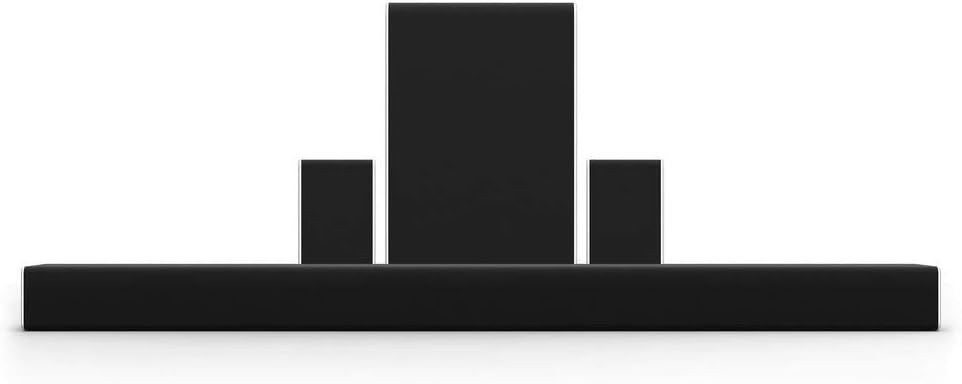
Figure 1: VIZIO 5.1.2 Sound System components, showing the sound bar, wireless subwoofer, and two satellite speakers.
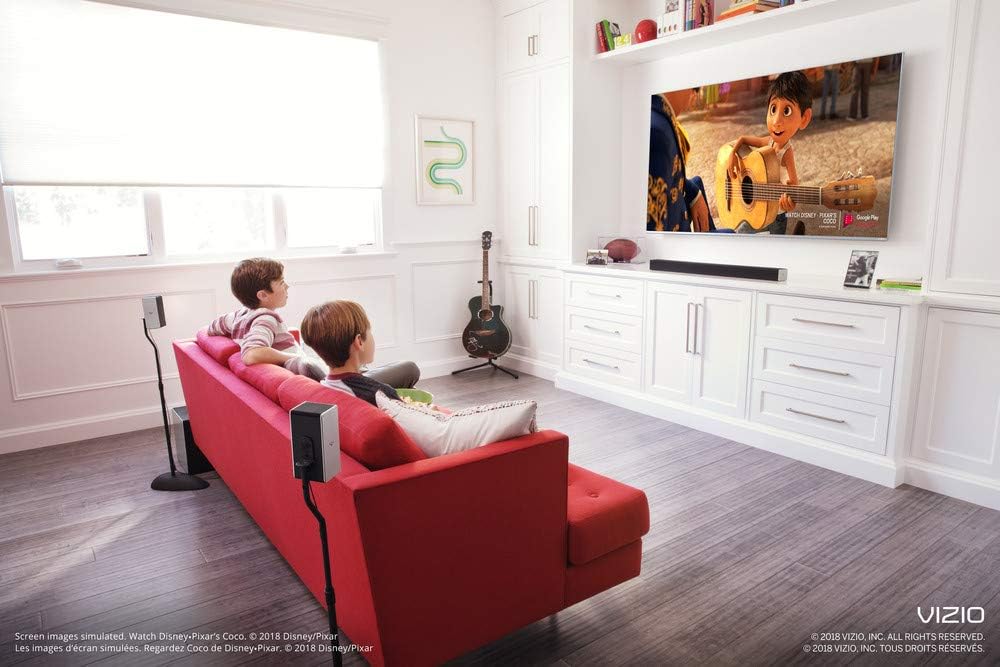
Şekil 2: Ör.ample setup of the VIZIO sound bar system in a living room, demonstrating speaker placement for an immersive experience.
2. Bağlantılar
Connect the sound bar to your television using either the HDMI ARC port (recommended for best audio quality and control) or the Optical Digital Audio port. Ensure the HDMI cable is connected to the HDMI ARC port on both your TV and the sound bar. Plug the power cables into the sound bar and wireless subwoofer, then connect them to a power outlet. The rear surround speakers connect directly to the wireless subwoofer via the included speaker wires.
- HDMI ARK: Connect one end of the HDMI cable to the HDMI ARC port on your TV and the other end to the HDMI OUT (ARC) port on the sound bar. This allows for high-quality audio transmission and control of the sound bar volume using your TV remote.
- Optik Dijital Ses: If your TV does not have an HDMI ARC port, connect the Optical Digital Audio cable from your TV's Optical OUT port to the Optical IN port on the sound bar.
- Güç: Connect the power cords to the sound bar and subwoofer, then plug them into a wall outlet.
- Arka Hoparlörler: Connect the left and right rear speakers to the corresponding ports on the wireless subwoofer.
Kullanım Talimatları
1. Güç Açma/Kapatma
Press the Power button on the sound bar or the remote control to turn the system on or off. If connected via HDMI ARC, the sound bar may automatically power on/off with your TV.
2. Giriş Seçimi
Use the Input button on the remote control to cycle through available audio sources (HDMI ARC, Optical, Bluetooth, Digital Coaxial, AUX).
3. Ses Kontrolü
Adjust the volume using the Volume Up/Down buttons on the remote control or the sound bar itself. If HDMI ARC is enabled, your TV remote may also control the sound bar volume.
4. Bluetooth Eşleştirme
To pair a Bluetooth device, press and hold the Bluetooth button on the sound bar or remote until the indicator lights flash. Select "VIZIO SB36512-F6" from your device's Bluetooth settings to connect.
5. Dahili Chromecast
Stream music and audio content directly to your sound bar from any Chromecast-enabled app on your smartphone or tablet (e.g., Spotify, Pandora, iHeartRadio). Ensure your device and the sound bar are connected to the same Wi-Fi network.
6. VIZIO SmartCast Mobile App
Download the free VIZIO SmartCast Mobile App to your smartphone or tablet. This app allows you to control the sound bar, adjust settings, and manage audio playback from your mobile device.
7. Google Assistant Compatibility
The sound system works with Google Assistant-enabled devices (e.g., Google Home). Once set up, you can use voice commands to control playback, adjust volume, and more.
Bakım
To ensure the longevity and optimal performance of your VIZIO sound system, follow these maintenance guidelines:
- Temizlik: Gently wipe the surfaces of the sound bar, subwoofer, and speakers with a soft, dry, lint-free cloth. Avoid using abrasive cleaners, waxes, or solvents.
- Havalandırma: Aşırı ısınmayı önlemek için tüm bileşenlerin etrafında yeterli havalandırma olduğundan emin olun. Havalandırma açıklıklarını asla kapatmayın.
- Donanım Yazılımı Güncellemeleri: Periodically check for and install firmware updates via the VIZIO SmartCast Mobile App or VIZIO's official webSite. Güncellemeler performansı artırabilir ve yeni özellikler ekleyebilir.
- Kablo yönetimi: Kabloları düzenli tutun ve hasar görmelerini önlemek için bükülme veya aşırı gerilimden uzak tutun.
Sorun giderme
If you encounter issues with your VIZIO sound system, refer to the following common troubleshooting steps:
- Güç Yok:
- Ensure all power cables are securely connected to the sound bar, subwoofer, and wall outlets.
- Başka bir cihazı prize takarak prizin çalışıp çalışmadığını doğrulayın.
- Ses Yok:
- Check that the correct input source is selected on the sound bar (e.g., HDMI ARC, Optical).
- Increase the volume on both the sound bar and your TV.
- If using Optical, ensure your TV's audio output is set to "PCM" or "Stereo" (not Bitstream or Dolby Digital if experiencing issues).
- HDMI ARC kullanıyorsanız, TV'nizin ses ayarlarında ARC'nin etkinleştirildiğinden emin olun.
- Subwoofer/Surround Speakers Not Connecting:
- Subwoofer'ın açık olduğundan ve ses çubuğunun menzilinde olduğundan emin olun.
- Manually re-pair the subwoofer by pressing the Pair button on the back of the subwoofer and then the Power button on the sound bar.
- Verify the rear speakers are correctly wired to the subwoofer.
- Bluetooth Bağlantı Sorunları:
- Ses çubuğunun Bluetooth eşleştirme modunda olduğundan emin olun.
- Forget the device on your smartphone/tablet and attempt to re-pair.
- Cihazınızı ses çubuğuna daha yaklaştırın.
Özellikler
| Özellik | Detay |
|---|---|
| Model Adı | SB36512-F6 |
| Hoparlör Tipi | Çevresel Ses |
| Çevresel Ses Kanalı Yapılandırması | 5.1.2 |
| Hoparlör Maksimum Çıkış Gücü | 400 Watt |
| Ürün Ölçüleri (Ses Çubuğu) | 36"D x 3.19"G x 2.5"Y |
| Ürün Ağırlığı | 5.6 Pound |
| Bağlantı Teknolojisi | Bluetooth, Wi-Fi, Optical, HDMI, Coaxial |
| Subwoofer Bağlantı Teknolojisi | Kablosuz |
| Kontrol Yöntemi | Voice (Google Assistant), Remote |
| Özel Özellik | Bass Boost, Stereo Pairing, Dolby Enabled, Chromecast built-in |
| Renk | Siyah |
| Üretici | VİZİO |
| UPC | 845226017353 |
Garanti ve Destek
For detailed warranty information and technical support, please visit the official VIZIO support webSite üzerinden satın alabilir veya müşteri hizmetleriyle iletişime geçebilirsiniz. Garanti talepleriniz için satın alma fişinizi saklayın.
Çevrimiçi destek: support.vizio.com
Telefon Desteği: VIZIO'nun resmi sayfasına bakın. webEn güncel iletişim numaraları için siteyi ziyaret edin.