
Samsung UE43NU7400UXZT
Samsung Series 7 UE43NU7400UXZT User Manual
Model: UE43NU7400UXZT
1. Giriş
This manual provides essential information for the setup, operation, and maintenance of your Samsung Series 7 UE43NU7400UXZT 4K UHD Smart LED TV. Please read this manual thoroughly before using your television to ensure safe and optimal performance.
Televizyonunuzun başlıca özellikleri şunlardır:
- Ekran Boyutu: 43 inç (108 cm görünür diyagonal)
- Ekran Teknolojisi: LED Panel with 4K Resolution
- Resim Geliştirme: HDR (Yüksek Dinamik Aralık) Teknolojisi
- Ayarlayıcılar: DVB-T2CS2 x 2
- Bağlantı: Wireless (Wi-Fi) and Ethernet
- En Boy Oranı: 16:9
- Enerji Verimliliği Sınıfı: A
2. Kurulum
2.1 Kutudan Çıkarma ve Yerleştirme
Carefully remove the television and all components from the packaging. It is recommended to have assistance due to the size and weight of the unit (approximately 15.1 kg). Place the TV on a stable, flat surface or mount it securely on a wall.
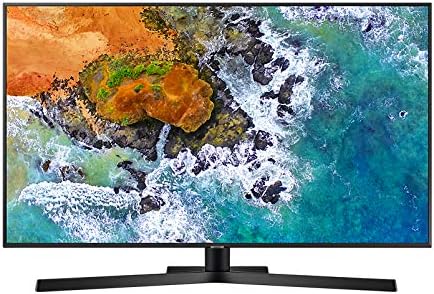
Şekil 2.1: Ön view of the Samsung Series 7 UE43NU7400UXZT television.
2.2 Connecting the Stand or Wall Mounting
Attach the included stand according to the separate assembly guide provided in the box. If wall mounting, ensure you use a compatible VESA mount and appropriate M8x45 bolts, as these are typically not included with the TV and may require separate purchase. The TV includes spacers for wall mounting.
2.3 Harici Cihazların Bağlanması
Connect your external devices such as set-top boxes, game consoles, or Blu-ray players to the available HDMI ports. This model features 3 HDMI inputs (one with ARC support) and 2 USB ports. It also includes 2 component RCA inputs (with connection cables) and an optical audio output.

Şekil 2.2: Arka view of the television displaying connection ports.
2.4 İlk Kurulum Sihirbazı
After connecting the power cable and turning on the TV, the initial setup wizard will guide you through language selection, network connection (Wi-Fi or Ethernet), and channel scanning for DVB-T2CS2 tuners.
3. Televizyonun Çalıştırılması
3.1 Uzaktan Kumanda
The included remote control is compact and features voice control for convenient navigation. While minimal buttons are present, all essential functions can be accessed. An accompanying mobile application is also available for more comprehensive control.
3.2 Akıllı TV Özellikleri (Tizen İşletim Sistemi)
Your television runs on Samsung's Tizen operating system, providing a user-friendly interface and access to various applications. Popular streaming services like Netflix and Prime Video are supported, offering excellent 4K HDR content. The system is designed for quick access to channel management and device control.
3.3 Görüntü ve Ses Ayarları
Access the TV's menu to adjust picture and sound settings. For optimal viewing, it may be necessary to calibrate colors and disable certain digital artifacts by setting controls to "OFF" to achieve a more natural image. The menu offers extensive options for customization.
3.4 Connectivity Notes
Please note that this television does not include a headphone jack. Additionally, direct recording to an external hard disk or USB pen drive is not supported.
4. Bakım
4.1 Televizyonun Temizlenmesi
To clean the screen, gently wipe it with a soft, dry, lint-free cloth. For the frame and stand, use a slightly damp cloth. Avoid using abrasive cleaners, waxes, or solvents as they can damage the finish.
4.2 Yazılım Güncellemeleri
Periodically check for software updates through the TV's settings menu to ensure optimal performance and access to the latest features. Updates can improve stability and introduce new functionalities.
5. Sorun Giderme
This section addresses common issues you might encounter with your television.
- Görüntü yok/Ses yok: Ensure all cables are securely connected and the correct input source is selected. Check power connections.
- Ağ Bağlantı Sorunları: Verify your Wi-Fi password or Ethernet cable connection. Restart your router if necessary.
- Image Irregularities: If you observe white spots in the corners, especially on dark images, this may indicate backlight uniformity variations. If persistent or severe, contact customer support.
- File Playback Issues: Note that the TV may not support all video formats, such as AVI. Ensure your media fileDosyalar uyumlu formatlardadır.
- Uzaktan Kumanda Tepki Vermiyor: Check battery levels. Ensure no obstructions are between the remote and the TV's sensor.
For issues not covered here, please refer to the full digital manual available within the TV's internal memory or contact Samsung customer support.
6. Özellikler
| Özellik | Detay |
|---|---|
| Üretici | SAMSUNG |
| Model Numarası | UE43NU7400UXZT |
| Ürün Boyutları | 97.02x5.88x56.32 cm |
| Ağırlık | 15.1 kilo |
| Ekran Boyutu | 43 inç (108 santimetre) |
| Ekran Teknolojisi | NEDEN OLMUŞ |
| Çözünürlük | 4K |
| Yenileme Hızı | 480 (Note: This often refers to a motion rate index, not native panel refresh rate.) |
| Özel Özellik | HDR Teknolojisi |
| Dahil Bileşenler | TV - Remote Control |
| Bağlantı Teknolojisi | Kablosuz (Wi-Fi), Ethernet |
| En Boy Oranı | 16:9 |
| Enerji Verimliliği Sınıfı | A |
| İlk Mevcut Tarih | 16 Temmuz 2018 |
7. Garanti ve Destek
For information regarding warranty and return policies, please refer to the official Samsung warranty documentation included with your product or visit the Samsung support website. Amazon's return policy allows for returns within 30 days of receipt if you change your mind. For defective or damaged products, consult Amazon's help page on returns. Specific information for Marketplace purchases is also available on Amazon's help pages.
For technical assistance or further inquiries, please contact Samsung customer support directly.
Relevant links for Amazon's return policies (for reference, actual links might vary):