
1. Giriş
This manual provides detailed instructions for the setup, operation, and maintenance of your Optoma UHD50 4K UHD Home Theater Projector. Designed to transform your living room into a high-quality home cinema, the Optoma UHD50 delivers stunning detail, clarity, and vibrant colors with its 4K UHD resolution and 2,400 lumens of brightness. Please read this manual thoroughly before using your projector to ensure optimal performance and longevity.
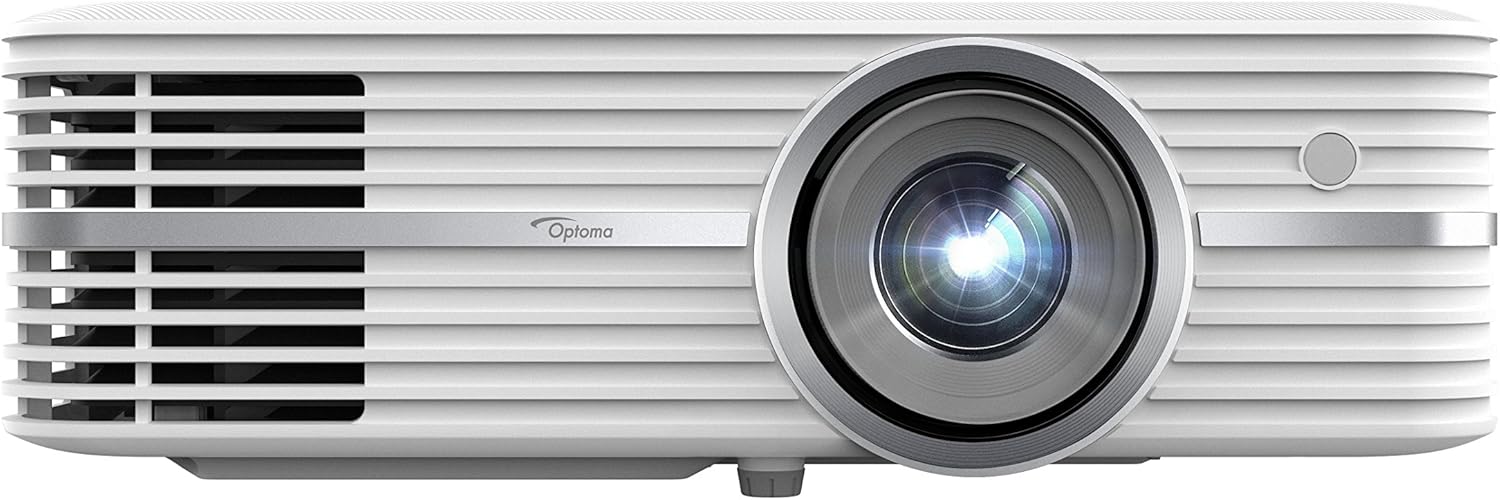
Figure 1: Optoma UHD50 4K UHD Home Theater Projector, front view.
2. Kurulum
2.1 Paketten Çıkarma ve Yerleştirme
Carefully remove all components from the packaging. Ensure all items listed in the "What's in the Box" section are present. Place the projector on a stable, flat surface or mount it securely to the ceiling. The Optoma UHD50 offers flexible installation options, including a 1.3x optical zoom and 15% vertical lens shift, allowing for precise image alignment whether placed on a table or ceiling-mounted.

Figure 2: Flexible installation of the Optoma UHD50, demonstrating zoom and vertical lens shift capabilities.
2.2 Bağlantılar
Connect your media players, gaming consoles, PCs, Macs, and mobile devices using the available input options. The Optoma UHD50 features HDMI 2.0 inputs with HDCP 2.2 support, HDMI 4K, USB, VGA, and more. Ensure all cables are securely connected to their respective ports.
3. Operasyon
3.1 Açma/Kapatma
To power on the projector, press the power button on the unit or the remote control. The indicator light will change to blue. To power off, press the power button again. The projector will go through a cool-down cycle before completely shutting down.
3.2 Görüntü Kalitesi ve Özellikleri
The Optoma UHD50 delivers a true 4K Ultra HD experience with 8.3 million addressable pixels, ensuring a razor-sharp picture. It is HDR10 compatible, supporting DCI-P3 wide color gamut for richer, more vivid colors, brighter whites, and deeper blacks. Dynamic Black technology further enhances image depth with a 500,000:1 contrast ratio. Ultra detail technology ensures enhanced image sharpness with a higher frame rate.

Figure 3: The Optoma UHD50 delivers stunning 4K UHD detail and color.

Figure 4: HDR10 compatibility provides enhanced contrast and color depth.

Figure 5: Enjoy a rich, vivid image with advanced color technology and 2,400 lumens of brightness.
4. Bakım
4.1 Lamp Hayat
The Optoma UHD50 features an extra-long lamp life of up to 15,000 hours, which translates to an average of two 2-hour movies every day for over 10 years. This significantly reduces the need for frequent lamp yedekler.

Figure 6: The Optoma UHD50 offers an extended lamp life for prolonged enjoyment.
4.2 Temizlik
To maintain optimal performance, regularly clean the projector's lens with a soft, lint-free cloth designed for optical surfaces. Ensure the air vents are clear of dust and debris to prevent overheating. Do not use abrasive cleaners or solvents.
5. Sorun Giderme
If you encounter any issues with your Optoma UHD50 projector, please refer to the official Sorun Giderme Kılavuzu (PDF) for detailed solutions. Common issues may include:
- Görüntü/Sinyal Yok: Verify all cable connections (HDMI, VGA) and ensure the correct input source is selected on the projector.
- Görüntü Kalitesi Sorunları: Adjust focus and keystone correction. Ensure the projection surface is flat and clean.
- Alışılmadık Gürültü: Check for obstructions around the fan vents. Ensure the projector is placed on a stable surface.
- Titreşen Görüntü: This may indicate a signal issue or require a firmware update. Consult the troubleshooting guide for specific steps.
- Aşırı Isınma: Projeksiyon cihazının çevresinde yeterli havalandırma olduğundan emin olun.
For further assistance, please contact Optoma customer support.
6. Özellikler
| Özellik | Detay |
|---|---|
| Ürün Boyutları | 11.1 x 15.4 x 4.6 inç |
| Ürün Ağırlığı | 11.75 pound |
| Model Numarası | UHD50 |
| Ekran Çözünürlüğü | 3840x2160 (4K UHD) |
| Parlaklık | 2400 Lümen |
| Kontrast Oranı | Up to 500,000:1 (Dynamic Black) |
| Lamp Hayat | 15,000 saate kadar |
| Bağlantı Teknolojisi | VGA, USB, RS232C, Ethernet, HDMI (HDMI 2.0 with HDCP 2.2 support) |
| Dikey Lens Kaydırma | 15% offset (with tolerance +/- 5%) |
| Projeksiyon Mesafesi | 2.9' - 34.89' |
7. Kutuda Neler Var?
- Optoma Home Theater Projectors Model UHD50
- Güç Kablosu
- Uzaktan kumanda
- User Manual (on CD or printed quick start guide)
- Garanti Kartı
Note: Specific contents may vary slightly by region or package.
8. Garanti ve Destek
Your Optoma UHD50 projector is covered by a limited warranty. Please refer to the warranty card included in your product packaging for specific terms and conditions. For technical support, product registration, or service inquiries, visit the official Optoma websitesine bakın veya müşteri hizmetleri departmanıyla iletişime geçin.
Ek kaynaklar:
- Resmi Kullanıcı Kılavuzu (PDF): Buradan İndirin
- Sorun Giderme Kılavuzu (PDF): Buradan İndirin