
1. Giriş
This manual provides essential information for the safe and efficient operation of your Cotek SP-3000-112 High Frequency Pure Sine Wave Inverter. This device converts 12V DC power from batteries into 120V AC power, suitable for a wide range of electronic appliances. Please read this manual thoroughly before installation and use, and retain it for future reference.
2. Güvenlik Bilgileri
Failure to follow these safety instructions may result in electric shock, fire, serious injury, or death. Always exercise caution when working with electrical equipment.
- Tüm talimatları okuyunuz: Before operating the inverter, read all instructions and cautionary markings on the inverter, the batteries, and all appropriate sections of this manual.
- Kalifiye Personel: Installation and servicing should be performed by qualified personnel familiar with batteries and inverters.
- Havalandırma: İnverter çevresinde yeterli havalandırma olduğundan emin olun. Sıfır boşluklu bir bölmeye monte etmeyin.
- Sudan Kaçının: İnvertörü yağmur, kar, su sıçraması veya sintine suyuna maruz bırakmayın.
- Uygun Topraklama: İnverterin düzgün bir şekilde topraklanması gerekir.
- Pil Güvenliği: Work near lead-acid batteries is dangerous. Batteries generate explosive gases during normal operation. Ensure proper ventilation and wear appropriate personal protective equipment.
- Gücü Kesin: Always disconnect the battery supply before performing any maintenance or troubleshooting.
- Doğru Cilttage: DC giriş hacmini sağlayıntage matches the inverter's specifications (12VDC for this model).


3. Ürün Bittiview
3.1 Temel Özellikler
- Hassas elektronik cihazlar için saf sinüs dalgası çıkışı.
- Power ON / OFF remote control capability (Green Terminal).
- Input & output fully isolated for enhanced safety.
- Temperature & load controlled cooling fan for optimal performance.
- User-friendly interface with 3-color LED status indicators.
- Multiple protection features: Reverse Polarity (Fuse), Under Voltage / Aşırı Hacimtage, Output Protection (Short Circuit / Overload / Over Temperature).
- E-13 / UL / CE / FCC approved.
3.2 İnverter Bileşenleri

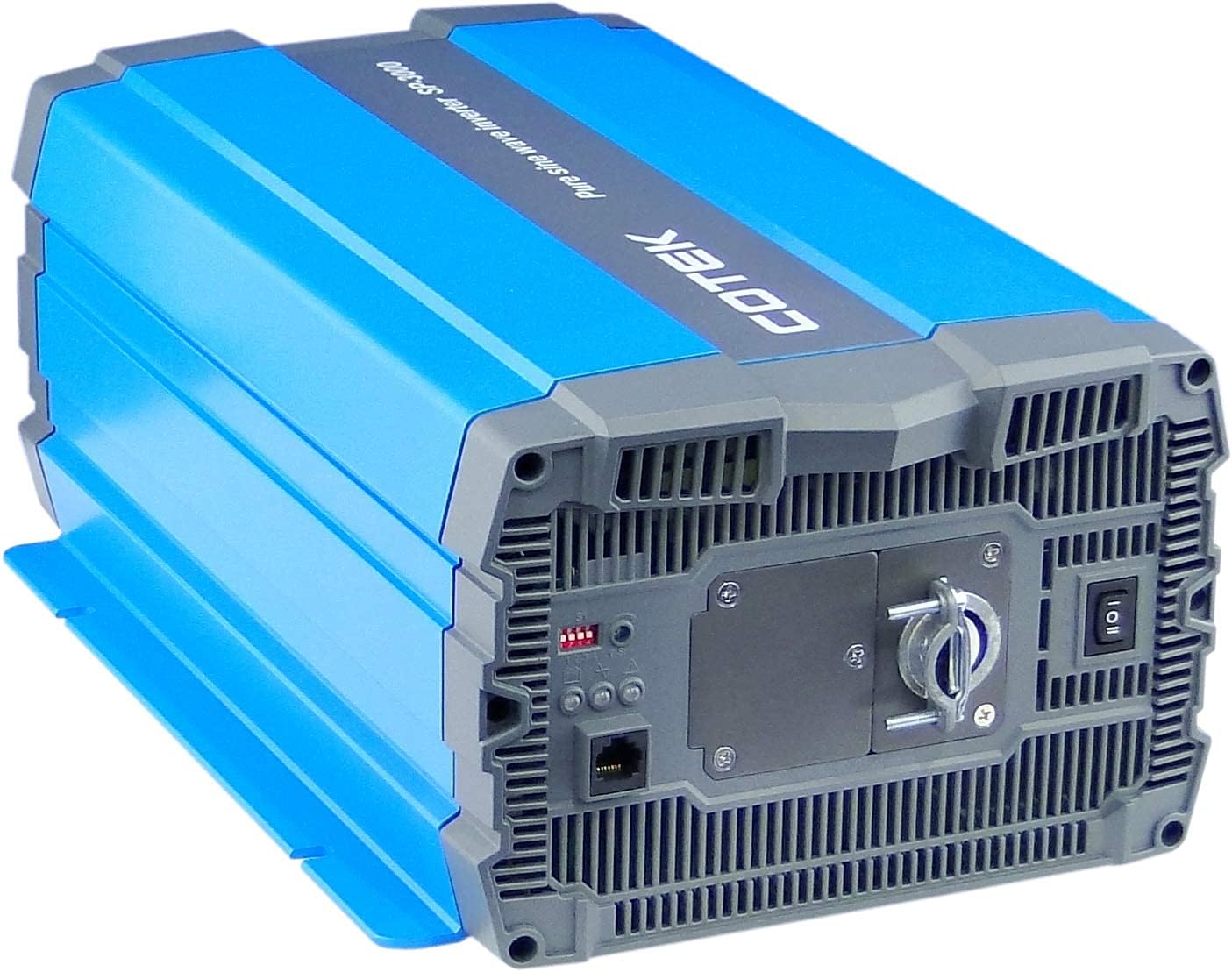
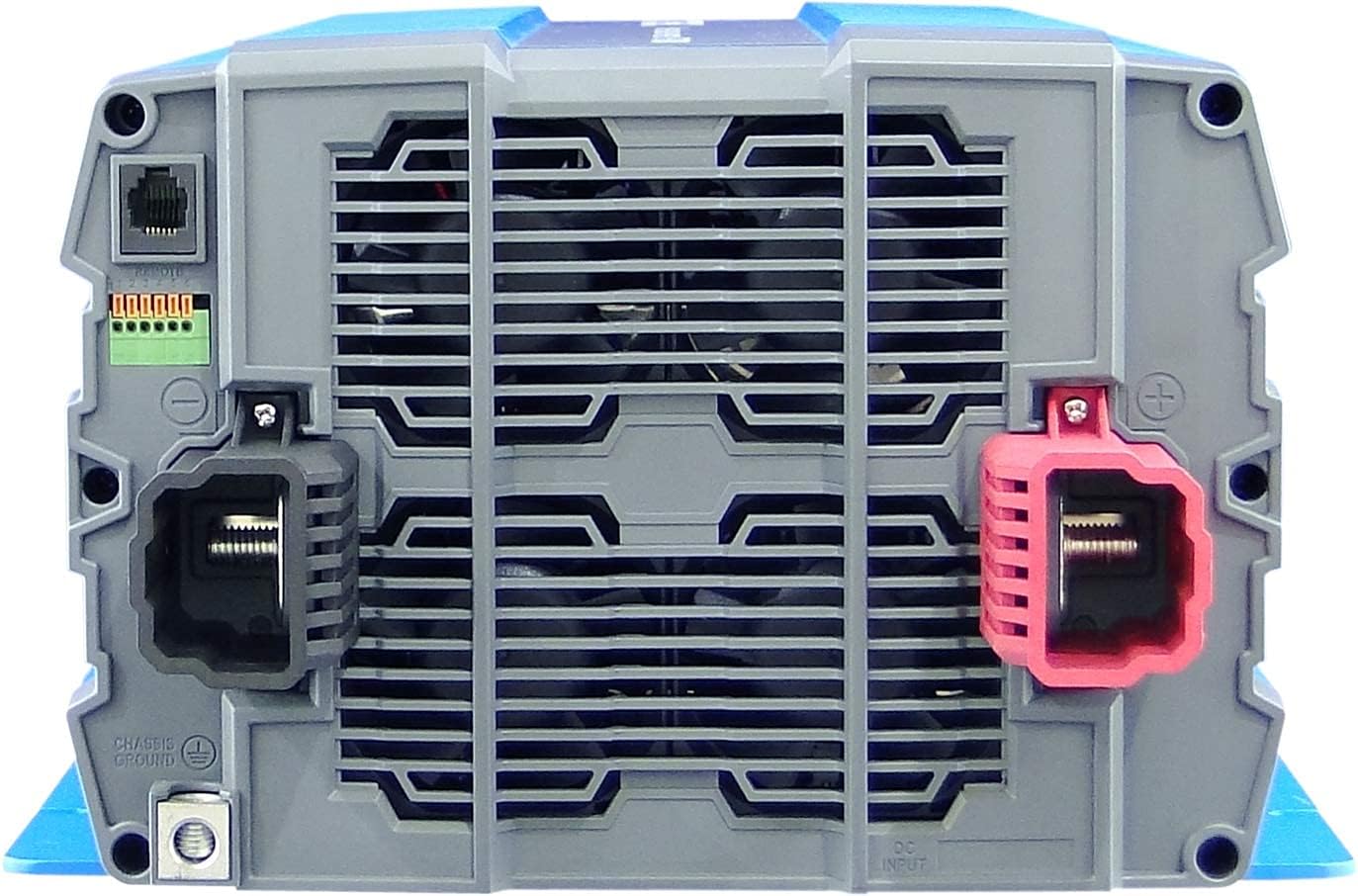
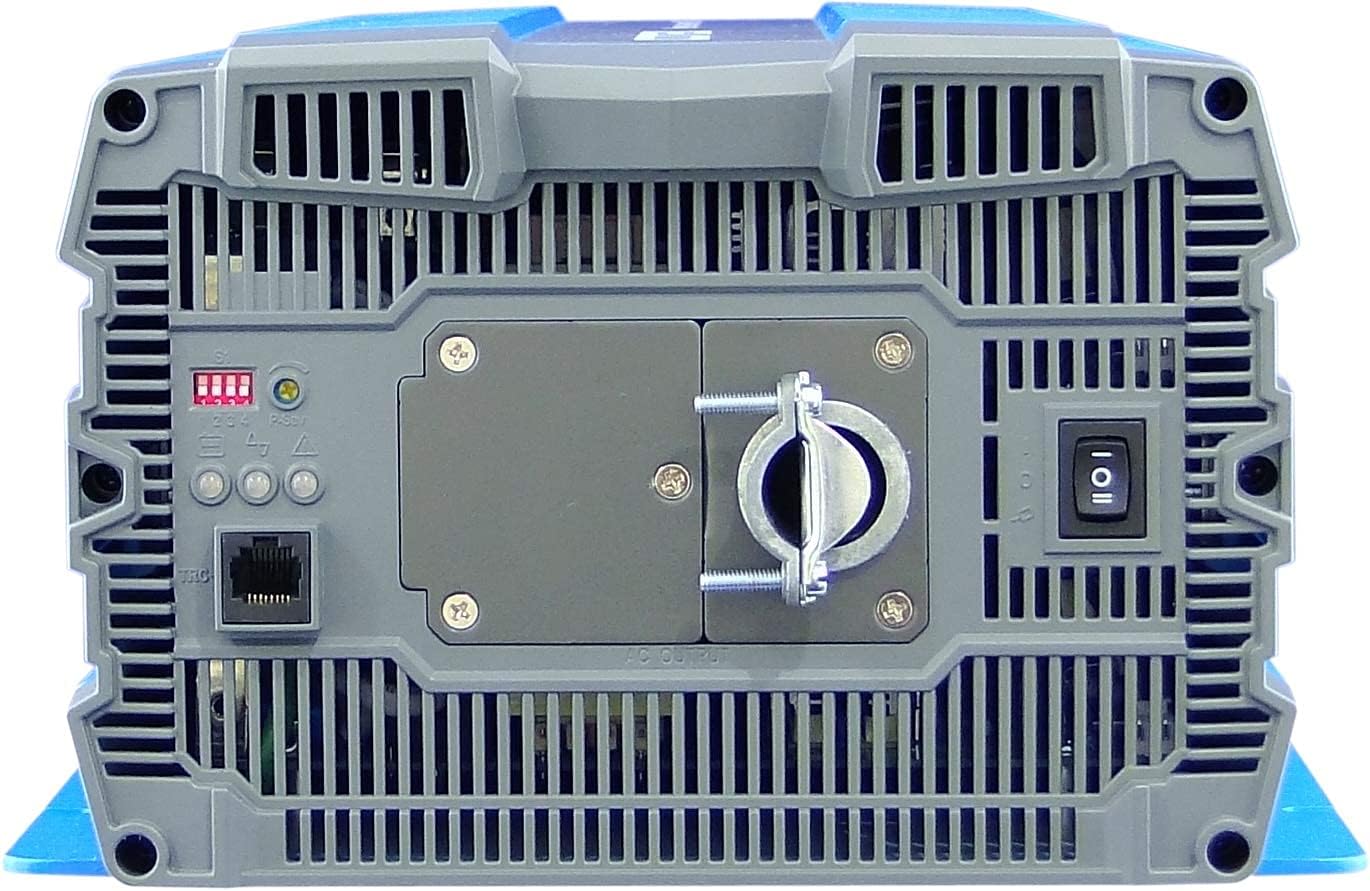
4. Kurulum ve Kurulum
Proper installation is crucial for the safe and efficient operation of your inverter. Refer to local electrical codes and standards.
4.1 Yerleştirme
- Install the inverter in a dry, well-ventilated area, away from direct sunlight, heat sources, and flammable materials.
- Ensure sufficient clearance around the inverter for proper airflow, especially around the cooling fan vents.
- Mount the inverter securely on a stable, non-combustible surface.
- Avoid areas where dust, moisture, or corrosive fumes are present.
4.2 Kablolama
All wiring must comply with applicable electrical codes and be performed by a qualified electrician.
- Topraklama: Connect the inverter's chassis ground terminal to a reliable earth ground using appropriate gauge wire.
- DC Giriş Bağlantısı:
- Ensure the battery bank voltage 12VDC'dir.
- Use appropriately sized cables for the DC input to minimize voltage drop and ensure safety. Refer to cable sizing charts based on current and distance.
- Connect the positive (+) terminal of the battery bank to the red (+) terminal on the inverter.
- Connect the negative (-) terminal of the battery bank to the black (-) terminal on the inverter.
- Install a DC-rated fuse or circuit breaker between the battery bank and the inverter's positive terminal, as close to the battery as possible.
- AC Çıkış Bağlantısı:
- Connect your AC loads to the hardwire AC output terminal block.
- Ensure the total load does not exceed the inverter's continuous power rating (3000W).
- Uzaktan Kumanda (Opsiyonel): Connect the remote control unit to the RJ45 port or use the green terminal for external ON/OFF control if desired.
5. Kullanım Talimatları
5.1 Açma/Kapatma
- Açmak İçin: Ensure all DC and AC connections are secure. Flip the main power switch on the inverter's rear panel to the 'ON' position. The Power LED indicator should illuminate.
- Kapatmak İçin: Disconnect all AC loads from the inverter. Flip the main power switch to the 'OFF' position.
5.2 LED Göstergeleri
The inverter features 3-color LED status indicators on the control panel (refer to Figure 4) to provide operational feedback:
- Yeşil LED: Indicates normal operation and power output.
- Sarı LED: Indicates a warning condition, such as low battery voltage or high temperature. The inverter may continue to operate but requires attention.
- Kırmızı LED: Indicates a fault condition, such as overload, short circuit, or severe over/under voltage. The inverter will shut down to protect itself and connected devices.
5.3 DIP Anahtar Ayarları
The DIP switches on the control panel allow for customization of certain inverter parameters, such as output voltage, frequency, and power saving mode. Refer to the detailed specifications table (Figure 5) or the product datasheet for specific configurations. Always adjust DIP switches when the inverter is powered off.
6. Bakım
Düzenli bakım, inverterinizin uzun ömürlü ve güvenilir çalışmasını sağlar.
- Temizlik: İnverterin dış yüzeyini periyodik olarak kuru bir bezle temizleyin. Havalandırma açıklıklarının toz ve kirden arındırılmış olduğundan emin olun. Sıvı temizleyiciler kullanmayın.
- Bağlantılar: Regularly check all electrical connections (DC input, AC output, ground) for tightness and corrosion. Loose connections can cause overheating and poor performance.
- Pil Denetimi: Inspect batteries for signs of damage, corrosion, or electrolyte leakage. Ensure battery terminals are clean and tight.
- Çevre: Çalışma ortamının belirtilen sıcaklık ve nem aralıklarında kaldığını doğrulayın.
7. Sorun Giderme
Bu bölümde karşılaşabileceğiniz yaygın sorunlara çözümler sunulmaktadır. Sorun devam ederse, müşteri desteğiyle iletişime geçin.
| Sorun | Olası Neden | Çözüm |
|---|---|---|
| İnverter açılmıyor. | No DC input power; Loose battery connections; Blown DC fuse/breaker; Inverter switch OFF. | Pil hacmini kontrol edintage; Tighten connections; Replace fuse/reset breaker; Turn inverter switch ON. |
| AC çıkışı yok. | Overload; Short circuit; Over-temperature shutdown; Low/High DC input voltage. | Reduce AC load; Check for short circuits in wiring/appliances; Allow inverter to cool; Check battery voltage. |
| Yellow LED illuminated. | Düşük pil hacmitage warning; High temperature warning. | Recharge batteries; Ensure adequate ventilation, reduce load. |
| Red LED illuminated / Inverter shut down. | Overload; Short circuit; Over-temperature; Under/Over voltage. | Identify and correct the fault (e.g., reduce load, fix short, allow cooling, check battery voltage), then restart the inverter. |
| Cooling fan runs constantly or loudly. | Ağır yük veya yetersiz havalandırma nedeniyle yüksek iç sıcaklık. | Reduce load; Improve ventilation around the inverter. |
8. Özellikler
The following table outlines the technical specifications for the Cotek SP-3000 Series Pure Sine Wave Inverter, specifically for the SP-3000-112 model.

| Kategori | Parametre | SP-3000-112 |
|---|---|---|
| Çıktı | AC Hacmitage | 100 / 110 / 115 / 120VAC ±%5 |
| Anma Gücü | 3000W | |
| Surge Power (1 Sec.) | 6000W | |
| Maksimum Çıkış Gücü (1 Dakika) | 3450W | |
| Çıkış Dalga Formu | Pure Sine Wave (THD<3%) | |
| Sıklık | 50 / 60 Hz ±0.5% | |
| Giriş | DC Hacmitage | 12VDC |
| Cilttage Aralık | 10.5 ~ 16.5VDC | |
| Yüksüz Akım | <3.0A@12VDC | |
| Güç Tasarrufu Modu | <0.4A@12VDC | |
| Verimlilik (Maks.) | %90 | |
| Koruma | Input Under - Voltage Koruma | 10.5 ±0.3 VDC |
| Input Under - VoltagAlarm | 11.0 ±0.3 VDC | |
| Input Under - Voltage Kurtarma | 12.0 ±0.3 VDC | |
| Input Over - Voltage Koruma | 16.5 ±0.3 VDC | |
| Input Over - Voltage Kurtarma | 14.5 ±0.3 VDC | |
| Çıkış Aşırı Yükü | Kapatma çıkışı hacmitage, kurtarmak için yeniden başlat | |
| Çıkış Kısa | Kapatma çıkışı hacmitage, kurtarmak için yeniden başlat | |
| Çevre | Çalışma Sıcaklığı | -20°C ~ +40°C |
| Saklama derecesi. & Nem | -30°C ~ +70°C, 10 ~ 95% RH | |
| Genel | Boyutlar (G x Y x D) | 442 x 214 x 102 mm (17.4 x 8.4 x 4.0 inç) |
| Ağırlık | 8.2kg (18.1 lbs) | |
| Soğutma | Sıcaklık ve yük kontrollü soğutma fanı |

9. Garanti ve Destek
9.1 Garanti Bilgileri
The Cotek SP-3000-112 Pure Sine Wave Inverter comes with a 2 Yıllık Üretici GarantisiBu garanti, normal kullanım koşullarındaki malzeme ve işçilik kusurlarını kapsar. Garanti talepleriniz için lütfen satın alma belgenizi saklayın.
9.2 Müşteri Desteği
For technical assistance, troubleshooting beyond this manual, or warranty inquiries, please contact Cotek customer support through their official website or your point of purchase. Provide your model number (SP-3000-112) and a detailed description of the issue to expedite service.