
TECKNET BC69117
TECKNET Omni Küçük Taşınabilir 2.4G Kablosuz Optik Fare Kullanım Kılavuzu
Model: BC69117 | Brand: TECKNET
giriiş
This manual provides comprehensive instructions for the setup, operation, maintenance, and troubleshooting of your TECKNET Omni Small Portable 2.4G Wireless Optical Mouse. Please read this manual thoroughly before using the product to ensure optimal performance and longevity.

Figure 1: TECKNET Omni Wireless Mouse and USB Nano Receiver.
Temel Özellikler
- 2.4G Kablosuz Bağlantı: Provides a stable and reliable connection up to 10 meters (33 feet) with virtually no delays or dropouts.
- USB Nano Alıcı: A tiny, plug-and-play receiver that can be stored inside the mouse for portability.
- Ayarlanabilir DPI Seviyeleri: Easily switch between 1000, 1500, and 2000 DPI for precise cursor control.
- Uzun Pil Ömrü: Up to 18 months of battery life with smart sleep mode to conserve power.
- TruWave Precision: Ensures smoother tracking on various surfaces.
- Co-Link Technology: Automatically pairs the mouse with the nano receiver.
- Dayanıklı Yapı: Primary TeckNet N-Switches rated to a 5.5-million-click lifespan.
- Kompakt ve Taşınabilir Tasarım: Small size fits easily into bags or pockets, ideal for travel.
- Ergonomik Tasarım: Contoured shape with soft rubber grips for comfortable use.

Şekil 2: Rahat kullanım için ergonomik tasarım.

Figure 3: Compact and portable design.
Paket İçeriği
Paketinizde tüm öğelerin mevcut olduğundan emin olun:
- 1 x TECKNET Omni Wireless Mouse
- 1 x USB Nano Receiver (stored inside the mouse's battery compartment)
- 1 x Kullanım Kılavuzu (bu belge)
- Note: 1 AA battery is NOT included and must be purchased separately.
Kurulum Kılavuzu
- Pili Takın:
Locate the battery compartment on the underside of the mouse. Open the cover and insert one (1) AA battery, ensuring correct polarity (+/-). Close the battery compartment cover securely.

Figure 4: Battery compartment and nano receiver storage.
- USB Nano Alıcıyı Alın:
The USB nano receiver is conveniently stored within the battery compartment of the mouse. Gently slide it out from its slot.
- Alıcıyı Bilgisayara Bağlayın:
Plug the USB nano receiver into an available USB port on your laptop or desktop computer. Your operating system should automatically detect and install the necessary drivers. No additional software installation is required.

Figure 5: Connecting the USB nano receiver to a laptop.
- Start Using the Mouse:
Once the receiver is plugged in and the battery is installed, the mouse is ready for use. The mouse features smart power management and will activate automatically when moved or a button is clicked.
Operasyon
Fare Düğmeleri ve İşlevleri

Figure 6: Mouse button layout.
- Sol Tuş: Birincil tıklama işlevi.
- Sağ Buton: Secondary click function, typically opens context menus.
- Kaydırma tekerleği: Parşömen belgeleri ve web pages vertically. Can also be clicked for middle-click functionality.
- DPI Değiştirme Düğmesi: Changes the cursor speed (DPI).
DPI (İmleç Hızı) Ayarı
The TECKNET Omni mouse offers three adjustable DPI levels to suit your preference for cursor speed and precision. To change the DPI setting, simply press the DPI Switch Button located on the top of the mouse, just behind the scroll wheel.
- Press once to cycle through the available DPI settings: 1000 DPI (default), 1500 DPI, and 2000 DPI.
- The mouse will indicate the current DPI setting, often with a subtle change in cursor speed or a brief LED flash (refer to the Low Battery Indicator for potential dual function).
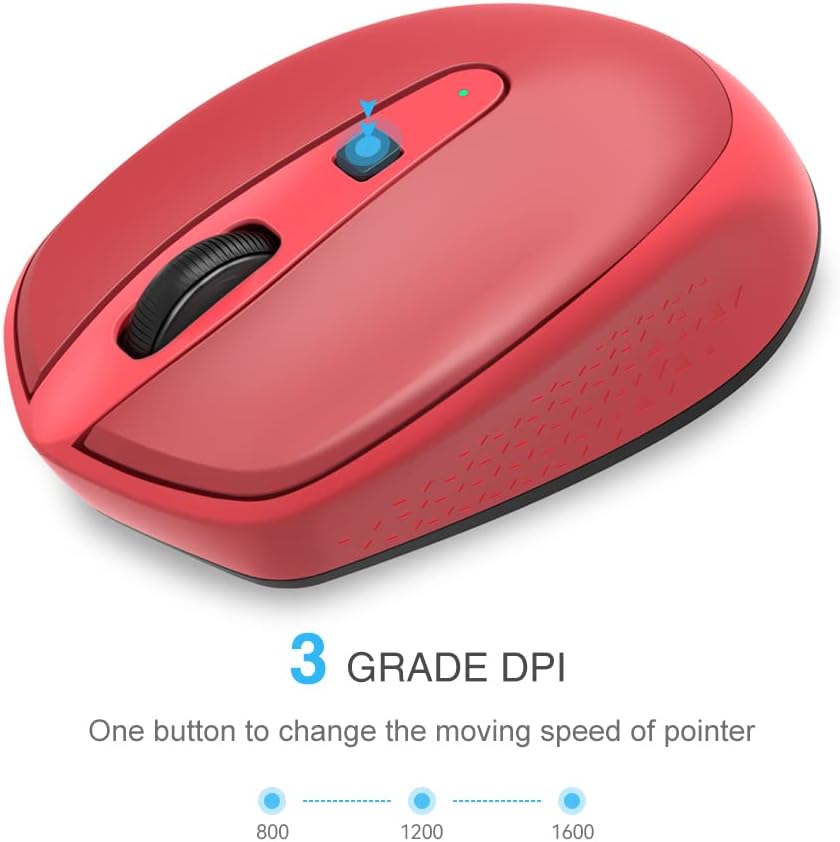
Figure 7: DPI adjustment levels.
Güç Yönetimi
The mouse is equipped with a smart sleep mode to conserve battery life. If the mouse is inactive for a period, it will automatically enter a low-power sleep state. To wake the mouse, simply move it or click any button. There is no manual on/off switch required.
Bakım
Pil Değişimi
When the mouse's performance degrades or the low battery indicator (if present) illuminates, it's time to replace the battery. The TECKNET Omni mouse uses one (1) AA battery.
- Fareyi ters çevirin ve pil bölmesi kapağını bulun.
- Bölmeyi açmak için kapağı kaydırın veya kaldırın.
- Eski AA pili çıkarın.
- Yeni bir AA pil takın ve pozitif (+) ve negatif (-) kutupların pil bölmesinin içindeki işaretlerle doğru şekilde hizalandığından emin olun.
- Pil bölmesi kapağını sıkıca kapatın.
Kullanılmış pilleri yerel düzenlemelere uygun şekilde sorumlu bir şekilde atın.
Temizlik
En iyi performansı korumak için farenizi düzenli olarak temizleyin:
- Yumuşak, tiftiksiz bir bez kullanın ve hafifçe kurulayın.ampFarenin dış yüzeyini silmek için su veya hafif bir temizleme solüsyonu kullanın.
- For the optical sensor on the underside, use a dry cotton swab or compressed air to gently remove any dust or debris.
- Sert kimyasallar, aşındırıcı temizleyiciler kullanmaktan veya fareyi sıvıya batırmaktan kaçının.
Sorun giderme
| Sorun | Olası Neden | Çözüm |
|---|---|---|
| Mouse not responding or cursor not moving. |
|
|
| İmleç hareketi düzensiz veya kesik kesik. |
|
|
| DPI setting does not change. |
|
|
If you continue to experience issues, please refer to the support section or visit the TECKNET webDaha fazla yardım için siteyi ziyaret edin.
Özellikler
| Model Numarası | BC69117 |
| Bağlantı | 2.4G Kablosuz (USB Nano Alıcı) |
| Hareket Algılama | Optik |
| DPI Seviyeleri | 1000 / 1500 / 2000 DPI (Ayarlanabilir) |
| Düğme Sayısı | 4 (Sol, Sağ, Kaydırma Tekerleği, DPI Anahtarı) |
| Pil Türü | 1 x AA (dahil değildir) |
| Pil Ömrü | 18 aya kadar (kullanıma bağlı olarak değişir) |
| Click Lifespan | 5.5 Milyon Tıklama |
| Ürün Boyutları (U x G x Y) | 4.0 x 2.44 x 1.42 inç (102 x 62 x 36 mm) |
| Ürün Ağırlığı | 1.92 ons (yaklaşık 54.4 g) |
| Desteklenen İşletim Sistemleri | Windows 10, 8, 7, Vista, XP, 2008 |

Şekil 8: Ürün boyutları.
Garanti ve Destek
TECKNET products are designed for reliability and performance. For specific warranty details, please refer to the warranty card included with your purchase or visit the official TECKNET webalan.
For technical support, troubleshooting assistance, or product inquiries, please contact TECKNET customer service through their official website or the contact information provided in your product packaging. When contacting support, please have your product model number (BC69117) and purchase details ready.
Official TECKNET Webalan: Visit TECKNET Store on Amazon