
giriiş
This manual provides essential instructions for setting up, operating, and maintaining your Coolpad Note 3 smartphone. Please read this guide thoroughly to ensure proper use and to maximize the features of your device.
Güvenlik Bilgileri
Uyarı: Çocukların erişemeyeceği yerde saklayın.
Always handle your device with care. Avoid exposure to extreme temperatures, direct sunlight, and liquids. Do not attempt to disassemble or repair the device yourself, as this will void the warranty and may cause damage or injury.
Paket İçeriği
Paketinizin aşağıdaki öğeleri içerdiğini doğrulayın:
- Coolpad Note 3 Handset
- Kulaklık
- Şarj cihazı
- USB kablosu
- Koruyucu Film
- Kullanım Kılavuzu (bu belge)
- Garanti Kartı
Kurmak
1. SIM Kart ve MicroSD Kart Takma
The Coolpad Note 3 supports dual SIM cards (4G+2G) and a MicroSD card for expandable storage up to 64GB. Ensure the device is powered off before inserting or removing cards.
- Cihazın yan tarafında bulunan SIM/MicroSD kart yuvasını bulun.
- Tepsiyi açmak için verilen SIM çıkarma aracını kullanın.
- Place your SIM cards into the designated slots. Ensure the gold contacts face downwards.
- Insert your MicroSD card into its slot. For 64GB cards, ensure it is formatted to FAT32 for compatibility.
- Tepsiyi yerine oturana kadar dikkatlice cihazın içine doğru itin.
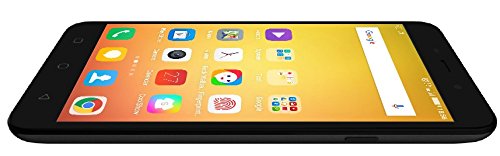
Resim: Yan view of the Coolpad Note 3, illustrating the location of the SIM/MicroSD card tray and physical buttons.
2. İlk Güç Açma ve Kurulum Sihirbazı
- Press and hold the Power button until the Coolpad logo appears.
- Ekranda beliren yönergeleri izleyerek dilinizi seçin, Wi-Fi'ye bağlanın ve Google hesabınızı kurun.
3. Parmak İzi Sensörü Kurulumu
The Coolpad Note 3 features a fingerprint sensor for enhanced security and quick access.
- Şuraya git: Ayarlar > Güvenlik > Parmak izi.
- Follow the prompts to register your fingerprints. You can register multiple fingers.
- Optionally, customize fingerprints to launch specific applications directly.
Kullanım Talimatları
1. Temel Gezinme
Your Coolpad Note 3 runs on Android v5.1 Lollipop with the COOLUI 6.0 interface. Use the touchscreen for navigation, tapping icons to open apps, swiping to scroll, and pinching to zoom.

Resim: Ön view of the Coolpad Note 3, showing the vibrant home screen with various application icons.
2. Kamera Kullanımı
Cihazda 13 MP arka kamera ve 5 MP ön kamera yer alıyor.
- Açın Kamera başvuru.
- Odaklanmak için ekrana dokunun.
- Fotoğraf çekmek veya video kaydını başlatmak/durdurmak için deklanşör düğmesine basın.
- Kamera geçiş simgesini kullanarak ön ve arka kameralar arasında geçiş yapın.
- Explore various shooting modes available in the camera app.
3. Fingerprint Sensor for Unlocking
To unlock your phone, simply place your registered finger on the fingerprint sensor. The device unlocks in approximately 0.5 seconds. The sensor is designed to detect both dry and wet fingers accurately.
4. Bağlantı
- Wifi: Git Ayarlar > Wifi Mevcut ağlara bağlanmak için.
- Mobil veri: SIM kartınızın etkin olduğundan ve mobil verinin etkinleştirildiğinden emin olun Ayarlar > Veri kullanımı.
- Bluetooth: Diğer cihazlarla eşleştirin Ayarlar > Bluetooth.
- USB OTG'si: The Micro USB port supports On-The-Go (OTG) functionality for connecting external USB devices (e.g., flash drives) with an adapter.
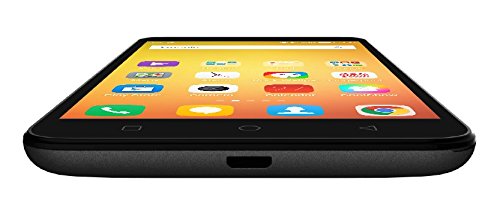
Resim: Alt view of the Coolpad Note 3, highlighting the Micro USB port for charging and data transfer.
Bakım
1. Pilin Şarj Edilmesi
Use the provided charger and USB cable to charge your Coolpad Note 3. Connect the USB cable to the phone's Micro USB port and the charger to a power outlet. A full charge typically takes approximately 2 hours.
2. Yazılım Güncellemeleri
Regularly check for software updates to ensure optimal performance and access to the latest features and security patches. Go to Ayarlar > Telefon hakkında > Sistem güncellemeleri.
3. Cihazınızı Temizleme
Telefonunuzun ekranını ve gövdesini temizlemek için yumuşak, tiftiksiz bir bez kullanın. Sert kimyasallar veya aşındırıcı malzemeler kullanmaktan kaçının.
4. Ekran Koruması
While the device features a durable display, it is recommended to use a tempered glass screen protector and a protective case to prevent scratches and damage from accidental drops.
Sorun giderme
- Device is heating: It is normal for smartphones to generate some heat during intensive use (e.g., gaming, prolonged video playback). If excessive heating occurs, close background applications and allow the device to cool. Software updates often address heating optimizations.
- Kamera kalitesi düşük: Ensure good lighting conditions. For potentially improved results, consider using third-party camera applications available on the Google Play Store.
- Network connectivity issues (international travel): The Coolpad Note 3's 3G/4G bands may not be compatible with all international carriers. Verify network compatibility with your service provider before traveling.
- Yavaş performans/gecikme: Close unused applications, clear cache, and restart the device. Ensure sufficient free storage space.
Özellikler
| Marka | Soğuk ped |
| Örnek | Not 3 |
| İşletim Sistemi | Android v5.1 Lollipop |
| İşlemci | 1.3GHz Cortex-A53 MT6753 Mediatek Octacore |
| Veri deposu | 3 GB |
| Dahili Depolama | 16GB (expandable up to 64GB via MicroSD) |
| Ekran Boyutu | 5.5 inç (13.97 cm) |
| Ekran Çözünürlüğü | 1280 x 720 piksel (HD) |
| Arka Kamera | 13 MP |
| Ön Kamera | 5 MP |
| Pil Kapasitesi | 3000mAh Lityum-İyon |
| Konuşma Zamanı | 15 saate kadar |
| Bekleme Süresi | 400 saate kadar |
| SIM Desteği | Dual SIM (4G+2G) |
| Biyometrik Güvenlik | Parmak İzi Tanıma |
| Sensörler | G sensor, Proximity sensor, Light sensor, Gyro sensor, eCompass, Fingerprint sensor |
| Boyutlar (U x G x Y) | 15.2x7.7x0.9 cm |
| Ağırlık | 150 Gram |
Garanti Bilgileri
Your Coolpad Note 3 comes with a manufacturer's warranty:
- Cihaz: Satın alma tarihinden itibaren 1 yıl üretici garantisi.
- Kutu İçeriğindeki Aksesuarlar: 6 months manufacturer warranty for accessories including batteries, from the date of purchase.
Lütfen satın alma fişinizi ve garanti kartınızı ileride başvurmak üzere saklayın.
Destek
For further assistance, technical support, or service inquiries, please refer to the official Coolpad support channels. Coolpad has partnered with HCL for service in some regions.
Visit the official Coolpad webEn güncel destek bilgileri ve iletişim detayları için siteyi ziyaret edin.