
1. Giriş
The SJCAM SJ5000 WiFi Novatek 96655 14MP FHD 1080p Sport Action Waterproof Camera is a versatile and robust device designed for capturing high-quality video and photos in various environments, including underwater. Featuring a Novatek 96655 processor and a Panasonic MN34110PA 14MP CMOS sensor, it delivers crisp 1080P Full HD video and 14-megapixel still images. Its compact design, 2.0-inch Ultra HD screen, and Wi-Fi capabilities make it an ideal companion for sports enthusiasts and adventurers.
2. Paket İçeriği
Lütfen paket içeriğini kontrol ederek tüm öğelerin mevcut olduğundan emin olun:
- SJCAM SJ5000 Action Camera
- Su geçirmez Casing
- Şarj Edilebilir Lityum İyon Pil
- USB kablosu
- Various Mounts and Adapters (e.g., Helmet Mount, Handlebar Mount, Tripod Adapter)
- Hızlı Çıkarma Tokası
- Lens Temizleme Bezi
- Kullanım Kılavuzu (bu belge)
3. Ürün Bittiview
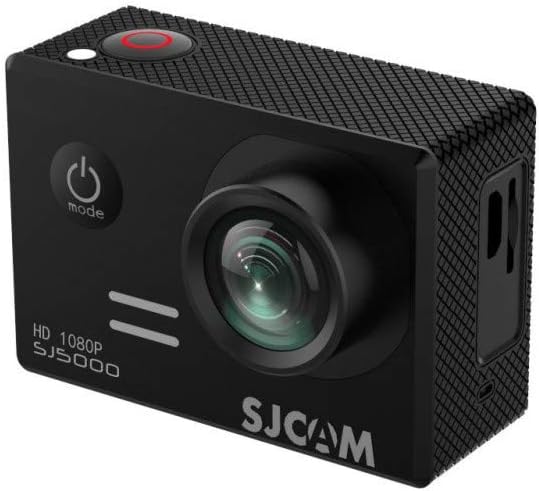
Şekil 3.1: Ön view of the SJCAM SJ5000 camera, showing the lens, power/mode button, and shutter button.
Familiarize yourself with the main components and controls of your SJCAM SJ5000 camera:
- Mercek: 170° Ultra orthoscopic camera for wide-angle capture.
- Güç / Mod Düğmesi: Located on the front, used to power on/off and switch between modes (Video, Photo, Playback, Settings).
- Deklanşör/Tamam Düğmesi: Located on top, used to start/stop recording, take photos, or confirm selections.
- Yukarı/Aşağı Düğmeleri: Yan tarafta yer alır, menülerde gezinme ve yakınlaştırma kontrolü için kullanılır.
- 2.0 inch Ultra HD Screen: Located on the back for live view, oynatma ve menüde gezinme.
- MicroSD Kart Yuvası: For inserting memory cards up to 32GB.
- USB Bağlantı Noktası: For charging, data transfer, and USB-AV video output.
- HDMI Bağlantı Noktası: For HD video output to external displays.
- Pil Bölmesi: Houses the detachable battery.
4. Kurulum
4.1. Pilin Takılması
- Kameranın alt kısmında bulunan pil yuvası kapağını açın.
- Insert the provided Lithium-Ion battery, ensuring the contacts align correctly.
- Pil bölmesi kapağını yerine güvenli bir şekilde oturana kadar kapatın.
4.2. MicroSD Kart Takma
The camera supports MicroSD cards up to 32GB. A Class 10 or higher speed rating is recommended for optimal performance.
- Fotoğraf makinesinin yan tarafında bulunan MicroSD kart yuvasını bulun.
- Altın renkli kontaklar kameranın arkasına bakacak şekilde MicroSD kartı yerine oturana kadar takın.
- Çıkarmak için, kartı hafifçe içeri doğru itin, kendiliğinden dışarı fırlayacaktır.
4.3. Pilin Şarj Edilmesi
Connect the camera to a USB power source (e.g., computer, USB wall adapter) using the provided USB cable. The charging indicator light will illuminate during charging and turn off when fully charged.
5. Kameranızı Çalıştırma
5.1. Açma/Kapama
- Açmak için, düğmesine basın ve basılı tutun. Güç/Mod Düğmesi birkaç saniyeliğine.
- Kapatmak için tuşunu basılı tutun. Güç/Mod Düğmesi Ekran kapanana kadar tekrar.
5.2. Anahtarlama Modları
Basın Güç/Mod Düğmesi repeatedly to cycle through the different operating modes: Video Recording, Photo Capture, Playback, and Settings.
5.3. Video Kaydı
- Video kayıt moduna geçin.
- Basın Deklanşör/Tamam Düğmesi to start recording. A red indicator light will blink, and a timer will appear on the screen.
- Basın Deklanşör/Tamam Düğmesi again to stop recording. The indicator light will stop blinking.
5.4. Fotoğraf Çekimi
- Switch to Photo Capture mode.
- Basın Deklanşör/Tamam Düğmesi fotoğraf çekmek.
- Multiple photo shooting modes are available: Single shot, Snapper, Time-lapse. Adjust these in the camera settings.
5.5. Wi-Fi Bağlantısı
The Wi-Fi function allows you to operate and review content via an Android or iOS device using the dedicated SJCAM app.
- Download and install the official SJCAM app on your smartphone or tablet.
- Kamerada, ayarlar menüsüne gidin ve Wi-Fi'yi etkinleştirin. Kameranın Wi-Fi ağ adı (SSID) ve şifresi görüntülenecektir.
- On your mobile device, go to Wi-Fi settings, find the camera's SSID, and connect using the provided password.
- Open the SJCAM app to control the camera, view canlı footage ve transfer files.
5.6. Oynatma
In Playback mode, use the Up/Down buttons to navigate through your recorded videos and photos. Press the Deklanşör/Tamam Düğmesi video oynatmak veya view tam ekran bir fotoğraf.
5.7. Web Kamera Fonksiyonu
The SJCAM SJ5000 can be used as a web camera. Connect the camera to your computer via the USB cable. Select the "PC Camera" or "Webcam" option on the camera's screen (if prompted) to enable this function.
6. Bakım
6.1. Genel Bakım
- Keep the camera and accessories away from dust, dirt, and sand.
- Kamerayı aşırı sıcaklıklara maruz bırakmaktan kaçının.
- Fotoğraf makinesini düşürmeyin veya sert darbelere maruz bırakmayın.
- Kullanılmadığı zaman kamerayı serin ve kuru bir yerde saklayın.
6.2. Lens ve Ekranın Temizlenmesi
Use a soft, lint-free cloth (like the one provided) to gently wipe the lens and screen. For stubborn smudges, a small amount of lens cleaning solution can be applied to the cloth, not directly to the lens/screen.
6.3. Waterproof Casing Care
After using the waterproof casing in saltwater, rinse it thoroughly with fresh water and allow it to air dry. Inspect the O-ring seal regularly for any debris or damage and ensure it is properly seated before each use.
7. Sorun Giderme
| Sorun | Olası Çözüm |
|---|---|
| Kamera açılmıyor. | Ensure the battery is fully charged and correctly inserted. Try charging the camera for at least 30 minutes. |
| Video kaydı yapılamaz veya fotoğraf çekilemez. | Check if a MicroSD card is inserted and has sufficient free space. Ensure the card is formatted correctly (FAT32). |
| Wi-Fi bağlantı sorunları. | Ensure Wi-Fi is enabled on the camera and your mobile device. Restart both devices. Verify the correct Wi-Fi password. |
| Video/fotoğraf kalitesi kötü. | Clean the camera lens. Ensure adequate lighting. Check resolution settings in the camera menu. Use a high-speed MicroSD card. |
| Kamera donuyor veya tepkisizleşiyor. | Remove and reinsert the battery to perform a hard reset. Ensure firmware is up to date (check SJCAM webalan). |
8. Özellikler
| Özellik | Detay |
|---|---|
| Örnek | SJ5000 |
| İşlemci | Novatek 96655 |
| Görüntü Sensörü | Panasonic MN34110PA 14MP CMOS |
| Video Çözünürlüğü | 1080P, 720P, WVGA |
| Fotoğraf Çözünürlüğü | 14 MP'ye kadar |
| Mercek Açısı | 170° Ultra Orthoscopic |
| Ekran Boyutu | 2.0 Inches Ultra HD |
| Depolamak | Micro SD (up to 32GB maximum) |
| Bağlantı | Wi-Fi, USB, HDMI |
| Özel Özellikler | Waterproof (with casing up to 30m), Vehicle-mounted recording support, Web camera function, Detachable battery |
| Boyutlar | 2.36 x 0.97 x 1.61 inç |
| Ağırlık | 1.88 ons |
9. Garanti ve Destek
Garanti bilgileri, teknik destek veya servis talepleri için lütfen resmi SJCAM web sitesine başvurun. webYetkili satıcınızla iletişime geçin veya siteyi ziyaret edin. Satın alma belgenizi olası garanti talepleri için saklayın.