
giriiş
This manual provides detailed instructions for the safe and effective use of your Nikon Coolpix S3000 digital camera. The Coolpix S3000 combines a 12.0 effective megapixel sensor with a 4x optical Zoom-Nikkor glass lens, designed for capturing high-quality images. Its sleek, all-metal design and bright 2.7-inch LCD enhance usability. Please read this manual thoroughly before operating the camera to ensure optimal performance and longevity.

Şekil 1: Ön view of the Nikon Coolpix S3000 Digital Camera, showcasinObjektifi ve flaşı açın.
Kurmak
1. Paketin Açılması ve İçerik
Paketin içinde tüm öğelerin mevcut olduğundan emin olun:
- Nikon Coolpix S3000 Dijital Kamera
- EN-EL10 Şarj Edilebilir Li-ion Pil
- EH-68P AC Adaptör/Şarj Cihazı
- UC-E6 USB Kablosu
- EG-CP14 Ses ve Görüntü Kablosu
- AN-CP19 Kayışı
- Coolpix Yazılım Paketi CD-ROM'u
2. Pilin Şarj Edilmesi
Before initial use, fully charge the EN-EL10 Li-ion battery.
- EN-EL10 pilini kameraya takın.
- Connect the camera to the EH-68P AC Adapter/Charger using the UC-E6 USB Cable.
- Plug the AC Adapter/Charger into a power outlet. The charging indicator will illuminate.
- Şarj işlemi, gösterge söndüğünde tamamlanmıştır.
Alternatively, the camera can be charged via a PC using the UC-E6 USB Cable.
3. Hafıza Kartının Takılması
The Coolpix S3000 supports SD/SDHC memory cards.
- Pil/kart bölmesi kapağını açın.
- Insert the memory card with the contacts facing the correct direction until it clicks into place.
- Bölme kapağını güvenli bir şekilde kapatın.
The camera also has approximately 47 MB of internal memory for temporary storage.
Kameranın Çalıştırılması
1. Açma/Kapama
Basın AÇIK/KAPALI Kameranın üst kısmında bulunan açma/kapama düğmesi.

Şekil 2: Tepe view of the Nikon Coolpix S3000, showing the ON/OFF button and shutter release.
2. Temel Fotoğrafçılık
- Deklanşör Yayını: Press the shutter button halfway to focus, then fully to take a picture.
- Yakınlaştır: Use the zoom control around the shutter button to adjust the 4x optical zoom.
- LCD Ekran: The 2.7-inch LCD screen displays your composition and camera settings.
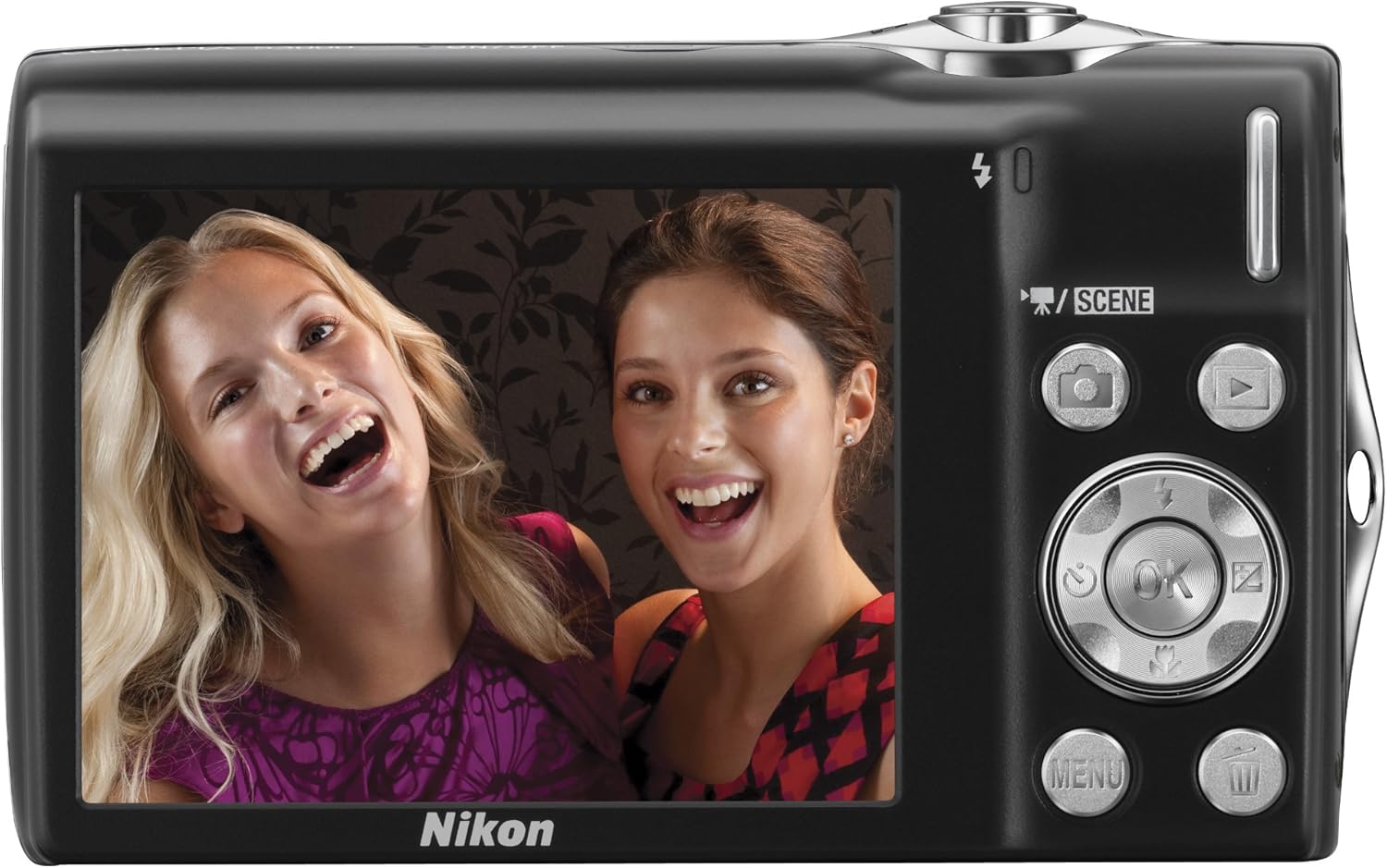
Şekil 3: Geri view of the Nikon Coolpix S3000, showing the 2.7-inch LCD and control buttons.
3. Çekim Modları
The camera offers various modes to optimize your shooting experience.
- Sahne Otomatik Seçici: This intelligent function automatically analyzes the subject and its surroundings, then selects the most appropriate scene mode from six options (Portrait, Landscape, Night Portrait, Night Landscape, Close-up, or Backlight) for optimal results.
- 16 Sahne Modu: For specific shooting conditions, you can manually select from 16 optimized scene modes.
- Flaş Modları: Adjust flash settings (Auto, On, Off, Slow Synch) via the menu for different lighting conditions.
Görüntü Sabitleme
The Nikon Coolpix S3000 features a 4-way Image Stabilization System to help ensure sharper results by minimizing blur caused by camera shake and subject movement.
- Electronic VR Image Stabilization: Kamera titremesini telafi eder.
- Hareket Algılama: Automatically adjusts shutter speed and ISO settings to compensate for both subject movement and camera shake.
- ISO 3200 Yeterliliği: Düşük ışık koşullarında veya hızlı hareket eden nesneleri çekerken daha hızlı enstantane hızlarına olanak tanır.
- Best Shot Selector (BSS): Otomatik olarak bir dizi kare çeker ve en net olanı kaydeder.
The camera automatically selects and uses the necessary features to optimize each image.
Smart Portrait System
Nikon's exclusive Smart Portrait System is designed to enhance portrait photography.
- Yüze öncelikli AF: Automatically detects up to 12 faces in a shot and adjusts focus and exposure for optimal portraits.
- Gülümseme Zamanlayıcısı: Automatically releases the shutter when the primary subject smiles.
- Blink Proof Function: Automatically captures two sequential frames and saves the one where the subject's eyes are open.
- Fotoğraf Makinesinde Kırmızı Göz Düzeltme: Görüntüyü kaydetmeden önce otomatik olarak kırmızı göz efektini düzeltir.
Subject Tracking
Subject Tracking automatically detects and maintains focus on a moving subject. This feature is particularly useful for capturing children or other active subjects. It can even re-acquire focus if the subject temporarily leaves and re-enters the frame within three seconds.
Film Kaydı
The Coolpix S3000 can record movies with sound.
- Çözünürlük: Record at 640 x 480 pixels at 30 frames per second (fps).
- Süre: Up to 1.6 hours of movie shooting, though recording stops automatically after 29 minutes or when the file Boyut 2 GB'a ulaşır.
- File Biçim: MJPEG.
Actual recording time may vary based on ambient temperature, zoom usage, and autofocus operations.
Bakım
Proper care and maintenance will ensure the longevity and optimal performance of your camera.
- Temizlik: Use a soft, lint-free cloth to clean the camera body. For the lens, use a lens brush or blower to remove dust, then gently wipe with a lens cleaning cloth and solution if necessary. Avoid touching the lens surface directly.
- Depolamak: Uzun süre kullanılmayacaksa, pili çıkarın ve kamerayı doğrudan güneş ışığından ve aşırı sıcaklıklardan uzak, serin ve kuru bir yerde saklayın.
- Pil Bakım: Pil kapasitesini korumak için, kullanılmadığı zamanlarda bile düzenli olarak şarj edin. Pili sık sık tamamen boşaltmaktan kaçının.
Sorun giderme
This section addresses common issues you might encounter with your Nikon Coolpix S3000.
| Sorun | Olası Neden | Çözüm |
|---|---|---|
| Kamera açılmıyor. | Pil bitmiş veya yanlış takılmış. | Pilin tam şarjlı olduğundan ve doğru şekilde takıldığından emin olun. |
| Görüntüler bulanık. | Kameranın titremesi, nesnenin hareketi veya yanlış odaklama. | Hold the camera steady, use the Image Stabilization features, or ensure the camera has focused correctly before pressing the shutter. |
| Flaş çalışmıyor. | Flaş modu "Kapalı" konumda veya pil seviyesi düşük. | Menüden flaş ayarlarını kontrol edin. Pili şarj edin. |
| Hafıza kartı hatası. | Kart dolu, bozuk veya yanlış takılmış. | Gereksizleri sil files, format the card (this will erase all data), or reinsert the card. Try a different card. |
If you encounter issues not covered here, please refer to the official Nikon support resources.
Özellikler
| Özellik | Detay |
|---|---|
| Marka | Nikon |
| Model Adı | Coolpix S3000 |
| Etkili Hareketsiz Çözünürlük | 12 MP |
| Fotoğraf Sensörü Teknolojisi | CCD |
| Optik Yakınlaştırma | 4x |
| Maksimum Odak Uzaklığı | 108 Milimetre |
| Minimum Odak Uzaklığı | 27 Milimetre |
| Görüntü Sabitleme | Elektronik |
| Ekran Boyutu | 2.7 inç |
| Görüntü Türü | LCD |
| Flash Bellek Türü | SD/SDHC, Internal (47 MB) |
| Pil Türü | Lityum iyon EN-EL10 |
| Video Çözünürlüğü | 640 x 480 (30 kare/sn) |
| Bağlantı Teknolojisi | USB |
| Ürün Ağırlığı | 0.26 Pound |
| Renk | Silver (as per current product) |
Garanti ve Destek
For information regarding warranty coverage, technical support, or service, please refer to the official Nikon website or contact Nikon customer service directly. Keep your proof of purchase for warranty claims.
You can visit the official Nikon Store for additional resources: Nikon Store.