giriiş
This manual provides comprehensive instructions for the operation, maintenance, and troubleshooting of your Fujifilm FinePix 3800 Digital Camera. Designed for both novice and experienced photographers, the FinePix 3800 offers a 3.0-megapixel sensor, 6x optical zoom, and various features to capture high-quality images and videos.
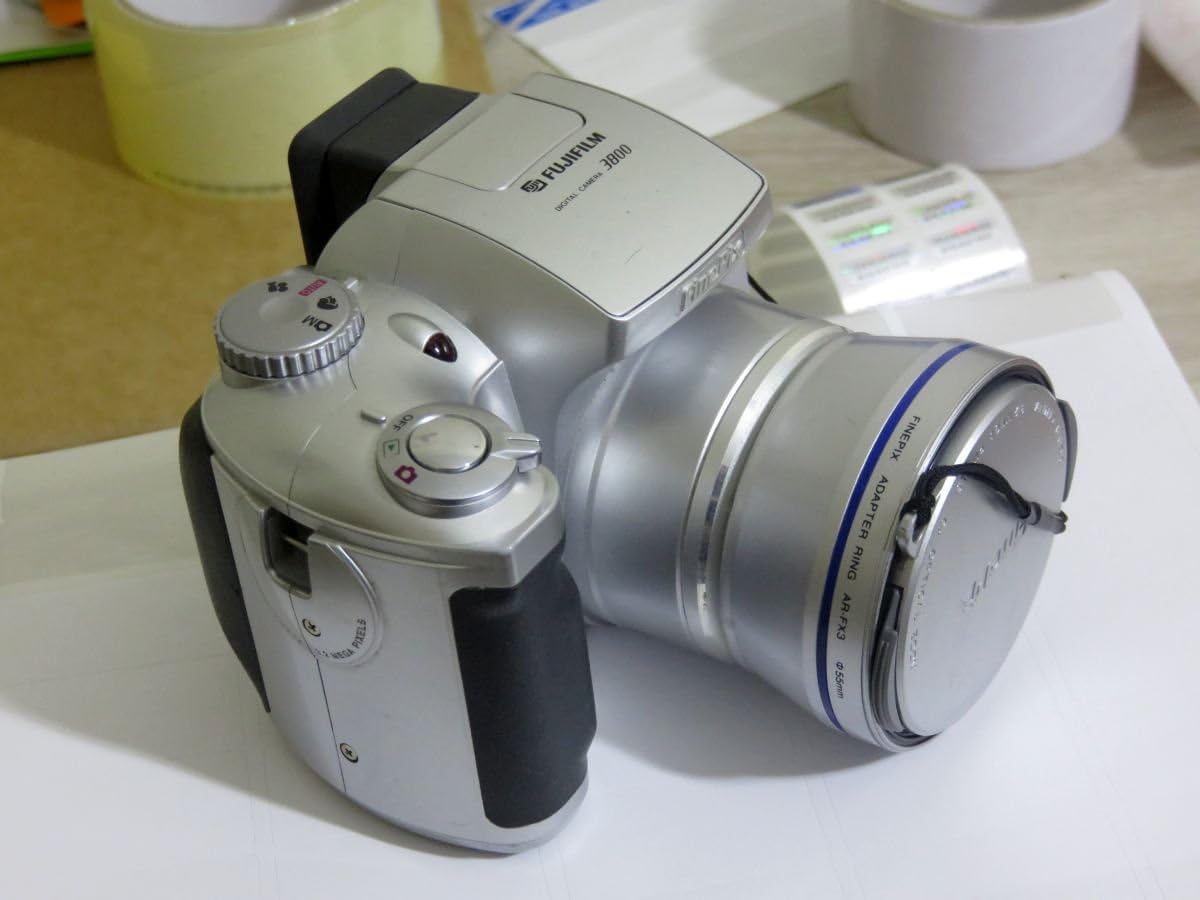
Şekil 1: Ön view of the Fujifilm FinePix 3800 Digital Camera with the lens cap attached, showcasing its silver body and ergonomic grip.
Kurmak
1. Pil Kurulumu
The FinePix 3800 operates on four (4) AA batteries. For optimal performance and extended usage, it is highly recommended to use rechargeable Nickel Metal Hydride (NiMH) batteries. Alkaline batteries are suitable for temporary use but will deplete quickly.
- Fotoğraf makinesinin alt veya yan tarafında bulunan pil bölmesi kapağını bulun.
- Bölmeyi açmak için kapağı kaydırın veya kaldırın.
- Dört adet AA pili, bölmenin içinde gösterildiği gibi doğru kutuplara (+/-) dikkat ederek yerleştirin.
- Pil bölmesi kapağını yerine oturana kadar sıkıca kapatın.
2. Hafıza Kartı Kurulumu
The camera uses xD-Picture Card memory. A 16 MB xD card is typically included, capable of storing approximately 12 images in fine mode or 26 images in normal mode.
- Hafıza kartı yuvasını bulun, genellikle pil bölmesinin yakınındadır.
- Hafıza kartı yuvası kapağını açın.
- Insert the xD-Picture Card with the metal contacts facing the correct direction (refer to the diagram inside the slot). Push gently until it clicks into place.
- Hafıza kartı yuvasının kapağını güvenli bir şekilde kapatın.
3. İlk Açılış ve Tarih/Saat Ayarı
After installing batteries and the memory card, power on the camera for the first time.
- Turn the power dial or press the power button to switch on the camera.
- The LCD monitor will display the initial setup screen, prompting you to set the date and time.
- Use the camera's navigation buttons to adjust the year, month, day, hour, and minute.
- Confirm the settings to proceed. Correct date and time settings are crucial for proper image file yönetmek.
Kullanım Talimatları
1. Temel Fotoğraf Çekim Modları
The FinePix 3800 offers various shooting modes to suit different conditions and user preferences.
- Otomatik Mod: For simple point-and-shoot operation. The camera automatically adjusts aperture, shutter speed, and white balance.
- Manuel Mod: Provides control over settings such as aperture, exposure compensation, and white balance for advanced users.
- Scene Position: Optimize settings for specific scenes like landscape or portrait.

Figure 2: The Fujifilm FinePix 3800 with its lens extended and the pop-up flash activated, ready for capturing images.
2. Yakınlaştırma İşlemi
The camera features a 6x optical zoom Fujinon lens (equivalent to 38-228mm on a 35mm camera) and a variable digital zoom.
- Use the zoom lever (typically located near the shutter button) to zoom in (telephoto) or zoom out (wide-angle).
- Optical zoom provides higher quality images. Digital zoom can be used to extend magnification further (up to 3.25x in 640x480 pixel mode), but may result in reduced image quality.
3. Flaş Modları
The built-in pop-up flash offers several modes:
- Otomatik Flaş: Kamera flaşa ihtiyaç olup olmadığını otomatik olarak belirler.
- Kırmızı Göz Azaltma: Emits pre-flashes to reduce red-eye effect.
- Forced Flash: Ortam ışığına bakılmaksızın flaş patlar.
- Suppressed Flash: Flash devre dışı.
- Yavaş Senkronizasyon: Combines flash with a slow shutter speed for balanced exposure of subject and background in low light.
4. White Balance and Exposure
- Beyaz Dengesi: In manual mode, select from 6 preset positions (e.g., Daylight, Cloudy, Fluorescent) or use automatic white balance for accurate color reproduction.
- Deklanşör Hızı: The camera supports shutter speeds from 3 to 1/1,500 second. In manual mode, you can adjust this setting to control motion blur or freeze action.
5. LCD Monitor and Electronic Viewbulucu (EVF)
The FinePix 3800 features a 1.8-inch LCD monitor and an electronic viewfinder for composing shots and reviewgörüntüler.

Şekil 3: Arka view of the Fujifilm FinePix 3800, highlighting the 1.8-inch LCD monitor, electronic viewbulucu ve kontrol düğmeleri.
- Use the LCD for a larger preview ve menü navigasyonu.
- The EVF is useful in bright sunlight or to conserve battery power during image playback.
- A dedicated button (e.g., "EVF/LCD") allows switching between the two displays.
6. Movie and Voice Memo Capabilities
- Film Modu: Record digital videos with sound in QVGA (320 x 240) format, up to approximately 60 seconds in length at 10 frames per second.
- Sesli not: Add up to 30 seconds of voice tags to your captured images for personal notes or descriptions.
7. Image Transfer to PC
Transferring images and videos to your computer is straightforward using the included USB cable and FinePixViewya yazılım.
- Connect one end of the USB cable to the camera's USB port and the other end to your computer.
- Ensure the camera is powered on. Your computer should automatically recognize the camera as a removable storage device.
- Use the FinePixViewer software (included on CD-ROM) or your computer's file explorer to browse and transfer files.
Bakım
1. Kamerayı Temizleme
- Mercek: Use a soft, lint-free cloth specifically designed for optical lenses. Gently wipe in a circular motion. Avoid using harsh chemicals.
- Vücut: Kamera gövdesini yumuşak ve kuru bir bezle silin. İnatçı kirler için hafifçe silin.ampen the cloth with water, then wipe dry. Do not use solvents.
- LCD Ekran: Use a soft, dry cloth. For smudges, a screen cleaner designed for electronics can be used sparingly.
2. Pil Bakımı
- Uzun süre kamerayı kullanmayacaksanız pil sızıntısını önlemek için pilleri çıkarın.
- Pilleri serin ve kuru bir yerde saklayın.
- If using rechargeable batteries, follow the charger manufacturer's instructions for charging and maintenance.
3. Hafıza Kartı Kullanımı
- Yeni hafıza kartlarını ilk kullanımdan önce mutlaka kamerada biçimlendirin.
- Avoid removing the memory card while the camera is writing data (e.g., after taking a photo) to prevent data corruption.
- Hafıza kartlarını güçlü manyetik alanlardan ve aşırı sıcaklıklardan uzak tutun.
Sorun giderme
This section addresses common issues you might encounter with your FinePix 3800.
Kamera açılmıyor.
- Pillerin doğru kutuplara sahip olacak şekilde doğru şekilde takıldığından emin olun.
- Check battery charge level. Replace with fresh alkaline batteries or fully charged NiMH batteries.
- Pil bölmesi kapağının sıkıca kapalı olduğundan emin olun.
Kötü Görüntü Kalitesi
- Bulanık Görüntüler: Ensure the lens is clean. Check if the camera is in focus. Use a tripod in low light or for slow shutter speeds.
- Yanlış Renkler: Adjust white balance settings to match the lighting conditions.
- Dark/Overexposed Images: Check flash settings. Adjust exposure compensation if available in manual mode.
Memory Card Errors
- Hafıza kartının doğru ve tam olarak takıldığından emin olun.
- Try formatting the memory card (Not: Bu işlem karttaki tüm verileri silecektir. Önemli verileri yedekleyin. fileİlk önce.).
- If errors persist, the memory card may be faulty and require replacement.
Computer Does Not Recognize Camera
- USB kablosunun hem kameraya hem de bilgisayara güvenli bir şekilde bağlandığından emin olun.
- Verify the camera is powered on and in the correct connection mode (if applicable).
- Install or reinstall the FinePixViewer software and USB drivers from the included CD-ROM.
- Bilgisayarınızda farklı bir USB bağlantı noktası deneyin.
Özellikler
Key technical specifications for the Fujifilm FinePix 3800 Digital Camera:
| Özellik | Şartname |
|---|---|
| Model Adı | Fujifilm FinePix 3800 |
| Etkili Hareketsiz Çözünürlük | 3.0 Megapiksel |
| Fotoğraf Sensörü Teknolojisi | CCD |
| Optik Yakınlaştırma | 6x |
| Dijital Zoom | Up to 3.25x (in 640x480 mode) |
| Maksimum Odak Uzaklığı | 228 milimetre (35 mm eşdeğeri) |
| Minimum Odak Uzaklığı | 38 milimetre (35 mm eşdeğeri) |
| Maksimum Diyafram | f/2.8 |
| Deklanşör Hızı | 3 to 1/1,500 seconds |
| ISO Hassasiyeti | ISO 100 equivalent (Expanded ISO Minimum: 100, Maximum: 1600) |
| LCD Ekran Boyutu | 1.8 inç |
| Viewbulucu | Elektronik |
| Bellek Türü | xD-Resim Kartı (16 MB dahil) |
| Bağlantı | USB |
| Güç Kaynağı | 4 x AA Pil |
| Boyutlar (Y x G x D) | Yaklaşık. 3.03 x 3.9 x 2.7 inç |
| Ağırlık | Approx. 0.88 Pounds (without batteries/card) |
| Video Çözünürlüğü | QVGA (320x240) with audio, max 60 seconds |
Garanti ve Destek
Garanti Bilgileri
The Fujifilm FinePix 3800 Digital Camera comes with a 1 Yıllık Sınırlı Garanti from the manufacturer. Please retain your proof of purchase for warranty claims. For detailed terms and conditions, refer to the warranty card included with your product or contact Fujifilm customer support.
Ek Kaynaklar
- Resmi Kullanıcı Kılavuzu (PDF): For a more detailed guide, you can download the official PDF manual: PDF indir Manuel
- Fujifilm Store: Explore other Fujifilm products and support resources: Visit Fujifilm Store