
1. Product Overview
The DEWALT DXF2490 is a 24-inch high-velocity industrial drum fan designed for powerful air movement in various environments. Its robust construction and versatile features make it suitable for industrial, commercial, and residential applications requiring significant airflow.

Image: DEWALT DXF2490 24-inch Industrial Fan for Quick and Efficient Cooling.
Key Features:
- Variety of Application: Ideal for outdoor use, factories, garages, shops, barns, homes, greenhouses, gyms, and patios.
- Unique Trumpet-Shaped Drum: Generates strong and steady airflow, delivering up to 6500 CFM at 1050 RPM.
- 360° Adjustable Tilting: Fan head can be adjusted 360 degrees to direct airflow and ensure dynamic circulation.
- Stable & Reliable Design: Constructed with durable metal and sturdy aluminum blades. Features small grid spacing for safety.
- Easy to Move: Equipped with semi-pneumatic tires, a non-skid foot pad for stability, and a folding handle for easy transport.
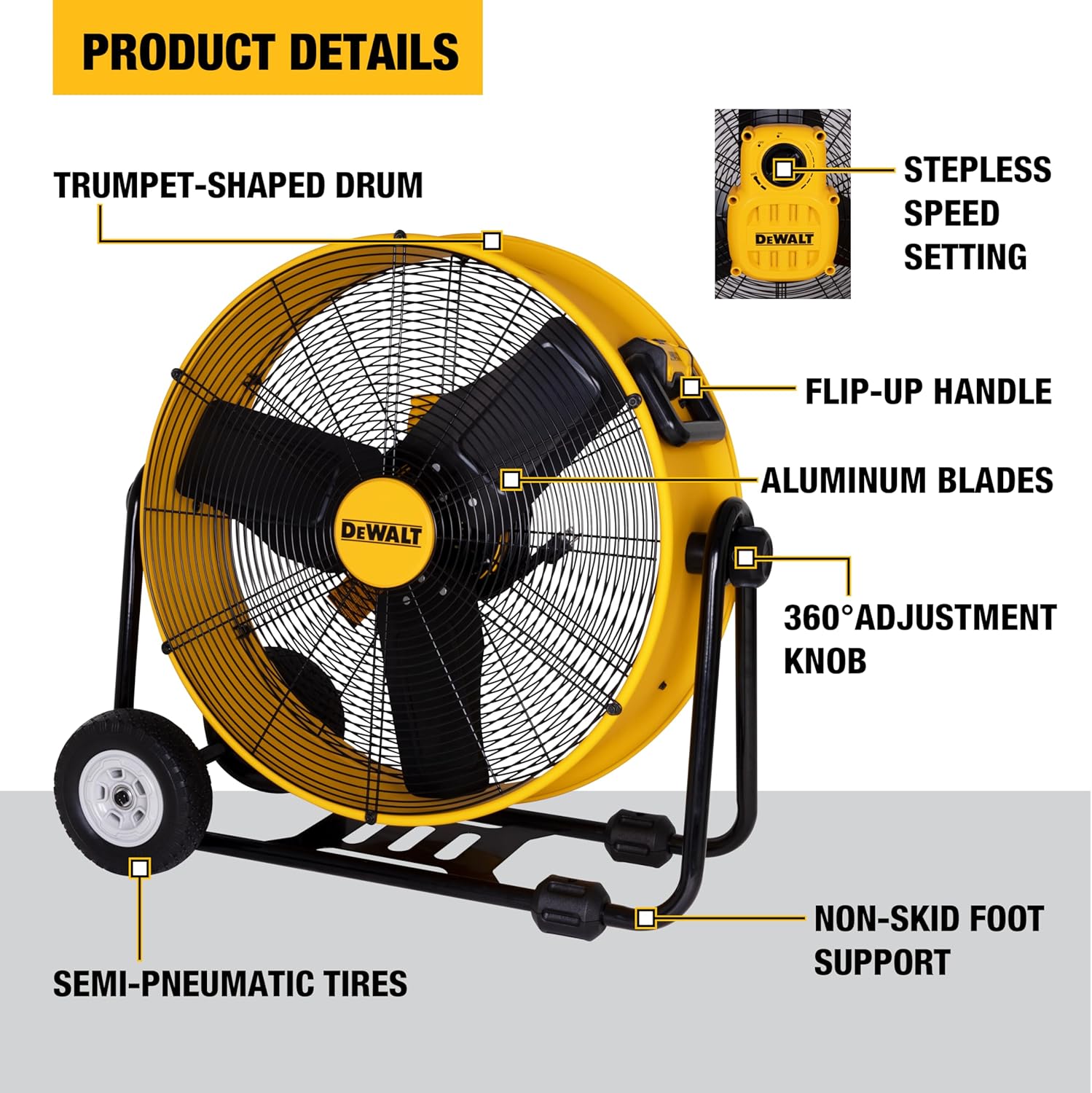
Image: Detailed view of the fan's components and features.
2. Setup
The DEWALT DXF2490 fan requires minimal assembly before first use. Ensure all components are present and undamaged upon unboxing.
Assembly Steps:
- Attach the wheels to the base frame using the provided hardware.
- Secure the non-skid foot pads to the base frame.
- Ensure the folding handle is securely in place.

Image: The fan's handle and wheels facilitate easy movement across various surfaces.
Power Connection:
Connect the 12-foot power cord to a standard household electrical outlet (120V). The fan features a built-in cord wrap design for convenient storage when not in use.

Image: The fan's power cord and integrated storage feature.
3. Operating Instructions
The DEWALT DXF2490 fan offers intuitive controls for adjusting airflow to your specific needs.
Power On/Off and Speed Control:
- Locate the electronic touch control dial on the back of the fan.
- Turn the dial to the 'ON' position to power on the fan.
- Adjust the dial between 'MIN' and 'MAX' to select your desired airflow speed. The fan features a stepless speed setting for precise control.
- Turn the dial to the 'OFF' position to power off the fan.
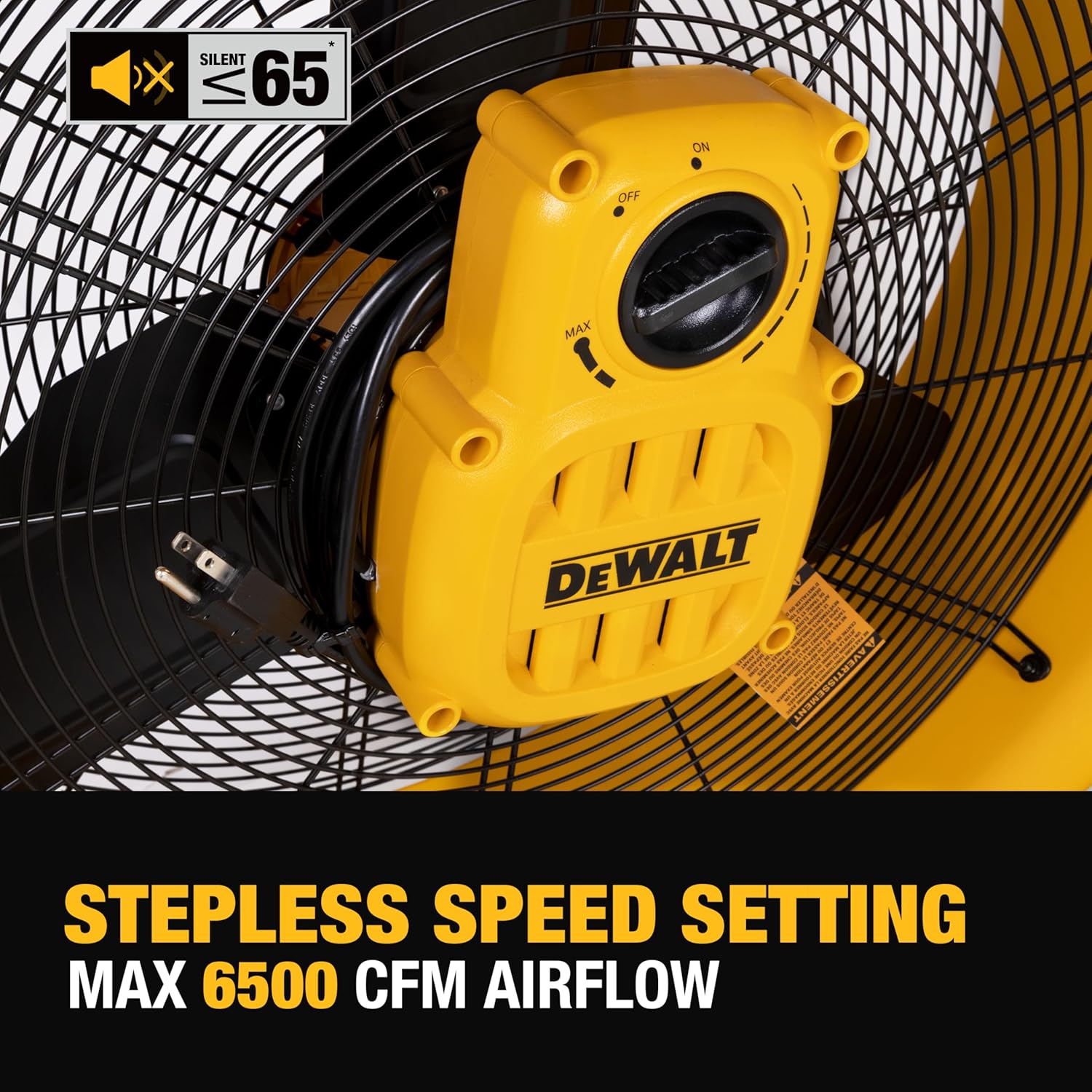
Image: The stepless speed setting allows for precise airflow control.
Adjusting Fan Tilt:
The fan head can be tilted 360 degrees to direct air exactly where it is needed. Simply grasp the fan housing and pivot it to the desired angle. The adjustment knob on the side allows for secure positioning.

Image: The fan's 360-degree tilting capability for versatile air direction.
Official Product Video:
Video: An official overview of the DEWALT DXF2490 High Velocity Fan, demonstrating its features and operation.
4. Maintenance
Regular maintenance ensures optimal performance and longevity of your DEWALT DXF2490 fan.
Cleaning:
- Always unplug the fan before cleaning.
- Use a soft, damp cloth to wipe down the exterior surfaces.
- Carefully clean the fan blades and grilles to remove dust and debris. Ensure the fan is completely dry before plugging it back in.
Storage:
When not in use, store the fan in a cool, dry place. Utilize the built-in cord wrap for tidy storage of the power cord.
5. Troubleshooting
If you encounter issues with your DEWALT DXF2490 fan, please refer to the following basic troubleshooting steps:
- Fan does not turn on: Ensure the power cord is securely plugged into a functional outlet. Check the speed control dial is set to an 'ON' position.
- Reduced airflow: Inspect the fan blades and grilles for any obstructions or excessive dust buildup. Clean as necessary.
- Unusual noise: Turn off and unplug the fan. Check for any loose parts or foreign objects within the fan housing or blades.
For persistent issues or complex problems, please contact DEWALT customer support.
6. Specifications
| Feature | Specification |
|---|---|
| Brand | DEWALT |
| Model Name | DXF2490 |
| Electric Fan Design | Floor Fan |
| Power Source | Corded Electric |
| Product Dimensions | 31.42"D x 15.63"W x 30.51"H |
| Item Weight | 33.1 Pounds |
| Noise Level | 60 Decibels |
| Air Flow Capacity | 6500 Cubic Feet Per Minute |
| Speed | 1050 RPM |
| Voltage | 120V |
| Number of Blades | 3 |
| Blade Length | 24 Inches |
| Indoor/Outdoor Usage | Outdoor |
7. Warranty and Support
Warranty Information:
The DEWALT DXF2490 fan comes with a 2-Year Limited Warranty. Please refer to the product packaging or official DEWALT documentation for full warranty terms and conditions.
Customer Support:
For technical assistance, parts, or warranty claims, please contact DEWALT customer support. Visit the official DEWALT website or refer to your purchase documentation for contact details.