
SPA SCIENCES 860021001161
Spa Sciences MIO - Diamond Tip Microdermabrasion System User Manual
Your comprehensive guide to achieving clearer, smoother, and more radiant skin at home.
Product Overview
The Spa Sciences MIO is an innovative 2-in-1 Microdermabrasion and Pore Extraction Skin Resurfacing System. It is designed to provide professional-grade skincare results in the comfort of your home, targeting concerns such as enlarged pores, uneven texture, dark spots, fine lines, and wrinkles. The device combines laser-cut diamond bit technology for exfoliation with gentle vacuum suction for pore purification.

Image: The Spa Sciences MIO device in pink, showcasing its ergonomic design, control panel, USB charging cable, three vacuum suction tips, and a diamond microdermabrasion tip, along with foam filters.
What's Included
- 1 x Spa Sciences MIO Device (Pink)
- 1 x Diamond Microdermabrasion Tip
- 3 x Vacuum Suction Extraction Tips (various shapes/sizes)
- 20 x Single-Use Foam Filters
- 1 x USB Charging Cable
- User Manual (this document)
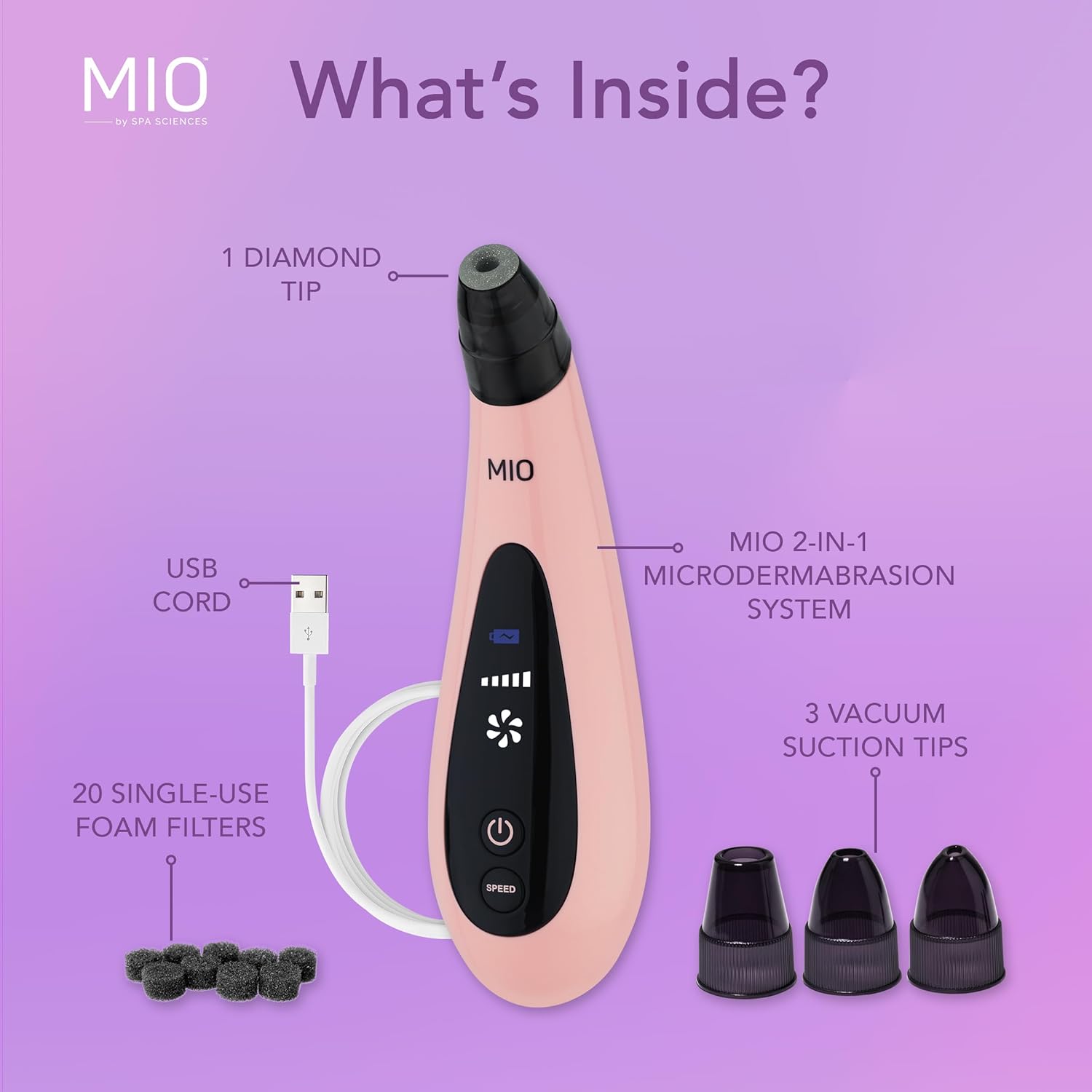
Image: A visual representation of all components included in the MIO package, laid out neatly.
Setup and First Use
- Initial Charge: Before first use, fully charge the MIO device for 9-12 hours using the provided USB cable. The device features an upgraded LCD screen to indicate battery level.
- Prepare Skin: Cleanse your face thoroughly, rinse with water, and pat dry. Ensure your skin is clean and free of makeup or oils.
- Attach Tip: Select the desired tip (Diamond Microdermabrasion Tip or one of the Vacuum Suction Extraction Tips) and securely attach it to the device.
- Power On: Press and hold the Power button to turn on the device.
- Select Speed: Use the Speed button to select your desired power level. The MIO offers 5 adjustable speed settings to customize your treatment intensity based on your skin type and needs.

Image: Detailed view of the two main types of tips for the MIO device: the diamond microdermabrasion tip and the three vacuum suction extraction tips.
Operating Instructions
The MIO system offers two primary modalities: Microdermabrasion and Pore Extraction. It is recommended to use the device 1-2 times per week, allowing your skin to recover between sessions.
Microdermabrasion (Rejuvenating Diamond Tip)
This step utilizes the laser-cut diamond tip to gently polish away dead skin cells, promoting cell renewal and revealing smoother, more radiant skin. It helps to improve uneven texture, dark spots, fine lines, and wrinkles.
- Attach the Diamond Microdermabrasion Tip.
- Select a comfortable power level.
- Gently glide the device over treatment sections of your face, ensuring continuous movement. Avoid holding the device stationary on any area to prevent excessive suction or irritation.
- Focus on areas with dullness, rough texture, or fine lines.

Image: A user demonstrating the application of the MIO device on the cheek area, highlighting its ergonomic design for ease of use.
Pore Extraction (Vacuum Suction Tips)
The multiple suction extraction tips are designed to effectively remove unwanted pore congestion, blackheads, and impurities without pinching the skin. They come in different shapes and sizes to target various facial areas.
- Attach one of the Vacuum Suction Extraction Tips suitable for the area you wish to treat (e.g., smaller tips for nose, larger for forehead/cheeks).
- Select a power level appropriate for your skin's sensitivity and the level of congestion.
- Glide the device over congested areas, such as the nose, chin, and forehead. Maintain continuous movement to avoid bruising.
After Treatment
After completing your treatment, rinse your face clean with water. Your skin will be better able to absorb skincare products, so apply your preferred serums and moisturizers for enhanced benefits.

Image: A visual comparison showing significant skin improvement, including reduced pore size and smoother texture, after using the MIO device.
Official Product Videos
Video: MIO Demo Video. This video provides a detailed demonstration of how to use the Spa Sciences MIO device for both microdermabrasion and pore extraction, showcasing its features and benefits.
Video: MIO Product Video. An overview of the Spa Sciences MIO, highlighting its key functionalities and the benefits of incorporating it into your skincare routine.
Video: MIO New Product Video - 2021. A promotional video from Spa Sciences introducing the MIO device, emphasizing its features and the results it can deliver.
Maintenance
Proper maintenance ensures the longevity and effectiveness of your MIO device.
- Cleaning Tips: After each use, remove the tip and clean it thoroughly with warm water and mild soap. Ensure no debris remains.
- Filter Replacement: The device uses single-use foam filters to prevent debris from entering the motor. Replace the foam filter after every 1-2 uses, or when it appears dirty, to maintain optimal suction and hygiene.
- Device Cleaning: Wipe the body of the MIO device with a soft, damp cloth. Do not submerge the device in water.
- Storage: Store the device in a cool, dry place away from direct sunlight and moisture.
Troubleshooting
If you encounter any issues with your Spa Sciences MIO device, please refer to the following common troubleshooting tips:
- Device Not Turning On: Ensure the device is fully charged. If it's a new device, remember the initial charge time is 9-12 hours.
- Weak Suction: Check if the foam filter is clean and properly installed. A clogged or improperly placed filter can significantly reduce suction power. Also, ensure the chosen tip is securely attached.
- Skin Irritation/Redness: Ensure you are gliding the device continuously and not holding it stationary on any part of the skin. Use a lower speed setting if your skin is sensitive. Always clean and dry your skin before use.
- Tips Not Attaching Securely: Verify that the tips are aligned correctly and twisted into place firmly.
For persistent issues not covered here, please contact Spa Sciences customer support.
Specifications
| Feature | Detail |
|---|---|
| Brand | SPA SCIENCES |
| Model Number | 860021001161 |
| ASIN | B07MTPV2SP |
| Item Form | Pen |
| Material | Stainless Steel |
| Color | Pink |
| Skin Type | Acne Prone (suitable for various skin types) |
| Power Settings | 5 adjustable speeds |
| Battery Life | Up to 60 minutes max running time (cordless use) |
| Dimensions | 7.95 x 4.61 x 2.44 inches |
| Weight | 9.91 ounces |
| First Available | January 15, 2019 |
Warranty and Support
The Spa Sciences MIO device is backed by a 2-year limited warranty. Spa Sciences is committed to the quality of their devices and customer satisfaction.
For detailed warranty information, please refer to the official warranty document: Spa Sciences MIO Warranty PDF.
For further assistance, product inquiries, or support, please visit the official Spa Sciences store or contact their customer service:
- Manufacturer: Spa Sciences
- Online Store: Visit the SPA SCIENCES Store on Amazon
Important Safety Information
Please read all instructions and warnings before using the device. Statements regarding dietary supplements have not been evaluated by the FDA and are not intended to diagnose, treat, cure, or prevent any disease or health condition. Consult a healthcare professional if you have any pre-existing skin conditions or concerns.