
AccuRelief ACRL-3100
AccuRelief Complete 3-in-1 TENS Unit, EMS, Massager Device Instruction Manual
Model: ACRL-3100
Product Overview
The AccuRelief 3-in-1 TENS, EMS, and Massager Pain Management System is designed for natural, drug-free pain relief and muscle stimulation. This versatile, compact, and highly effective device offers three distinct therapy modes to address various needs.
TENS (Transcutaneous Electrical Nerve Stimulation): A safe, non-invasive method to block pain signals to your brain by sending stimulating pulses through the skin, encouraging the body to release endorphins (natural painkillers).
EMS (Electric Muscle Stimulator): Works by contracting, activating, and relaxing muscles to speed up recovery, improve strength, blood circulation, and overall endurance.
Massager Setting: Features a massage therapy mode with three massage-like modes (tap, knead, and rub) to reduce muscle tension for a relaxing experience.
Key Features
- 25 levels of intensity for customized treatment.
- 6 preset programs with 6 customizable programs for targeted therapy.
- Compatible with 2 or 4 wired electrodes.
- Easy-to-read LED screen for clear display of settings.
- Safe for all users when used as directed.
- Compact and portable design, ideal for travel.
- Battery operated (3 AAA batteries included).
Package Contents
- AccuRelief Complete 3-in-1 Device
- 4 Wired Electrodes
- Lead Wires
- 3 AAA Batteries
- Quick Start Guide
- Electrode Placement Guide
- Instruction Manual (this document)
Setup and Initial Use
1. Install Batteries:
Open the battery compartment on the back of the device. Insert 3 AAA batteries, ensuring correct polarity (+/-). Close the compartment securely.
2. Connect Lead Wires:
Plug the lead wires into the output ports on the top of the AccuRelief device. The device supports either 2 or 4 electrodes. If using 2 electrodes, plug one lead wire into either port. If using 4 electrodes, plug both lead wires into both ports.
3. Attach Electrodes:
Attach the electrodes to the ends of the lead wires. Ensure a secure connection. Remove the protective film from the gel pads of the electrodes.

Figure 1: Peeling the protective film from an electrode pad before application. 
Figure 2: The flexible design of the electrode pads allows for comfortable application to various body parts. 4. Apply Electrodes to Skin:
Place the electrodes firmly on clean, dry skin around the target pain area or muscle group. Refer to the included Electrode Placement Guide for specific recommendations for different body parts (e.g., neck, back, shoulders, arms, legs, hands, feet).

Figure 3: Example electrode placement areas for various body parts. 
Figure 4: Proper placement of electrodes on the lower back for targeted relief.
Operating Instructions
1. Power On:
Press and hold the Power/Mode button to turn on the device. The LED screen will illuminate.
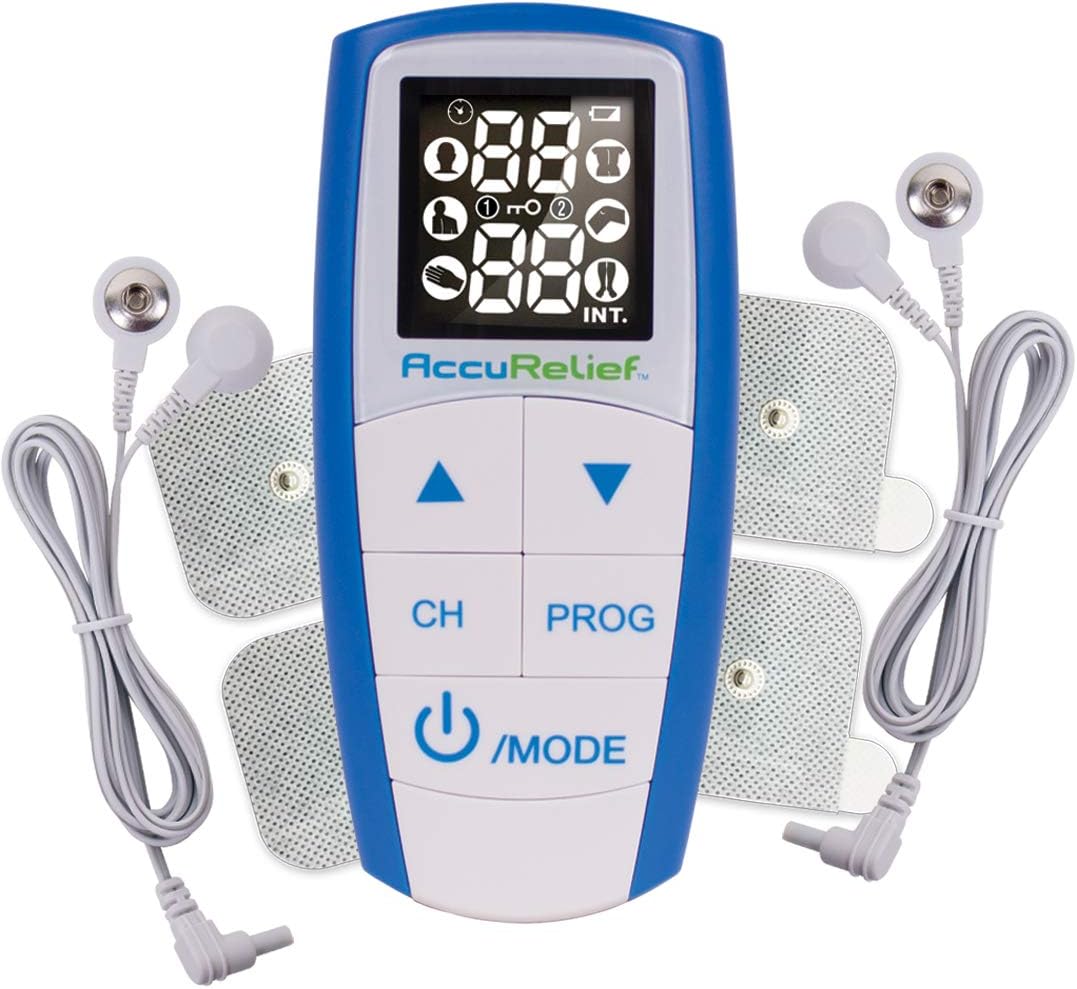
Figure 5: The AccuRelief device with its clear LED screen and control buttons. 2. Select Mode (TENS, EMS, or Massager):
Press the Power/Mode button repeatedly to cycle through the three therapy modes: TENS, EMS, and Massager. The selected mode will be indicated on the screen.

Figure 6: Understanding the three therapy modes of the AccuRelief device. 3. Choose Program:
Press the PROG button to select from the 6 preset programs or 6 customizable programs. Each program offers different pulse patterns and frequencies optimized for specific types of relief or muscle stimulation.
4. Adjust Intensity:
Use the Up (▲) and Down (▼) arrow buttons to increase or decrease the intensity level. Start with a low intensity and gradually increase it until you feel a comfortable, yet effective, sensation. There are 25 levels of intensity.
5. Select Channel (if applicable):
If using multiple channels (e.g., 4 electrodes), press the CH button to switch between channels and adjust their intensity independently.
6. Begin Therapy:
Once settings are adjusted, the device will begin delivering therapy. The duration of therapy can be set or will run for a default period as per the selected program. Always ensure electrodes are firmly attached to the skin for optimal performance.
7. Power Off:
Press and hold the Power/Mode button to turn off the device when therapy is complete.
Maintenance and Storage
Cleaning the Device:
Wipe the device with a soft, damp cloth. Do not use abrasive cleaners or submerge the device in water.
Caring for Electrodes:
After each use, reattach the protective film to the gel pads of the electrodes to preserve their adhesive quality and extend their lifespan. Store electrodes in a cool, dry place.

Figure 7: Ensure electrodes are properly connected and cared for after each use. Battery Replacement:
Replace batteries when the low battery indicator appears on the screen or when the device fails to power on. Always use new AAA batteries.
Storage:
Store the AccuRelief device and accessories in their original packaging or a protective case in a cool, dry place, away from direct sunlight and extreme temperatures.
Troubleshooting
| Problem | Possible Cause | Solution |
|---|---|---|
| Device does not turn on. | Low or dead batteries; incorrect battery installation. | Check battery polarity. Replace with new AAA batteries. |
| No sensation or weak sensation. | Electrodes not properly attached; low intensity setting; worn-out electrodes; loose lead wire connection. | Ensure electrodes are firmly on skin. Increase intensity gradually. Replace old electrodes. Check lead wire connections to device and electrodes. |
| Sensation is uncomfortable or stinging. | Intensity too high; electrodes not fully adhered; dry skin. | Decrease intensity. Ensure full contact of electrodes with skin. Apply a small amount of water to skin before applying electrodes if skin is very dry. |
Specifications
- Product Dimensions: 5 x 1 x 2.5 inches
- Item Weight: 7.05 ounces
- Model Number: ACRL-3100
- Batteries: 3 AAA batteries (included)
- Manufacturer: Carex
- ASIN: B07KMGP646
Important Safety Information
Always read and follow all instructions and warnings provided with the AccuRelief device. Consult with a healthcare professional before using this device if you have any pre-existing medical conditions, are pregnant, or have a pacemaker or other implanted electronic device. Do not use on broken skin or over areas of swelling, redness, or inflammation.
Statements regarding dietary supplements have not been evaluated by the FDA and are not intended to diagnose, treat, cure, or prevent any disease or health condition.
Warranty and Support
For warranty information and customer support, please refer to the warranty card included with your product or contact the manufacturer, Carex, directly. Contact details can typically be found on the product packaging or their official website.
Manufacturer: Carex (via AccuRelief Store)
Related Documents - ACRL-3100
 |
AccuRelief Dual 3-in-1 Electrotherapy Pain Relief User Manual Comprehensive user manual for the AccuRelief Dual 3-in-1 Electrotherapy Pain Relief device (Model ACRL-3100), detailing its TENS, EMS, and Massage functions, safety guidelines, usage instructions, troubleshooting, and specifications. |
 |
AccuRelief ACRL-3000 Dual Channel TENS User Manual: Natural Pain Relief User manual for the AccuRelief ACRL-3000 Dual Channel TENS unit by Carex Health Brands. Learn about safe operation, electrode placement, pain relief programs, and troubleshooting for drug-free pain management. |
 |
AccuRelief Single Channel TENS User Manual for Pain Relief Comprehensive user manual for the AccuRelief™ Single Channel TENS unit (Model ACRL-2000) by Carex Health Brands. Discover natural, drug-free pain relief solutions, understand TENS therapy, safety guidelines, device operation, and troubleshooting. |
 |
AccuRelief ACRL-5100 Menstrual Pain Relief TENS Unit with Heat User Manual Comprehensive user manual for the AccuRelief ACRL-5100 Menstrual Pain Relief TENS Electrostimulation Device with Heat. Learn about features, operation, safety precautions, troubleshooting, and specifications. |