
1. ประกาศสำคัญ
Please carefully check the store name and ensure you are purchasing products sold by "LUZHAN." We have received customer feedback stating that products received did not match the description and were of poor quality. Upon investigation, we found that these customers did not purchase the products from us. To prevent such incidents from happening again in the future and to avoid unnecessary misunderstandings, please carefully verify the store name LUZHAN.

Image: Important notice to verify seller name LUZHAN for authentic products.
2. สูงกว่าview
The XIAOMI POCO X8 Pro Max 5G is a high-performance smartphone designed for advanced users. It features a powerful Mediatek Dimensity 9500s processor, a vibrant 1.5K 120Hz AMOLED display, a large 8500mAh battery with 100W HyperCharge, and a 50 MP Light Fusion 600 camera system with OIS. This manual provides essential information for setting up and operating your device.
ภาพ: ด้านหน้าและด้านหลัง view of the POCO X8 Pro Max 5G smartphone.
วิดีโอ: จบแล้วview of the POCO X8 Pro Series, highlighting key features and design.
3. การตั้งค่า
3.1 อะไรอยู่ในกล่อง
- XIAOMI POCO X8 Pro Max 5G Smartphone
- เครื่องชาร์จ
- ฟิล์มกันรอยหน้าจอ (ติดมาให้แล้วหรือมีให้ในชุด)
3.2 การตั้งค่าอุปกรณ์เริ่มต้น
- เปิดเครื่อง: Press and hold the power button located on the side of the device until the XIAOMI logo appears.
- ภาษาและภูมิภาค: ทำตามคำแนะนำบนหน้าจอเพื่อเลือกภาษาและภูมิภาคที่คุณต้องการ
- เชื่อมต่อกับ Wi-Fi: Select your Wi-Fi network and enter the password to connect to the internet. This is necessary for initial setup and software updates.
- บัญชี Google: ลงชื่อเข้าใช้ด้วยบัญชี Google ของคุณหรือสร้างบัญชีใหม่ ซึ่งถือเป็นสิ่งสำคัญสำหรับการเข้าถึง Google Play Store และบริการอื่น ๆ ของ Google
- การถ่ายโอนข้อมูล: If you are upgrading from another device, you may have the option to transfer your data (apps, photos, contacts) during this stage.
- การตั้งค่าความปลอดภัย: Set up your preferred security method, such as a PIN, pattern, password, or fingerprint. The device supports an ultrasonic fingerprint sensor.
- ตั้งค่าให้เสร็จสมบูรณ์: ทำตามคำแนะนำที่เหลือเพื่อดำเนินการติดตั้งให้เสร็จสมบูรณ์
3.3 SIM Card and eSIM Setup
The POCO X8 Pro Max 5G supports physical SIM cards and eSIM functionality.
- Physical SIM: Use the provided SIM ejector tool to open the SIM tray. Insert your Nano-SIM card(s) into the tray, ensuring proper orientation. Close the tray securely.
- อีซิม: สำหรับการเปิดใช้งาน eSIM โปรดไปที่ การตั้งค่า > เครือข่ายและอินเทอร์เน็ต > ซิม and follow the instructions to add an eSIM profile provided by your carrier.
4. คู่มือการใช้งาน
4.1 คุณสมบัติการแสดงผล
Your device features a 6.83-inch 1.5K ultra-bright AMOLED display with a 120Hz refresh rate for smooth visuals and a 24x super resolution touch for enhanced responsiveness. It also includes eye protection features and Corning Gorilla Glass 7i for durability.
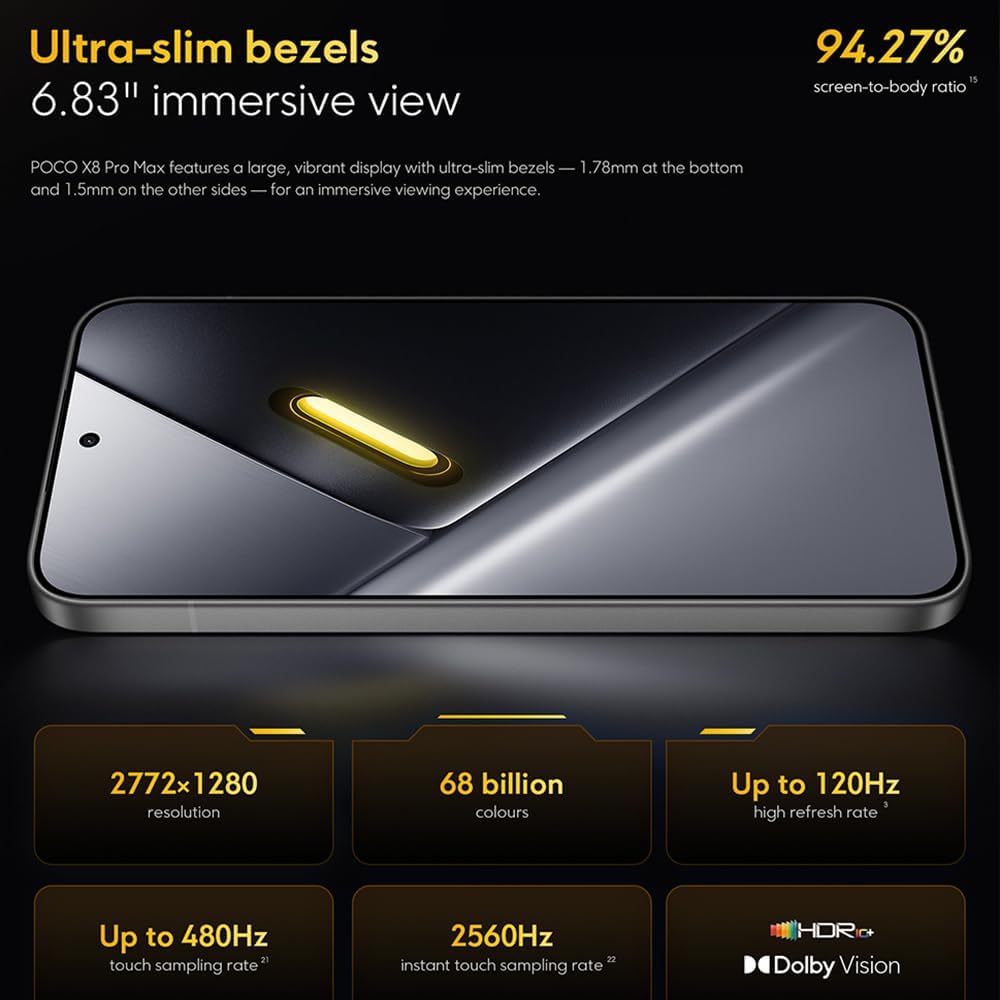
Image: The 6.83-inch 1.5K ultra-bright AMOLED display with minimal bezels.
4.2 การปฏิบัติงาน
Powered by the Mediatek Dimensity 9500s chipset (3nm, 4+4 All Big Core architecture, NPU890 AI processor), the POCO X8 Pro Max 5G delivers high performance. The POCO 3D IceLoop cooling system ensures efficient heat dissipation, maintaining optimal performance during intensive tasks like gaming.

Image: Diagram illustrating the Mediatek Dimensity 9500s flagship platform.

Image: Illustration of the 5800mm² ultra-large LHP area for cooling.
4.3 ระบบกล้อง
The device features a 50 MP Light Fusion 600 main camera with OIS (Optical Image Stabilization) and an 8 MP ultra-wide camera. It supports portrait mode with bokeh + HDR and dynamic video-to-still conversion.

Image: Close-up of the 50 MP main camera and 8 MP ultra-wide camera system.
4.4 แบตเตอรี่และการชาร์จ
Equipped with a massive 8500 mAh (typical) battery, the POCO X8 Pro Max 5G offers extended usage. It supports 100W HyperCharge, allowing for rapid recharging. A 16% ultra-high carbon-silicon content contributes to its high energy density.

Image: Illustration highlighting the massive 8500mAh battery capacity.

Image: Visual representation of the 100W HyperCharge technology.
4.5 เสียง
The device features symmetrical dual stereo speakers (1115F) for a balanced and immersive audio experience.
ซอฟต์แวร์ 4.6
The POCO X8 Pro Max 5G comes with Xiaomi HyperOS 3 installed, offering an optimized and user-friendly interface based on Android 16.
5. การบำรุงรักษา
5.1 การทำความสะอาดอุปกรณ์ของคุณ
- ใช้ผ้านุ่มที่ไม่เป็นขุยเช็ดหน้าจอและแผงด้านหลัง
- หลีกเลี่ยงการใช้สารเคมีรุนแรง วัสดุที่มีฤทธิ์กัดกร่อน หรือสเปรย์แอโรซอล
- สำหรับรอยเปื้อนฝังแน่น ให้เช็ดออกเล็กน้อยampเทน้ำหรือน้ำยาทำความสะอาดหน้าจอที่ออกแบบมาสำหรับอุปกรณ์อิเล็กทรอนิกส์ลงบนผ้า
5.2 ความทนทานต่อฝุ่นและน้ำ
The device is certified for IP68 dust and water resistance. This means it can withstand immersion in up to 2 meters of water for 30 minutes under specific laboratory conditions. However, water and dust resistance may deteriorate over time with normal wear and tear. The warranty does not cover liquid damage. Avoid exposing the device to hot water, saltwater, or other liquids.

Image: Visual representation of the IP68 dust and water resistance.
5.3 การอัปเดตซอฟต์แวร์
ตรวจสอบและติดตั้งการอัปเดตซอฟต์แวร์เป็นประจำเพื่อให้แน่ใจว่าอุปกรณ์ของคุณมีฟีเจอร์ แพตช์ความปลอดภัย และการปรับปรุงประสิทธิภาพล่าสุด โดยทั่วไปคุณจะพบตัวเลือกนี้ได้ใน การตั้งค่า > เกี่ยวกับโทรศัพท์ > อัปเดตระบบ.
6 การแก้ไขปัญหา
6.1 ปัญหาทั่วไปและแนวทางแก้ไข
- อุปกรณ์ไม่เปิด: ตรวจสอบให้แน่ใจว่าแบตเตอรี่ชาร์จเต็มแล้ว เสียบอุปกรณ์เข้ากับเครื่องชาร์จและรอสักครู่ก่อนลองเปิดเครื่องอีกครั้ง
- หน้าจอไม่ตอบสนอง: Try restarting the device by holding the power button for an extended period (e.g., 10-15 seconds) until it reboots.
- แอปขัดข้อง: ล้างแคชของแอปที่มีปัญหา (การตั้งค่า > แอป > [ชื่อแอป] > ที่เก็บข้อมูล > ล้างแคช) or reinstall the app. Ensure your device software is up to date.
- อายุการใช้งานแบตเตอรี่ไม่ดี: Check background app usage, reduce screen brightness, disable unnecessary features like GPS or Bluetooth when not in use, and ensure your software is updated.
- ปัญหาการเชื่อมต่อเครือข่าย: Restart your device. Check if your SIM card is properly inserted. Toggle Airplane Mode on and off. Reset network settings (การตั้งค่า > ระบบ > ตัวเลือกการรีเซ็ต > รีเซ็ต Wi-Fi มือถือ และบลูทูธ).
6.2 รีเซ็ตเป็นค่าโรงงาน
If you encounter persistent issues, a factory reset may be necessary. คำเตือน: การดำเนินการนี้จะลบข้อมูลทั้งหมดในอุปกรณ์ของคุณ โปรดสำรองข้อมูลสำคัญก่อนดำเนินการต่อ ไปที่ การตั้งค่า > ระบบ > ตัวเลือกการรีเซ็ต > ลบข้อมูลทั้งหมด (รีเซ็ตเป็นค่าโรงงาน) และทำตามคำแนะนำบนหน้าจอ
7. ข้อมูลจำเพาะ
| คุณสมบัติ | ข้อมูลจำเพาะ |
|---|---|
| ยี่ห้อ | เสี่ยวหมี่ |
| ชื่อรุ่น | POCO X8 Pro Max 5G |
| ระบบปฏิบัติการ | Android 16 (with Xiaomi HyperOS 3) |
| ความจุของหน่วยความจำ | 512GB |
| ขนาดหน้าจอ | 6.83 นิ้ว |
| ประเภทจอภาพ | AMOLED, 1.5K, 120Hz refresh rate |
| เทคโนโลยีเซลลูล่าร์ | 5G |
| สี | นัวร์ (สีดำ) |
| ประเภทขั้วต่อ | USB ประเภท C |
| การรักษาความปลอดภัยด้วยไบโอเมตริกซ์ | Fingerprint Recognition (Ultrasonic) |
| ความจุของแบตเตอรี่ | 8500 mAh (ลิเธียมโพลิเมอร์) |
| การชาร์จไฟ | ไฮเปอร์ชาร์จ 100W |
| กล้องหลัก | 50 MP Light Fusion 600 with OIS |
| กล้องอัลตร้าไวด์ | 8 MP |
| โปรเซสเซอร์ | Mediatek Dimensity 9500s |
| ทนทานต่อฝุ่นและน้ำ | IP68 |
| ปีของรุ่น | 2025 |
| ประเทศต้นกำเนิด | จีน |
8. การรับประกันและการสนับสนุน
For detailed warranty information and customer support, please refer to the warranty card included with your product or visit the official XIAOMI webไซต์นี้ โปรดเก็บหลักฐานการซื้อไว้เพื่อใช้ยืนยันการรับประกัน
Online resources and FAQs may also be available on the XIAOMI support portal.