
1. บทนำ
Thank you for choosing the Cillso GTR3 Fitness Smart Watch. This manual provides essential information for the proper setup, operation, and maintenance of your device. Please read it thoroughly to ensure optimal performance and a complete understanding of all features.
2. เนื้อหาบรรจุภัณฑ์
ตรวจสอบว่ามีรายการทั้งหมดอยู่ในแพ็คเกจของคุณ:
- 1 x Cillso GTR3 Smart Watch
- 1 x สายชาร์จแบบแม่เหล็ก
- 1 x Detailed User Manual (this document)
3. คู่มือการติดตั้ง
3.1 การชาร์จสมาร์ทวอทช์
Before first use, fully charge your Cillso GTR3 Smart Watch. Connect the magnetic charging cable to the charging points on the back of the watch and plug the USB end into a standard USB power adapter (not included).

Image: The Cillso GTR3 Smart Watch connected to its magnetic charging cable, indicating a 350 mAh battery and 3ATM waterproof rating.
A full charge typically takes approximately 2 hours. The watch has a standby time of up to 45 days and can last up to 10 days with heavy usage.
3.2 การดาวน์โหลดและการจับคู่แอป
To unlock the full functionality of your smart watch, download the "Runmefit" application on your smartphone.
- ดาวน์โหลดแอป: ค้นหา "Runmefit" in your smartphone's app store (compatible with iOS 12.0+ and Android 7.0+).
- เปิดใช้งานบลูทูธ: เปิดบลูทูธบนสมาร์ทโฟนของคุณ
- Open Runmefit App: Launch the app and follow the on-screen instructions to search for your device. Select "GTR3" from the list of available devices.
- ยืนยันการจับคู่: Confirm the pairing request on both your phone and the smart watch.

Image: Visual guide demonstrating the steps to download the "Runmefit" app, enable Bluetooth, and connect the GTR3 smart watch.
3.3 การเปิดใช้งานฟังก์ชันการโทรผ่านบลูทูธ
For Bluetooth calling functionality, an additional connection is required:
- Ensure the watch is successfully bound to the "Runmefit" app.
- Go to your smartphone's Bluetooth settings.
- Find and select "GTR3" (or a similar identifier) in the list of available devices and click to bind. This creates a separate audio connection.
- Once connected, you can use the watch to answer and make calls.
4. คู่มือการใช้งาน
4.1 การนำทางพื้นฐาน
The Cillso GTR3 features a 1.46-inch AMOLED Ultra-HD full touchscreen display. Swipe across the screen to navigate through menus and functions. Use the physical buttons for quick access or to return to the home screen.

Image: The 1.46-inch AMOLED display of the GTR3 Smart Watch showcasinหน้าปัดนาฬิกาที่ปรับแต่งได้หลากหลายรูปแบบ
4.2 การตรวจติดตามสุขภาพ
นาฬิกาเรือนนี้จะตรวจสอบตัวชี้วัดสุขภาพต่างๆ อย่างต่อเนื่อง:
- อัตราการเต้นของหัวใจ: ติดตามอัตราการเต้นของหัวใจของคุณตลอด 24 ชั่วโมง View real-time data and historical trends in the Runmefit app.
- ออกซิเจนในเลือด (SpO2): Monitors blood oxygen levels to help ensure vital signs stay within a healthy range.
- การติดตามการนอนหลับ: Automatically tracks sleep patterns, including deep sleep, light sleep, and awake times, providing insights into sleep quality.
- การติดตามความเครียด: Analyzes stress levels throughout the day.
- เตือนวงจรสรีรวิทยา: Provides reminders for women's health tracking when configured in the app.

ภาพ: เหนือview of the GTR3's 24/7 health tracking capabilities, including heart rate, SpO2, body energy, and sleep monitoring.

ภาพ: รายละเอียด view of the heart rate monitoring feature on the GTR3 Smart Watch and its companion app.

Image: The GTR3 Smart Watch showing continuous blood oxygen monitoring, with data also visible in the app.

Image: The GTR3 Smart Watch's sleep monitoring interface, showing duration of deep sleep, light sleep, and awake periods.
โหมดกีฬา 4.3 โหมด
The GTR3 supports over 110 sports modes, including walking, running, cycling, soccer, and hiking. Select your desired activity to track specific metrics such as steps, distance, calories burned, and exercise duration.

Image: The GTR3 Smart Watch highlighting its 110+ sports modes and detailed tracking of steps, calories, heart rate, blood oxygen, and stress.
4.4 การโทรและการแจ้งเตือนบลูทูธ
Once the Bluetooth call function is enabled (see Section 3.3), you can answer, reject, or make calls directly from your watch. The watch also displays notifications from your smartphone, including messages and app alerts.
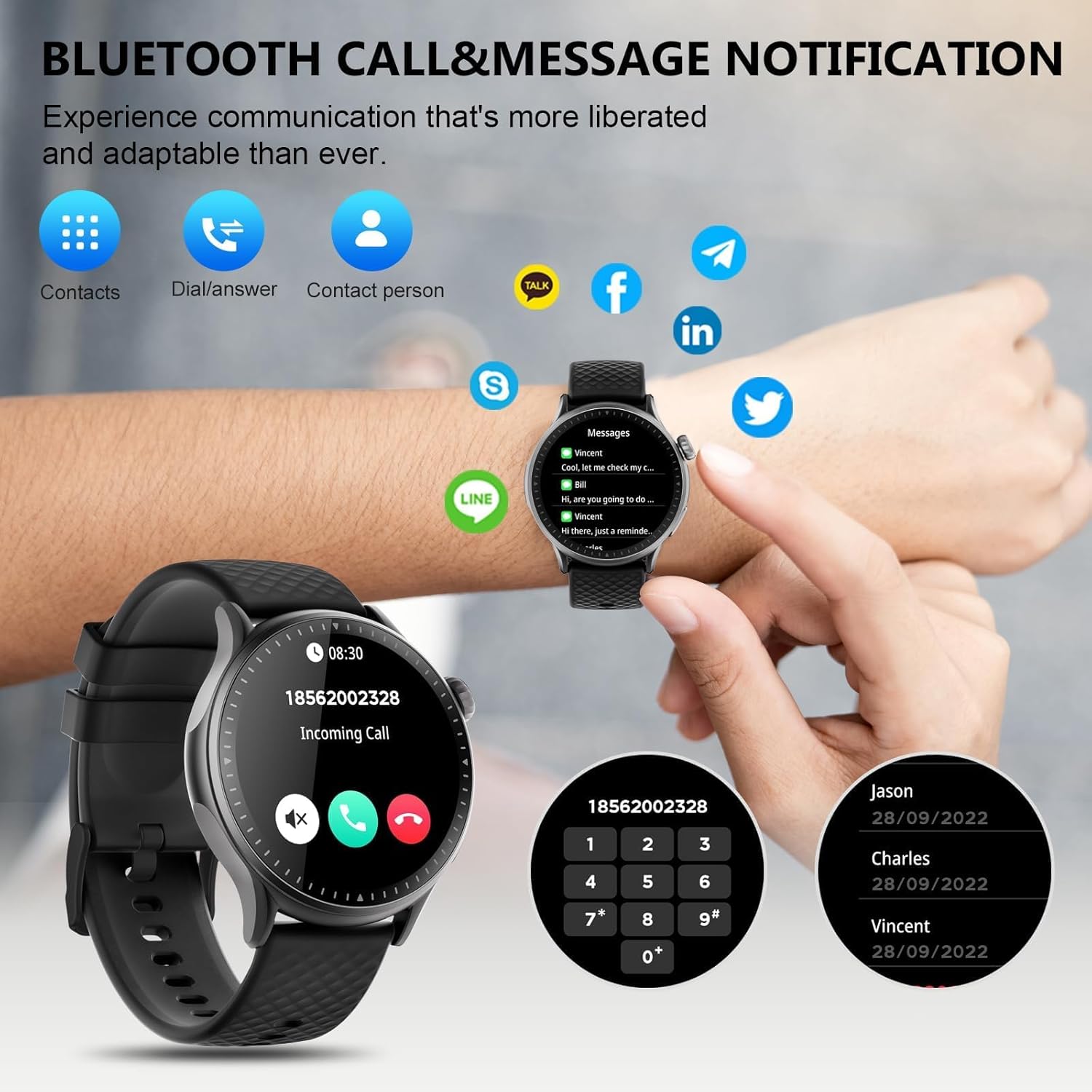
Image: The GTR3 Smart Watch displaying an incoming call and various message notification icons from social media and communication apps.
4.5 ผู้ช่วยเสียง AI
The built-in AI assistant allows for hands-free control. Use voice commands to check the weather, control music playback on your phone, set alarms, and more.

Image: The GTR3 Smart Watch's AI Voice Assistant interface, illustrating how to use voice commands for tasks like checking weather or setting alarms.
4.6 ฟังก์ชั่นเพิ่มเติม
The Cillso GTR3 offers a range of other useful features:
- พยากรณ์อากาศ
- ค้นหาโทรศัพท์
- นาฬิกาจับเวลาและตัวจับเวลา
- เครื่องคิดเลข
- นาฬิกาปลุก
- การควบคุมกล้องจากระยะไกล
- Music Control (for your phone's music player)
- การออกกำลังกายการหายใจ

Image: The GTR3 Smart Watch's app menu, showcasing icons for various functions including Find Phone, Weather, Calculator, Remote Camera Shutter, Breathing Exercises, Women's Health, and Alarm Clock.
4.7 การปรับแต่งหน้าปัดนาฬิกา
Personalize your watch with a variety of watch faces. The "Runmefit" app offers over 200 watch faces to choose from. You can also upload your favorite photos to create custom watch faces.
5. การบำรุงรักษา
5.1 การกันซึม
The Cillso GTR3 has a 3ATM waterproof rating, meaning it is resistant to splashes, rain, and sweat. It is suitable for daily use and can withstand brief immersion in water. However, it is ไม่ recommended for hot showers, saunas, diving, or high-speed water sports, as steam or high water pressure can compromise the seals.
5.2 การทำความสะอาดและการดูแล
เพื่อรักษารูปลักษณ์และฟังก์ชันการทำงานของนาฬิกาของคุณ:
- เช็ดหน้าจอและสายรัดเป็นประจำด้วยผ้าเนื้อนุ่มและแห้งamp ผ้า.
- หลีกเลี่ยงการใช้สารเคมีรุนแรง น้ำยาทำความสะอาดที่มีฤทธิ์กัดกร่อน หรือตัวทำละลาย
- ตรวจสอบให้แน่ใจว่าหน้าสัมผัสการชาร์จสะอาดและแห้งก่อนชาร์จ
- หลีกเลี่ยงการวางนาฬิกาไว้ในอุณหภูมิที่สูงหรือต่ำเกินไปหรือโดนแสงแดดโดยตรงเป็นเวลานาน
5.3 อายุการใช้งานแบตเตอรี่
To maximize battery life, avoid fully discharging the watch frequently. Charge it when the battery level is low, and disconnect it once fully charged.
6 การแก้ไขปัญหา
If you encounter issues with your Cillso GTR3 Smart Watch, refer to the following common problems and solutions:
| ปัญหา | วิธีแก้ปัญหาที่เป็นไปได้ |
|---|---|
| Watch not connecting to phone via Bluetooth. | Ensure Bluetooth is enabled on your phone. Restart both the watch and phone. Make sure the "Runmefit" app is open and running in the background. Check if the watch is already paired with another device. |
| Bluetooth call function not working. | Verify that the watch is connected via Bluetooth in ทั้งคู่ the "Runmefit" app and your phone's native Bluetooth settings (as a separate audio device). |
| Notifications or calls only vibrate, no sound. | Check the sound settings on your watch and in the "Runmefit" app. Ensure the watch's speaker volume is not muted or set too low. Note that the speaker volume may be limited in noisy environments. |
| จำนวนก้าวเดินหรือข้อมูลสุขภาพไม่ถูกต้อง | Ensure the watch is worn snugly on your wrist. Calibrate the watch in the "Runmefit" app if available. Keep the app connected to sync data regularly. |
| ข้อมูลสภาพอากาศไม่ได้รับการอัปเดต | Ensure your phone's location services are enabled and the "Runmefit" app has permission to access your location. The app must be connected and running in the background to sync weather data. |
| Watch disconnects frequently. | Maintain close proximity between your watch and smartphone. Avoid obstacles that may interfere with the Bluetooth signal. Ensure the "Runmefit" app is not being closed by your phone's power-saving features. |
| Cannot customize watch faces. | Ensure the watch is connected to the "Runmefit" app. Follow the app's instructions for selecting or uploading watch faces. Some watches may have limitations on the number of custom faces stored simultaneously. |
7. ข้อมูลจำเพาะ
| คุณสมบัติ | รายละเอียด |
|---|---|
| ชื่อรุ่น | GTR3 |
| ยี่ห้อ | ซิลโซ่ |
| ประเภทจอภาพ | อโมเลด |
| ขนาดหน้าจอ | 1.46 นิ้ว |
| ปณิธาน | 1.46" AMOLED Ultra-HD |
| ระบบปฏิบัติการ | iOS 12.0+ และ Android 7.0+ |
| ความจุของหน่วยความจำ | 128MB |
| เทคโนโลยีการเชื่อมต่อ | บลูทูธ |
| มาตรฐานการสื่อสารไร้สาย | บลูทูธ |
| ความจุของแบตเตอรี่ | 350 mAh (approximate, based on image) |
| อายุการใช้งานแบตเตอรี่โดยเฉลี่ย | Up to 10 days (heavy usage), 45 days (standby) |
| ระดับความต้านทานต่อน้ำ | 3ATM (30 เมตร) |
| เมตริกที่วัด | Heart Rate, Sleep Duration, Blood Oxygen Monitor |
| คุณสมบัติพิเศษ | 24/7 Activity Tracker, Heart Rate Monitor, Sleep Monitor, AI Voice Control, Message Notifications, Answer/Make Call, AMOLED Touchscreen, Cycle Tracking, Alarm Clock, Blood Oxygen Monitor, 110+ Sport Modes, Music Control, Distance Record/Pedometer/Calories, Distance Tracker |
| ประเภทวัสดุของสาย | Silicone, Rubber, or Fluoroelastomer |
| จีพีเอส | GPS ผ่านสมาร์ทโฟน |
| กลุ่มเป้าหมาย | ผู้ใหญ่ทั้งชายและหญิง |
8. ข้อมูลการรับประกัน
The Cillso GTR3 Smart Watch comes with a รับประกันมาตรฐาน 1 ปี นับจากวันที่ซื้อสินค้า การรับประกันนี้ครอบคลุมถึงข้อบกพร่องจากการผลิตและการทำงานผิดปกติภายใต้การใช้งานปกติ ไม่ครอบคลุมถึงความเสียหายที่เกิดจากการใช้งานผิดวิธี อุบัติเหตุ การดัดแปลงโดยไม่ได้รับอนุญาต หรือการไม่ปฏิบัติตามคำแนะนำในคู่มือนี้
โปรดเก็บหลักฐานการซื้อของคุณไว้เพื่อเรียกร้องการรับประกัน
9. การสนับสนุนลูกค้า
For further assistance, technical support, or warranty inquiries, please refer to the contact information provided with your purchase or visit the official Cillso website. Ensure you have your product model (GTR3) and proof of purchase ready when contacting support.