
1. บทนำ
This manual provides detailed instructions for the LAUNCH Creader Elite V3.0 OBD2 Scanner, a professional diagnostic tool designed specifically for Land Rover and Jaguar vehicles. It covers device setup, operational procedures for various diagnostic and service functions, software updates, and troubleshooting tips. Please read this manual thoroughly before operating the device to ensure correct usage and optimal performance.
2. สินค้าหมดview
2.1. อะไรอยู่ในกล่อง
- 1 * เครื่องสแกน OBD2 LAUNCH Creader Elite V3.0 สำหรับ JLR
- 1 * สายเคเบิลวินิจฉัย OBD2
- 1 * คู่มือเริ่มต้นอย่างรวดเร็ว
- 1 * คู่มือผู้ใช้
2.2. คุณสมบัติหลัก
The LAUNCH Creader Elite V3.0 offers a comprehensive suite of features for vehicle diagnostics and maintenance:
- ฮาร์ดแวร์ที่ได้รับการปรับปรุง: Features Android 8.1 operating system, 32GB ROM, 3000mAh battery, and 2.4&5GHz dual-band Wi-Fi for improved performance.
- DoIP Protocol Support: Supports the new DoIP protocol for Land Rover & Jaguar models manufactured after 2017 (requires an adapter).
- การวินิจฉัยระบบอย่างครบถ้วน: Provides in-depth scanning for all available vehicle modules, including engine, transmission, ABS, SRS, and more.
- Bi-Directional Control (Active Test): Allows control of vehicle components and systems for active testing, such as windows, mirrors, wipers, and horn.
- ฟังก์ชันการบริการที่ครอบคลุม: Includes Oil Reset, Electronic Parking Brake (EPB) Reset, Battery Management System (BMS) Reset, Steering Angle Sensor (SAS) Calibration, Injector Coding, Throttle Relearn, Height Calibration, Transmission Adaptation, Crankshaft/Camshaft Relearn, Sunroof Calibration, and more.
- 4-in-1 Live Data Stream: Displays real-time data from multiple sensors simultaneously in a graphical format, with recording and playback capabilities.
- Smart Diagnostic Functions: Features Auto VIN for automatic vehicle identification, DTC Lookup for code explanations, and the ability to generate and share diagnostic reports.
- ฟังก์ชั่น OBD2 ครบครัน: Supports all 10 OBD2 test modes for universal vehicle compatibility (post-1996 models).
- อัปเดตฟรีตลอดอายุการใช้งาน: Provides lifetime free software updates specifically for Land Rover and Jaguar vehicle brands.
2.3. การเปรียบเทียบอุปกรณ์
The Creader Elite V3.0 offers significant upgrades over previous versions:

Image: Comparison of Creader Elite V3.0, V2.0, and V1.0, highlighting V3.0's superior features like DoIP, Android 8.1, 32GB memory, and 2.4&5GHz WiFi.
2.4. คำอธิบายทางกายภาพ
The device features a durable orange casing with a 4-inch touchscreen display. The back of the device includes product identification details such as the model number, FCC ID, and serial number.
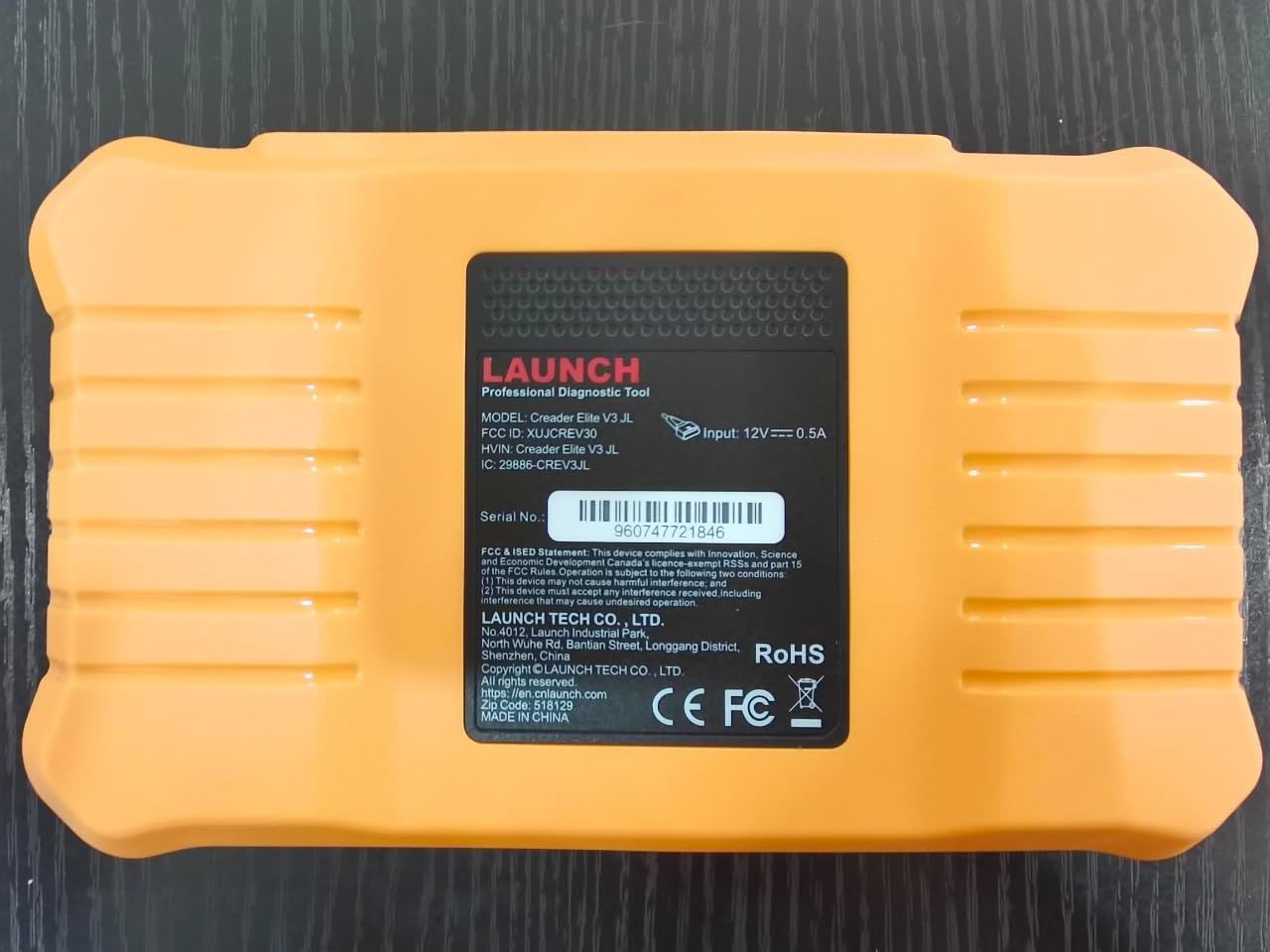
ภาพ: ด้านหลัง view of the LAUNCH Creader Elite V3.0, displaying the model number, FCC ID, and serial number (e.g., 960747721846).
3. การตั้งค่า
3.1. เปิดเครื่องครั้งแรก
- ตรวจสอบให้แน่ใจว่าอุปกรณ์ชาร์จเต็มแล้วหรือเชื่อมต่อกับแหล่งพลังงาน
- กดปุ่มเปิด/ปิดค้างไว้จนกว่าหน้าจอจะสว่างขึ้น
- ทำตามคำแนะนำบนหน้าจอเพื่อเลือกภาษาและภูมิภาคที่คุณต้องการ
3.2 การเชื่อมต่อ Wi-Fi
- จากเมนูหลักไปที่ การตั้งค่า.
- เลือก ไวไฟ และเปิดมันขึ้นมา
- เลือกเครือข่าย Wi-Fi ที่ต้องการจากรายการ และป้อนรหัสผ่านหากระบบถาม
- Confirm the connection. A stable internet connection is required for software updates and online resources.
3.3. การลงทะเบียนและการเปิดใช้งาน
Upon first use or after a factory reset, you may be prompted to register your device. Follow the on-screen instructions to create an account or log in. This step is crucial for accessing software updates and technical support.
4. คู่มือการใช้งาน
4.1 การเชื่อมต่อกับรถยนต์
- Locate the vehicle's OBD2 diagnostic port, typically under the dashboard on the driver's side.
- ตรวจสอบให้แน่ใจว่าสวิตช์กุญแจรถอยู่ในตำแหน่งที่ถูกต้อง ON position (engine off or running, depending on the test).
- Connect the OBD2 diagnostic cable to the vehicle's OBD2 port and to the LAUNCH Creader Elite V3.0 device.
- The device will automatically power on or prompt you to do so.
4.2. Full Systems Diagnostics
This function allows you to scan all available electronic control units (ECUs) in the vehicle.

Image: Display showing OE-level all system diagnostics, including Auto VIN, fault codes, 4-in-1 live data, and MIL reset.
- จากเมนูหลัก เลือก การวินิจฉัยในท้องถิ่น.
- Choose the vehicle brand (Land Rover or Jaguar).
- เลือก ค้นหาอัตโนมัติ or การเลือกด้วยตนเอง. Auto Search (Auto VIN) will attempt to automatically identify the vehicle.
- Once the vehicle is identified, select รายงานสุขภาพ or การสแกนระบบ to perform a comprehensive scan of all modules.
- Review the diagnostic trouble codes (DTCs) and ECU information. You can then choose to clear codes if necessary.
4.3. ฟังก์ชั่นการบริการ
The Creader Elite V3.0 provides numerous maintenance and reset services. Access these functions via Diagnose > Brand > System Selection > Special Function.

ภาพ: เหนือview of various service functions including Oil Reset, Brake Reset, SAS Calibration, Start-Stop Reset, TPMS Reset, Injector Coding, Battery Reset, ABS Bleeding, Seat Calibration, and Height Calibration.
Common services include:
- รีเซ็ตน้ำมัน: รีเซ็ตระบบกำหนดอายุการใช้งานน้ำมันเครื่อง
- รีเซ็ต EPB: Resets the electronic parking brake after replacement.
- การสอบเทียบ SAS: ปรับเทียบเซ็นเซอร์มุมพวงมาลัย
- การเข้ารหัสหัวฉีด: เข้ารหัสหมายเลขหัวฉีดใหม่ลงใน ECU
- การเรียนรู้คันเร่งใหม่: เรียนรู้ตำแหน่งของลิ้นปีกผีเสื้อใหม่
- การสอบเทียบความสูง: Calibrates the vehicle's suspension height.
- รีเซ็ตแบตเตอรี่: Registers a new battery replacement.
- เลือดออกบริเวณ ABS: ดำเนินการตามขั้นตอนการไล่ลมระบบเบรก ABS
Note: The availability of specific service functions may vary depending on the vehicle model and year. Always check compatibility before performing a service.
4.4. การควบคุมแบบสองทิศทาง (การทดสอบเชิงรุก)
Active tests allow you to send commands to vehicle systems and components to verify their functionality.

Image: Depicts bi-directional active tests, showing the device sending commands to vehicle actuators like wipers, windows, clutch, and injectors to check their status.
- Navigate to the desired vehicle system within the diagnostic menu.
- เลือก ทดสอบการใช้งาน or การควบคุมแบบสองทิศทาง.
- Choose the specific component or system you wish to test (e.g., 'Wiper Test', 'Window Test', 'Horn Test').
- ทำตามคำแนะนำบนหน้าจอเพื่อเปิดใช้งานและสังเกตการตอบสนองของส่วนประกอบ
4.5. ฟังก์ชั่น OBD2 ครบถ้วน
For universal vehicle diagnostics (all OBD2 compliant vehicles after 1996), use the OBD II ตัวเลือกเมนู
- อ่านรหัส: Retrieves generic (P0, P2, P3, U0) and manufacturer specific (P1, P3, U1) codes.
- รหัสที่ชัดเจน: Clears diagnostic trouble codes and turns off the Malfunction Indicator Light (MIL).
- ข้อมูลสด: แสดงข้อมูลแบบเรียลไทม์จากเซ็นเซอร์ของรถยนต์
- ความพร้อมของ I/M: ตรวจสอบความพร้อมของอุปกรณ์ตรวจวัดที่เกี่ยวข้องกับการปล่อยมลพิษ
- ตรึงกรอบ: Displays a snapshot of operating conditions at the time of an emission-related fault.
- การทดสอบเซ็นเซอร์ O2: ดึงผลการทดสอบเครื่องตรวจสอบเซนเซอร์ O2
- การทดสอบจอภาพออนบอร์ด (โหมด 6): ดึงผลลัพธ์สำหรับส่วนประกอบและระบบส่งกำลังที่เกี่ยวข้องกับการปล่อยมลพิษ
- การทดสอบระบบ EVAP (โหมด 8): เริ่มดำเนินการทดสอบระบบควบคุมการปล่อยไอระเหย
- ข้อมูลรถ: ดึงข้อมูลหมายเลขประจำตัวรถ (VIN), รหัสการสอบเทียบ (CALID) และหมายเลขการตรวจสอบการสอบเทียบ (CVN)
4.6. Real-Time Monitoring and Data Stream
Monitor various vehicle parameters in real-time to diagnose intermittent issues or verify repairs.

Image: Real-time monitoring screen showing battery voltage, transmission oil temperature, coolant temperature, and vehicle speed, with a detailed 4-in-1 data stream graph below.
- จากเมนูการวินิจฉัย ให้เลือก ข้อมูลสด.
- เลือกพารามิเตอร์ที่คุณต้องการตรวจสอบ
- The device can display up to four data streams simultaneously in a graphical format.
- ใช้ บันทึก และ การเล่นซ้ำ functions to capture and review data for later analysis.
4.7. Smart Diagnostic Features
The device includes features to streamline the diagnostic process:
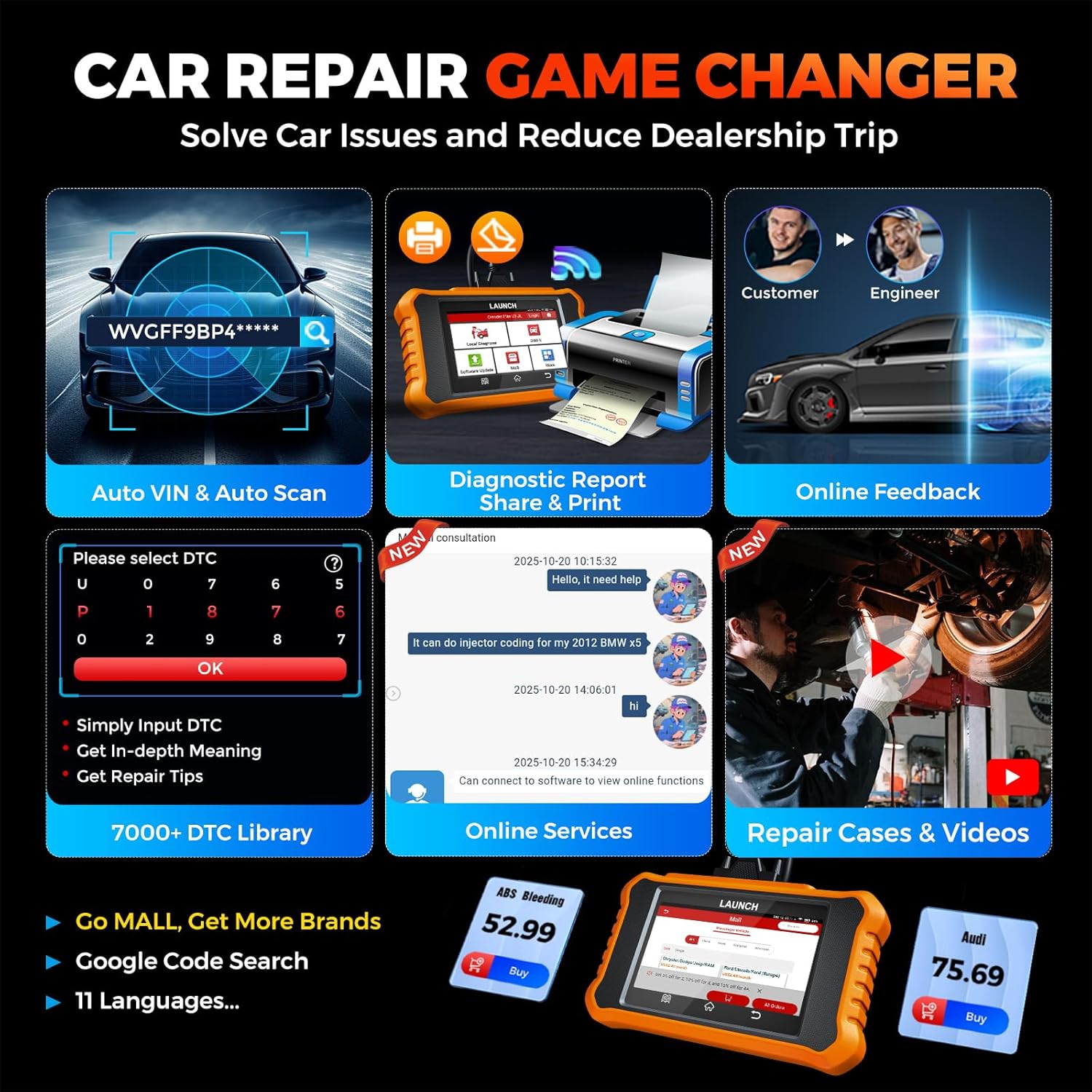
Image: Smart diagnostic features such as Auto VIN, diagnostic report generation and printing, online feedback, 7000+ DTC library, and access to online services.
- หมายเลขตัวถังรถยนต์: Automatically identifies vehicle information (year, make, model) for quicker diagnostics.
- การค้นหา DTC: Provides detailed explanations for diagnostic trouble codes.
- รายงานการวินิจฉัย: Generates a professional diagnostic report that can be shared or printed.
- ข้อเสนอแนะออนไลน์: Allows users to submit feedback or issues directly to technical support.
5. การบำรุงรักษาและการอัปเดต
5.1. การอัปเดตซอฟต์แวร์
The LAUNCH Creader Elite V3.0 offers lifetime free software updates for Land Rover and Jaguar brands.
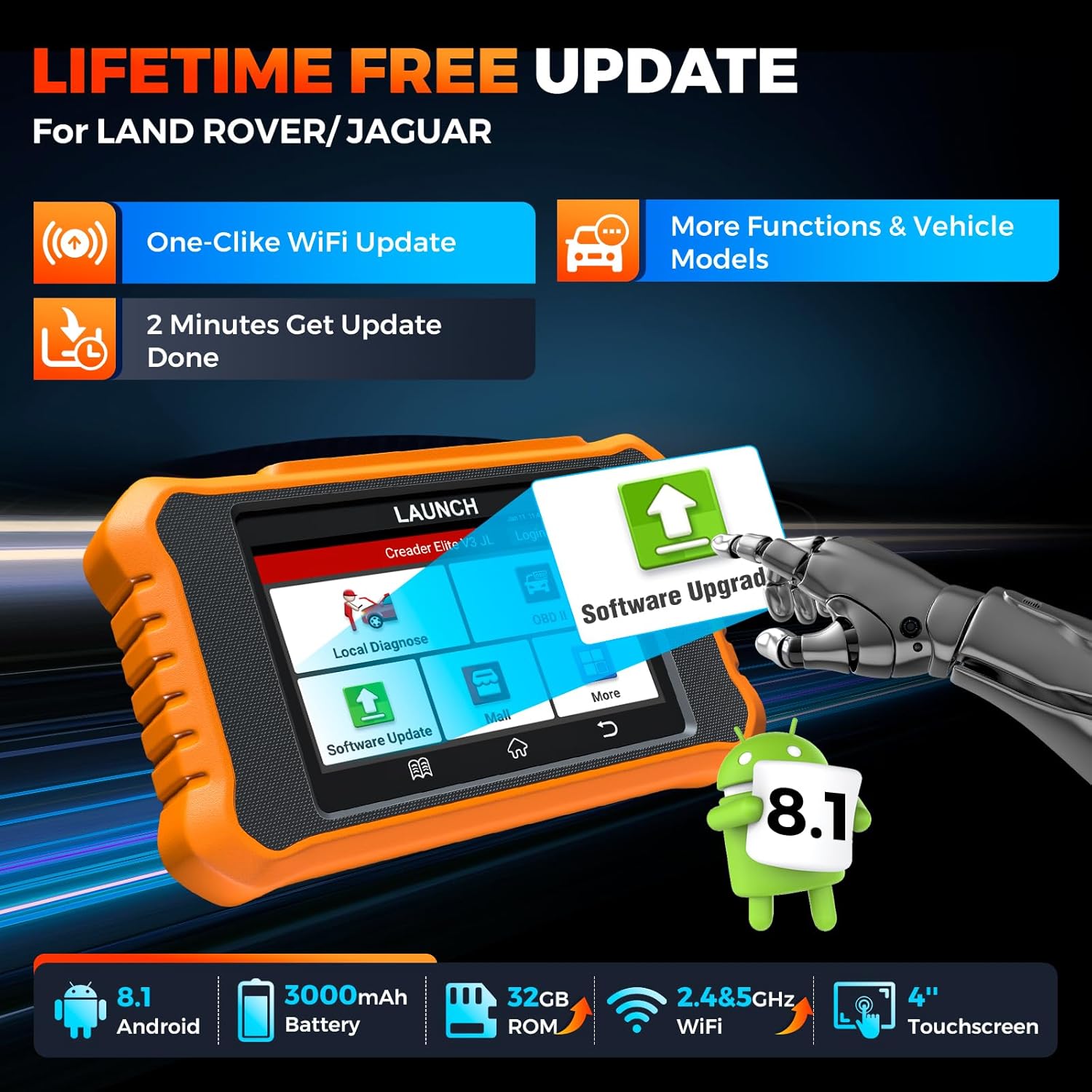
Image: Device screen illustrating the one-click Wi-Fi update process, emphasizing lifetime free updates for Land Rover/Jaguar and the ability to get more functions and vehicle models.
- ตรวจสอบให้แน่ใจว่าอุปกรณ์เชื่อมต่อกับเครือข่าย Wi-Fi ที่เสถียรแล้ว
- จากเมนูหลัก เลือก การอัปเดตซอฟต์แวร์.
- อุปกรณ์จะตรวจสอบการอัปเดตที่มีอยู่
- Select the updates you wish to install and follow the on-screen prompts. Updates typically take a few minutes.
5.2. Expanding Vehicle Coverage (Mall)
If you require diagnostic capabilities for other vehicle brands beyond Land Rover and Jaguar, you can purchase additional software packages from the ห้างสรรพสินค้า application on the device. Please note that software purchased from the Mall is typically valid for one year and may require re-purchase after expiry.
5.3. การดูแลรักษาอุปกรณ์
- รักษาอุปกรณ์ให้สะอาดและปราศจากฝุ่นละอองและความชื้น
- หลีกเลี่ยงการทำอุปกรณ์หล่นหรือกระแทกอย่างรุนแรง
- เก็บอุปกรณ์ไว้ในที่แห้งและเย็นเมื่อไม่ใช้งาน
- ใช้เฉพาะสายชาร์จและอุปกรณ์เสริมที่ให้มาเท่านั้น
6. ความเข้ากันได้
The LAUNCH Creader Elite V3.0 is primarily designed for:

Image: Device interface showing diagnostic options for Land Rover (Defender, Discovery, Range Rover, Evoque) and Jaguar (E-Pace, F-Pace, F-Type, S-Type, X-Type, XE, XF, XJ, XK) models, with a note on DoIP protocol for models after 2017.
- แลนด์โรเวอร์: Compatible with models such as Defender, Discovery, Discovery Sport, Range Rover, Range Rover Evoque, etc.
- จาการ์ : Compatible with models such as E-Pace, F-Pace, F-Type, S-Type, X-Type, XE, XF, XJ, XK, etc.
- DoIP Protocol: Supports Land Rover & Jaguar models after 2017, requiring a separate DoIP adapter.
- Universal OBD2: Fully compatible with all OBD2 compliant vehicles manufactured after 1996 for basic OBD2 functions.
For specific vehicle compatibility, it is recommended to contact technical support via obdbox21@163.com.
7. ข้อมูลจำเพาะ
| แบบอย่าง | LAUNCH Creader Elite 3.0-JL |
| ระบบปฏิบัติการ | แอนดรอยด์ 8.1 |
| ขนาดหน้าจอ | 4 นิ้ว |
| หน่วยความจำภายใน (ROM) | 32GB |
| ความจุของแบตเตอรี่ | 3000mAh |
| ไวไฟ | 2.4 & 5GHz Dual-band |
| แหล่งพลังงาน | ใช้พลังงานจากแบตเตอรี่ |
| น้ำหนักสินค้า | 1.49 ปอนด์ |
| ขนาดแพ็คเกจ | 8 x 7.5 x 1.5 นิ้ว |
| ประเภทความพอดีของยานยนต์ | Universal Fit (for OBD2 functions) |
8 การแก้ไขปัญหา
8.1. อุปกรณ์ไม่เปิดเครื่อง
- Check battery level. Connect the device to a charger and allow it to charge for at least 30 minutes.
- ตรวจสอบให้แน่ใจว่าได้กดปุ่มเปิด/ปิดค้างไว้อย่างถูกต้องแล้ว
- If connected to the vehicle, ensure the vehicle's ignition is on and the OBD2 cable is securely connected.
8.2. ข้อผิดพลาดในการสื่อสารกับยานพาหนะ
- Verify the OBD2 cable is securely connected to both the device and the vehicle's port.
- ตรวจสอบให้แน่ใจว่าสวิตช์กุญแจรถอยู่ในตำแหน่งที่ถูกต้อง ON ตำแหน่ง.
- Confirm that the vehicle is OBD2 compliant (generally 1996 and newer for US vehicles).
- Try a different OBD2 compliant vehicle to rule out a vehicle-specific issue.
- Ensure the correct vehicle brand software is installed and up to date.
8.3. Software Update Failure
- Check your Wi-Fi connection for stability and signal strength.
- Ensure the device has sufficient battery charge or is connected to power during the update process.
- Verify that there is enough free storage space on the device.
- รีสตาร์ทอุปกรณ์แล้วลองทำการอัปเดตอีกครั้ง
8.4. Inaccurate Readings or Functions Not Working
- Ensure the vehicle's make, model, and year are correctly identified by the device.
- Verify that the specific function is supported for your vehicle model and year. Refer to the compatibility section or contact support.
- Ensure the device software is fully updated.
9. การรับประกันและการสนับสนุน
9.1. ข้อมูลการรับประกัน
The LAUNCH Creader Elite V3.0 comes with an Extended 60-Day Return & Replacement policy and a 5-Year Quality Backup. Please retain your proof of purchase for warranty claims.
9.2. การสนับสนุนด้านเทคนิค
For any technical assistance, questions, or compatibility inquiries, please contact our support team:
- อีเมล: obdbox21@163.com
- Our support team is available 24/7/365.
Note: Please direct all support inquiries to the provided email address. Do not contact LAUNCH Tech USA for support related to this specific product.