
1. บทนำ
This manual provides essential information for the safe and efficient operation of your LMYYDES Commercial POS System. Please read this manual thoroughly before using the device and retain it for future reference. This system is designed for various commercial environments, including retail stores, restaurants, cafes, and supermarkets.
1.1 เนื้อหาบรรจุภัณฑ์
เมื่อแกะกล่อง ตรวจสอบว่าสิ่งของทั้งหมดที่ระบุไว้ด้านล่างนี้มีอยู่ครบถ้วนและไม่ได้รับความเสียหาย:
- 1 x LMYYDES Commercial POS System (Main Unit with 15.6-inch Touch Screen and Integrated 58mm Thermal Printer)
- 1 x Handheld Barcode Scanner
- อะแดปเตอร์ไฟ 1 ตัว (12V/5A)
- สายไฟ 1 เส้น
- 1 x Cash Drawer (Five-grid, three-speed lock electric)
- 1 x 101-key Cash Register Keyboard
- 1 x คู่มือผู้ใช้ (เอกสารนี้)
2. ข้อมูลด้านความปลอดภัย
โปรดปฏิบัติตามข้อควรระวังด้านความปลอดภัยต่อไปนี้ เพื่อป้องกันความเสียหายต่ออุปกรณ์ หรือการบาดเจ็บต่อตัวคุณเองและผู้อื่น:
- แหล่งจ่ายไฟ: Use only the provided power adapter and cable. Ensure the voltage matches the system's requirements (110~220V 50~60HZ AC).
- สิ่งแวดล้อม: Operate the system in a stable, dry environment. Avoid exposure to extreme temperatures (storage temperature: 0-60°C), direct sunlight, dust, and moisture.
- การระบายอากาศ : อย่าปิดกั้นช่องระบายอากาศ ตรวจสอบให้แน่ใจว่าอากาศไหลเวียนรอบเครื่องอย่างเพียงพอเพื่อป้องกันความร้อนสูงเกินไป
- การทำความสะอาด: Disconnect power before cleaning. Use a soft, dry cloth. Avoid liquid cleaners directly on the screen or components.
- การจัดการ: โปรดใช้งานด้วยความระมัดระวัง หลีกเลี่ยงการทำตกหรือการกระแทกอย่างแรง
- การบริการ: อย่าพยายามเปิดหรือซ่อมแซมเครื่องด้วยตัวเอง แนะนำให้ช่างผู้ชำนาญเข้ารับบริการทั้งหมด
3. คุณสมบัติของผลิตภัณฑ์
The LMYYDES Commercial POS System is an all-in-one solution designed for efficient point-of-sale operations. Key features include:
- การออกแบบแบบบูรณาการ: Combines a 15.6-inch touch screen, 58mm thermal receipt printer, cash drawer, and barcode scanner into a single compact unit.
- ประสิทธิภาพอันทรงพลัง: Equipped with an i5 processor, 8GB DDR3 RAM, and a 128GB SSD for fast and stable operation, running on Windows 10.
- High-Speed Thermal Printer: Built-in 58mm thermal printer for quick, quiet, and clear receipt printing.
- Adjustable Touch Screen: The 15.6-inch capacitive touch screen offers multi-angle rotation for comfortable viewing and reduced fatigue. It is designed to be waterproof, oilproof, and dustproof.
- การเชื่อมต่อที่กว้างขวาง: Features 6 USB ports, LAN, VGA, serial, and audio ports for connecting various peripherals like scales and customer displays.
- Customer Display: An 8-digit LED customer display provides clear transaction information to customers.
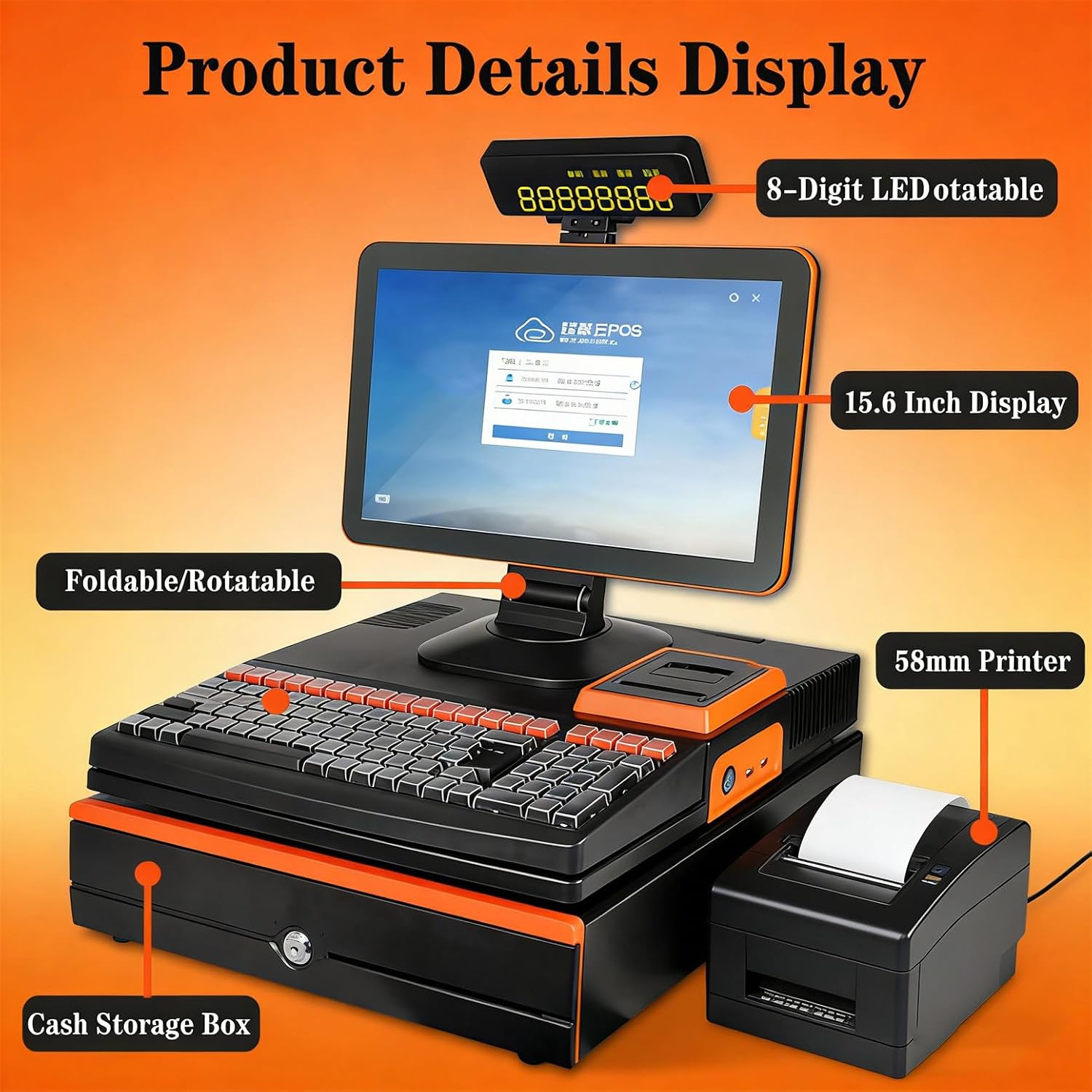
รูปที่ 3.1: เกินview of the LMYYDES Commercial POS System components, including the 15.6-inch display, 8-digit LED customer display, 58mm printer, and cash storage box.

รูปที่ 3.2: The 15.6-inch main screen is designed to be waterproof, oilproof, and dustproof, featuring an A+ grade LED panel for high brightness and durability.
4. การตั้งค่า
4.1 การแกะและการจัดวาง
- นำส่วนประกอบทั้งหมดออกจากบรรจุภัณฑ์อย่างระมัดระวัง
- Place the main POS unit on a stable, flat surface with adequate space for ventilation.
- Ensure the cash drawer is positioned securely.
4.2 การต่อสายไฟ
- Connect the power adapter to the DC 12V/5A input port on the rear of the POS system.
- เสียบสายไฟเข้ากับเต้ารับไฟฟ้าที่มีสายดิน
4.3 การเชื่อมต่ออุปกรณ์ต่อพ่วง
- เครื่องสแกนบาร์โค้ด: Connect the handheld scanner to an available USB port.
- แป้นพิมพ์: Connect the 101-key cash register keyboard to an available USB port.
- เครือข่าย: For wired internet, connect an Ethernet cable to the LAN port. The system also supports Wi-Fi.
- จอแสดงผลภายนอก (ตัวเลือก): If using a secondary VGA display, connect it to the VGA port.
4.4 Initial Power-On and Screen Adjustment
- Press the power button, usually located on the side or front of the main unit.
- The system will boot into Windows 10. Follow any on-screen prompts for initial setup.
- Adjust the main screen to your preferred viewing angle. The screen supports multi-angle rotation for ergonomic use.
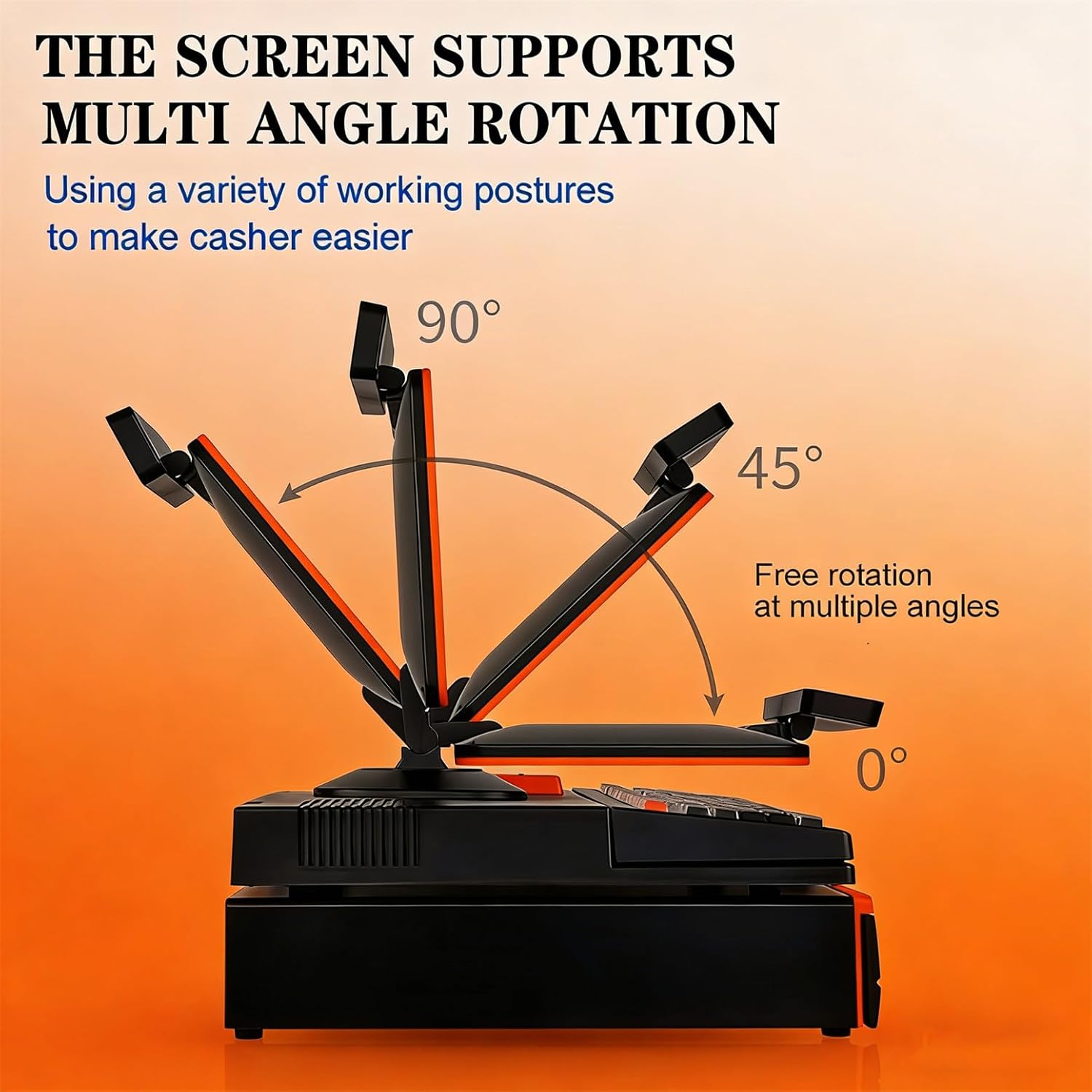
รูปที่ 4.1: The main display screen can be freely rotated and adjusted to various angles (0°, 45°, 90°) to optimize viewing comfort for the user.
5. คู่มือการใช้งาน
5.1 เปิด/ปิดเครื่อง
- เปิดเครื่อง: Press the power button once. The system will start.
- หมดแรง: To shut down, use the Windows 10 'Shut down' option from the Start Menu. Avoid direct power-off unless necessary to prevent data loss.
5.2 การใช้งานหน้าจอสัมผัส
The 15.6-inch capacitive touch screen functions like a standard Windows touch interface. Use your finger for navigation, selection, and input. Ensure your hands are clean and dry for optimal responsiveness.
5.3 Using the Integrated 58mm Thermal Printer
The built-in thermal printer is designed for quick receipt generation.
- Ensure thermal paper is loaded correctly (refer to Maintenance section for paper loading).
- Initiate printing from your POS software. The printer will automatically print the receipt.

รูปที่ 5.1: The integrated 58mm thermal printer provides simple operation and quick, clear paper output for receipts.
5.4 Cash Drawer Operation
The electric cash drawer is typically controlled by your POS software.
- The cash drawer will automatically open upon completing a transaction or when manually triggered by the POS software.
- To manually open the cash drawer in case of power failure or software issue, use the key provided.

รูปที่ 5.2: รายละเอียด view of the cash storage box, featuring a panel curve design, plastic banknote holders, a safety lock, and a super long check slot for efficient space utilization.
5.5 Using the Handheld Barcode Scanner
The included handheld barcode scanner connects via USB and is plug-and-play.
- Ensure the scanner is connected to a USB port.
- Point the scanner at a barcode and press the trigger button. The scanned data will appear in the active input field of your POS software.
5.6 Customer Display (8-Digit LED)
The 8-digit LED customer display shows transaction totals and change to the customer.
- The display automatically updates with relevant information as transactions proceed.
- The display can be rotated 360 degrees for optimal visibility.

รูปที่ 5.3: The LED8N customer display provides clear, convenient, and practical information to customers, with a 360-degree flip capability for flexible viewการไอเอ็นจี
6. การบำรุงรักษา
6.1 การทำความสะอาด
- หน้าจอ: ใช้ผ้านุ่มไม่เป็นขุยเช็ดเล็กน้อยampened with water or a screen-specific cleaning solution. Do not spray liquid directly onto the screen.
- ภายนอก: Wipe the exterior surfaces with a soft, dry cloth. Avoid abrasive cleaners or solvents.
- เครื่องพิมพ์: Periodically clean the thermal print head with a specialized thermal printer cleaning pen or isopropyl alcohol on a cotton swab. Ensure the printer is off and cooled before cleaning.
6.2 Replacing Printer Paper
- Open the printer cover by pressing the release latch.
- Remove the old paper roll core, if any.
- Insert a new 58mm thermal paper roll, ensuring the paper feeds from the bottom of the roll towards the front.
- Pull a small amount of paper out past the cutting edge.
- Close the printer cover firmly until it latches.
7 การแก้ไขปัญหา
If you encounter issues with your POS system, refer to the following common problems and solutions:
| ปัญหา | สาเหตุที่เป็นไปได้ | สารละลาย |
|---|---|---|
| ระบบเปิดไม่ติด | Power cable loose; Power adapter faulty; Power outlet issue | Check power cable connections; Try a different power outlet; Contact support if adapter is suspected faulty. |
| เครื่องพิมพ์ไม่พิมพ์ | No paper; Paper loaded incorrectly; Printer driver issue; Printer cover not closed | Replace paper roll; Re-load paper correctly; Ensure printer cover is latched; Check printer settings in Windows. |
| หน้าจอสัมผัสไม่ตอบสนอง | Software freeze; Calibration issue; Physical damage | Restart the system; Re-calibrate touch screen (if option available in Windows); Contact support. |
| Barcode scanner not working | USB connection loose; Scanner faulty; Driver issue | Ensure scanner is firmly connected to a USB port; Try a different USB port; Restart system. |
| ลิ้นชักเก็บเงินเปิดไม่ได้ | Software command issue; Cable connection loose; Lock mechanism jammed | Check POS software settings; Ensure cash drawer cable is connected; Use manual key if necessary; Contact support. |
8. ข้อมูลจำเพาะ
Detailed technical specifications for the LMYYDES Commercial POS System:
| คุณสมบัติ | ข้อมูลจำเพาะ |
|---|---|
| ชื่อสินค้า | Intelligent Touch Cashier All-in-One Machine |
| หมายเลขรุ่น | asdfwe-1000180 |
| โปรเซสเซอร์ | i5 (Quad-core, Optional Core i3/Core i7) |
| แรม | 8GB DDR3 (Optional 4GB) |
| ฮาร์ดไดรฟ์ | 128GB SSD (Optional 64GB/256GB/512GB) |
| ระบบปฏิบัติการ | วินโดวส์ 10 |
| หน้าจอหลัก | 15.6-inch LCD, Capacitive Touchscreen |
| ความละเอียดหน้าจอหลัก | 1366*768 (Optional 1920*1080) |
| Secondary Screen (Customer Display) | 8-digit LED digital display |
| เครื่องพิมพ์ | Built-in 58mm Thermal Printer |
| กล่องใส่เงิน | Five-grid, three-speed lock electric cash box |
| แป้นพิมพ์ | 101-key Cash Register Keyboard |
| ลำโพง | 3W |
| เครือข่าย | อีเธอร์เน็ต / อินเตอร์เน็ตไร้สาย |
| พอร์ตเชื่อมต่อ | 6 x USB, 1 x LAN, 1 x VGA, Serial, Audio |
| อุณหภูมิในการจัดเก็บ | 0-60 องศาเซลเซียส |
| ปฏิบัติการฉบับที่tage | 110~220V 50~60HZ AC, DC12V/5A |
| น้ำหนักสินค้า | 29.3 ปอนด์ (ประมาณ 13.3 กก.) |
| ขนาดแพ็คเกจ | 3.94 x 3.94 x 3.94 นิ้ว (ประมาณ 10 x 10 x 10 ซม.) |

รูปที่ 8.1: Physical dimensions of the LMYYDES Commercial POS System, showing measurements for height, width, and depth of the main unit and cash drawer.
9. การรับประกันและการสนับสนุน
Your LMYYDES Commercial POS System comes with a standard manufacturer's warranty. Please refer to the warranty card included in your package for specific terms and conditions, including warranty duration and coverage details.
9.1 การสนับสนุนด้านเทคนิค
For technical assistance, troubleshooting beyond this manual, or warranty claims, please contact LMYYDES customer support. Contact information can typically be found on the product packaging, the official LMYYDES webเว็บไซต์ หรือเอกสารการสั่งซื้อของคุณ