
1. บทนำ
The GEEVON-LINK GL-25TH08 is a smart WiFi and Bluetooth-enabled indoor hygrometer thermometer designed to monitor temperature and humidity levels in your environment. It features a large E-Ink display, smart app connectivity for remote monitoring and alerts, and data storage capabilities. This manual provides essential information for setting up, operating, and maintaining your device.
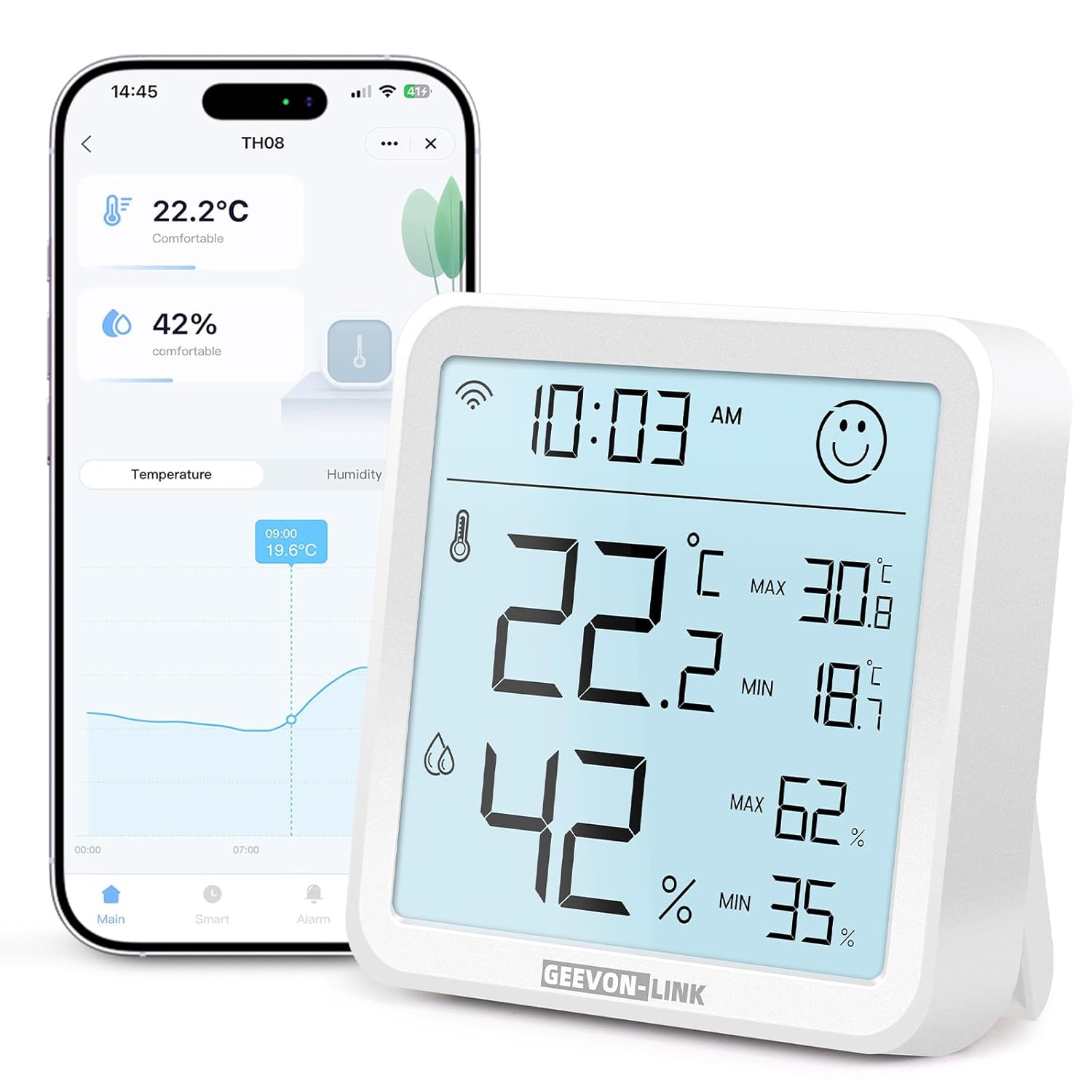
Image: GEEVON-LINK GL-25TH08 WiFi Indoor Hygrometer Thermometer, front view showing the large digital display.
2. คุณสมบัติของผลิตภัณฑ์
- Dual Wi-Fi & Bluetooth Connectivity: Connects to 2.4GHz Wi-Fi for remote monitoring and Bluetooth for local data access via the Smart Life app.
- ความแม่นยำสูง: Provides temperature accuracy of ±1°C (±1.8°F) and humidity accuracy of ±5% RH.
- Large Backlit E-Ink Display: A 3.2-inch screen with an ultra-wide viewing angle for clear readability. Backlight activates for 8 seconds with a top touch button press.
- Smart Alerts & Automated Control: Receive instant app alerts for high/low temperature, humidity, and low battery. Integrates with Alexa and Google Home for voice control and automated scene creation.
- Long-Term Data Storage & Export: View historical data trends (hour, day, month, year) and export records for up to one year via the app.
- ไอคอนแสดงระดับความสบายบนใบหน้า: Displays a happy face for comfortable conditions (18°C-28°C / 64.4°F-82.4°F and 40%-65% RH) and an unhappy face when conditions are outside this range.
- แบตเตอรี่ใช้งานได้ยาวนาน: Energy-efficient design powered by 3 AAA batteries (included), with in-app low battery alerts.

Image: Close-up of the GEEVON-LINK GL-25TH08 display showing temperature, humidity, time, comfort indicator, and max/min records.
3. คำแนะนำในการตั้งค่า
3.1. การติดตั้งแบตเตอรี่
- Open the rear battery cover of the device.
- Remove any battery insulation sheet if present.
- Insert 3 new AAA alkaline batteries into the battery compartment, ensuring correct polarity.
- ปิดฝาครอบแบตเตอรี่ให้แน่น

Video: This video demonstrates the physical features of the GEEVON-LINK WiFi Thermometer Hygrometer, including how to open the battery compartment and insert batteries.
3.2. App Installation & Device Pairing
- ดาวน์โหลด ชีวิตที่ชาญฉลาด app from your smartphone's app store (Google Play Store or Apple App Store). You can also scan the QR code provided in the product packaging.
- ลงทะเบียนบัญชีใหม่หรือเข้าสู่ระบบหากคุณมีบัญชีอยู่แล้ว
- Ensure the device's Wi-Fi icon is flashing. If not, press and hold the reset button (usually a small pinhole on the back or side) for 5 seconds until it flashes.
- In the Smart Life app, tap the "+" icon in the top-right corner or select "Add Device" to begin searching for devices.
- Enable phone Bluetooth as prompted by the app.
- Select your device from the list and follow the on-screen prompts to complete pairing.

Image: Step-by-step guide for installing the Smart Life app, inserting batteries, checking the Wi-Fi indicator, and pairing the device.
3.3 การเชื่อมต่อ Wi-Fi
During the pairing process, you will be prompted to enter your Wi-Fi network details. The device supports 2.4GHz Wi-Fi networks only (5GHz is not supported). Ensure your smartphone is connected to a 2.4GHz network during setup.
4. คู่มือการใช้งาน
4.1. แสดงผลทับview
The large E-Ink display shows current temperature, humidity, time, and max/min records. A comfort icon (happy/unhappy face) indicates the environmental comfort level. Press the top touch button to activate the backlight for 8 seconds in low-light conditions.

Image: The GEEVON-LINK GL-25TH08 display with its backlight activated, showing clear visibility in a dim environment.
4.2. ตัวบ่งชี้ความสะดวกสบาย
The device features a face icon to visually represent comfort levels:
- ใบหน้ายิ้มแย้ม: Temperature between 18°C-28°C (64.4°F-82.4°F) and humidity between 40%-65% RH.
- Unhappy Face: Conditions are outside the comfortable range.
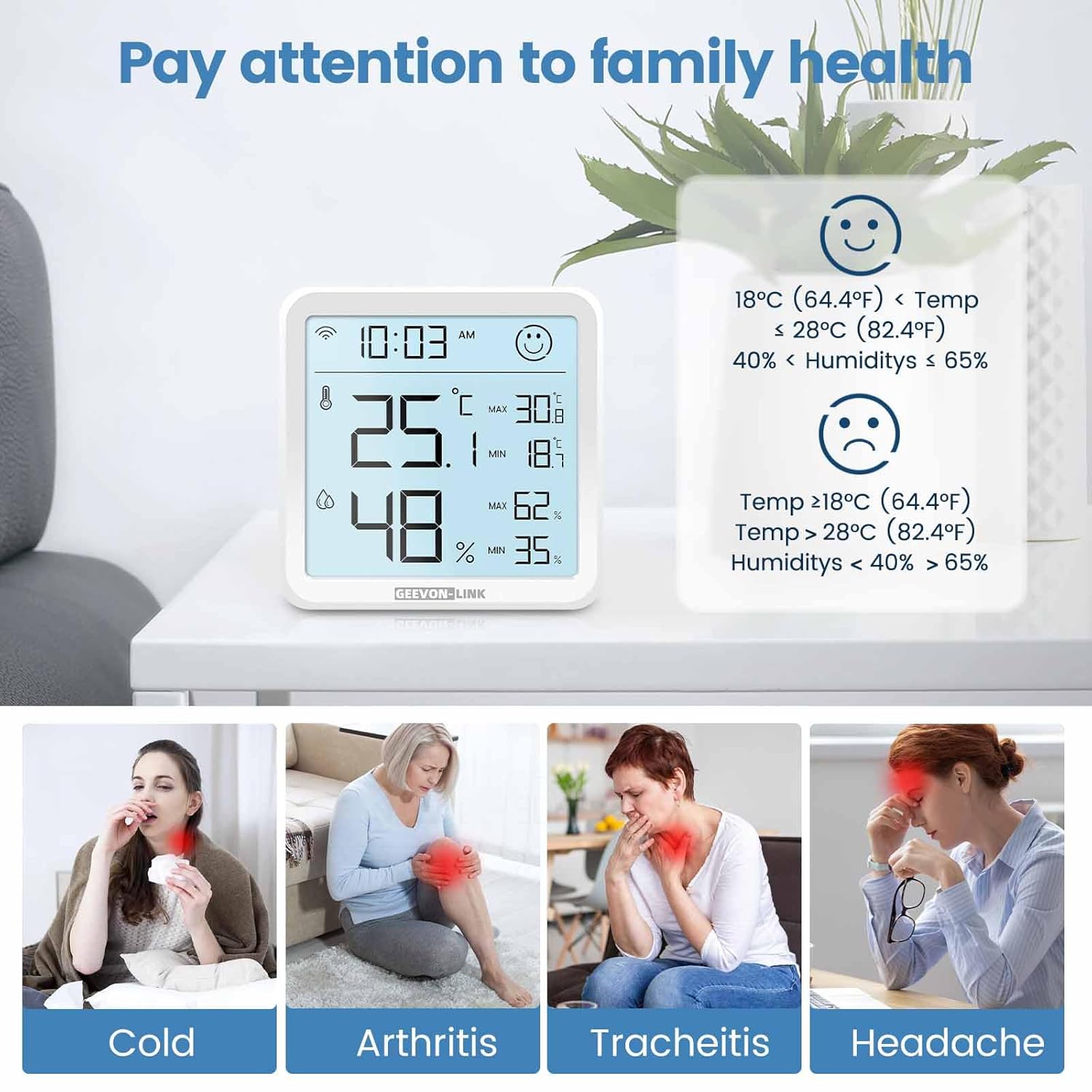
Image: The GEEVON-LINK GL-25TH08 display showing the comfort indicator face icon, with examples of temperature and humidity ranges for happy and unhappy faces.
4.3. App Monitoring & Data Export
เมื่อเชื่อมต่อกับแอป Smart Life แล้ว คุณสามารถทำสิ่งต่อไปนี้ได้:
- View current temperature and humidity readings remotely.
- Access historical data graphs by hour, day, month, or year.
- Export up to one year of data records by tapping the share icon in the top-right corner of the data screen and entering your email address.
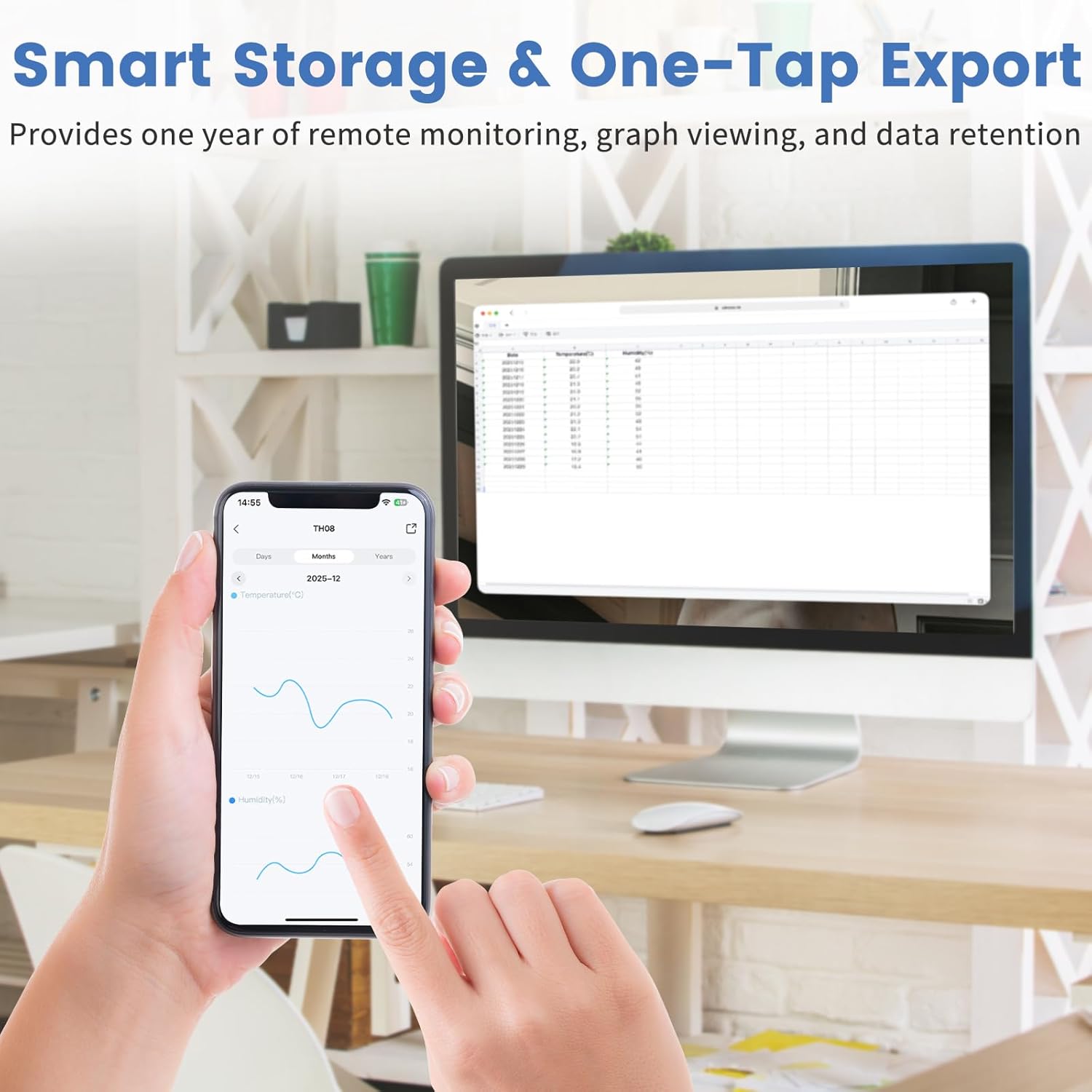
Image: A smartphone displaying the Smart Life app interface with temperature and humidity graphs, demonstrating the data storage and export function.
4.4. Smart Alerts & Automation
Configure custom alerts and smart scenes through the Smart Life app:
- Set upper and lower limits for temperature and humidity to receive instant app, phone, or SMS notifications.
- Integrate with Alexa or Google Home to create automated scenes, such as turning on an AC or dehumidifier when specific conditions are met.
- Use voice commands (e.g., "Alexa, what's the temperature in the living room?") to get current readings.

Image: Screenshots of the Smart Life app demonstrating real-time notifications for temperature and humidity, and options for smart device linkage.

Image: A person interacting with a smart speaker, illustrating the device's compatibility with Alexa and Google Home for voice control.
Video: A detailed "How to Use" guide demonstrating app setup, alarm functions, and settings for the GEEVON-LINK WiFi Thermometer Hygrometer.
4.5. การสอบเทียบ
The Smart Life app allows for temperature and humidity calibration to ensure accuracy. Navigate to the device settings within the app to adjust calibration values if needed. These settings will take effect the next time the device wakes up.
4.6. ตัวเลือกการจัดวาง
The device can be placed on a flat surface using its integrated bracket or mounted on a wall using the keyhole slot on the back. Ensure placement in a location that provides accurate readings for the desired area, away from direct sunlight, heat sources, or drafts.

Image: The GEEVON-LINK GL-25TH08 device shown with its adjustable stand extended and retracted, illustrating flexible placement options.
5. ข้อมูลจำเพาะ
| คุณสมบัติ | รายละเอียด |
|---|---|
| ยี่ห้อ | GEEVON-LINK |
| ชื่อรุ่น | GL-25TH08-1-WH-WUS |
| สี | สีขาว |
| วัสดุภายนอก | พลาสติก |
| แหล่งพลังงาน | ใช้พลังงานจากแบตเตอรี่ (รวมแบตเตอรี่ AAA 3 ก้อน) |
| ความยาวสินค้า | 3.2 นิ้ว |
| น้ำหนักสินค้า | 3.68 ออนซ์ |
| ช่วงอุณหภูมิ | -9.9°C ถึง 60°C |
| ความแม่นยำของอุณหภูมิ | ±1 องศาเซลเซียส (±1.8 องศาฟาเรนไฮต์) |
| ช่วงความชื้น | ความชื้นสัมพัทธ์ 0%-99% |
| ความแม่นยำของความชื้น | ±5%ความชื้นสัมพัทธ์ |
| ความถี่ไวไฟ | 2.4GHz (ไม่รองรับ 5GHz) |
6. การบำรุงรักษา
- การทำความสะอาด: เช็ดอุปกรณ์ด้วยผ้าแห้งเนื้อนุ่ม ห้ามใช้น้ำยาทำความสะอาดหรือวัสดุที่มีฤทธิ์กัดกร่อน
- การเปลี่ยนแบตเตอรี่: Replace all three AAA batteries when the low battery alert is received in the app or indicated on the device display.
- พื้นที่จัดเก็บ: หากเก็บรักษาอุปกรณ์เป็นเวลานาน ควรถอดแบตเตอรี่ออกเพื่อป้องกันการรั่วไหล เก็บไว้ในที่แห้งและเย็น
7 การแก้ไขปัญหา
- อุปกรณ์ไม่เปิด: ตรวจสอบการติดตั้งแบตเตอรี่และให้แน่ใจว่าแบตเตอรี่ใหม่และใส่เข้าไปอย่างถูกต้อง
- ไม่สามารถเชื่อมต่อกับ Wi-Fi:
- ตรวจสอบให้แน่ใจว่าเครือข่าย Wi-Fi ของคุณเป็น 2.4GHz อุปกรณ์นี้ไม่รองรับเครือข่าย 5GHz
- ตรวจสอบว่ารหัสผ่าน Wi-Fi ของคุณถูกต้อง
- ย้ายอุปกรณ์ให้ใกล้กับเราเตอร์ Wi-Fi มากขึ้น
- Reset the device by holding the reset button for 5 seconds and try pairing again.
- การอ่านค่าที่ไม่ถูกต้อง:
- Ensure the device is not placed near heat sources, direct sunlight, or strong drafts.
- Perform temperature and humidity calibration via the Smart Life app settings.
- App alerts not received:
- Check your phone's notification settings for the Smart Life app.
- Verify that alert thresholds are correctly set in the app.
- ตรวจสอบให้แน่ใจว่าอุปกรณ์มีการเชื่อมต่อ Wi-Fi ที่เสถียร
8. การรับประกันและการสนับสนุน
GEEVON-LINK products are designed for reliability and performance. For warranty information, technical support, or service inquiries, please refer to the contact information provided in your product packaging or visit the official GEEVON-LINK webไซต์ โปรดเก็บใบเสร็จรับเงินไว้เป็นหลักฐานการซื้อสำหรับการเรียกร้องการรับประกัน