
การแนะนำ
This manual provides essential information for the proper installation, operation, and maintenance of the Generic Raytools BW101-GS Laser Welding Head Accessory, specifically the switch button component. Adhering to these instructions will ensure safe and efficient use of the product and help prolong its lifespan.
Please read this manual thoroughly before attempting any installation or operation.
สินค้าเกินview
The switch button is a critical component designed for integration with the Raytools BW101-GS Laser Welding Head. It facilitates the control of specific functions, typically power activation or mode selection, within the laser welding system. This accessory is engineered for durability and reliable performance in industrial metalworking environments.
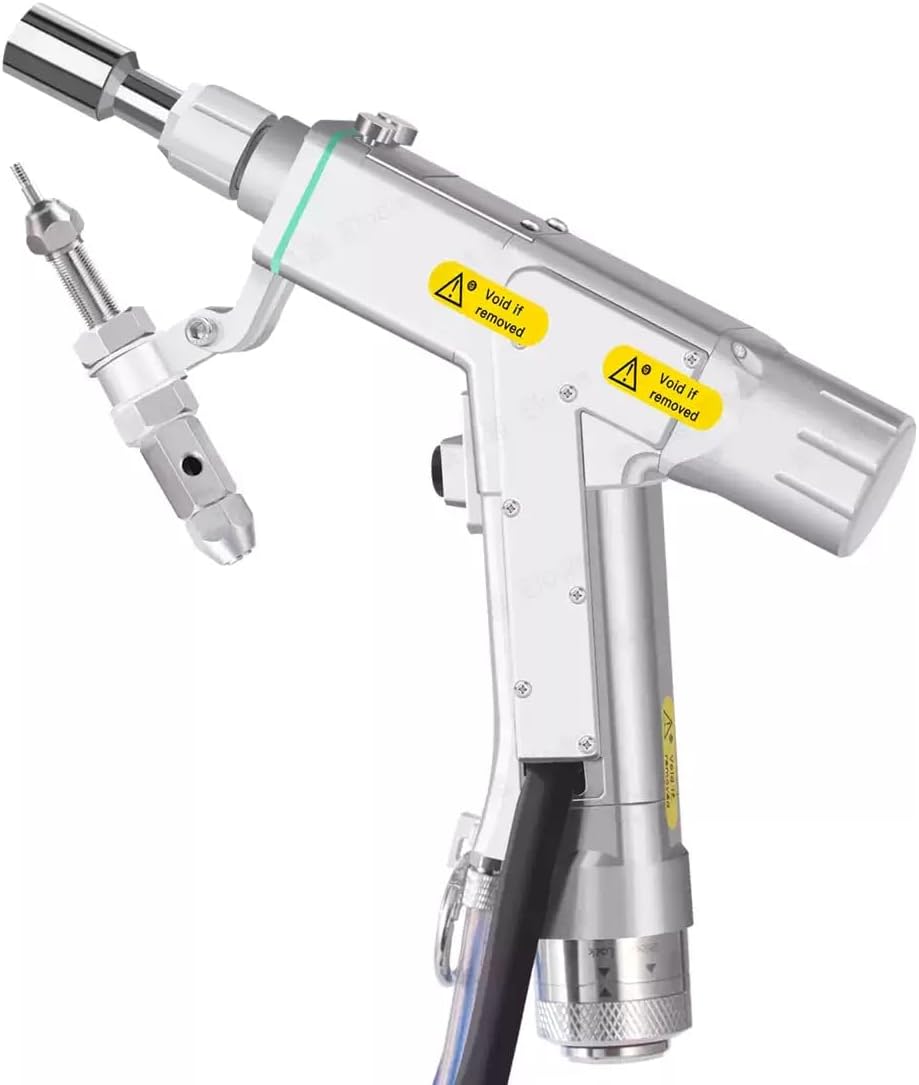
Image: Raytools BW101-GS Laser Welding Head. This image shows the complete laser welding head, illustrating the context in which the switch button accessory is used.
Key features of the switch button include:
- การควบคุมที่แม่นยำ: Designed for accurate activation and deactivation of functions.
- โครงสร้างทนทาน: Built to withstand the demands of industrial use.
- ความเข้ากันได้: Specifically designed for the Raytools BW101-GS series.
การติดตั้งและการตั้งค่า
Proper installation of the switch button is crucial for its functionality and the overall safety of the laser welding system. Consult the main Raytools BW101-GS Laser Welding Head manual for specific wiring diagrams and mounting locations.
ขั้นตอนการติดตั้ง:
- การตัดการเชื่อมต่อไฟฟ้า: Ensure the entire laser welding system is powered off and disconnected from the main power supply before beginning installation.
- ระบุตำแหน่งการติดตั้ง: Locate the designated mounting point for the switch button on the Raytools BW101-GS Laser Welding Head or control panel.
- การเชื่อมต่อสายไฟ: Carefully connect the wires from the switch button to the corresponding terminals on the welding head's control board. Refer to the wiring diagram provided with your main welding head unit. Typically, red indicates positive (+) and black indicates negative (-) or ground.
- การติดตั้งที่ปลอดภัย: Mount the switch button securely using appropriate fasteners (not included, typically part of the main unit's design). Ensure it is firmly in place to prevent accidental dislodgement during operation.
- ตรวจสอบการเชื่อมต่อ: Double-check all wiring connections for correctness and ensure no loose wires are present.
- การประกอบระบบใหม่: Reassemble any covers or panels removed during installation.
- การเพิ่มพลังเริ่มต้น: Reconnect the main power supply and power on the system. Observe for any unusual behavior or error indicators.
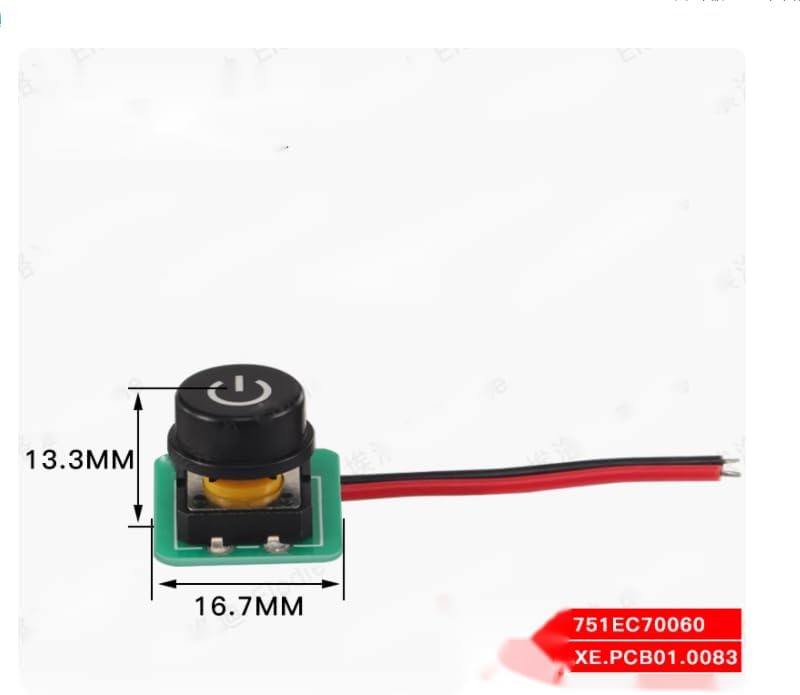
Image: Switch button component with dimensions (13.3mm height, 16.7mm width). This image provides a visual reference for the physical size and appearance of the switch button.
คำแนะนำการใช้งาน
The switch button provides a straightforward interface for controlling specific functions of the Raytools BW101-GS Laser Welding Head. Its operation is typically intuitive.
การใช้งานพื้นฐาน:
- เปิด/ปิดเครื่อง: If configured as a power switch, press the button once to activate the system or a specific function. Press it again to deactivate.
- การเลือกโหมด: If configured for mode selection, pressing the button may cycle through different operating modes (e.g., continuous weld, pulse weld). Refer to your main welding head manual for specific mode functionalities.
- ไฟแสดงสถานะ: Some switch buttons may include an integrated LED indicator. Observe its behavior (e.g., solid light for active, blinking for standby) as per your system's documentation.
Always refer to the comprehensive operating manual for the Raytools BW101-GS Laser Welding Head for detailed instructions on system-specific functions controlled by this switch.
การซ่อมบำรุง
The switch button requires minimal maintenance. Regular inspection and cleaning will help ensure its longevity and reliable performance.
แนวทางการบำรุงรักษา:
- การทำความสะอาด: Periodically clean the surface of the switch button with a soft, dry cloth. If necessary, a slightly damp สามารถใช้ผ้าชุบสบู่เหลวอ่อนๆ เช็ดทำความสะอาดได้ โดยระวังอย่าให้ของเหลวเข้าไปในส่วนประกอบภายใน หลีกเลี่ยงน้ำยาทำความสะอาดที่มีฤทธิ์กัดกร่อนหรือตัวทำละลาย
- การตรวจสอบ: Regularly inspect the button for any signs of physical damage, wear, or loose connections. Check the wiring for fraying or damage.
- สภาพแวดล้อม : Ensure the operating environment is free from excessive dust, moisture, and corrosive substances, which can degrade the switch's performance over time.
- พื้นที่จัดเก็บ: When not in use for extended periods, store the welding head and its accessories in a clean, dry environment.
Do not attempt to disassemble the switch button. Internal repairs should only be performed by qualified technicians.
การแก้ไขปัญหา
If you encounter issues with the switch button, perform the following basic troubleshooting steps before seeking professional assistance.
| ปัญหา | สาเหตุที่เป็นไปได้ | สารละลาย |
|---|---|---|
| Switch button unresponsive. | สายไฟหลวมหรือหลุด Faulty switch button. Power supply issue to the main unit. | ตรวจสอบการเชื่อมต่อสายไฟทั้งหมดเพื่อให้แน่ใจว่าแน่นหนาดีแล้ว Test the switch button with a multimeter if possible (only by qualified personnel). Verify the main laser welding head is receiving power. |
| ไฟแสดงสถานะไม่ทำงาน | ไฟ LED ชำรุด สายไฟไม่ถูกต้อง ระบบไม่ได้เปิดใช้งาน | Confirm the switch button's function is active. Re-check wiring according to the main unit's diagram. Ensure the main laser welding head is powered on. |
| Intermittent functionality. | Loose internal connection. การปนเปื้อน | Ensure the button is securely mounted. ทำความสะอาดพื้นผิวปุ่มและบริเวณรอบๆ |
If these steps do not resolve the issue, contact your supplier or a qualified service technician.
ข้อมูลจำเพาะ
The following specifications apply to the Raytools BW101-GS Laser Welding Head Accessory - Switch Button:
| คุณสมบัติ | รายละเอียด |
|---|---|
| หมายเลขรุ่น | BW101-GS (Accessory Component) |
| ประเภทส่วนประกอบ | ปุ่มสวิตซ์ |
| ความเข้ากันได้ | Raytools BW101-GS Laser Welding Head |
| ขนาด (โดยประมาณ) | Height: 13.3 mm, Width: 16.7 mm (Refer to image for visual representation) |
| ผู้ผลิต | CHINA (as per product data) |
การรับประกันและการสนับสนุน
For warranty information and technical support regarding this Raytools BW101-GS Laser Welding Head Accessory (switch button), please contact the original seller or distributor from whom the product was purchased. Keep your purchase receipt or proof of purchase for warranty claims.
Specific warranty terms and conditions may vary depending on the region and seller policies.