
1. บทนำ
The Amazfit Active Max Smart Watch is designed to assist with fitness tracking, health monitoring, and smart notifications. This manual provides essential information for setting up, operating, and maintaining your device.
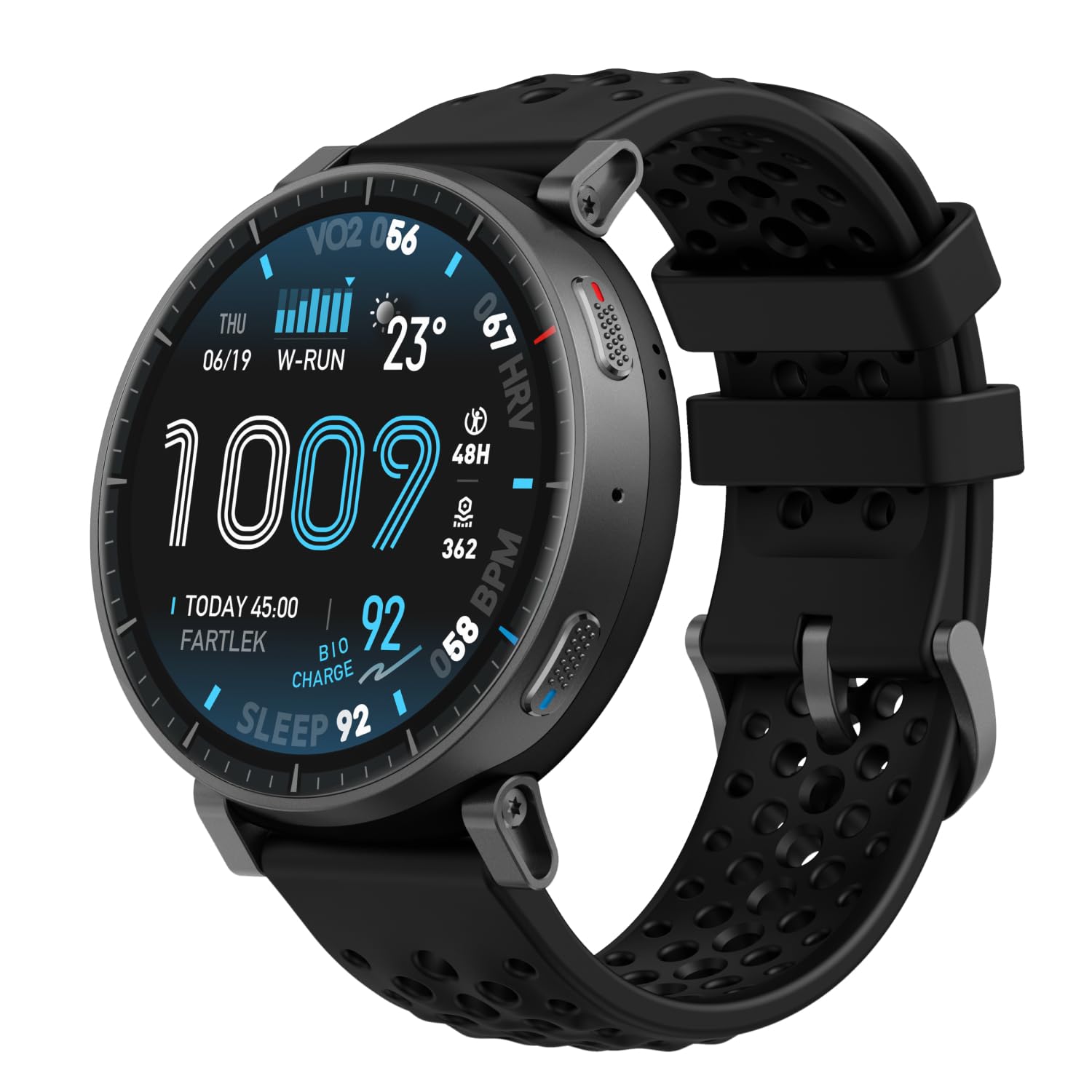
Image: Amazfit Active Max Smart Watch with its vibrant AMOLED display showing various data points.
2. คู่มือการติดตั้ง
2.1 อะไรอยู่ในกล่อง
- Amazfit Active Max Smart Watch
- แท่นชาร์จแม่เหล็ก (ไม่รวมสาย USB Type-C)
- คู่มือการใช้งาน
2.2 การชาร์จอุปกรณ์
Before first use, fully charge your Amazfit Active Max. Connect the magnetic charging base to a USB power source (e.g., a computer USB port or a USB wall adapter). Place the watch onto the charging base, ensuring the magnetic pins align correctly. The watch display will indicate charging status.

Image: The Amazfit Active Max Smart Watch connected to its magnetic charging base, indicating a full charge.
2.3 การจับคู่กับสมาร์ทโฟนของคุณ
- ดาวน์โหลด แอป Zepp จากแอปสโตร์ของสมาร์ทโฟนของคุณ (มีให้ใช้งานสำหรับ Android และ iPhone)
- เปิดแอป Zepp แล้วสร้างบัญชีหรือเข้าสู่ระบบ
- Follow the on-screen instructions in the app to pair your Amazfit Active Max. This typically involves scanning a QR code displayed on the watch or selecting the device from a list.
- โปรดตรวจสอบให้แน่ใจว่าได้เปิดใช้งานบลูทูธบนสมาร์ทโฟนของคุณในระหว่างขั้นตอนการจับคู่

Image: A smartphone screen showing the Zepp App interface, which is used to manage the Amazfit Active Max.
3. การใช้งานนาฬิกา
3.1 การแสดงผลและการนำทาง
The Amazfit Active Max features a 1.5-inch ultra-bright AMOLED display with up to 3,000 nits peak brightness for clear visibility in various lighting conditions. Navigate the watch interface using touch gestures (swipe, tap) and the physical buttons on the side.

ภาพ: รายละเอียด view of the Amazfit Active Max's vivid AMOLED display, showcasing various health and activity metrics.
3.2 การปรับแต่งหน้าปัดนาฬิกา
You can change the watch face directly on the device or through the Zepp App. The app offers a wider selection of watch faces, including free and paid options, to personalize your watch's appearance.
4. การติดตามสุขภาพและการออกกำลังกาย
4.1 โหมดการออกกำลังกายและ GPS
The watch supports over 170 workout modes. It features built-in GPS with five satellite systems for accurate outdoor activity tracking. You can download terrain and ski maps directly to the watch for offline navigation, eliminating the need for a phone signal.

Image: A person engaged in outdoor running, demonstrating the watch's use during physical activity and highlighting its workout modes.
4.2 การตรวจติดตามสุขภาพ
The Amazfit Active Max provides 24/7 monitoring of key health metrics:
- อัตราการเต้นของหัวใจ: การติดตามอัตราการเต้นของหัวใจอย่างต่อเนื่อง
- ออกซิเจนในเลือด (SpO2): On-demand and continuous blood oxygen level measurement.
- การติดตามการนอนหลับ: ตรวจสอบการนอนหลับtages, ระยะเวลา และคุณภาพ
- ระดับความเครียด: Tracks stress and provides breathing exercises.
- BioCharge Energy Monitoring: Assesses your body's recovery and energy levels based on activity and stress.

Image: A person running while wearing the Amazfit Active Max, with the watch display showing a real-time heart rate graph.
4.3 แผนการฝึกสอนและโปรแกรม Zepp Coach
Utilize Zepp Coach for personalized AI-driven workout plans that adapt to your performance and recovery. Choose from various training programs, including specific running plans for 3K, 5K, 10K, half, and full marathons.

Image: An individual running, symbolizing the use of Zepp Coach for guided training and performance improvement.
4.4 Onboard Storage for Music and Maps
The watch includes 4GB of onboard storage, allowing you to store music and downloaded maps directly on the device. This enables phone-free workouts with music playback and offline navigation.

Image: A person using the Amazfit Active Max to view maps and listen to music via connected earbuds, highlighting the onboard storage feature.
5. คุณสมบัติอันชาญฉลาด
5.1 Bluetooth Calls and Message Replies
When connected to your smartphone, the Amazfit Active Max allows you to take Bluetooth calls directly from your wrist. For Android users, Zepp Flow enables hands-free message replies using a QWERTY keyboard or speech-to-text.

Image: The Amazfit Active Max displaying a message notification and options for replying, demonstrating its communication features.
5.2 Bluetooth Peripheral Connectivity
The watch can connect to various Bluetooth peripherals, including heart rate belts, cadence meters, power meters, and speedometers, to enhance your workout data collection.

Image: An individual cycling indoors, with the Amazfit Active Max on their wrist, illustrating its capability to connect with external Bluetooth sensors.
6. การบำรุงรักษา
6.1 ความต้านทานต่อน้ำ
The Amazfit Active Max is 5 ATM water-resistant, meaning it can withstand pressures equivalent to a depth of 50 meters. It is suitable for swimming and showering but not for high-speed water sports or diving.
6.2 การทำความสะอาดและการดูแล
- ทำความสะอาดนาฬิกาและสายนาฬิกาด้วยผ้านุ่มๆ เป็นประจำamp ผ้า.
- หลีกเลี่ยงการใช้สารเคมีรุนแรงหรือวัสดุที่มีฤทธิ์กัดกร่อน
- ตรวจสอบให้แน่ใจว่าขั้วชาร์จด้านหลังนาฬิกาสะอาดและแห้งก่อนทำการชาร์จ
6.3 อายุการใช้งานแบตเตอรี่
The watch offers extended battery life:
- การใช้งานทั่วไป: นานถึง 25 วัน
- การใช้งานหนัก: นานถึง 13 วัน
- Continuous GPS Usage: นานถึง 64 ชั่วโมง
อายุการใช้งานแบตเตอรี่จริงอาจแตกต่างกันไปขึ้นอยู่กับรูปแบบการใช้งานและการตั้งค่า
7 การแก้ไขปัญหา
7.1 ปัญหาทั่วไปและแนวทางแก้ไข
- นาฬิกาไม่เปิด: ตรวจสอบให้แน่ใจว่านาฬิกาชาร์จเต็มแล้ว
- ไม่สามารถจับคู่กับโทรศัพท์ได้: Check if Bluetooth is enabled on your phone and the watch is in pairing mode. Restart both devices and try again.
- ข้อมูลไม่ถูกต้อง: Ensure the watch is worn snugly on your wrist. For GPS, ensure a clear view ของท้องฟ้า
- การแจ้งเตือนไม่ปรากฏ: Check notification settings in the Zepp App and your phone's system settings.
หากต้องการความช่วยเหลือเพิ่มเติม โปรดดูส่วนช่วยเหลือในแอป Zepp หรือติดต่อฝ่ายบริการลูกค้าของ Amazfit
8. ข้อมูลจำเพาะ
| คุณสมบัติ | รายละเอียด |
|---|---|
| หมายเลขรุ่น | เอ2557 |
| แสดง | จอ AMOLED ขนาด 1.5 นิ้ว |
| พื้นที่จัดเก็บ | 4GB |
| ความต้านทานต่อน้ำ | ตู้เอทีเอ็ม 5 ตู้ |
| อายุการใช้งานแบตเตอรี่ (ทั่วไป) | นานถึง 25 วัน |
| จีพีเอส | 5 Satellite Systems |
| น้ำหนักสินค้า | 1.97 ออนซ์ |
| ผู้ผลิต | อามาซฟิต |
9. การรับประกันและการสนับสนุน
สำหรับข้อมูลการรับประกันและการบริการลูกค้า โปรดดูที่เว็บไซต์อย่างเป็นทางการของ Amazfit website or contact your local Amazfit service center. Keep your purchase receipt for warranty claims.