
1. บทนำ
This manual provides essential information for setting up, operating, and maintaining your HP OmniDesk Slim Desktop PC, Model S03-0006. This desktop PC is designed for daily tasks, offering an Intel Core i3-14100 processor, ample memory, and various connectivity options for productivity and entertainment.
2. เนื้อหาบรรจุภัณฑ์
ตรวจสอบว่ามีรายการทั้งหมดอยู่ในแพ็คเกจ:
- HP S03-000 OmniDesk Slim Desktop PC
- แหล่งจ่ายไฟ
- USB Black Wired Keyboard (if included with specific bundle)
- USB Wired Mouse (if included with specific bundle)
หมายเหตุ: อุปกรณ์เสริมเพิ่มเติมอาจจำหน่ายแยกต่างหาก
3. สินค้าหมดview
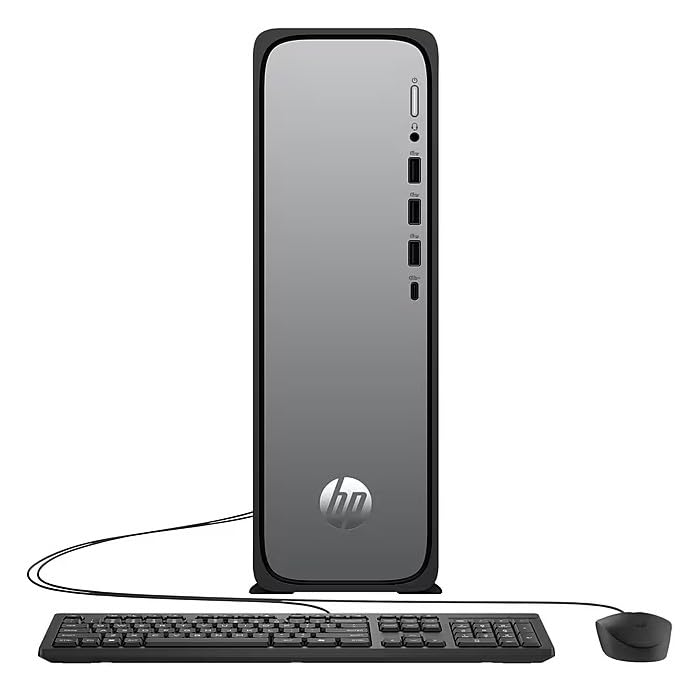
The HP OmniDesk Slim Desktop PC features a compact design with essential components for efficient computing.

รูปที่ 3.1: HP OmniDesk Slim Desktop PC showcasinจี อิทส์ สลิม โปรfile, Intel Core i3-14100 processor, 8GB DDR5 RAM, 256GB SSD, Intel UHD Graphics 710, Wi-Fi 6, Bluetooth 5.4, Windows 11, and dual display support.
3.1. พอร์ตและขั้วต่อ
Familiarize yourself with the various ports on your desktop PC for connecting peripherals and displays.
รูปที่ 3.2: Front and rear port layout of the HP OmniDesk Slim Desktop PC. Front ports include a headphone/microphone combo jack, USB Type-A 5Gbps ports, and a USB Type-C 10Gbps port. Additional ports (typically rear) include 4 USB 2.0 Type-A, 1 RJ-45 (Ethernet), 1 HDMI Out, and 1 DisplayPort 1.4.
- พอร์ตด้านหน้า:
- คอมโบหูฟัง/ไมโครโฟน
- USB Type-A 5Gbps signaling rate (3 ports)
- USB Type-C 10Gbps signaling rate (1 port)
- พอร์ตด้านหลัง:
- USB 2.0 Type-A (4 ports)
- RJ-45 (อีเธอร์เน็ต)
- HDMI 1.4b (1 port)
- DisplayPort 1.4a (1 port)
4. คู่มือการติดตั้ง
Follow these steps to set up your HP OmniDesk Slim Desktop PC:
- เชื่อมต่อจอภาพ: Connect your monitor to the PC using an HDMI or DisplayPort cable. Ensure the cable is securely plugged into both the PC and the monitor.
- เชื่อมต่ออุปกรณ์ต่อพ่วง: Plug in your USB keyboard and mouse into the available USB ports on the PC.
- เชื่อมต่อพลังงาน: Connect the power supply cable to the PC's power input, then plug the other end into a wall outlet or surge protector.
- เปิดเครื่อง: Press the power button on the front of the PC. The system will boot up, and you will see the Windows 11 setup screen.
- การตั้งค่า Windows เริ่มต้น: ทำตามคำแนะนำบนหน้าจอเพื่อทำการติดตั้ง Windows 11 ให้เสร็จสมบูรณ์ รวมถึงการเลือกภาษา ภูมิภาค การเชื่อมต่อเครือข่าย และการสร้างบัญชีผู้ใช้
5. คู่มือการใช้งาน
5.1. การทำงานพื้นฐาน
- เปิด/ปิดเครื่อง: Press the power button to turn on the PC. To shut down, click the Start button, then Power > Shut down.
- เริ่มต้นใหม่อีกครั้ง: คลิกปุ่มเริ่ม จากนั้นคลิกเปิด/ปิดเครื่อง > เริ่มระบบใหม่
- โหมดสลีป: คลิกปุ่ม Start จากนั้นคลิกปุ่ม Power > Sleep
5.2. การเชื่อมต่อกับเครือข่าย
Your PC supports both wired (Ethernet) and wireless (Wi-Fi) network connections.
- การเชื่อมต่อแบบมีสาย: Connect an Ethernet cable from your router or modem to the RJ-45 port on the back of the PC.
- การเชื่อมต่อไร้สาย (Wi-Fi 6):
- คลิกไอคอน Wi-Fi ในแถบงาน
- เลือกเครือข่าย Wi-Fi ที่คุณต้องการจากรายการ
- ป้อนรหัสความปลอดภัยของเครือข่าย (รหัสผ่าน) หากระบบถาม จากนั้นคลิก เชื่อมต่อ.
5.3. Dual Display Support
To extend your desktop to a second monitor:
- Connect the second monitor to an available video output port (HDMI or DisplayPort) on your PC.
- คลิกขวาบนเดสก์ท็อปแล้วเลือก การตั้งค่าการแสดงผล.
- Under "Multiple displays," select how you want the displays to behave (e.g., Extend these displays, Duplicate these displays).
6. การบำรุงรักษา
- การอัปเดตซอฟต์แวร์: ตรวจสอบและติดตั้งการอัปเดต Windows เป็นประจำเพื่อให้มั่นใจถึงความเสถียรและความปลอดภัยของระบบ ไปที่ การตั้งค่า > Windows Update.
- การอัปเดตไดรเวอร์: Keep your device drivers updated. HP Support Assistant (MyHP) can help manage these updates.
- การทำความสะอาด: Use a soft, dry cloth to clean the exterior of the PC. Avoid liquid cleaners directly on components. Ensure ventilation openings are clear of dust.
- ข้อมูลสำรอง: สำรองข้อมูลสำคัญเป็นประจำ fileไปยังไดรฟ์ภายนอกหรือที่เก็บข้อมูลบนคลาวด์เพื่อป้องกันการสูญหายของข้อมูล
7 การแก้ไขปัญหา
| ปัญหา | วิธีแก้ปัญหาที่เป็นไปได้ |
|---|---|
| เครื่องพีซีไม่สามารถเปิดเครื่องได้ |
|
| ไม่มีการแสดงผลบนจอภาพ |
|
| ไม่มีการเชื่อมต่ออินเตอร์เน็ต |
|
| Peripherals (keyboard/mouse) not working. |
|
8. ข้อมูลจำเพาะ
| ชื่อรุ่น | HP OmniDesk Desktop HP S03-000 PC |
| หมายเลขรุ่น | OmniDesk Slim S03-0006 |
| โปรเซสเซอร์ | Intel Core i3-14100 (3.5 GHz, 6 MB Cache) |
| กราฟฟิก | Intel UHD Graphics 710 (รวม) |
| แรม | 8 GB DDR5 (4800 MT/s), Max 64 GB |
| พื้นที่จัดเก็บ | 256 GB SSD (โซลิดสเตทไดรฟ์) |
| ระบบปฏิบัติการ | วินโดวส์ 11 โฮม |
| การเชื่อมต่อ | Realtek Wi-Fi 6 (2x2), Bluetooth 5.4, Gigabit Ethernet (RJ-45) |
| พอร์ต |
|
| ขนาด (สูง x กว้าง x ลึก) | 11.61 x 3.94 x 11.97 นิ้ว |
| น้ำหนัก | 8.38 ปอนด์ |
| การรับรอง | ENERGY STAR certified, EPEAT Gold with Climate+ |
9. การรับประกันและการสนับสนุน
9.1. ข้อมูลการรับประกัน
This HP OmniDesk Slim Desktop PC comes with a รับประกันจำกัด 90 วันโปรดดูเอกสารการรับประกันที่รวมอยู่ในผลิตภัณฑ์ของคุณเพื่อดูข้อกำหนดและเงื่อนไขเฉพาะ
9.2. การสนับสนุนด้านเทคนิค
หากต้องการความช่วยเหลือด้านเทคนิค ดาวน์โหลดไดรเวอร์ หรือข้อมูลเพิ่มเติม โปรดเยี่ยมชมเว็บไซต์สนับสนุนอย่างเป็นทางการของ HP website. You can also utilize the pre-installed MyHP application for device customization, optimization, and access to helpful messages and settings.
Always provide your product model number (S03-0006) and serial number when contacting support.