
1. บทนำ
The YUNZII B75 PRO MAX is a 75% layout wireless mechanical keyboard featuring QMK/VIA programmability, a customizable TFT screen, and a multi-function knob. It supports tri-mode connectivity (wired, 2.4GHz wireless, and Bluetooth) and is designed for a premium typing experience with hot-swappable, pre-lubed switches and a gasket-mount structure.
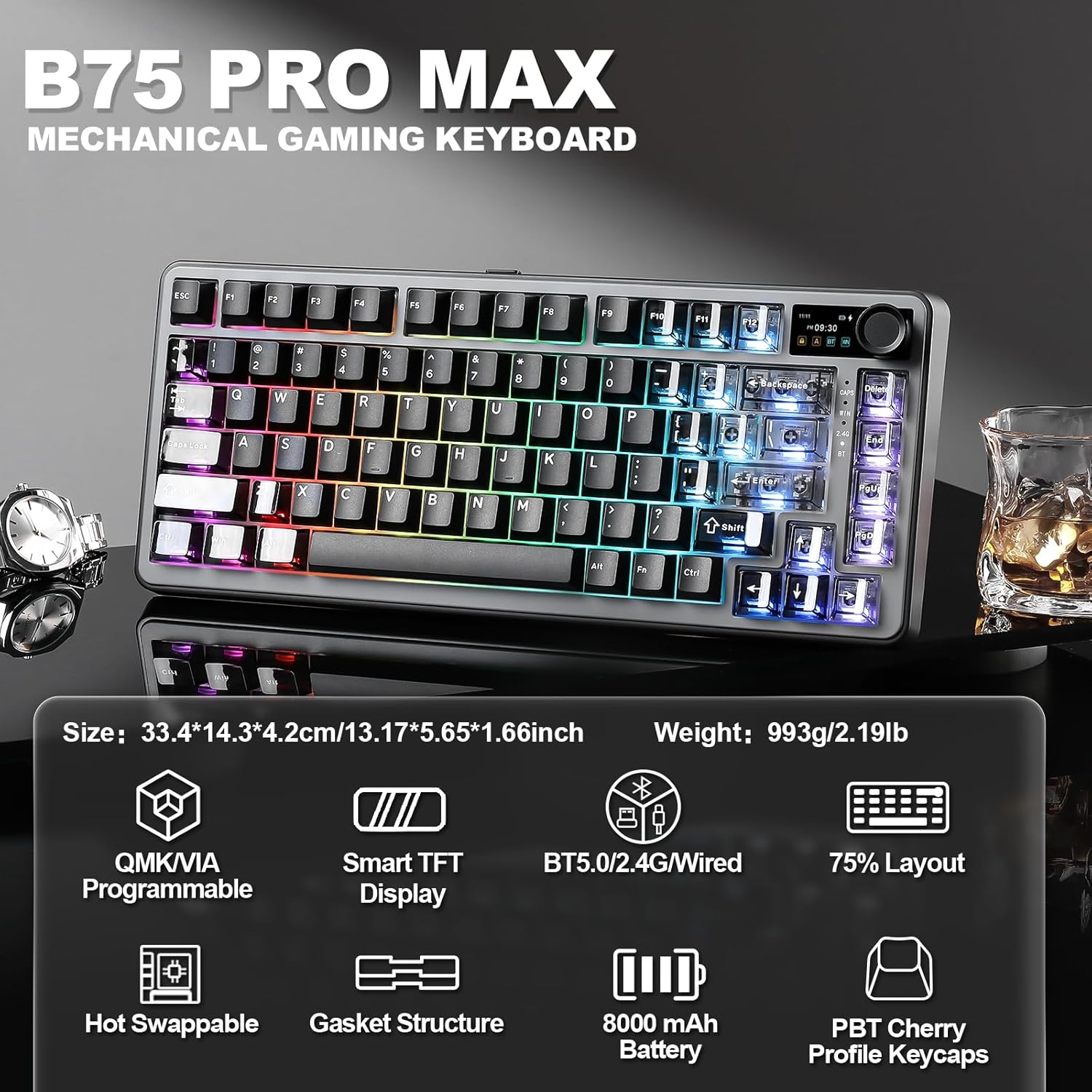
Image: YUNZII B75 PRO MAX Mechanical Gaming Keyboard with RGB lighting.
2. เนื้อหาบรรจุภัณฑ์
โปรดตรวจสอบว่าสินค้าทั้งหมดมีอยู่ในแพ็คเกจของคุณ:
- B75 PRO MAX Keyboard x 1
- USB Cable for Type-C x 1
- Switch and Keycap Puller x 1
- คู่มือการใช้งาน x 1
- 2.4G Dongle x 1
- ฝาครอบกันฝุ่น x 1
- Extra Keycaps and Switches (if applicable to your model)

Image: Contents included in the YUNZII B75 PRO MAX package.
3. Keyboard Layout and Features Overview
The B75 PRO MAX features a compact 75% layout, integrating essential keys while saving desk space. Key features include:
- 75% เค้าโครง: Efficient design with 81 keys, a multi-function knob, and a TFT screen.
- Customizable TFT Screen: Displays battery level, date, time, operating system, and supports custom GIFs or images.
- ปุ่มปรับมัลติฟังก์ชั่น: Default control for volume, customizable via QMK/VIA.
- โครงสร้างการติดตั้งแบบใช้ปะเก็น: Enhances typing feel and sound by reducing internal vibrations.
- ซ็อกเก็ตแบบ Hot-Swappable: Compatible with 3-pin and 5-pin mechanical switches for easy customization.
- Pre-Lubed Switches: Ensures smooth keystrokes and consistent tactile response.
- PBT Cherry Profile คีย์แคป: Durable and comfortable for extended use.
- แบตเตอรี่ 8000mAh: ช่วยให้ใช้งานระบบไร้สายได้นานขึ้น
- เอ็นเคโร: N-Key Rollover for accurate simultaneous key presses.
- ไฟแบ็คไลท์ RGB: Over 19 vibrant backlight modes with south-facing LEDs.

ภาพ: เหนือview of the YUNZII B75 PRO MAX 75% layout and dimensions.

ภาพ: รายละเอียด view ของส่วนประกอบโครงสร้างซีลยางของแป้นพิมพ์

Image: Close-up of the customizable TFT smart screen and multi-media knob.
4. การตั้งค่า
4.1 Connectivity (Tri-Mode)
The B75 PRO MAX supports three connection modes: Wired (Type-C), 2.4GHz Wireless, and Bluetooth.

Image: Tri-mode connection options for the YUNZII B75 PRO MAX keyboard.
4.1.1 การเชื่อมต่อแบบมีสาย
- เชื่อมต่อสาย USB Type-C ที่ให้มาเข้ากับพอร์ต Type-C ของแป้นพิมพ์
- ต่อปลายอีกด้านของสายเคเบิลเข้ากับพอร์ต USB ของคอมพิวเตอร์ของคุณ
- แป้นพิมพ์จะสลับไปเป็นโหมดมีสายโดยอัตโนมัติ
4.1.2 การเชื่อมต่อไร้สาย 2.4GHz
- Locate the 2.4G wireless dongle (usually stored in a slot on the keyboard).
- เสียบดองเกิลเข้ากับพอร์ต USB ที่ว่างอยู่บนคอมพิวเตอร์ของคุณ
- Switch the mode button on the keyboard to the 2.4G wireless position.
- The keyboard should connect automatically. If not, long press Fn+4 to enter pairing mode.

Image: Step-by-step guide for setting up 2.4GHz wireless mode.
4.1.3 การเชื่อมต่อบลูทูธ
- Switch the mode button on the keyboard to the Bluetooth (BT) position.
- Short press Fn+1, Fn+2, or Fn+3 to select a Bluetooth channel.
- Long press the selected Fn+ (1/2/3) key combination to enter pairing mode. The BT indicator will flash rapidly.
- On your device (PC, laptop, smartphone, tablet), search for Bluetooth devices and select "YUNZII B75 PRO MAX" to connect.

Image: Step-by-step guide for setting up Bluetooth mode.
4.2 ค่าบริการเริ่มต้น
The keyboard is equipped with an 8000mAh high-capacity battery. For optimal performance, it is recommended to fully charge the keyboard before its first use. Connect the USB Type-C cable to a power source.
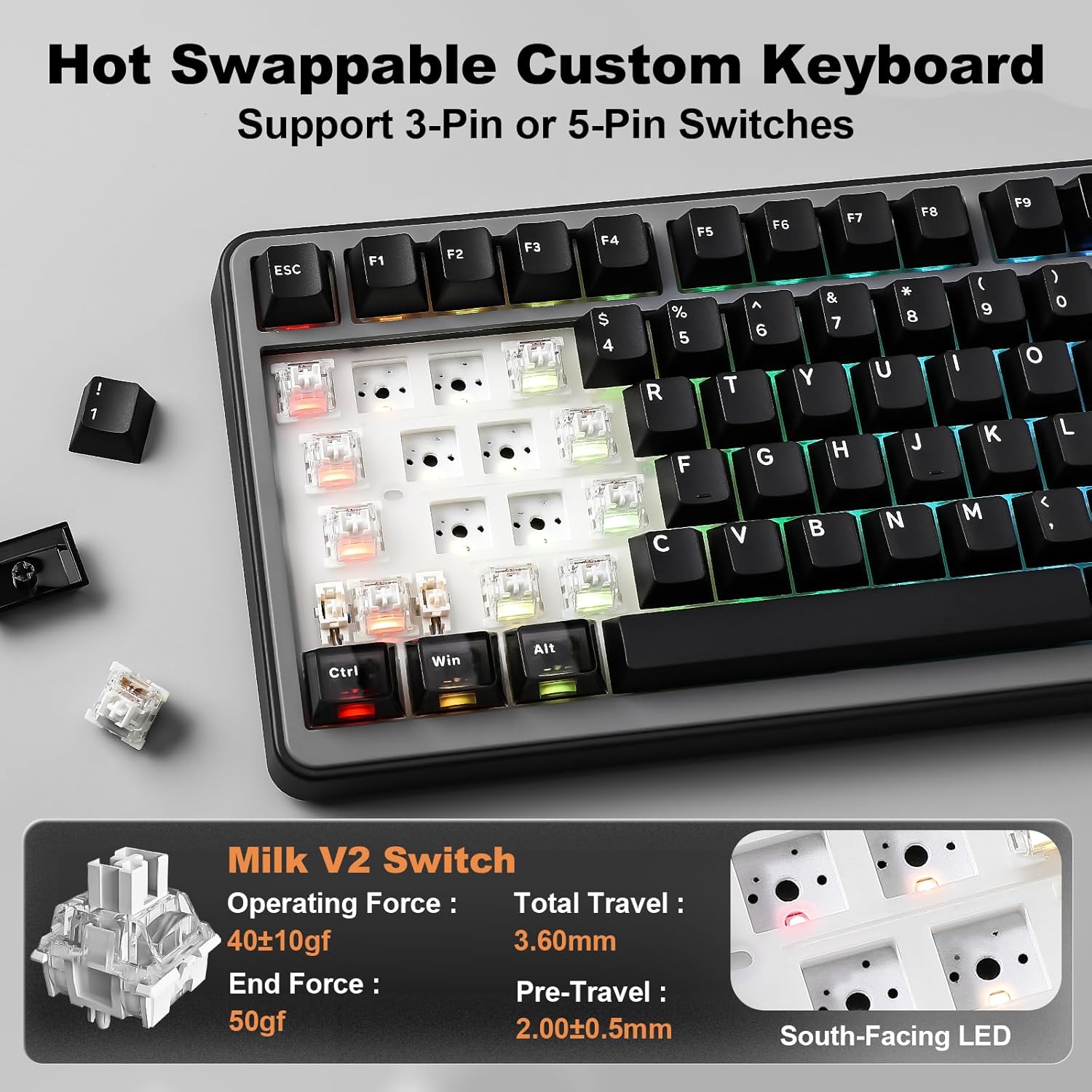
Image: Information on the keyboard's 8000mAh battery and usage duration.
4.3 ความเข้ากันได้ของระบบ
The YUNZII B75 PRO MAX is compatible with various operating systems, including Windows, macOS, Linux, and Android devices (laptops, PCs, smartphones, tablets).

Image: The keyboard supports a wide range of devices and operating systems.
วิดีโอ: จบแล้วview of the YUNZII B75 PRO MAX Wireless Mechanical Keyboard in Black.
Video: An unboxing of the YUNZII B75 PRO MAX Wireless Mechanical Keyboard.
5. คู่มือการใช้งาน
5.1 TFT Smart Screen Customization
The TFT screen can display various information and custom content. Use the YUNZII web application to customize it.
- หน้าแรก : Press Fn+8 to view battery, time, date, and connection mode.
- Picture Page: Press Fn+9 to display uploaded pictures.
- GIF Page: Press Fn+0 to display uploaded GIFs.
- รูปแบบเวลา: Press Fn+END to switch between 12H/24H format.
Video: Guide on how to customize the TFT screen of the YUNZII B75 PRO MAX.
5.2 Multi-Media Knob
The knob's default function is volume control. Rotate left to decrease volume, right to increase. Press the knob to mute/unmute audio. The knob's functions can be customized via QMK/VIA software.
5.3 การปรับแต่ง QMK/VIA
The keyboard supports QMK/VIA open-source firmware for advanced customization:
- การรีแมปคีย์: Assign new functions to any key.
- มาโคร: Create complex sequences of key presses.
- เอฟเฟกต์แสง: Adjust RGB lighting patterns and colors.
- Multiple Layers: Configure different key layouts for various tasks or applications.
Access the YUNZII web application for QMK/VIA customization.
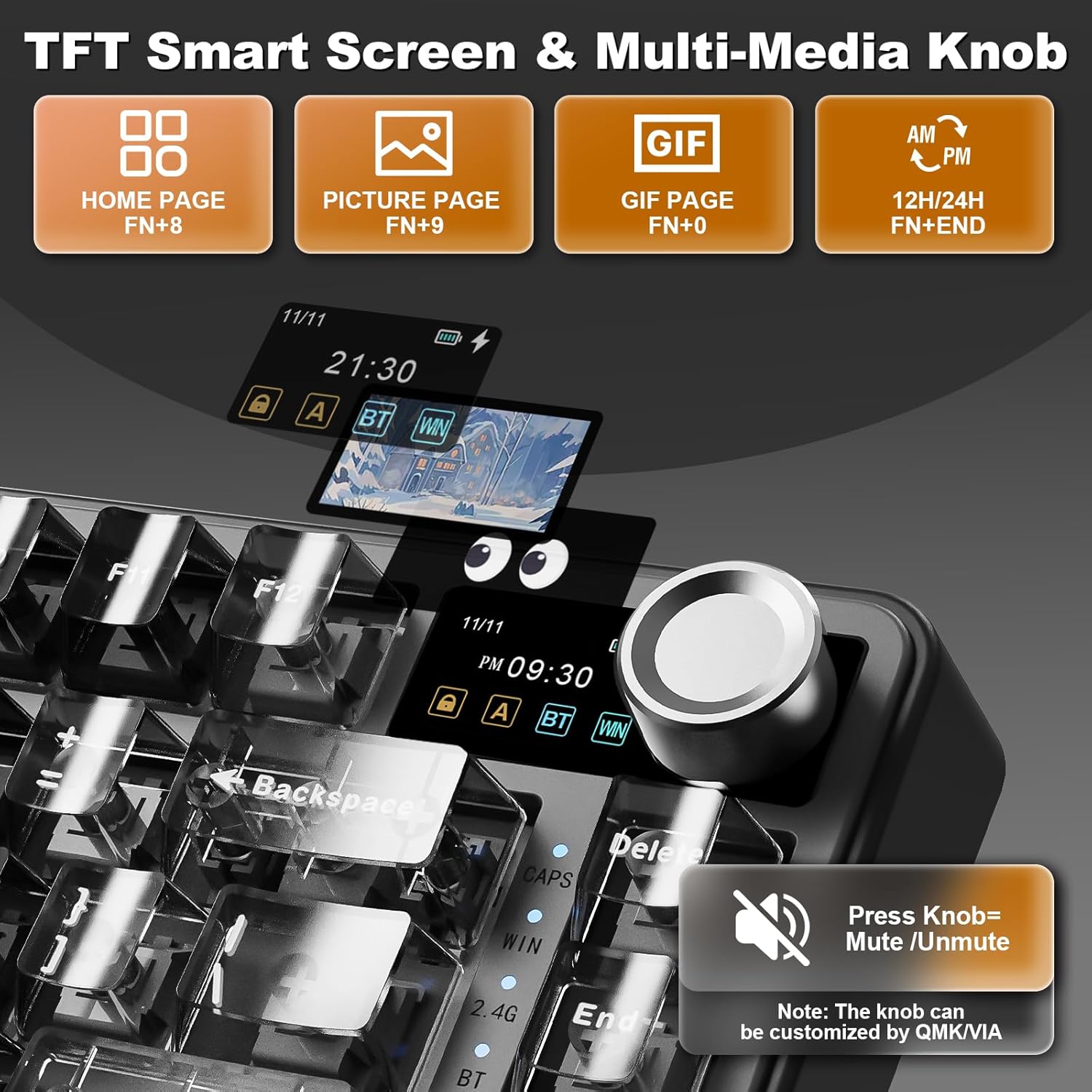
Image: Interface for QMK/VIA software customization, showing options for key mappings, macros, and lighting effects.
5.4 การควบคุมไฟแบ็คไลท์ RGB
The keyboard features 16.8 million RGB backlight with 19 default lighting effects. Use the following Fn key combinations:
- Fn + แบ็คสเปซ: เปิด/ปิดแบ็คไลท์
- ฟน + \|: เปลี่ยนเอฟเฟกต์แสงพื้นหลัง
- กดปุ่ม Fn + Enter: เปลี่ยนสีแบ็คไลท์
- Fn + ↑: เพิ่มความสว่าง
- Fn + ↓: ลดความสว่าง
- Fn + →: Increase Blinking Speed
- Fn + ←: Decrease Blinking Speed

Image: Visual guide for controlling the 16.8 million RGB backlight effects.
5.5 Function Keys (Windows/macOS)
The keyboard includes dedicated function key combinations for both Windows and macOS environments:
Windows (Fn+A)
- Fn+F1: Screen Brightness ↓
- Fn+F2: Screen Brightness ↑
- Fn+F3: Open Task View (วิน+แท็บ)
- Fn+F4: เครื่องคิดเลข
- Fn+F5: อีเมล
- Fn+F6: เบราว์เซอร์
- Fn+F7: เพลงก่อนหน้า
- Fn+F8: เล่น/หยุดชั่วคราว
- Fn+F9: เพลงถัดไป
- Fn+F10: ปิดเสียง
- Fn+F11: Volume ↓
- Fn+F12: Volume ↑
macOS (Fn+S)
- F1: Screen Brightness ↓
- F2: Screen Brightness ↑
- F3: การควบคุมภารกิจ
- F4: ลอนช์แพด
- F5: No Function
- F6: No Function
- F7: เพลงก่อนหน้า
- F8: เล่น/หยุดชั่วคราว
- F9: เพลงถัดไป
- F10: ปิดเสียง
- F11: Volume ↓
- F12: Volume ↑

Image: Function key combinations for Windows and macOS operating systems.
6. Customization and Maintenance
6.1 สวิตช์แบบ Hot-Swappable
The B75 PRO MAX features hot-swappable sockets, allowing you to easily change switches without soldering. It supports both 3-pin and 5-pin switches. Use the provided switch puller to carefully remove and insert switches.
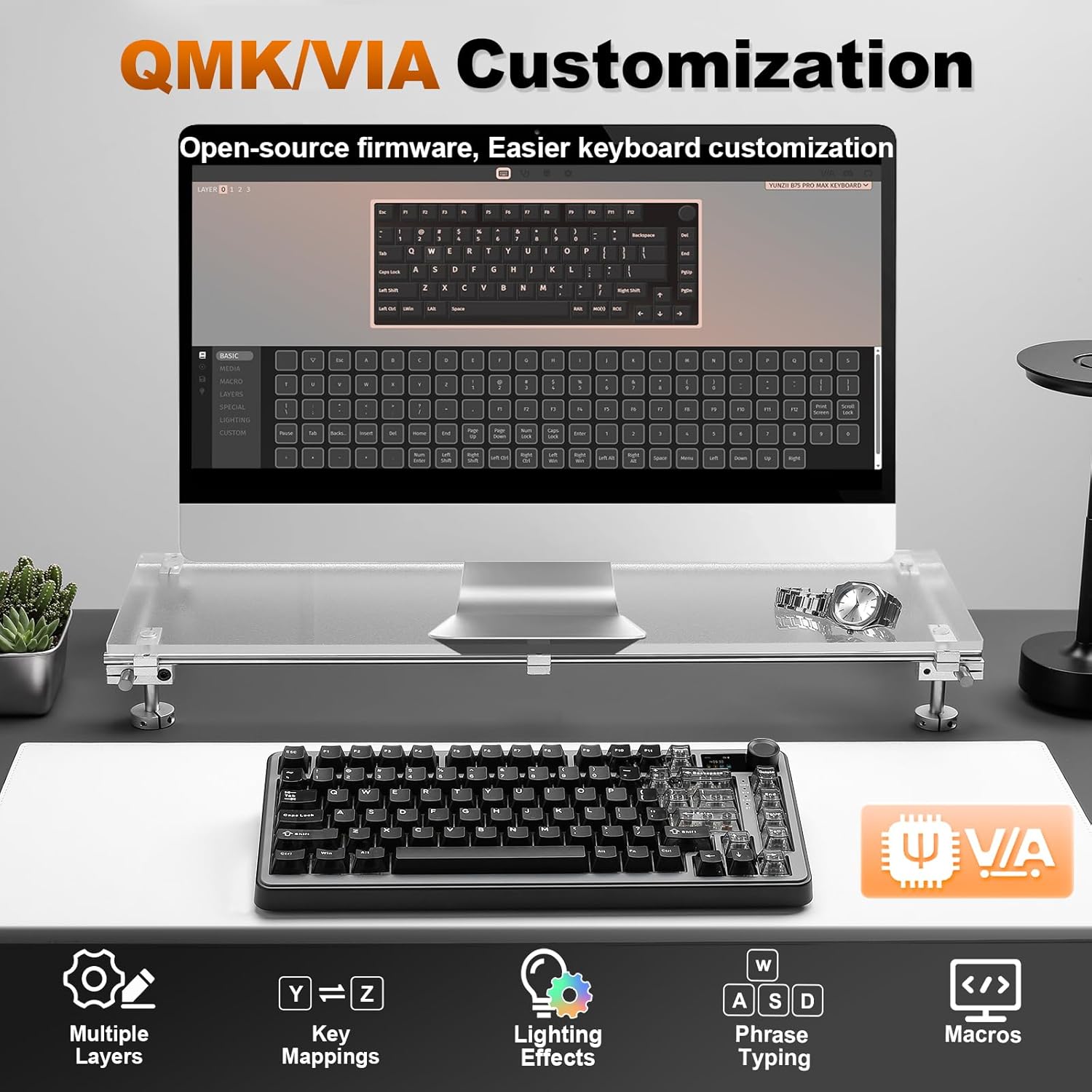
Image: Demonstrating the hot-swappable feature, supporting both 3-pin and 5-pin switches.

Image: Details on the available switch types: Candy Linear, Cocoa Cream V2 Linear, and Milk V2 Linear switches.
6.2 การเปลี่ยนคีย์แคป
The keyboard comes with durable PBT Cherry profile keycaps. You can replace them with custom keycaps using the provided keycap puller. Some models include extra themed keycaps for personalization.
วิดีโอ: โชว์asing coffee-themed extra keycaps for the B75 PRO MAX Black Keyboard.
6.3 การทำความสะอาด
To clean your keyboard, power it off and disconnect it from your device. Use a soft, lint-free cloth to wipe down the keycaps and chassis. For deeper cleaning, remove keycaps and use compressed air to clear debris from between switches.
7 การแก้ไขปัญหา
- แป้นพิมพ์ไม่ตอบสนอง: Ensure the keyboard is charged and correctly connected (wired, 2.4G dongle, or Bluetooth paired). Try restarting your computer.
- 2.4GHz wireless connection issues: Ensure the dongle is securely plugged in and the keyboard is in 2.4G mode. Try re-pairing by long pressing Fn+4.
- ปัญหาการเชื่อมต่อบลูทูธ: Ensure the keyboard is in Bluetooth mode and the correct channel (Fn+1/2/3) is selected. Try re-pairing by long pressing the Fn+channel key. Ensure your device's Bluetooth is enabled.
- ไฟแบ็คไลท์ไม่ทำงาน: Press Fn+Backspace to toggle the backlight. Check brightness settings (Fn+↑/↓).
- TFT screen not updating: Ensure the keyboard is connected to the YUNZII web application for customization.
8. ข้อมูลจำเพาะ
| คุณสมบัติ | รายละเอียด |
|---|---|
| ขนาดสินค้า | 12.99 x 5.51 x 1.57 นิ้ว |
| น้ำหนักสินค้า | 1.98 ปอนด์ |
| ผู้ผลิต | ยูนซี |
| เทคโนโลยีการเชื่อมต่อ | Bluetooth, 2.4GHz, Type-C |
| คำอธิบายแป้นพิมพ์ | เครื่องจักรกล |
| การใช้ที่แนะนำ | การใช้งานทั่วไป, การเล่นเกม |
| คุณสมบัติพิเศษ | Backlit, Ergonomic, 3 Modes, Customizable Display, Hot-Swappable |
| สี | Black (variant shown) |
| แป้นพิมพ์แบ็คไลท์ | อาร์จีบี |
| วัสดุ | พลาสติก |
| แบตเตอรี่ | 8000mAh (1 AAA battery included) |
9. การรับประกันและการสนับสนุน
For warranty information and technical support, please refer to the documentation included with your product or visit the official YUNZII website. If you encounter any issues not covered in this manual, please contact YUNZII customer service for assistance.