
1. สูงกว่าview
The Xiaomi Redmi Note 15 Pro 5G is a high-performance smartphone designed for robust daily use. It features a massive 6580 mAh battery, IP66/IP68 dust and water resistance, a 200 MP camera, and a 6.83-inch 1.5K AMOLED display. This manual provides essential information for setting up, operating, and maintaining your device.

ภาพ: หลายภาพ views of the Xiaomi Redmi Note 15 Pro 5G smartphone, showcasinก. การออกแบบและโมดูลกล้อง
2. อะไรอยู่ในกล่อง
เมื่อแกะกล่อง Xiaomi Redmi Note 15 Pro 5G คุณจะพบสิ่งของดังต่อไปนี้:
- สมาร์ทโฟน Xiaomi Redmi Note 15 Pro 5G
- USB Cable (USB Type-C)
- เครื่องมือถอดซิม
- เคสป้องกัน
- Holding Ring (Keyring)
Note: A power adapter is not included with this device.
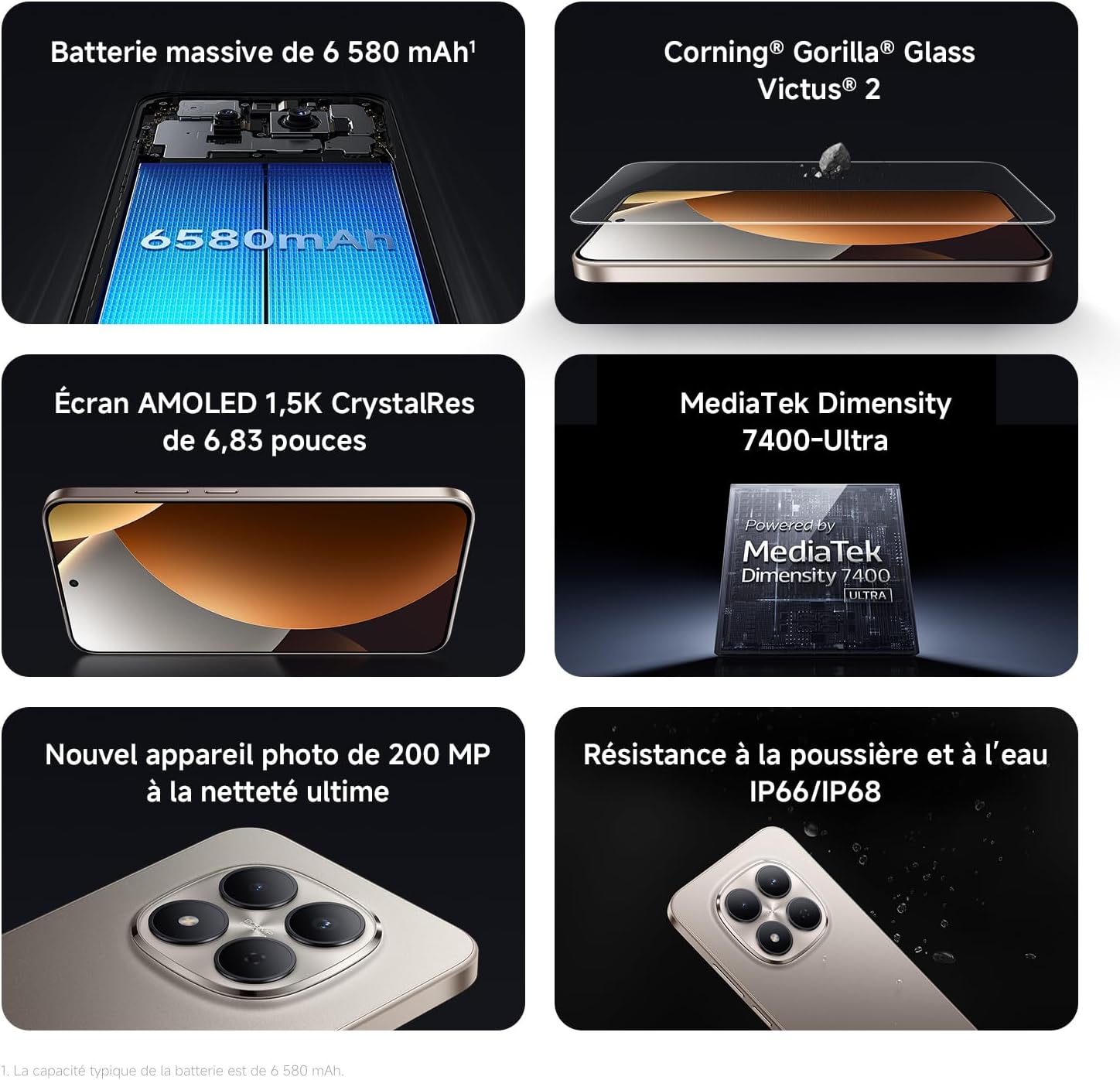
Image: Contents of the Xiaomi Redmi Note 15 Pro 5G box, showing the smartphone, USB-C cable, SIM ejection tool, protective case, and holding ring.
3. คุณสมบัติหลัก
- Massive 6580 mAh Battery with 45W Turbo Charging: Equipped with an ultra-large silicon-carbon battery for extended usage while maintaining a slim and light design. Supports 45W turbo charging and up to 22.5W reverse charging.
- IP66 / IP68 Dust and Water Resistance: The device has successfully passed 2-meter water resistance tests for 24 hours. It is designed to withstand daily splashes, accidental immersion, or drops in water without affecting performance.
- New 200 MP Ultra-Clear Camera System: Features a 4th generation 200 MP main sensor combined with a large 1/1.4-inch sensor, offering unprecedented image detail.
- Immersive 6.83-inch 1.5K Eye-Care AMOLED Display: Utilizes flagship-level luminous materials for reduced power consumption and a peak brightness of 3200 nits, ensuring clear visibility even in bright sunlight.
- ผู้ช่วย AI: Intelligent optimization with a single gesture, enhancing imaging capabilities and creative efficiency.
- กระจก Corning Gorilla Glass Victus 2: Reinforced front glass for enhanced shock and scratch resistance, ensuring long-term durability.
- MediaTek Dimensity 7400-Ultra Processor: Built on a 4nm TSMC process with an octa-core architecture up to 2.6 GHz, providing powerful multitasking, smooth gaming, and stable performance.
- Xiaomi HyperOS 2: Offers a faster, smarter, and smoother user experience with 6 years of security updates.

Image: Diagram illustrating the 6580 mAh battery capacity of the Redmi Note 15 Pro 5G.

Image: The Redmi Note 15 Pro 5G with water droplets, demonstrating its IP66/IP68 dust and water resistance.

ภาพ: ระยะใกล้ view of the 200 MP camera module on the Redmi Note 15 Pro 5G.

Image: The 6.83-inch 1.5K AMOLED display of the Redmi Note 15 Pro 5G with its specifications.

Image: Before and after images demonstrating AI photo optimization on the Redmi Note 15 Pro 5G.

Image: Illustration of Corning Gorilla Glass Victus 2 durability on the Redmi Note 15 Pro 5G.

Image: Technical image showing RAM chips, indicating up to 24GB RAM with memory extension on the Redmi Note 15 Pro 5G.

Image: Screenshot of the Xiaomi HyperOS 2 interface on the Redmi Note 15 Pro 5G.
4. การตั้งค่า
4.1. การใส่ซิมการ์ด
- ค้นหาถาดใส่การ์ด SIM ที่ด้านข้างอุปกรณ์ของคุณ
- ใส่เครื่องมือถอดซิมเข้าไปในรูเล็ก ๆ ข้างถาดแล้วกดให้แน่นจนกว่าถาดจะดีดออกมา
- Place your Nano-SIM card(s) into the tray with the gold contacts facing down. Ensure they are correctly aligned.
- Carefully push the SIM card tray back into the device until it clicks into place.
4.2. การเปิดเครื่องครั้งแรกและการตั้งค่า
- กดปุ่มเปิด/ปิดค้างไว้ (ปกติจะอยู่ทางด้านขวา) จนกว่าโลโก้ Xiaomi จะปรากฏขึ้น
- ปฏิบัติตามคำแนะนำบนหน้าจอเพื่อเลือกภาษา ภูมิภาค และเชื่อมต่อกับเครือข่าย Wi-Fi
- ลงชื่อเข้าใช้ด้วยบัญชี Google ของคุณหรือสร้างบัญชีใหม่เพื่อเข้าถึงบริการของ Google และ Play Store
- Set up your screen lock (PIN, pattern, password, fingerprint, or face unlock) for security.
- Review และยอมรับข้อกำหนดและเงื่อนไขเพื่อดำเนินการติดตั้งให้เสร็จสมบูรณ์
5. คู่มือการใช้งาน
5.1. การนำทางพื้นฐาน
- หน้าจอหลัก: ปัดไปทางซ้ายหรือขวาเพื่อนำทางระหว่างหน้าจอหลัก
- ลิ้นชักแอป: ปัดขึ้นจากด้านล่างของหน้าจอเพื่อเข้าถึงแอพพลิเคชั่นที่ติดตั้งทั้งหมด
- การแจ้งเตือนและการตั้งค่าด่วน: ปัดลงจากด้านบนของหน้าจอไปที่ view การแจ้งเตือนและการเข้าถึงการตั้งค่าด่วน
- แอปล่าสุด: Swipe up from the bottom and hold, or tap the square navigation button (if enabled) to see recently used applications.
5.2. การใช้กล้อง
The 200 MP camera system offers various modes for capturing photos and videos.
- เปิดแอปกล้องจากหน้าจอหลักหรือลิ้นชักแอปของคุณ
- Swipe left or right on the screen to switch between modes like Photo, Video, Portrait, Pro, and more.
- แตะปุ่มชัตเตอร์เพื่อถ่ายภาพ หรือปุ่มบันทึกเพื่อเริ่ม/หยุดบันทึกวิดีโอ
- Use the zoom options (e.g., 0.6x, 1x, 2x) or pinch to zoom for different perspectives.
- Access settings (gear icon) for advanced options like resolution, aspect ratio, and AI enhancements.

Image: A hand holding the Redmi Note 15 Pro 5G, displaying the camera interface with various modes and controls.
5.3. การตั้งค่าการแสดงผล
Customize your display for optimal viewและความสบายใจ
- ไปที่ การตั้งค่า > การแสดงผล.
- Adjust brightness, enable Adaptive brightness, or activate Reading mode for eye comfort.
- Change the Refresh rate (up to 120Hz) for smoother scrolling and animations.
- Select Color scheme and adjust color temperature to your preference.
5.4. การจัดการแบตเตอรี่
Optimize your battery life and utilize charging features.
- เข้าถึง ตั้งค่า > แบตเตอรี่ ถึง view usage statistics and enable Battery Saver modes.
- Use the provided USB Type-C cable with a compatible 45W charger for turbo charging.
- To use reverse charging, connect a compatible device to your smartphone via a USB-C to USB-C cable.
6. การบูรณาการสื่อ
6.1. สินค้าหมดview วีดีโอ
วิดีโอ: วิดีโอที่ผู้ขายจัดหาให้view of the Redmi Note 15 Pro, showcasing its design, interface, and camera features. This video highlights the device's smooth operation and aesthetic appeal.
7. การบำรุงรักษา
7.1. การทำความสะอาดอุปกรณ์ของคุณ
- ใช้ผ้าเนื้อนุ่มที่ไม่เป็นขุยเช็ดทำความสะอาดหน้าจอและตัวเครื่องโทรศัพท์ของคุณ
- หลีกเลี่ยงการใช้สารเคมีรุนแรงหรือวัสดุที่มีฤทธิ์กัดกร่อน
- For speaker and port cleaning, the device features a function to expel water and dust. Access this feature through the settings or a dedicated app.

Image: Screenshot of the Redmi Note 15 Pro 5G showing a speaker cleaning function on the screen, which uses high-frequency vibration to expel residual water and dust.
7.2. การอัปเดตซอฟต์แวร์
ตรวจสอบและติดตั้งการอัปเดตซอฟต์แวร์เป็นประจำเพื่อให้มั่นใจถึงประสิทธิภาพ ความปลอดภัย และการเข้าถึงฟีเจอร์ใหม่ๆ ที่เหมาะสมที่สุด
- ไปที่ การตั้งค่า > เกี่ยวกับโทรศัพท์ > เวอร์ชัน MIUI (or HyperOS version) to check for updates.
8 การแก้ไขปัญหา
8.1. อุปกรณ์ไม่ตอบสนอง
- กดปุ่มเปิด/ปิดค้างไว้ประมาณ 10-15 วินาทีเพื่อบังคับให้รีสตาร์ท
- If the issue persists, ensure the device is charged. Connect it to a charger and wait a few minutes before attempting to power it on again.
8.2 ปัญหาการเชื่อมต่อเครือข่าย
- Toggle Airplane mode on and off from Quick Settings.
- รีสตาร์ทอุปกรณ์ของคุณ
- ตรวจสอบว่าคุณได้ใส่ซิมการ์ดอย่างถูกต้องหรือไม่
- ไปที่ การตั้งค่า > ซิมการ์ดและเครือข่ายมือถือ to ensure your mobile data is enabled and the correct network type is selected.
8.3. แอปขัดข้องหรือหยุดทำงาน
- ล้างแคชและข้อมูลของแอปที่มีปัญหา (การตั้งค่า > แอป > จัดการแอป > [ชื่อแอป] > ล้างข้อมูล).
- ถอนการติดตั้งและติดตั้งแอปใหม่อีกครั้ง
- ตรวจสอบให้แน่ใจว่าซอฟต์แวร์ของอุปกรณ์ของคุณได้รับการอัปเดตแล้ว
8.4. รีเซ็ตเป็นค่าโรงงาน
If you encounter persistent issues, a factory reset may be necessary. คำเตือน: การดำเนินการนี้จะลบข้อมูลทั้งหมดในอุปกรณ์ของคุณ โปรดสำรองข้อมูลสำคัญก่อนดำเนินการต่อ
- ไปที่ การตั้งค่า > เกี่ยวกับโทรศัพท์ > รีเซ็ตเป็นค่าจากโรงงาน.
- ปฏิบัติตามคำแนะนำบนหน้าจอเพื่อยืนยันการรีเซ็ต
9. ข้อมูลจำเพาะ
| คุณสมบัติ | รายละเอียด |
|---|---|
| ยี่ห้อ | เสี่ยวหมี่ |
| ชื่อรุ่น | เรดหมี่ โน้ต 15 โปร 5G |
| ระบบปฏิบัติการ | ไฮเปอร์โอเอส |
| แรม | 12GB |
| ความจุในการเก็บข้อมูล | 512GB |
| รุ่นซีพียู | มีเดียเทก ไดเมนซิตี้ 7400 |
| ขนาดหน้าจอ | 6.83 นิ้ว |
| ความละเอียดการแสดงผล | 1560 x 720 |
| อัตราการรีเฟรช | 120 เฮิรตซ์ |
| ประเภทจอภาพ | อโมเลด |
| ผู้ให้บริการไร้สาย | ปลดล็อคแล้ว |
| สี | สีดำ |
| ช่องใส่ซิมการ์ด | ซิมคู่ |
| อินเตอร์เฟซการป้อนข้อมูล | USB ประเภท C |
| ระดับความต้านทานต่อน้ำ | Waterproof (IP66/IP68) |
| ความละเอียดของกล้องหน้า | 20 MP |
| ความละเอียดกล้องหลัง | 200 ล้านพิกเซล |
| ความจุของแบตเตอรี่ | 6580 มิลลิแอมป์ |
| เทคโนโลยีเซลลูล่าร์ | 5G |
| เทคโนโลยีการเชื่อมต่อ | บลูทูธ, NFC, USB, Wi-Fi |
| รุ่นปี | 2026 |

Image: Technical specifications and feature legends for the Redmi Note 15 Pro 5G.
10. การรับประกันและการสนับสนุน
Your Xiaomi Redmi Note 15 Pro 5G comes with a การรับประกันจากผู้ผลิต 2 ปีการรับประกันนี้ครอบคลุมถึงข้อบกพร่องในวัสดุและฝีมือการผลิตภายใต้การใช้งานปกติ
For warranty claims, technical support, or service inquiries, please contact Xiaomi customer service or visit the official Xiaomi support webไซต์ โปรดเก็บหลักฐานการซื้อไว้เพื่อใช้ยืนยันการรับประกัน