
1. บทนำ
The Black Shark Wireless Gaming Headset Goblin X8 offers a versatile audio experience for gamers across multiple platforms. Featuring tri-mode connectivity (2.4GHz wireless, Bluetooth 6.0, and wired 3.5mm audio), 7.1 virtual surround sound, and a noise-canceling microphone, this headset is designed for immersive gameplay and clear communication. Its ergonomic design ensures comfort during extended use, complemented by a long-lasting battery.
2. อะไรอยู่ในกล่อง
- Black Shark BS-X8 Gaming Headset
- Wireless Dongle (USB & USB-C)
- สายสัญญาณเสียงขนาด 3.5 มม.
- สายชาร์จ USB-C
- คู่มือการใช้งาน

3. คุณสมบัติของผลิตภัณฑ์
3.1 Tri-Mode Connectivity & Ultra-Low Latency
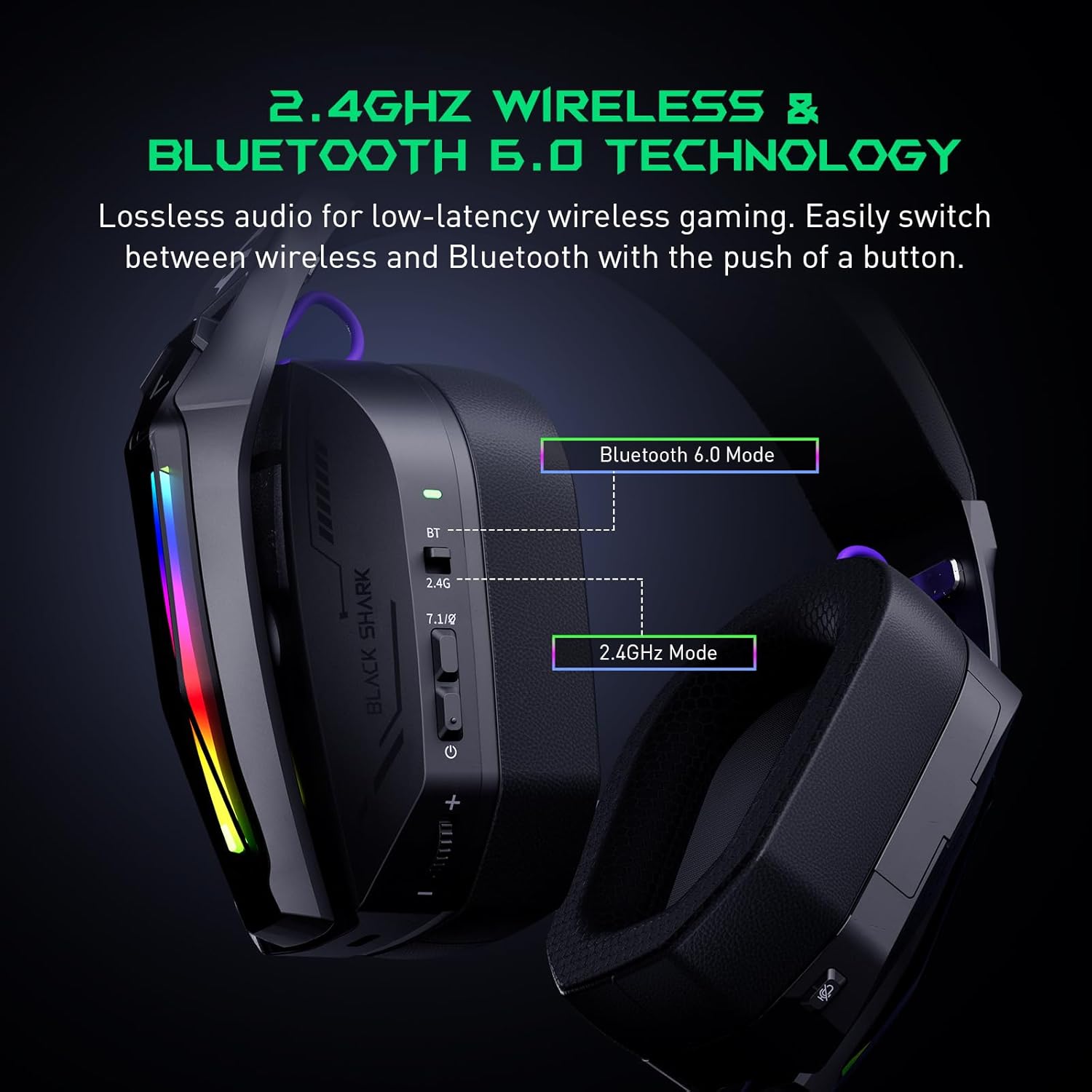
The Goblin X8 offers three connection methods: 2.4GHz wireless (via USB/Type-C dongle), Bluetooth 6.0, and a wired 3.5mm audio connection. The 2.4GHz mode provides ultra-low latency (under 20ms), ideal for competitive gaming. Bluetooth 6.0 ensures stable connectivity with under 30ms delay.


3.2 7.1 ระบบเสียงรอบทิศทางเสมือนจริง
Equipped with 40mm magnetic neodymium drivers and 2.4GHz lossless wireless technology, the headset delivers virtual 7.1 surround sound. This expands the audio dynamic range, providing exceptional scene reproduction and an immersive 3D sound experience in games.

3.3 ไมโครโฟนตัดเสียงรบกวน
The 120° adjustable, high-sensitivity microphone features omnidirectional noise cancellation technology. This effectively suppresses background noise, ensuring clear voice capture for communication during games or chats. It includes a one-touch mic mute switch for convenience.

3.4 ความเข้ากันได้กว้าง
This headset is compatible with a broad range of gaming devices, including PC, PS4, PS5, Switch, Xbox, laptops, tablets, TVs, iPads, and mobile phones, thanks to its triple-mode connectivity.

3.5 Ergonomic Design & Comfort
Designed for all-day comfort, the headset features an adjustable, ergonomic headband and breathable protein leather ear cups. This design reduces pressure and heat, preventing fatigue during long gaming sessions.
3.6 อายุการใช้งานแบตเตอรี่ยาวนาน
The gaming headphones offer up to 40 hours of battery life for continuous use without RGB lights. With RGB lights on, the battery lasts for 20 hours. A low battery alert is provided when voltagอีลดลงต่ำกว่า 3.2V

4. การควบคุมและตัวชี้วัด
The headset features intuitive controls for easy management of audio and settings:
- ตัวบ่งชี้สถานะ: Displays connection and battery status.
- 2.4G & Bluetooth Switching: Toggle between wireless modes.
- Virtual 7.1 Surround Sound On/Off: Activate or deactivate surround sound.
- ปุ่มเปิด/ปิด: เปิด/ปิดชุดหูฟัง
- ล้อระดับเสียง: ปรับระดับเสียง
- พอร์ตชาร์จ USB-C: สำหรับการชาร์จชุดหูฟัง
- ปุ่มปิดเสียงไมค์: ปิดเสียงหรือเปิดเสียงไมโครโฟน
- Hidden 2.4G USB Dongle: Stores the wireless dongle securely.

5. การตั้งค่า
5.1 การเชื่อมต่อไร้สาย 2.4GHz
- Locate the hidden 2.4G USB dongle on the headset.
- Plug the USB-A or USB-C end of the dongle into your PC, PS4, PS5, or Switch.
- Slide the connectivity switch on the headset to the '2.4G' position.
- ชุดหูฟังจะเชื่อมต่อกับดองเกิลโดยอัตโนมัติ
5.2 การเชื่อมต่อบลูทูธ 6.0
- Slide the connectivity switch on the headset to the 'BT' (Bluetooth) position.
- On your device (smartphone, tablet, laptop), go to Bluetooth settings and search for 'Black Shark Goblin X8'.
- Select the headset to pair and connect.
5.3 Wired 3.5mm Audio Connection
- Connect one end of the included 3.5mm audio cable to the headset's 3.5mm jack.
- Connect the other end to the 3.5mm audio port on your device (PC, PS4, PS5, Xbox controller, Switch, etc.).
- ชุดหูฟังจะทำงานในโหมดใช้สาย
6. คู่มือการใช้งาน
6.1 เปิด/ปิดเครื่อง
- To power on, press and hold the Power Button until the status indicator lights up.
- To power off, press and hold the Power Button until the status indicator turns off.
6.2 การปรับระดับเสียง
- Rotate the Volume Wheel up to increase volume.
- Rotate the Volume Wheel down to decrease volume.
6.3 การใช้งานไมโครโฟน
- To use the microphone, gently pull it down from its hidden position on the earcup.
- To mute the microphone, press the Mic Mute Button. Press again to unmute.
- To store the microphone, push it back into its hidden slot.
6.4 7.1 ระบบเสียงรอบทิศทางเสมือนจริง
- Press the Virtual 7.1 Surround Sound On/Off button to toggle the surround sound feature.
เอฟเฟกต์แสง RGB 6.5 แบบ
- Double-press the Virtual 7.1 Surround Sound On/Off button to turn the RGB lights on or off.
7. การบำรุงรักษา
- รักษาชุดหูฟังให้สะอาดด้วยการเช็ดด้วยผ้าแห้งนุ่ม
- หลีกเลี่ยงการให้ชุดหูฟังสัมผัสกับอุณหภูมิที่สูงหรือความชื้นสูงหรือแสงแดดโดยตรง
- Do not attempt to disassemble or repair the headset yourself. Contact customer support for assistance.
- ควรเก็บหูฟังไว้ในที่ปลอดภัยเพื่อป้องกันความเสียหายเมื่อไม่ได้ใช้งาน
8 การแก้ไขปัญหา
8.1 ไม่มีเสียง/คุณภาพเสียงไม่ดี
- Ensure the headset is powered on and properly connected (2.4GHz dongle, Bluetooth, or 3.5mm cable).
- ตรวจสอบระดับเสียงทั้งบนชุดหูฟังและอุปกรณ์ที่เชื่อมต่อของคุณ
- If using 2.4GHz wireless, ensure the dongle is securely plugged in and the headset is in 2.4G mode.
- If using Bluetooth, ensure the headset is paired and connected in your device's Bluetooth settings.
- ทดสอบด้วยแหล่งเสียงหรืออุปกรณ์อื่นเพื่อตัดปัญหาที่เกิดจากอุปกรณ์เฉพาะออกไป
8.2 ไมโครโฟนไม่ทำงาน
- Ensure the microphone is pulled down and not muted (check the Mic Mute Button).
- ตรวจสอบการตั้งค่าอินพุตไมโครโฟนบนอุปกรณ์ที่เชื่อมต่อของคุณ
- Some devices (e.g., Nintendo Switch in 2.4GHz mode) may have limitations on microphone usage. Refer to the device's manual.
8.3 ปัญหาการเชื่อมต่อ
- For 2.4GHz, ensure the dongle is within range and there are no major obstructions.
- สำหรับการเชื่อมต่อบลูทูธ โปรดตรวจสอบให้แน่ใจว่าหูฟังอยู่ในโหมดจับคู่และบลูทูธบนอุปกรณ์ของคุณเปิดใช้งานอยู่ ลองยกเลิกการจับคู่แล้วจับคู่ใหม่อีกครั้ง
- ตรวจสอบให้แน่ใจว่าชุดหูฟังชาร์จเต็มแล้ว
9. ข้อมูลจำเพาะ
| คุณสมบัติ | ข้อมูลจำเพาะ |
|---|---|
| ชื่อรุ่น | Goblin X8 (BS-X8) |
| เทคโนโลยีการเชื่อมต่อ | แบบมีสาย, ไร้สาย (2.4GHz, Bluetooth 6.0) |
| ประเภทไดร์เวอร์เสียง | ไดร์เวอร์แบบไดนามิก |
| ขนาดไดร์เวอร์เสียง | 40 มิลลิเมตร |
| เวลาแฝงของเสียง | 20 มิลลิวินาที (2.4 GHz) |
| เวอร์ชันบลูทูธ | 6.0 |
| ช่วงบลูทูธ | 10 เมตร |
| อายุการใช้งานแบตเตอรี่ | 40 Hours (lights off), 20 Hours (lights on) |
| เวลาในการชาร์จ | 3 ชั่วโมง |
| ไมโครโฟน | Noise Cancelling, 120° Adjustable |
| คุณสมบัติพิเศษ | Surround Sound, Volume Control, Rechargeable Battery |
| อุปกรณ์ที่รองรับ | PC, PS4, PS5, Switch, Xbox, Laptops, Tablets, TVs, iPads, Mobile Phones |
| น้ำหนักสินค้า | 325 กรัม (11.5 ออนซ์) |
10. การรับประกันและการสนับสนุน
สำหรับข้อมูลการรับประกัน การสนับสนุนทางเทคนิค หรือสอบถามเกี่ยวกับบริการ โปรดดูที่เว็บไซต์อย่างเป็นทางการของ Black Shark webหรือติดต่อฝ่ายบริการลูกค้าโดยตรง เก็บใบเสร็จรับเงินไว้เพื่อใช้ในการเคลมประกัน