
การแนะนำ
This manual provides essential information for setting up, operating, and maintaining your Roku 32-Inch Select Series 1080p Full HD Smart TV. Designed for a delightful streaming experience, this TV offers excellent picture quality, clear sound, and automatic updates. Please read this manual thoroughly before using your television.
มีอะไรอยู่ในกล่อง
ตรวจสอบว่าบรรจุภัณฑ์มีส่วนประกอบทั้งหมด:
- Roku 32-Inch Select Series 1080p Full HD Smart TV
- รีโมทคอนโทรล
- ขาตั้ง (2 ชิ้น)
- สกรูยึดขาตั้ง (4 ชิ้น)
- สายไฟ
- คู่มือการใช้งาน (เอกสารนี้)

Image: Contents of the Roku TV box, showing the television, remote control, two stand pieces, and four screws.
คำแนะนำการตั้งค่า
1. การติดตั้งขาตั้งทีวี
- Carefully place your TV face-down on a soft, clean surface to prevent damage to the screen.
- จัดวางชิ้นส่วนขาตั้งให้ตรงกับรูสกรูที่ด้านล่างของทีวี
- Secure each stand piece with two screws using a Phillips head screwdriver. Do not overtighten.
2. การเชื่อมต่อพลังงานและอุปกรณ์
- เชื่อมต่อสายไฟเข้ากับช่องอินพุตไฟของทีวี จากนั้นจึงเชื่อมต่อกับเต้ารับที่ผนัง
- Connect your external devices (e.g., cable box, gaming console, Blu-ray player) to the available HDMI ports on the back of the TV. This model features 3 HDMI ports.
- For older devices, use the AV input ports (yellow, white, red).
- An optical audio output is available for connecting to soundbars or home theater systems.
- A USB port is provided for media playback.

ภาพ: ด้านหลัง view of the Roku TV displaying HDMI, AV, Antenna, USB, Optical, and Headphone ports.
3. การเปิดเครื่องและการเชื่อมต่อเครือข่ายครั้งแรก
- กดปุ่มเปิดปิดบนรีโมทคอนโทรลหรือทีวี
- ทำตามคำแนะนำบนหน้าจอเพื่อเลือกภาษาและเชื่อมต่อกับเครือข่าย Wi-Fi ของคุณ
- Activate your Roku account or create a new one. This is required to access streaming channels and features.
คำแนะนำการใช้งาน
1. Roku OS Interface
The Roku OS provides a simple and intuitive home screen for accessing all your entertainment. Easily navigate between streaming apps, live TV, and connected devices.

Image: The Roku TV home screen with a menu on the left and app icons on the right, including Netflix, Disney+, Apple TV, and Roku Channel.
2. Voice Remote
Your Roku TV comes with a voice remote for convenient control. Use your voice to search for content, launch apps, and control playback.
- การค้นหาด้วยเสียง: Press the voice button and speak your command (e.g., "Find comedies," "Open Netflix").
- ทางลัดของแอป: ปุ่มเฉพาะช่วยให้เข้าถึงบริการสตรีมมิ่งยอดนิยมได้อย่างรวดเร็ว
- การควบคุมระดับเสียง: ปรับระดับเสียงโดยใช้ปุ่มด้านข้าง
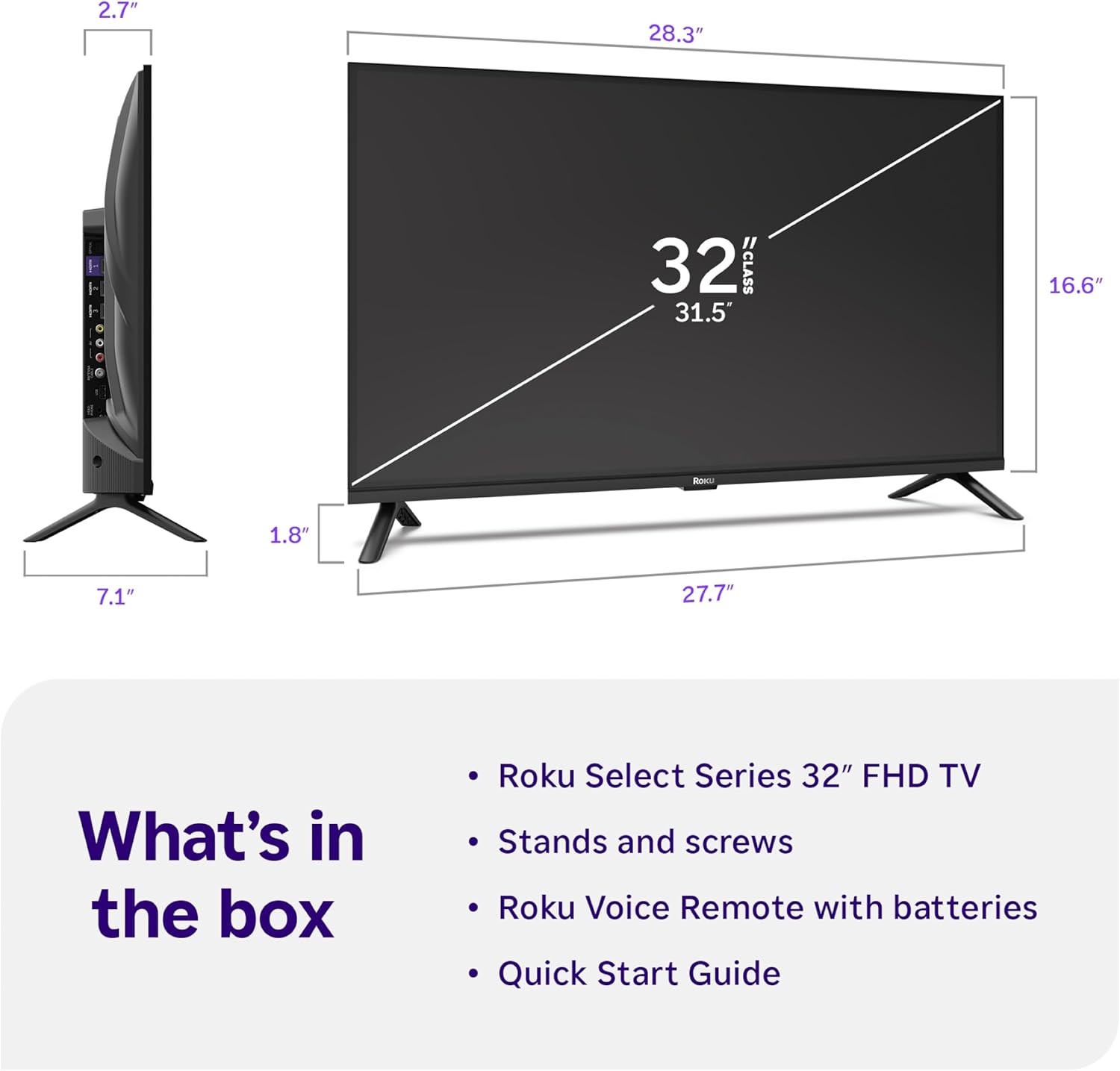
Image: Close-up of the Roku Voice Remote, highlighting buttons for TV power, volume, mute, voice search, instant replay, options, and dedicated app shortcuts.
3. Streaming Apps and Live TV
Access thousands of streaming channels, including Netflix, Disney+, Hulu, Prime Video, and Apple TV+. The Roku Channel also offers free live TV and on-demand content.

Image: A vibrant Roku TV home screen displaying a selection of popular streaming applications and recommended shows.
4. การตั้งค่ารูปภาพ
เพิ่มประสิทธิภาพของคุณ viewing experience with various picture settings:
- Roku Smart Picture: Automatically adjusts picture mode for optimal viewการไอเอ็นจี
- โหมดภาพ: Choose from presets like Movie, Sports, Vivid, Standard, or Low Power.
- การปรับแต่ง: Adjust brightness, contrast, sharpness, color, and tint for a personalized picture.
5. การตั้งค่าเสียง
Enhance your audio experience:
- ระบบเสียง Dolby: Enjoy clear speech and louder sound.
- โหมดเสียง: Select from Standard, Dialogue, Movie, Music, or Night mode.
- Bluetooth Headphone Mode: Connect your wireless headphones to listen without disturbing others.

Image: A child wearing wireless headphones while watching the Roku TV, demonstrating the Bluetooth Headphone Mode.
6. การบูรณาการบ้านอัจฉริยะ
Your Roku TV is compatible with various smart home ecosystems:
- การควบคุมด้วยเสียง: Use Roku Voice, Siri, Alexa, or Google Assistant for hands-free control.
- แอปเปิล AirPlay: Effortlessly share videos, photos, and music from your Apple devices.
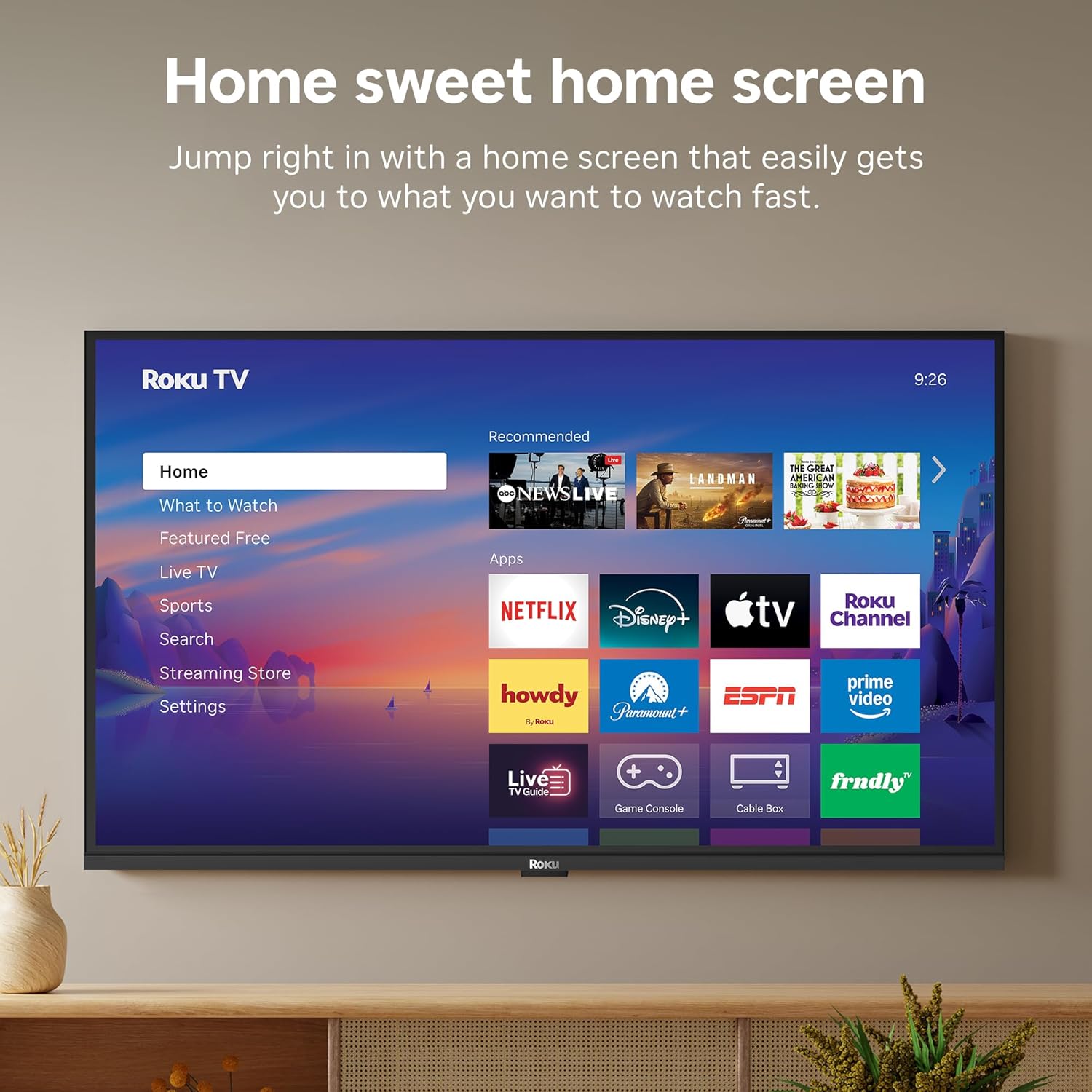
Image: The Roku TV screen displaying smart home compatibility logos for Roku Smart Home, Apple AirPlay, Apple Home, Alexa, and Google Home, with a smart speaker nearby.
7. การควบคุมโดยผู้ปกครอง
Manage content access with built-in parental controls, including V-Chip technology, to ensure a safe viewการสร้างสภาพแวดล้อมที่ดีให้กับเด็ก
วิดีโอผลิตภัณฑ์อย่างเป็นทางการ
วิดีโอ: จบแล้วview of the Roku TV OS, demonstrating its user-friendly interface, app selection, and smart features. This video is provided by Roku, Inc.
ข้อมูลจำเพาะ
- ขนาดหน้าจอ:
- 32 นิ้ว
- ปณิธาน:
- 1080p เต็ม HD
- เทคโนโลยีการแสดงผล:
- นำ
- อัตราการรีเฟรช:
- 60 เฮิรตซ์
- คุณสมบัติพิเศษ:
- Bluetooth Headphone Mode, Dolby Audio, Voice Remote, Roku Smart Picture
- เทคโนโลยีการเชื่อมต่อ:
- บลูทู ธ Wi-Fi
- อินเทอร์เฟซฮาร์ดแวร์:
- 3 HDMI Ports, 1 USB Port, S/PDIF (Optical Audio Out)
- ระบบปฏิบัติการ:
- ระบบปฏิบัติการ Roku
- ขนาดสินค้า (ลึก x กว้าง x สูง):
- ลึก 7.1 นิ้ว x กว้าง 28.3 นิ้ว x สูง 18.4 นิ้ว
- น้ำหนักสินค้า:
- 7.7 ปอนด์ (พร้อมขาตั้ง)
- มาตรฐานการยึด VESA:
- 200 x 200 มม.
- หมายเลขรุ่น:
- 32R3E5
- ยูพีซี:
- 829610009469
การแก้ไขปัญหา
If you encounter issues with your Roku TV, please refer to the following common solutions:
- ไม่มีไฟฟ้า: ตรวจสอบให้แน่ใจว่าสายไฟเชื่อมต่อกับทีวีและเต้ารับไฟฟ้าที่ใช้งานได้แน่นดีแล้ว ลองใช้เต้ารับอื่น
- ไม่มีภาพ/เสียง: Verify that the correct input source is selected on your TV. Check all cable connections (HDMI, AV, etc.) for looseness.
- รีโมตไม่ตอบสนอง: Replace the batteries in your remote control. Ensure there are no obstructions between the remote and the TV.
- ปัญหาการเชื่อมต่อเครือข่าย: Restart your Wi-Fi router and modem. Go to the TV's Settings > Network > Check connection to diagnose and reconnect.
- แอปไม่โหลด: Restart the app. If the issue persists, try removing and reinstalling the app from the Roku Channel Store.
หากต้องการความช่วยเหลือในการแก้ไขปัญหาอย่างละเอียด โปรดไปที่เว็บไซต์ฝ่ายสนับสนุนอย่างเป็นทางการของ Roku webเว็บไซต์.
การซ่อมบำรุง
To ensure the longevity and optimal performance of your Roku TV, follow these maintenance guidelines:
- การทำความสะอาดหน้าจอ: เช็ดหน้าจอเบาๆ ด้วยผ้าไมโครไฟเบอร์ที่นุ่มและแห้ง สำหรับคราบฝังแน่น ให้เช็ดเบาๆampชุบผ้าด้วยน้ำหรือน้ำยาทำความสะอาดหน้าจอที่ออกแบบมาสำหรับอุปกรณ์อิเล็กทรอนิกส์โดยเฉพาะ ห้ามฉีดน้ำยาลงบนหน้าจอโดยตรง
- การทำความสะอาดตัวทีวี: Use a soft, dry cloth to wipe the exterior of the TV. Avoid abrasive cleaners or solvents.
- การระบายอากาศ : ตรวจสอบให้แน่ใจว่าช่องระบายอากาศของทีวีไม่ถูกปิดกั้นเพื่อป้องกันความร้อนสูงเกินไป ควรเว้นพื้นที่รอบทีวีให้เพียงพอเพื่อการระบายอากาศ
- การอัปเดตซอฟต์แวร์: Your Roku TV automatically receives software updates. Ensure your TV is connected to the internet to receive the latest features and performance improvements.
- การจัดการพลังงาน: ถอดปลั๊กทีวีออกจากเต้าเสียบไฟฟ้าในระหว่างที่มีพายุฝนฟ้าคะนองหรือเมื่อปล่อยทิ้งไว้โดยไม่มีใครดูแลเป็นเวลานาน
การรับประกันและการสนับสนุน
ข้อมูลการรับประกัน
Roku warrants the hardware of this device against defects in materials and workmanship under normal use for a period of one (1) year from the date of purchase ("Warranty Period"). If Roku determines that the device’s hardware is defective during the Warranty Period, Roku’s sole obligation, and your exclusive remedy, will be to either repair or replace the unit with either a new or rebuilt device, at its option. This warranty applies if the device is used in accordance with the provided documentation.
Important information about warranty returns and replacements is available on the Roku support site. You may also return a device for any reason, subject to the terms of the applicable return policy: 1) Within thirty (30) days from the date of purchase from Roku; or 2) within the applicable return period if purchased from an authorized reseller or distributor. Additional details regarding product returns can be found on the Roku support site.
การสนับสนุนลูกค้า
For further assistance, technical support, or to access the full range of support resources, please visit the official Roku support webคุณสามารถค้นหาคำถามที่พบบ่อย คำแนะนำในการแก้ไขปัญหา และข้อมูลติดต่อฝ่ายบริการลูกค้าได้ที่นั่น