
1. บทนำ
Thank you for choosing the ATK Dragonfly A9 Ultimate Wireless Gaming Mouse. This high-performance gaming mouse is engineered for speed, precision, and ergonomic control, featuring a lightweight design, a PAW3950 Ultra sensor, Nordic 54L15 MCU, and 8K polling rate support. This manual provides essential information to help you set up, operate, and maintain your device for optimal performance.

Image 1: ATK A9 Ultimate Wireless Gaming Mouse, showcasing its lightweight design and advanced features.
2. คุณสมบัติหลัก
- Ultra-Lightweight Build: Engineered with a 55g lightweight shell for enhanced agility and precision during competitive esports sessions.
- เซ็นเซอร์แสงประสิทธิภาพสูง: Equipped with the PAW3950 Ultra sensor, supporting high-speed tracking and stable flick shots for consistent accuracy.
- 8000Hz Polling Support: Delivers smoother cursor response and reduced input latency, supporting 1K–8K output via USB-C and 2.4G wireless.
- อายุการใช้งานแบตเตอรี่ยาวนาน: Provides up to 800 hours of use at a 1000Hz polling rate, optimized for gaming and daily productivity, with quick USB-C charging.
- Ergonomic Shape Design: Sculpted for comfort across claw and fingertip grips, featuring textured side panels for enhanced control and PTFE feet for a smoother glide.

ภาพที่ 2: รายละเอียด view of the ATK A9 Ultimate's internal components, including the Nordic 54L15 MCU and PAW3950 Ultra sensor.

Image 3: Exploded diagram highlighting the 53g ultra-lightweight design of the ATK A9 Ultimate.

ภาพที่ 6: ประสิทธิภาพการทำงานเหนือview of the ATK A9 Ultimate, featuring the Apexshark MAX solution and Nordic 54L15 MCU.
3. เนื้อหาบรรจุภัณฑ์
The ATK Dragonfly A9 Ultimate package includes the following items:
- ATK Dragonfly A9 Ultimate Wireless Gaming Mouse
- GEM 8K Dongle
- 8K USB-C Cable
- Bonus Balanced Mouse Feet
- Matching Color Grip Tape
- คู่มือการใช้งาน (เอกสารนี้)
- ใบรับประกันสินค้า
- คู่มือข้อกำหนดด้านความปลอดภัย
4. คู่มือการติดตั้ง
4.1 การชาร์จเมาส์
Before first use, fully charge the mouse using the provided USB-C cable. Connect the USB-C end to the mouse and the USB-A end to a powered USB port on your computer or a USB wall adapter. The LED indicator on the mouse will show charging status.
4.2 Connecting Wirelessly (2.4G Mode)
- Insert the GEM 8K Dongle into an available USB port on your computer.
- เปิดใช้งานเมาส์โดยใช้สวิตช์เปิด/ปิดที่อยู่ด้านล่างของเมาส์
- The mouse should automatically connect to the dongle. If not, press the pairing button (if available) on the mouse and dongle simultaneously until the connection is established.
4.3 Connecting Wired (USB-C Mode)
To use the mouse in wired mode, simply connect the provided USB-C cable directly from the mouse to your computer. The mouse will function immediately and charge simultaneously.
4.4 การติดตั้งซอฟต์แวร์
For advanced customization, including DPI settings, polling rate adjustments, button remapping, and macros, download the official ATK software from the ATK webไซต์ ทำตามคำแนะนำบนหน้าจอเพื่อการติดตั้ง
5. คู่มือการใช้งาน
5.1 การปรับ DPI
Use the dedicated DPI button (usually located on the top or bottom of the mouse) to cycle through preset DPI levels. For precise control, customize DPI stages via the ATK software.
5.2 Polling Rate Settings
The ATK Dragonfly A9 Ultimate supports up to an 8000Hz polling rate. This can be adjusted via the ATK software. Higher polling rates provide smoother cursor movement and lower input latency but may consume more battery life and system resources.
5.3 การปรับแต่งปุ่ม
All programmable buttons can be remapped to perform various functions, macros, or keyboard shortcuts using the ATK software. Refer to the software's help section for detailed instructions.
5.4 Grip Styles and Ergonomics
The mouse features an ambidextrous design optimized for medium to large hands, accommodating claw, finger, and palm grip styles. The ergonomic side guide slots enhance grip comfort.

Image 4: Ambidextrous design and ergonomic features supporting various grip styles.

Image 5: Optimized scroll wheel and large Teflon mouse feet for smooth operation.
6. การบำรุงรักษา
6.1 การทำความสะอาด
- Ensure the mouse is turned off and disconnected from your computer before cleaning.
- ใช้ผ้านุ่มไม่เป็นขุยค่อยๆ งampชุบน้ำหรือน้ำยาทำความสะอาดอ่อนๆ เพื่อเช็ดพื้นผิวของเมาส์
- Avoid using harsh chemicals, abrasive materials, or excessive moisture, as these can damage the mouse.
- Use a soft brush or compressed air to clean dust and debris from around the scroll wheel and sensor area.
6.2 พื้นที่จัดเก็บ
When not in use for extended periods, store the mouse in a dry, cool place away from direct sunlight and extreme temperatures. Ensure the battery is not completely depleted before storage to prolong its lifespan.
7 การแก้ไขปัญหา
7.1 เมาส์ไม่ตอบสนอง
- ตรวจสอบแบตเตอรี่: Ensure the mouse is sufficiently charged. Connect it via USB-C cable to confirm if it works in wired mode.
- การเชื่อมต่อแบบไร้สาย: For 2.4G mode, ensure the GEM 8K Dongle is securely plugged into a working USB port. Try a different USB port.
- จับคู่ใหม่: If the wireless connection is lost, try re-pairing the mouse with the dongle as described in the setup section.
- วงจรไฟฟ้า: ปิดเมาส์แล้วเปิดใหม่อีกครั้ง
7.2 การเคลื่อนไหวของเคอร์เซอร์ที่ไม่แน่นอน
- เซ็นเซอร์ทำความสะอาด: ตรวจสอบให้แน่ใจว่าเซ็นเซอร์แสงที่ด้านล่างของเมาส์สะอาดและปราศจากฝุ่นหรือสิ่งสกปรก
- แผ่นรองเมาส์: ใช้เมาส์บนพื้นผิวที่สะอาดและสม่ำเสมอ หรือแผ่นรองเมาส์คุณภาพสูง หลีกเลี่ยงพื้นผิวที่สะท้อนแสงหรือโปร่งใส
- การรบกวน: Move the dongle closer to the mouse or away from other wireless devices that might cause interference.
7.3 ปัญหาซอฟต์แวร์
- ติดตั้งซอฟต์แวร์ใหม่: If the ATK software is not functioning correctly, try uninstalling and reinstalling it from the official ATK webเว็บไซต์.
- อัปเดตไดรเวอร์: Ensure your operating system and mouse drivers are up to date.
8. ข้อมูลจำเพาะ
| คุณสมบัติ | เอทีเค เอ9 อัลติเมท |
|---|---|
| ชื่อสินค้า | เมาส์ไร้สายน้ำหนักเบา ATK Dragonfly A9 Series |
| แบบอย่าง | เอ9 อัลติเมท |
| สี | Black, White, Red, Pink |
| การเคลือบ | New Nano Coating |
| ขนาด (กว้าง x ยาว x สูง) | 125 x 63.5 x 40 mm (Medium to Large Hand Fit) |
| เซ็นเซอร์ | PAW3950 อัลตร้า |
| สารละลาย | นอร์ดิก 54L15 |
| เทคโนโลยีไร้สาย | 3rd-gen Apexshark wireless transmission solution, Apexshark Gaming firmware MAX |
| อัตราการสำรวจความคิดเห็น | แบบมีสาย/ไร้สาย Dual 8K |
| แบตเตอรี่ | แบตเตอรี่ขนาด 800mAh (ไม่มาตรฐาน) (มีให้ในชุด) |
| อายุการใช้งานแบตเตอรี่ (1000Hz) | นานถึง 800 ชั่วโมง |
| น้ำหนัก | 53 ± 3g (1.94 ounces) |
| Main Button Switch | ATK customized optical switches |
| ดองเกิล | New GEM 8K Dongle |
| ล้อเลื่อน | TTC โกลด์วีล |
| เม้าส์ | Standard Gray Gaming Mouse Feet + Bonus Balanced Feet (PTFE) |
| เทคโนโลยีการเชื่อมต่อ | USB (Wired & 2.4G Wireless) |
| คุณสมบัติพิเศษ | น้ำหนักเบา ปุ่มตั้งโปรแกรมได้ ชาร์จไฟได้ |
| หมายเลขรุ่นสินค้า | ATK ดราก้อนฟลาย A9 |
| ผู้ผลิต | การโจมตี |
| วันที่พร้อมใช้งานครั้งแรก | วันที่ 14 สิงหาคม 2025 |
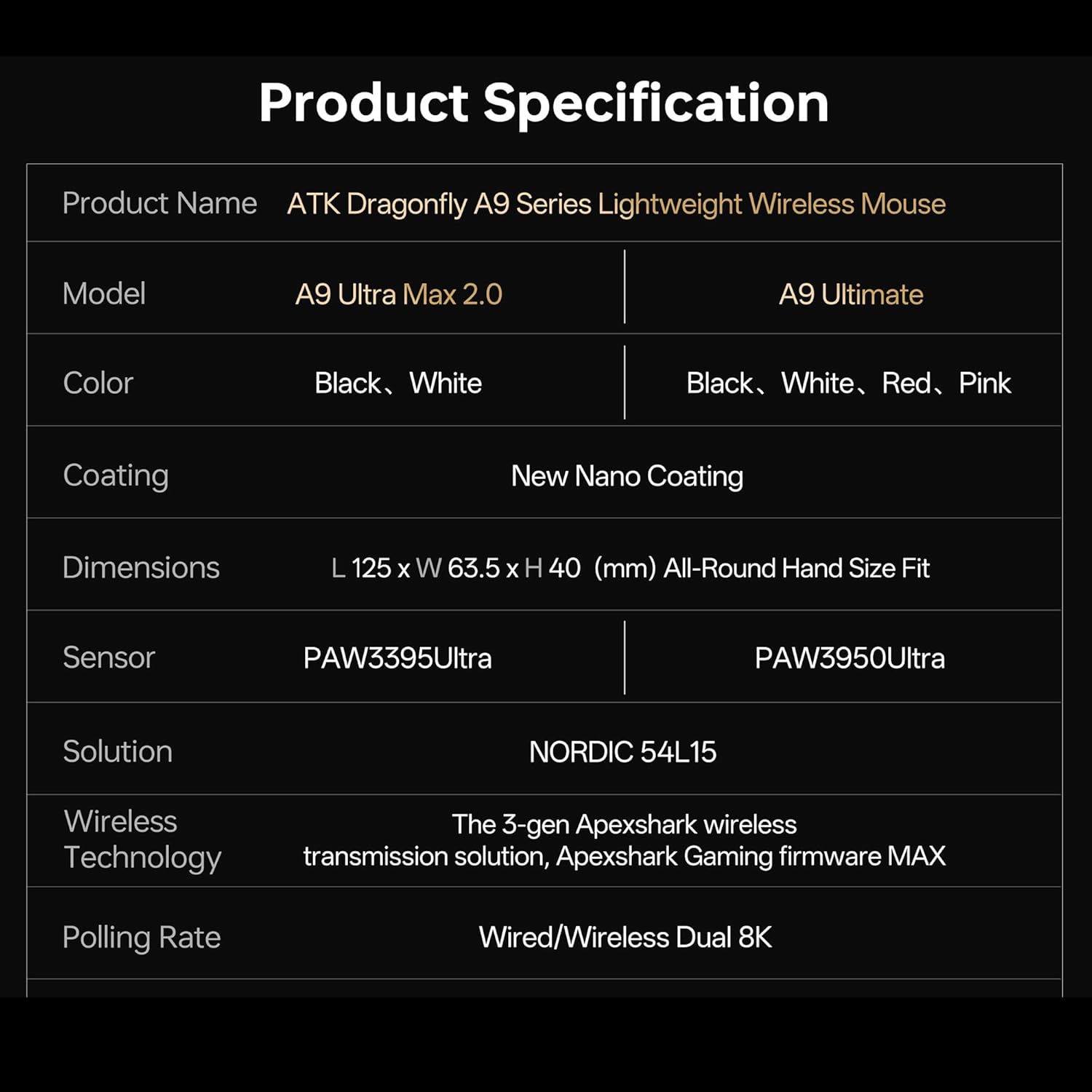
Image 7: Product specifications table, part 1.

Image 8: Product specifications table, part 2.
9. ข้อมูลการรับประกัน
The ATK Dragonfly A9 Ultimate Wireless Gaming Mouse comes with a standard manufacturer's warranty. Please refer to the Warranty Certificate included in your package for specific terms, conditions, and duration of coverage. Keep your proof of purchase for warranty claims.
10. การสนับสนุนลูกค้า
For further assistance, technical support, or warranty inquiries, please visit the official ATK website or contact ATK customer service. You can find more information and resources at the ร้าน ATK บน Amazon.


