
1. บทนำ
This manual provides detailed instructions for the safe and effective use of your Moukey MPS5 Portable Karaoke Machine. Please read this manual thoroughly before operating the device and retain it for future reference. The MPS5 is a versatile portable speaker system designed for various audio playback needs, including karaoke, music streaming, and public address, featuring wireless microphones and multiple connectivity options.
2. อะไรอยู่ในกล่อง
Carefully unpack all items from the box. Ensure all components listed below are present and in good condition.
- Moukey MPS5 Portable Karaoke Machine (1 unit)
- ไมโครโฟนไร้สาย (2 ชุด)
- สายชาร์จ USB (1 ชิ้น)
- 3.5mm AUX Cable (1 unit)
- Shoulder Strap (1 unit)
- คู่มือผู้ใช้ (1 หน่วย)
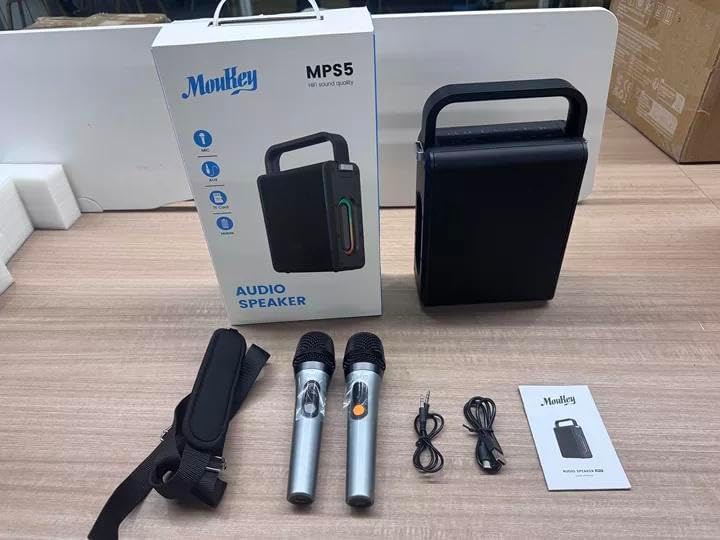
Image: All components included in the Moukey MPS5 package.
3. สินค้าหมดview
The Moukey MPS5 is a compact yet powerful portable karaoke machine. It features a robust design with integrated LED lighting on the sides, enhancing the user experience. A sturdy handle and an included shoulder strap provide convenient portability.
ภาพ: ด้านหน้า view of the Moukey MPS5 speaker.

ภาพ: ด้านข้าง view of the Moukey MPS5, showing the LED lighting.
4. คุณสมบัติหลัก
- Excellent Sound Output: The MPS5 delivers 200W peak power (RMS 60W) through a 4-inch woofer and two 2-inch tweeters, providing full-range stereo sound with enhanced bass.
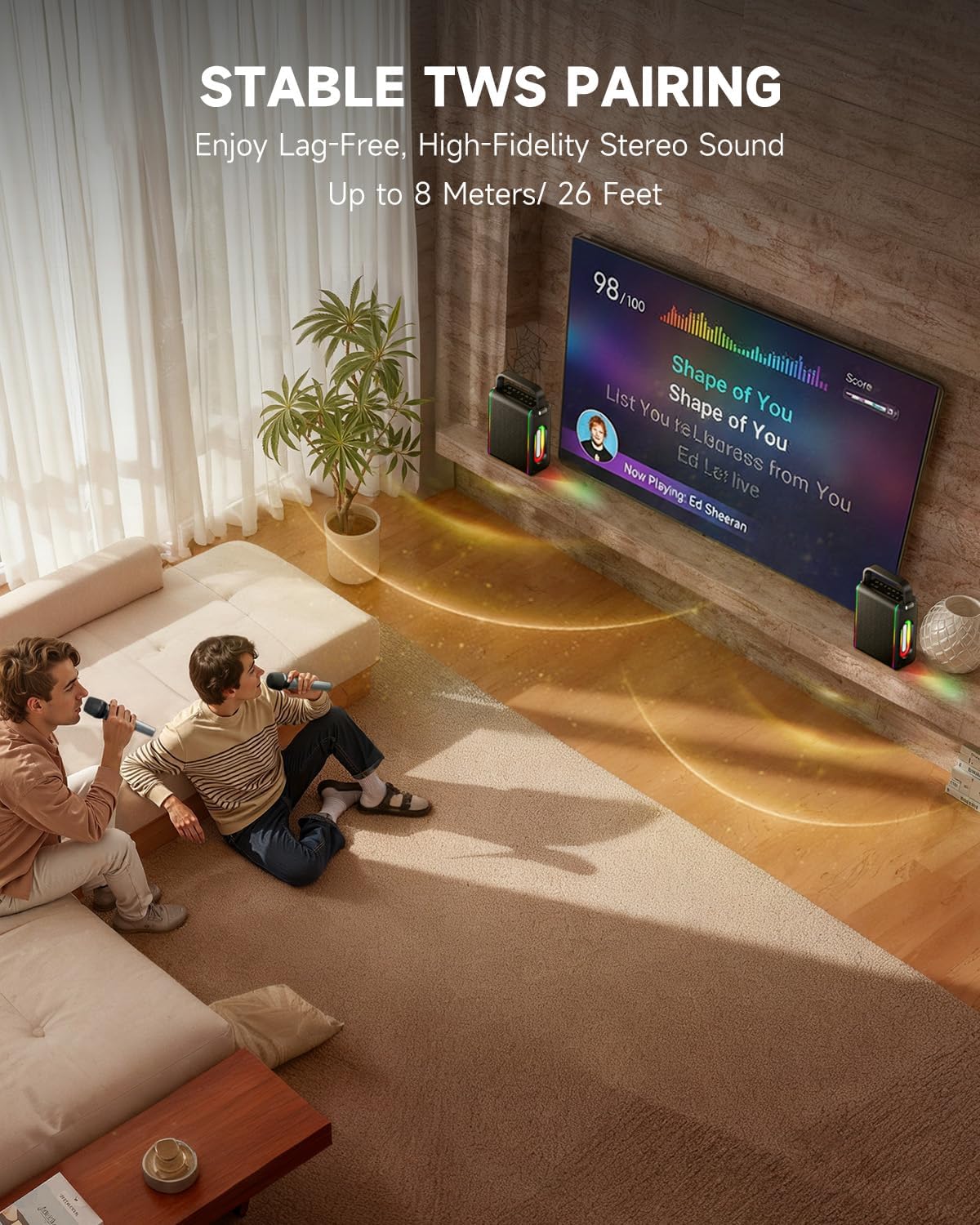
- Powerful Functionality: Supports Bluetooth 5.3 for wireless connection to various devices. Also includes Micro TF card, Flash USB, MP3, and AUX IN playback options. Features stable TWS (True Wireless Stereo) pairing for connecting two MPS5 units for a wider stereo soundstage.
- อายุการใช้งานแบตเตอรี่ยาวนานเป็นพิเศษ: The rechargeable battery provides up to 8 hours of continuous music playback on a 2-hour charge, suitable for extended use indoors or outdoors.
- การออกแบบน้ำหนักเบาและพกพาสะดวก: Weighing only 2kg, the MPS5 is designed for easy transport. It can be carried by hand using the integrated handle or with the included shoulder strap.
- ไมโครโฟนไร้สายคู่: Includes two 2.4Ghz rechargeable microphones with a connection range of up to 60 feet and up to 8 hours of use time per charge (2-3 hours charging time). Features one-tap connectivity for effortless pairing.

Image: Internal speaker components of the MPS5.

Image: MPS5 connected to multiple devices via Bluetooth.

Image: Battery life and charging details for the MPS5.

Image: Demonstrating the portability of the MPS5 with hand and shoulder strap options.

Image: The two wireless microphones for the MPS5.
5. การตั้งค่า
5.1 การชาร์จลำโพงและไมโครโฟน
Before first use, fully charge the MPS5 speaker and both wireless microphones.
- ผู้บรรยาย: Connect the provided USB Type-C cable to the charging port on the speaker and to a compatible USB power adapter (not included). The charging indicator light will show charging status. A full charge takes approximately 2 hours.
- ไมโครโฟน: Each microphone has a charging port. Connect them to a USB power source using the provided USB cable. Charging time for microphones is 2-3 hours.
5.2 เปิด/ปิดเครื่อง
- To power on the speaker, press and hold the power button (U) on the top panel for 2 seconds.
- หากต้องการปิดเครื่อง ให้กดปุ่มเปิด/ปิดค้างไว้ (U) อีกครั้งเป็นเวลา 2 วินาที
5.3 การจับคู่บลูทูธ
- Ensure the MPS5 speaker is powered on and in Bluetooth mode (indicated by a blue LED). If not, press the 'M' (Mode) button to switch to Bluetooth mode.
- บนอุปกรณ์เคลื่อนที่ของคุณ (สมาร์ทโฟน แท็บเล็ต ฯลฯ) เปิดใช้งานบลูทูธและค้นหาอุปกรณ์ที่มีอยู่
- Select 'Moukey MPS5' from the list of devices to pair. A voice prompt will confirm successful connection.
การจับคู่ 5.4 TWS (True Wireless Stereo)
To achieve stereo sound, you can pair two Moukey MPS5 speakers together.
- Ensure both MPS5 speakers are powered on and in Bluetooth mode, but not connected to any other device.
- On one of the speakers, double-press the 'M' (Mode) button. The speaker will enter TWS pairing mode.
- The two speakers will automatically connect to each other. A voice prompt will confirm successful TWS pairing.
- Once TWS is established, connect your mobile device to one of the MPS5 speakers via Bluetooth as described in section 5.3. Both speakers will then play audio in stereo.
วิดีโอ: ภาพรวมโดยย่อview of the MPS5 Karaoke Machine, demonstrating TWS pairing and other features.
6. คู่มือการใช้งาน
6.1 การควบคุมมากกว่าview
The top panel of the MPS5 speaker features several buttons for controlling playback, volume, and microphone settings.
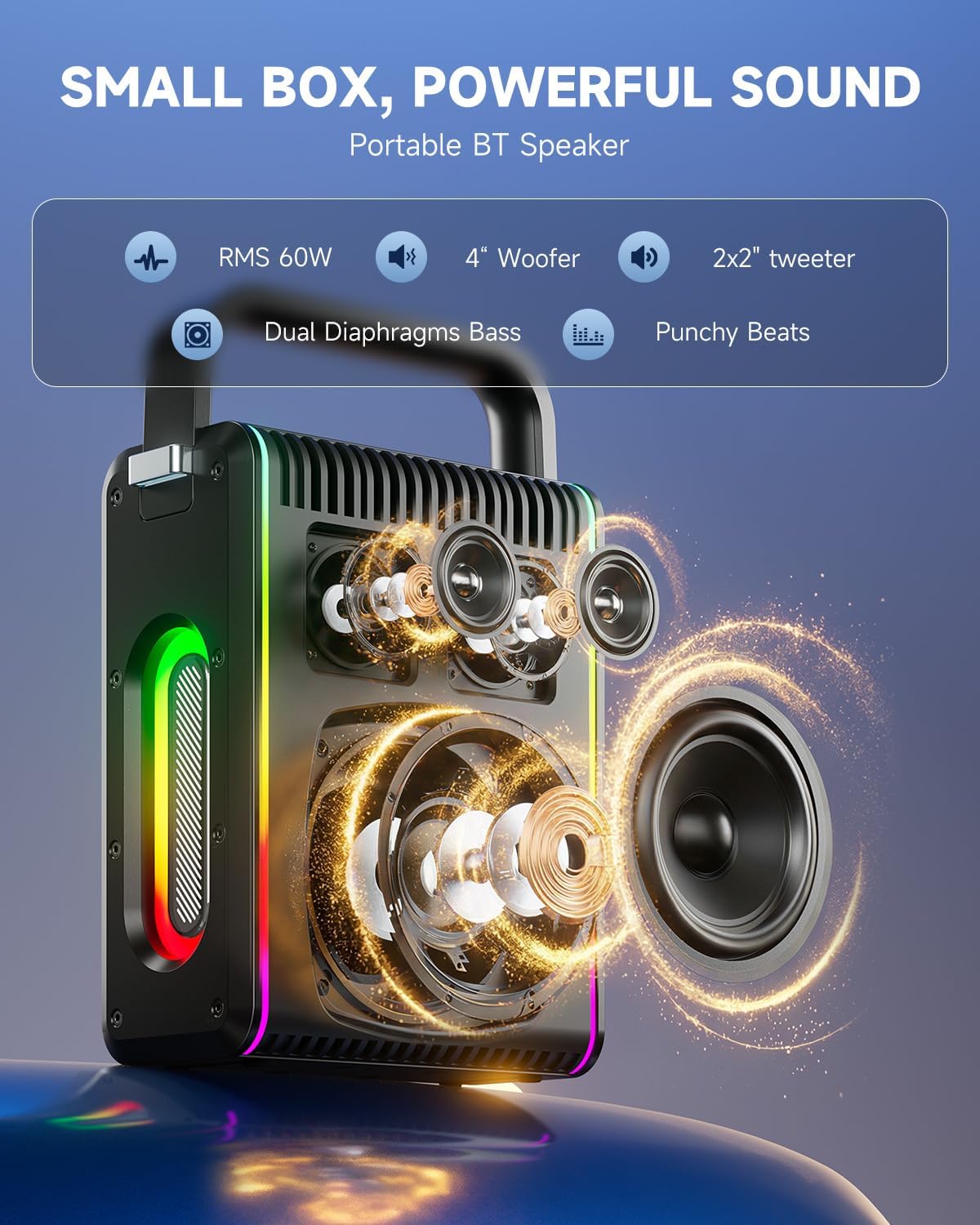
Image: Top control panel of the MPS5.
- ปุ่มเพาเวอร์ (U): กดค้างไว้ 2 วินาทีเพื่อเปิด/ปิด
- ปุ่มโหมด (M): Short press to cycle through input modes (Bluetooth, AUX, USB, TF Card). Double-press to initiate TWS pairing.
- Microphone Volume (Mic - / Mic +): ปรับระดับเสียงของไมโครโฟนที่เชื่อมต่ออยู่
- Echo Adjustment (R- / R+): ปรับค่าเอฟเฟ็กต์เสียงสะท้อนสำหรับไมโครโฟน
- เล่น/หยุดชั่วคราว (▶): เล่นหรือหยุดชั่วคราวแทร็กปัจจุบัน
- ลดระดับเสียง (-): Decreases the main speaker volume.
- เพิ่มระดับเสียง (+): Increases the main speaker volume.
- EQ A/E: Short press to switch between EQ modes. Long press to toggle between original sound and accompaniment elimination.
6.2 การใช้งานไมโครโฟน
The MPS5 comes with two wireless microphones for karaoke and vocal performances.
- เปิด/ปิดเครื่อง: Press and hold the power button on the microphone to turn it on or off.
- การจับคู่: The microphones are pre-paired with the speaker. If re-pairing is needed, ensure the speaker is on, then power on the microphone. They should connect automatically.
- Microphone Disconnect/Reconnect: Press the dedicated microphone button on the speaker's control panel to quickly disconnect or reconnect the microphones.
6.3 โหมดอินพุตเสียง
In addition to Bluetooth, the MPS5 supports several wired and local storage input options.

Image: Input ports on the MPS5 speaker.
- อินพุต AUX: Connect an external audio device using the 3.5mm AUX cable. Select AUX mode using the 'M' button.
- การเล่น USB: ใส่แฟลชไดรฟ์ USB ที่มีไฟล์เสียง MP3 fileเข้ากับพอร์ต USB ลำโพงจะสลับเป็นโหมด USB โดยอัตโนมัติและเริ่มเล่น
- การเล่นการ์ด TF: Insert a Micro TF card containing MP3 audio fileเสียบการ์ด TF ลงในช่องเสียบ ลำโพงจะสลับเป็นโหมดการ์ด TF โดยอัตโนมัติและเริ่มเล่น
6.4 ไฟ LED
The MPS5 features dynamic LED lighting on its sides. Use the dedicated LED button (if available, or refer to the 'M' button for light control if combined) to cycle through different light modes or turn them off.
7. การบำรุงรักษา
- การทำความสะอาด: ใช้ผ้าแห้งนุ่มเช็ดทำความสะอาดภายนอกลำโพง ห้ามใช้น้ำยาทำความสะอาดหรือวัสดุที่มีฤทธิ์กัดกร่อน
- พื้นที่จัดเก็บ: เก็บอุปกรณ์ไว้ในที่แห้งและเย็น หลีกเลี่ยงแสงแดดโดยตรงและอุณหภูมิที่สูงหรือต่ำเกินไป
- การดูแลแบตเตอรี่ เพื่อยืดอายุการใช้งานแบตเตอรี่ ควรหลีกเลี่ยงการคายประจุแบตเตอรี่จนหมดบ่อยๆ ควรชาร์จอุปกรณ์เป็นประจำ แม้ว่าจะไม่ได้ใช้งานเป็นเวลานานก็ตาม
8 การแก้ไขปัญหา
If you encounter issues with your Moukey MPS5, refer to the following common problems and solutions:
| ปัญหา | สาเหตุที่เป็นไปได้ | สารละลาย |
|---|---|---|
| ไม่มีไฟฟ้า | แบตเตอรี่หมด | ชาร์จลำโพงโดยใช้สาย USB Type-C ที่ให้มา |
| ไม่มีเสียงออกจากลำโพง | ระดับเสียงเบาเกินไปหรือปิดเสียงอยู่ โหมดอินพุตที่เลือกไม่ถูกต้อง | Increase volume using the '+' button. Press 'M' to cycle through input modes. |
| การจับคู่บลูทูธล้มเหลว | ลำโพงไม่ได้อยู่ในโหมดจับคู่ อุปกรณ์อยู่ไกลเกินไป | Ensure speaker is in Bluetooth mode. Move device closer to speaker. Try restarting both devices. |
| ไมโครโฟนไม่ทำงาน | Microphone is off or uncharged. Microphone is disconnected. | Ensure microphone is charged and powered on. Press the microphone button on the speaker to reconnect. |
| การจับคู่ TWS ล้มเหลว | Speakers are already connected to another device. | โปรดตรวจสอบให้แน่ใจว่าลำโพงทั้งสองตัวไม่ได้เชื่อมต่อกับอุปกรณ์บลูทูธอื่นใดก่อนเริ่มการจับคู่ TWS |
9. ข้อมูลจำเพาะ
- ยี่ห้อ: มูกี้
- หมายเลขรุ่น: MPS5
- เอาท์พุต วัดtage: 200 วัตต์ (พีค)
- เทคโนโลยีการเชื่อมต่อ: บลูทูธ 5.3
- อินพุตเสียง: Bluetooth, TF card, USB, MP3, AUX, Wired microphones
- จำนวนช่องสัญญาณ: 2
- แหล่งพลังงาน: ใช้พลังงานจากแบตเตอรี่
- ประเภทตัวเชื่อมต่อ: USB ประเภท C
- ขนาดรายการ (ยาว x กว้าง x สูง): 2.36 x 6.3 x 12.2 นิ้ว
- น้ำหนักสินค้า: ประมาณ 2 กก.
- อุปกรณ์ที่รองรับ: Smartphone, Tablet, Laptop, MP3 Player, Microphone
- สี: Black with Silver Accents
10. การรับประกันและการสนับสนุน
The Moukey MPS5 Portable Karaoke Machine comes with a รับประกัน 1 ปี นับจากวันที่ซื้อสินค้า การรับประกันนี้ครอบคลุมถึงข้อบกพร่องจากการผลิตและฝีมือการผลิตภายใต้การใช้งานปกติ โปรดเก็บหลักฐานการซื้อไว้เพื่อใช้ในการเรียกร้องการรับประกัน
For technical support, troubleshooting assistance, or warranty inquiries, please contact Moukey customer service through the retailer where the product was purchased or visit the official Moukey webเว็บไซต์สำหรับข้อมูลการติดต่อ