
1. บทนำ
Thank you for choosing the PROSTER Digital Angle Finder. This professional inclinometer and protractor gauge is designed for precise angle measurements in various applications, including woodworking, construction, and home improvement projects. Its strong magnetic base, clear LCD VA display, and dual measurement modes ensure accuracy and ease of use.
Please read this manual thoroughly before operating the device to ensure proper usage and to maximize its lifespan.
2. ข้อมูลด้านความปลอดภัย
- Keep the device away from water or other liquids. Do not immerse.
- Avoid exposing the device to extreme temperatures, humidity, or direct sunlight for prolonged periods, as this may affect accuracy.
- โปรดใช้งานด้วยความระมัดระวังเพื่อป้องกันการตกหล่นหรือการกระแทกที่อาจทำให้ชิ้นส่วนภายในเสียหาย
- ตรวจสอบให้แน่ใจว่าใส่แบตเตอรี่ถูกต้องตามเครื่องหมายขั้ว หากไม่ได้ใช้งานอุปกรณ์เป็นเวลานาน ให้ถอดแบตเตอรี่ออก
- เก็บให้พ้นจากมือเด็ก
3. สินค้าหมดview
คุณสมบัติหลัก:
- Professional Digital Inclinometer: Accurately measures angles from 0-90° across 4 surfaces. Error Range: ±0.1-0.2°, Resolution: 0.05°.
- 2 Measurement Modes: Absolute/Relative Zero Function for seamless comparative measurements.
- หน่วยคู่: Displays measurements in degrees (°) and percentagอี (%)
- ฐานแม่เหล็กที่แข็งแกร่ง: Adsorbs firmly onto iron surfaces for stability and improved safety.
- Clear LCD VA Display: Easy-to-read readings from any angle, even in varying light conditions, with a reading flip function.
- ฟังก์ชั่นค้างไว้: Captures and freezes measurements for convenient recording.
- สัญญาณเตือนแบตเตอรี่ต่ำ: Alerts you to replace batteries in time.
- ปิดเครื่องอัตโนมัติ: Saves battery life after 3 minutes of inactivity.
ส่วนประกอบที่รวมอยู่:
- 1 x Digital Level Box
- ไขควง 1 อัน
- แบตเตอรี่ AAA 2 ก้อน
แผนภาพผลิตภัณฑ์:
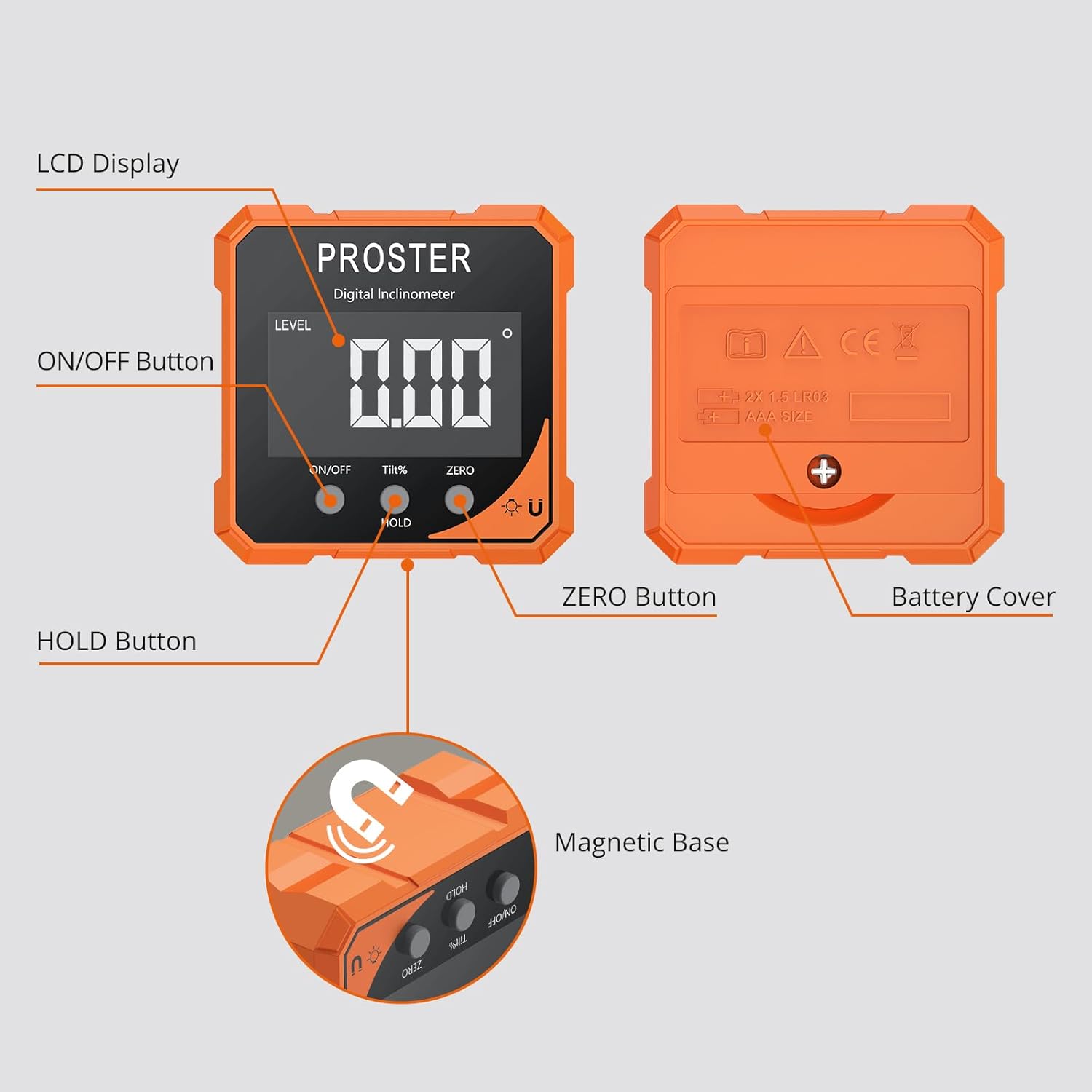
รูปที่ 3.1: รายละเอียด view of the Digital Angle Finder with labeled components.
4. การตั้งค่า
การติดตั้งแบตเตอรี่:
- หาฝาปิดแบตเตอรี่ที่ด้านหลังของอุปกรณ์
- ใช้ไขควงที่ให้มาเพื่อเปิดช่องใส่แบตเตอรี่
- ใส่แบตเตอรี่ AAA จำนวน 2 ก้อน โดยตรวจสอบให้แน่ใจว่าขั้วถูกต้อง (+/-)
- Close the battery cover and secure it with the screwdriver.
ตอนนี้อุปกรณ์พร้อมใช้งานแล้ว
5. คู่มือการใช้งาน
เปิด/ปิดเครื่อง:
- เปิด: กดสั้น ๆ เปิด/ปิด button. The LCD display will light up.
- วิธีปิด: กดปุ่มค้างไว้ เปิด/ปิด button for approximately 3 seconds. The device will also automatically shut off after 3 minutes of inactivity to conserve battery.
Measurement Modes (Absolute/Relative):
อุปกรณ์นี้มีโหมดการวัดสองโหมด:
- การวัดแบบสัมบูรณ์ (ABS): This mode measures the angle relative to a true horizontal plane (0°). The 'LEVEL' indicator will be displayed.
- Relative Measurement (ZERO): This mode allows you to set any surface as a temporary 0° reference point.
ในการสลับโหมด: กดสั้น ๆ ศูนย์ button. The 'LEVEL' indicator will appear for absolute mode and disappear for relative mode.
การแปลงหน่วย:
The device can display angles in degrees (°) or percentagอี (%)
- การสลับหน่วย: กดสั้น ๆ TILT% button to toggle between degrees and percentage.
ฟังก์ชั่นค้างไว้:
เพื่อหยุดการแสดงค่าการวัดปัจจุบันบนหน้าจอ:
- กดสั้น ๆ ถือ กดปุ่ม สัญลักษณ์ 'HOLD' จะปรากฏบนหน้าจอ
- To release the hold and resume live measurement, short press the ถือ ปุ่มอีกครั้ง
Magnetic Base Usage:
The strong magnetic base allows the device to attach securely to metallic surfaces, providing hands-free operation and stability during measurements.

Figure 5.1: Using the strong magnetic base for stable measurements.
Reading Flip Function:
The display automatically rotates to ensure upright readings, regardless of the device's orientation.

Figure 5.2: The display automatically flips for convenient reading.
Operational Exampเลส:
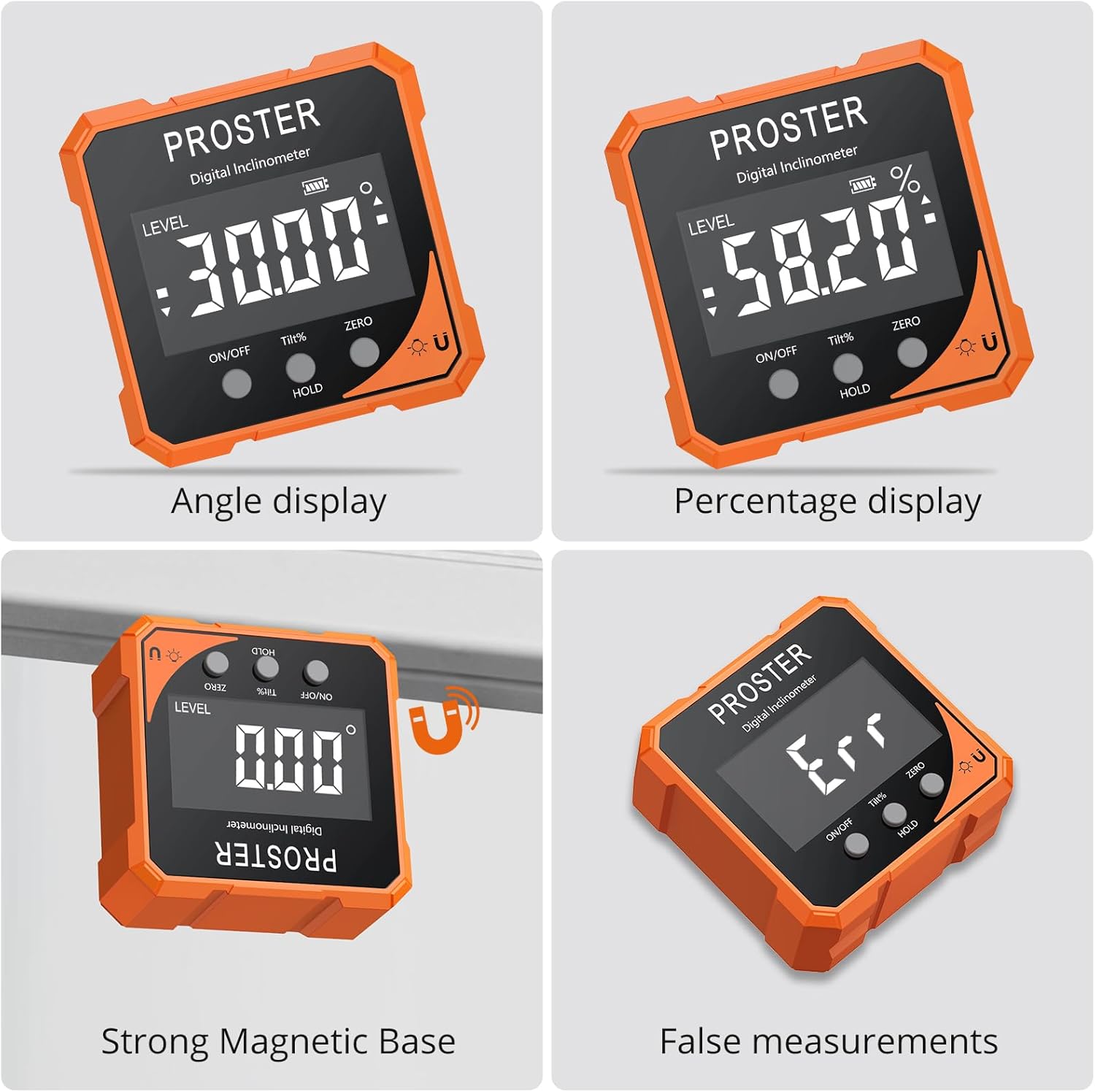
Angle display in degrees.

Angle display in percentage.

Measuring an angle on a wooden surface.

Measuring a saw blade angle.
วิดีโอสาธิต:
XUNTOP USB Charging Digital Level Box Angle Finder (General Operation)
This video demonstrates the general operation and display features of a similar digital angle finder, including how it measures angles and its magnetic capabilities.
BINTA Small Digital Angle Finder Gauge (General Use)
This video illustrates various applications and the magnetic functionality of a compact digital angle finder.
Lytool Digital Angle Gauge (General Use)
This video showcases the practical use of a digital angle gauge for different measurement tasks.
Portable Digital Angle Finder for Precision Measurement (General Use)
This video demonstrates the portability and precision measurement capabilities of a digital angle finder.
6. การสอบเทียบ
For optimal accuracy, it is recommended to calibrate the device periodically or if you suspect inaccurate readings.
ขั้นตอนการสอบเทียบ:
- ปิดอุปกรณ์
- กดค้างไว้ ศูนย์ ปุ่ม.
- ในขณะที่ยังคงถือครอง ศูนย์ กดปุ่ม เปิด/ปิด ปุ่มเพื่อเปิดเครื่อง
- "CAL1" will appear on the screen.
- Place the device on a stable, flat, and level surface.
- Follow the on-screen prompts (CAL1, CAL2, etc.) and rotate the device 180 degrees as instructed, ensuring it remains on a stable surface.
- Once calibration is complete, the display will show 0.00°.
หมายเหตุสำคัญ: During calibration, the surface should be stable and level. The inclination of the surface should not exceed 3 degrees, and the position of each calibration step should be consistent.
Calibration Video:
Digital Magnetic Angle Finder Calibration
This video provides a visual guide on how to calibrate a digital magnetic angle finder for accurate measurements.
7. การบำรุงรักษา
- ทำความสะอาดอุปกรณ์ด้วยผ้านุ่มและแห้ง ห้ามใช้น้ำยาทำความสะอาดหรือสารละลายที่มีฤทธิ์กัดกร่อน
- Store the device in a dry place, away from dust and direct sunlight.
- Remove batteries if the device is not used for an extended period to prevent leakage and damage.
8 การแก้ไขปัญหา
- Device not functioning properly: Check the battery level and replace if necessary. Try resetting the device by removing and reinserting the batteries.
- การอ่านค่าที่ไม่ถูกต้อง: Recalibrate the device following the steps in Section 6. Ensure the device is placed on a stable, level surface during measurement. Be aware that temperature fluctuations, humidity, or extreme conditions can affect accuracy over time.
- แสดงข้อความ "Err": This typically indicates that the device is tilted forward or backward more than 30 degrees, exceeding its optimal measurement range for certain functions. Adjust the device's position.
9. ข้อมูลจำเพาะ
| คุณลักษณะ | รายละเอียด |
|---|---|
| ยี่ห้อ | โปรสเตอร์ |
| แบบอย่าง | Level Box Orange |
| วัสดุ | อลูมิเนียม, พลาสติก |
| สี | ส้ม |
| โหมดการทำงาน | อัตโนมัติ |
| น้ำหนักสินค้า | 0.1 กิโลกรัม |
| ช่วงการวัด | 0-90° (across 4 surfaces) |
| ปณิธาน | 0.05° |
| ความแม่นยำ | ±0.1-0.2° |
| แหล่งพลังงาน | แบตเตอรี่ AAA 2 ก้อน |
| ปิดเครื่องอัตโนมัติ | ไม่มีการใช้งาน 3 นาที |
10. การรับประกันและการสนับสนุน
PROSTER products are manufactured to high-quality standards. For specific warranty information, please refer to the warranty card included with your purchase or contact PROSTER customer support.
If you encounter any issues or have questions regarding your Digital Angle Finder, please contact our customer support team for assistance. Contact details can typically be found on our official webไซต์หรือบนบรรจุภัณฑ์ผลิตภัณฑ์