
1. บทนำ
This manual provides detailed instructions for the safe operation, setup, and maintenance of your OYDL RC ERA A60 Mini Bell206 RC Helicopter. The A60 is a 1:42 scale, 6-channel remote-controlled helicopter featuring 6-axis gyro stabilization, altitude hold, and one-key takeoff/landing, designed for both beginners and experienced users. Please read this manual thoroughly before operating the helicopter to ensure proper function and safety.
2. ข้อควรระวังเพื่อความปลอดภัย
Operating a remote-controlled helicopter requires caution. Failure to follow these safety guidelines may result in injury or damage to the product or property.
- คำแนะนำด้านอายุ: This product is recommended for users aged 15 years and above. Adult supervision is advised for younger users.
- สภาพแวดล้อมการบิน: Fly in open, clear areas away from people, animals, buildings, power lines, and water. Avoid flying in strong winds or adverse weather conditions.
- ความปลอดภัยของแบตเตอรี่:
- ใช้เฉพาะสายชาร์จและแบตเตอรี่ที่ให้มาเท่านั้น
- อย่าชาร์จมากเกินไปหรือคายประจุแบตเตอรี่มากเกินไป
- อย่าให้แบตเตอรี่สัมผัสกับอุณหภูมิที่สูงเกินไปหรือถูกแสงแดดโดยตรง
- If the battery swells or shows signs of damage, discontinue use immediately.
- ความปลอดภัยของใบพัด: Keep hands, face, and loose clothing away from rotating propellers. The helicopter features intelligent anti-jamming protection, which automatically stops propellers if blocked, but caution is still necessary.
- ปริมาณต่ำtagอีปลุก: Pay attention to the low voltage alarm. Land the helicopter immediately when the alarm sounds to prevent loss of control.
- การป้องกันเมื่ออยู่นอกเหนือการควบคุม: The helicopter is equipped with out-of-control protection. If signal is lost, the helicopter will attempt a controlled landing.

Figure 2.1: Intelligent anti-jamming protection helps prevent propeller damage by stopping rotation if blocked.
3. เนื้อหาบรรจุภัณฑ์
ตรวจสอบว่ามีรายการทั้งหมดอยู่ในแพ็คเกจของคุณ:
- RC ERA A60 Mini Bell206 Helicopter (1)
- รีโมทคอนโทรล (1)
- 3.7V 220mAh Lithium Battery (Quantity may vary based on purchase, e.g., 2 batteries)
- สายชาร์จ (1)
- คู่มือการใช้งาน (1)
- Spare Propellers (Main and Tail)
- Tools (e.g., screwdriver, hex wrench)

Figure 3.1: Included components in the RC ERA A60 Mini Bell206 package.
4. สินค้าหมดview
The RC ERA A60 Mini Bell206 is a high-fidelity model aircraft designed for stable and enjoyable flight. Key features include a 6-axis gyroscope for stability, pressure constant height (altitude hold), and a modular battery system.

Figure 4.1: RC ERA A60 Mini Bell206 Helicopter design.

Figure 4.2: Core technical functions of the A60 helicopter.
5. การตั้งค่า
5.1 การชาร์จแบตเตอรี่เฮลิคอปเตอร์
The helicopter uses a 3.7V 220mAh lithium battery. Ensure the battery is fully charged before each flight.
- Remove the modular battery from the helicopter.
- เชื่อมต่อแบตเตอรี่เข้ากับสายชาร์จ USB ที่ให้มา
- เสียบสายชาร์จ USB เข้ากับแหล่งจ่ายไฟ USB ที่เหมาะสม (เช่น พอร์ต USB ของคอมพิวเตอร์ อะแดปเตอร์ติดผนัง USB)
- The charging indicator light on the cable will show the charging status (refer to charger instructions for specific light behavior).
- Charging typically takes about 40 minutes. Disconnect once fully charged.

Figure 5.1: Modular battery system for easy charging and replacement.
5.2 การติดตั้งแบตเตอรี่รีโมทคอนโทรล
The remote controller requires batteries (type not specified in product data, typically 4x AA batteries).
- เปิดช่องใส่แบตเตอรี่ที่ด้านหลังของรีโมทคอนโทรล
- ใส่แบตเตอรี่เพื่อให้แน่ใจว่ามีขั้วที่ถูกต้อง (+/-)
- ปิดช่องใส่แบตเตอรี่ให้แน่น
5.3 Pairing the Helicopter and Remote Controller
Follow these steps to establish a connection between the helicopter and the remote controller:
- วางเฮลิคอปเตอร์บนพื้นผิวที่เรียบและระดับเท่ากัน
- Ensure the helicopter's battery is fully charged and installed.
- เปิดสวิตช์ไฟของเฮลิคอปเตอร์ ไฟแสดงสถานะจะกะพริบ
- เปิดรีโมทคอนโทรล
- เลื่อนคันเร่ง (คันโยกซ้าย) ขึ้นจนสุด แล้วเลื่อนลงจนสุด
- The indicator lights on both the helicopter and remote controller will become solid, indicating successful pairing.
6. คู่มือการใช้งาน
6.1 การควบคุมการบินขั้นพื้นฐาน
Familiarize yourself with the remote controller layout and functions:
- คันเร่ง (คันโยกซ้าย):
- ขึ้น/ลง: ควบคุมระดับความสูง (ขึ้น/ลง)
- ซ้าย/ขวา: ควบคุมการหมุน (หมุนไปทางซ้าย/ขวา)
- จอยสติ๊กทิศทาง (จอยสติ๊กด้านขวา):
- Up/Down: Controls pitch (forward/backward flight).
- Left/Right: Controls roll (sideways flight left/right).
- ปุ่มขึ้น/ลงจอดแบบใช้ปุ่มเดียว: เริ่มการขึ้นหรือลงจอดโดยอัตโนมัติ
- ปุ่มปรับความเร็ว: หมุนเวียนผ่านโหมดความเร็วต่ำ กลาง และสูง
6.2 การขึ้นและลงด้วยปุ่มเดียว
After successful pairing, press the One-Key Takeoff button. The helicopter will automatically ascend to a stable hovering altitude. To land, press the One-Key Landing button, and the helicopter will descend and land automatically.
6.3 การรักษาระดับความสูง
The A60 features a pressure constant height system, allowing it to maintain a stable altitude without continuous throttle input. This enhances stability and reduces the risk of collisions.
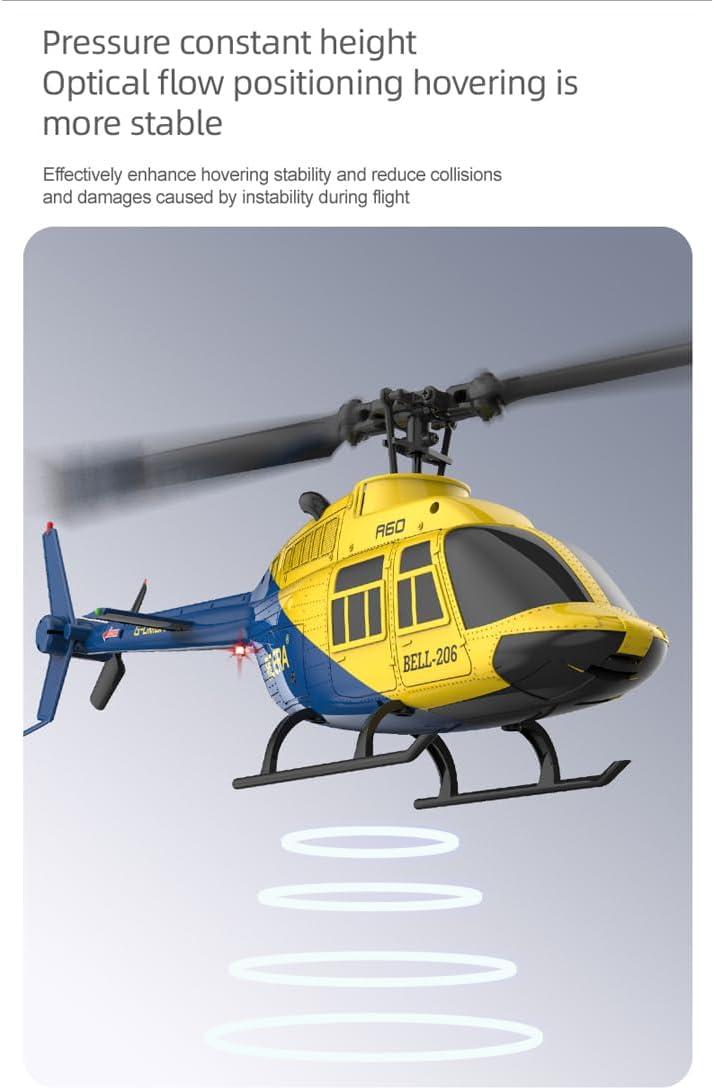
Figure 6.1: Altitude hold feature for stable flight.
6.4 Three-Speed Adjustment
The helicopter offers three flight speed settings (low, medium, high) to accommodate different skill levels and flight environments. Press the speed adjustment button on the remote controller to cycle through these modes.

Figure 6.2: Three-speed adjustment for varied flight experience.
6.5 Multi-Directional Flight
Once the flight mode is activated, the helicopter can be controlled for multi-directional flight using the directional stick. This includes forward, backward, left, and right movements.

Figure 6.3: Multi-directional flight control.

Figure 6.4: Smooth flight and control feel.
7. การบำรุงรักษา
Regular maintenance ensures the longevity and optimal performance of your helicopter.
- การทำความสะอาด: Use a soft, dry cloth to clean the helicopter after each flight. Avoid water or solvents.
- การตรวจสอบใบพัด: Regularly check propellers for damage (cracks, bends). Replace damaged propellers immediately using the provided spare parts and tools.
- การดูแลแบตเตอรี่ เก็บแบตเตอรี่ไว้ในที่แห้งและเย็น อย่าเก็บแบตเตอรี่ที่ชาร์จเต็มหรือแบตเตอรี่ที่หมดเกลี้ยงไว้นานเกินไป ควรชาร์จแบตเตอรี่ให้เหลือประมาณ 50% สำหรับการเก็บรักษาในระยะยาว
- พื้นที่จัดเก็บ: When not in use, store the helicopter and remote controller in a safe place, away from direct sunlight and extreme temperatures.
8 การแก้ไขปัญหา
หากคุณพบปัญหา โปรดดูปัญหาทั่วไปและวิธีแก้ไขต่อไปนี้:
| ปัญหา | สาเหตุที่เป็นไปได้ | สารละลาย |
|---|---|---|
| เฮลิคอปเตอร์ไม่ตอบสนองต่อรีโมทคอนโทรล | Not paired; low battery in helicopter or remote; remote not powered on. | Ensure both devices are powered on. Re-pair the helicopter and remote. Charge/replace batteries. |
| เฮลิคอปเตอร์ไม่สามารถบินขึ้นได้ หรือบินได้ไม่แรงพอ | Helicopter battery low; damaged propellers; motor issue. | Charge helicopter battery fully. Inspect and replace damaged propellers. Contact support if motor issue suspected. |
| เฮลิคอปเตอร์ลอยตัวขณะลอยอยู่กลางอากาศ | Not calibrated on a flat surface; environmental interference (wind). | Ensure helicopter is placed on a flat surface during power-on/pairing. Fly in calm conditions. Use trim adjustments on remote if available (refer to remote manual). |
| Propellers stop unexpectedly. | Propeller blocked (anti-jamming protection activated); low battery. | Clear any obstructions. Check helicopter battery level. |
9. ข้อมูลจำเพาะ
| คุณสมบัติ | รายละเอียด |
|---|---|
| ชื่อสินค้า | A60 Remote-Control Helicopter |
| เครื่องชั่งสินค้า | 1:42 น. |
| วัสดุ | Engineering materials / Electronic components |
| อายุที่สามารถใช้งาน | อายุ 15 ปีขึ้นไป |
| ระยะควบคุมด้วยรีโมทคอนโทรล | 80 - 120 เมตร |
| เส้นผ่านศูนย์กลางโรเตอร์ | 227 มม. (8.9 นิ้ว) |
| ความยาวลำตัวเครื่องบิน | 238 มม. (9.4 นิ้ว) |
| ความสูงของลำตัวเครื่องบิน | 80 มม. (3.1 นิ้ว) |
| เวลาบิน | About 8 - 10 minutes |
| ความจุของแบตเตอรี่ | แบตเตอรี่ลิเธียม 3.7V 220mAh |
| เวลาในการชาร์จ | ประมาณ 40 นาที |
| ไจโรสโคป | ไจโร 6 แกน |
| คุณสมบัติพิเศษ | Altitude Hold, One-Key Takeoff/Landing, Low Voltage Alarm, Locked Rotor Protection, Out-of-Control Protection, Three-Speed Adjustment |
10. การรับประกันและการสนับสนุน
For warranty information, technical support, or replacement parts, please contact OYDL customer service through the retailer where the product was purchased or visit the official OYDL brand store.
OYDL Brand Store: Visit OYDL Store on Amazon