
การแนะนำ
ขอบคุณสำหรับการซื้อasing the Anker Soundcore P31i True Wireless Earbuds. This manual provides detailed instructions on how to set up, operate, and maintain your earbuds to ensure optimal performance and longevity. Please read this manual carefully before use and retain it for future reference.
สิ่งที่รวมอยู่
Your Soundcore P31i package includes the following items:
- Soundcore P31i Earbuds (Left and Right)
- เคสชาร์จไฟ
- Ear Tips (XS, S, M, L - M size pre-installed)
- สายชาร์จ USB-C เป็น USB-A
- คู่มือเริ่มต้นอย่างรวดเร็ว
- คู่มือความปลอดภัย
สินค้าเกินview
The Soundcore P31i earbuds are designed for comfort and high-quality audio. Each earbud features a touch control area and an indicator light. The charging case protects the earbuds and provides additional battery life.
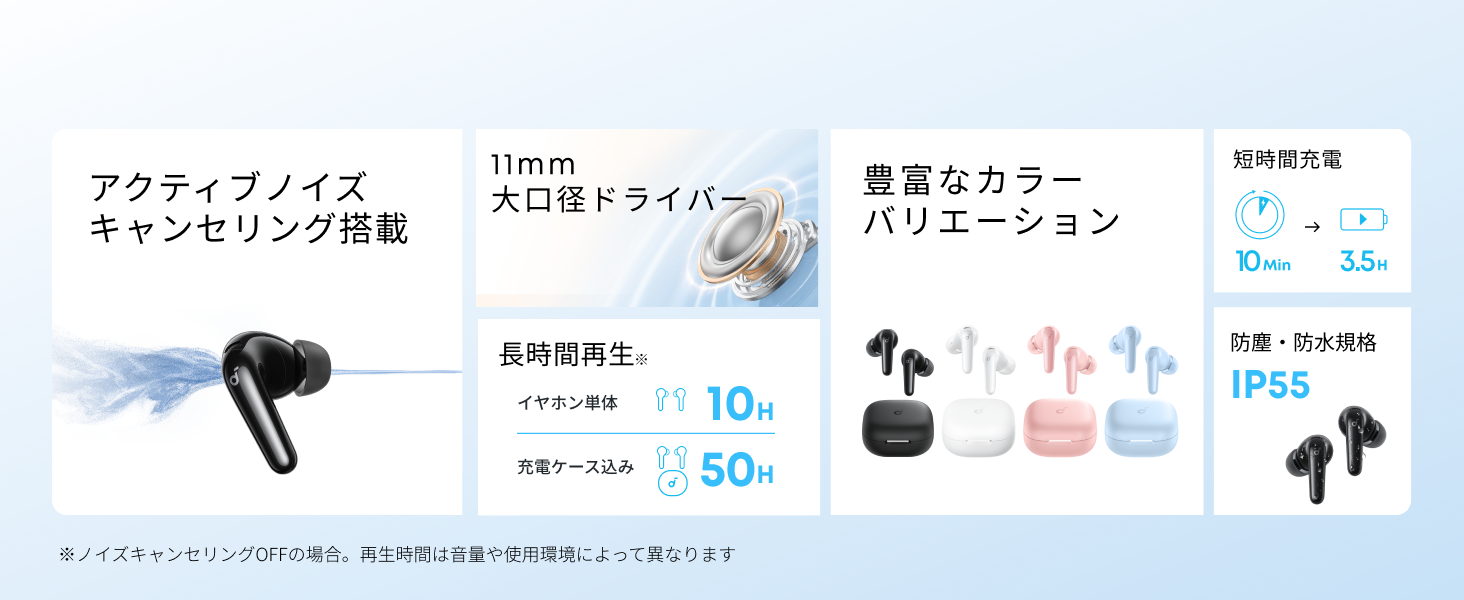
Diagram showing the Soundcore P31i earbuds and charging case with key components labeled.
หูฟัง: Each earbud is equipped with an 11mm dynamic driver for powerful bass and clear sound. They feature active noise cancellation and AI noise reduction for calls. The ergonomic design ensures a secure and comfortable fit.
เคสชาร์จ: The compact charging case not only stores and protects your earbuds but also recharges them on the go. It has a USB-C charging port and a strap hole for portability.
การชาร์จหูฟังเอียร์บัดและเคสของคุณ
ก่อนใช้งานครั้งแรก ควรชาร์จหูฟังและเคสชาร์จให้เต็มก่อน
- การชาร์จหูฟัง: Place the earbuds into the charging case. The indicator lights on the earbuds will show charging status.
- การชาร์จเคส: Connect the charging case to a power source using the provided USB-C to USB-A cable. A full charge for the case and earbuds takes approximately 3 hours.
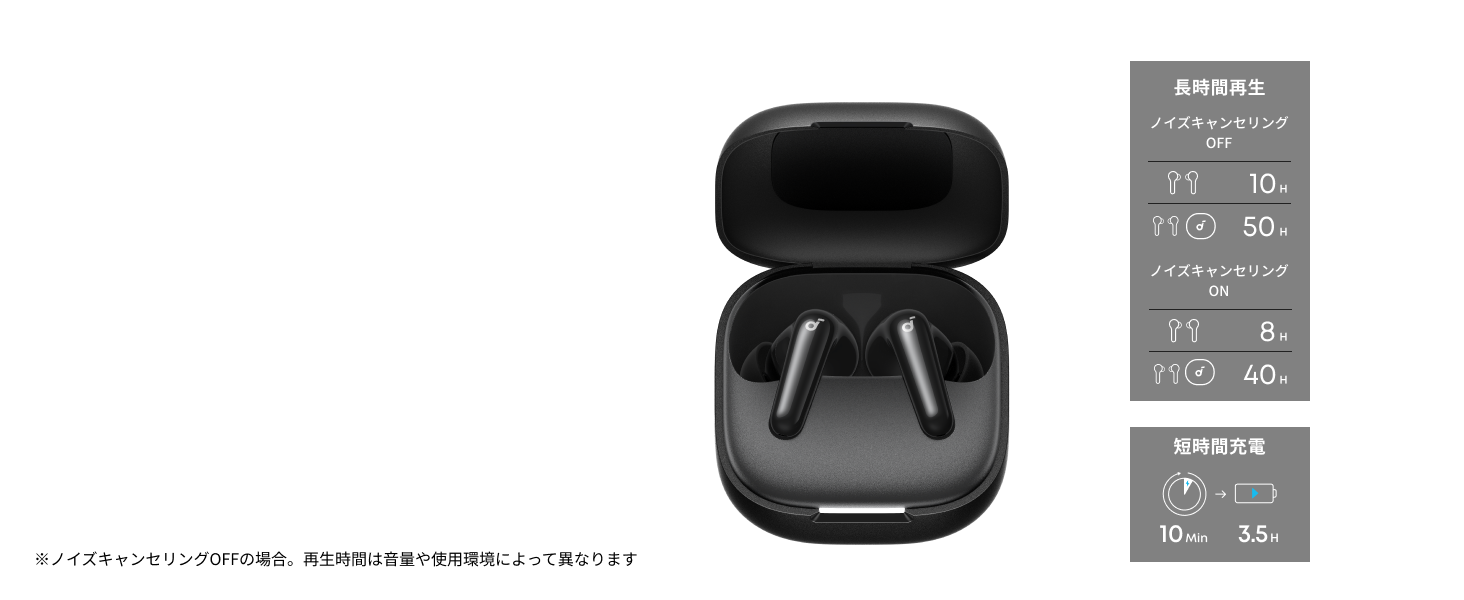
Diagram illustrating charging times and playback duration for Soundcore P31i earbuds.
อายุการใช้งานแบตเตอรี่:
- Up to 10 hours of playback on a single charge (earbuds only).
- สามารถเล่นเพลงได้นานสูงสุด 50 ชั่วโมงด้วยเคสชาร์จ
- A quick 10-minute charge provides up to 3.5 hours of listening time.
Note: Playback time varies depending on volume level and audio content.
สวมเอียร์บัดของคุณ
For optimal sound quality and comfort, it is important to wear your earbuds correctly.
- เลือกจุกหูฟังที่เหมาะสม: Select the ear tips that provide the best seal and comfort for your ears. Experiment with different sizes (XS, S, M, L) to find the perfect fit.
- ใส่เอียร์บัด: ค่อยๆ ใส่หูฟังเข้าไปในช่องหูของคุณ
- บิดเพื่อล็อคให้แน่น: Twist the earbuds slightly until they fit snugly and securely in your ears.

Image showing a person wearing the Soundcore P31i earbuds correctly.
จับคู่บลูทู ธ
Follow these steps to pair your Soundcore P31i earbuds with your device:
- การจับคู่ครั้งแรก:
- Open the charging case. The earbuds will automatically enter Bluetooth pairing mode. The indicator lights on the earbuds will flash white.
- บนอุปกรณ์ของคุณ (สมาร์ทโฟน แท็บเล็ต ฯลฯ) ไปที่การตั้งค่าบลูทูธ
- Select "Soundcore P31i" from the list of available devices.
- Once connected, the indicator lights on the earbuds will turn solid white for 1 second and then turn off.
- การจับคู่กับอุปกรณ์อื่น:
- วางหูฟังลงในกล่องชาร์จและเปิดฝากล่องไว้
- Press and hold the button on the charging case for 3 seconds until the earbud indicator lights flash white rapidly.
- ทำซ้ำขั้นตอนที่ 2 และ 3 จากหัวข้อ "การจับคู่ครั้งแรก" บนอุปกรณ์ใหม่ของคุณ
การควบคุม
The Soundcore P31i earbuds feature touch controls for managing playback, calls, and other functions. Specific control configurations can often be customized via the Soundcore app.
General Touch Controls (Default):
- เล่น/หยุดชั่วคราว: แตะหนึ่งครั้งที่หูฟังเอียร์บัดข้างใดข้างหนึ่ง
- เพลงถัดไป: แตะสองครั้งที่หูฟังเอียร์บัดด้านขวา
- แทร็กก่อนหน้า: แตะสองครั้งที่หูฟังเอียร์บัดด้านซ้าย
- รับ/วางสาย: แตะหนึ่งครั้งที่หูฟังเอียร์บัดข้างใดข้างหนึ่ง
- ปฏิเสธสาย: กดเอียร์บัดข้างใดข้างหนึ่งค้างไว้ 2 วินาที
- เปิดใช้งาน Voice Assistant: Triple-tap either earbud (may vary).
- สลับโหมด ANC/Transparency: Press and hold the right earbud for 2 seconds (may vary).
For detailed and customizable controls, please refer to the Soundcore app or the included Quick Start Guide.
ระบบตัดเสียงรบกวนแบบแอคทีฟ (ANC)
The Soundcore P31i earbuds feature Active Noise Cancelling technology to minimize ambient noise, allowing for an immersive listening experience.

Illustration demonstrating the active noise cancelling feature of the Soundcore P31i earbuds.
ANC detects and reduces various types of noise, such as engine hum on trains or buses, and chatter in cafes. This allows you to enjoy your music or podcasts with greater clarity and fewer distractions.
To switch between ANC, Normal, and Transparency modes, use the touch controls on the earbuds or adjust settings within the Soundcore app.
คุณภาพเสียง
The Soundcore P31i earbuds are engineered to deliver a rich audio experience.

Diagram illustrating the 11mm dynamic driver responsible for the audio output.
- ไดรเวอร์ไดนามิกขนาด 11 มม.: Equipped with large 11mm drivers, these earbuds produce a wide frequency range and detailed sound.
- เทคโนโลยี BassUp™: Anker's proprietary BassUp™ technology enhances low frequencies, delivering powerful and impactful bass.
You can further customize the sound profile using the equalizer settings within the Soundcore app.
คุณภาพการโทร
The Soundcore P31i earbuds ensure clear voice calls and web การประชุม

Illustration depicting AI noise reduction technology for clear voice calls.
การลดเสียงรบกวนด้วย AI: Integrated AI noise reduction technology effectively filters out background noise, ensuring your voice is transmitted clearly to the person on the other end of the call, even in noisy environments.
การเชื่อมต่อหลายจุด
The Soundcore P31i supports multi-point connection, allowing you to connect to two Bluetooth devices simultaneously.

Illustration showing the Soundcore P31i connected to multiple devices simultaneously.
This feature enables seamless switching between devices. For example, you can listen to music on your laptop and instantly switch to answer a call on your phone without manually re-pairing.
To enable multi-point connection, ensure both devices are paired with your earbuds. The earbuds will automatically connect to the last two paired devices when powered on.
แอพ Soundcore
Download the Soundcore app to enhance your experience with the P31i earbuds. The app offers various features and customization options.

Screenshots of the Soundcore app interface, highlighting customization features.
App Features include:
- การควบคุมที่ปรับแต่งได้: Personalize touch controls for playback, calls, and voice assistant.
- การตั้งค่าอีควอไลเซอร์: ปรับเสียงโปรfiles to your preference or choose from preset EQs.
- ANC/Transparency Mode Switching: Easily toggle between noise cancelling and transparency modes.
- อัพเดตเฟิร์มแวร์: อัปเดตหูฟังของคุณด้วยคุณสมบัติและการปรับปรุงล่าสุด
- ฟังก์ชันการแปลด้วย AI: (Available from Spring 2026, requires Soundcore app ver 4.0.0 or higher).
The Soundcore app is available for download on both iOS and Android devices.
สินค้าเกินview วีดีโอ
วิดีโอแสดงผลิตภัณฑ์อย่างเป็นทางการasing the key features and design of the Soundcore P31i True Wireless Earbuds, including active noise cancellation, powerful bass, long battery life, and multi-point connectivity.
การบำรุงรักษาและการดูแล
Proper maintenance ensures the longevity and performance of your Soundcore P31i earbuds.
- การทำความสะอาด: ทำความสะอาดหูฟังและกล่องชาร์จเป็นประจำด้วยผ้านุ่ม แห้ง และไม่เป็นขุย ห้ามใช้สารเคมีรุนแรงหรือวัสดุที่มีฤทธิ์กัดกร่อน
- เคล็ดลับหู: ถอดจุกหูออกและทำความสะอาดด้วยน้ำและสบู่อ่อนๆ หากจำเป็น ตรวจสอบให้แน่ใจว่าจุกหูแห้งสนิทก่อนใส่กลับเข้าไป
- หน้าสัมผัสการชาร์จ: รักษาความสะอาดและแห้งของขั้วชาร์จทั้งบนหูฟังและเคส เพื่อให้มั่นใจได้ว่าการชาร์จเป็นไปอย่างถูกต้อง
- พื้นที่จัดเก็บ: เมื่อไม่ได้ใช้งาน ให้เก็บหูฟังไว้ในกล่องชาร์จเพื่อป้องกันฝุ่นและความเสียหาย
- ความต้านทานน้ำ: The earbuds are rated IP55 for dust and water resistance. This means they can withstand sweat and light rain, but are not designed for submersion in water. Ensure the earbuds are dry before placing them back in the charging case.

Image showing Soundcore P31i earbuds with water droplets, highlighting their IP55 water resistance.
การแก้ไขปัญหา
If you encounter any issues with your Soundcore P31i earbuds, refer to the following common solutions:
- เอียร์บัดไม่จับคู่:
- ตรวจสอบให้แน่ใจว่าชาร์จหูฟังทั้งสองข้างจนเต็ม
- Place earbuds in the case, close the lid, then open it again to re-enter pairing mode.
- Forget "Soundcore P31i" from your device's Bluetooth list and try pairing again.
- รีเซ็ตหูฟัง (โปรดดูคำแนะนำการรีเซ็ตโดยละเอียดในคู่มือเริ่มต้นใช้งานฉบับย่อ)
- Only One Earbud Playing Audio:
- ใส่หูฟังทั้งสองข้างกลับเข้าไปในกล่องชาร์จ แล้วปิดฝาค้างไว้ 5 วินาที จากนั้นเปิดฝาอีกครั้ง
- ตรวจสอบให้แน่ใจว่าหูฟังทั้งสองข้างมีแบตเตอรี่เพียงพอ
- รีเซ็ตหูฟัง
- คุณภาพเสียงไม่ดี:
- ตรวจสอบให้แน่ใจว่าจุกหูฟังแนบสนิทกับช่องหูของคุณ ลองใส่ขนาดต่างๆ
- ทำความสะอาดเศษสิ่งสกปรกออกจากหัวฉีดหูฟัง
- ขยับเข้าไปใกล้อุปกรณ์ที่เชื่อมต่อของคุณเพื่อหลีกเลี่ยงการรบกวน
- ปัญหาการชาร์จ:
- ตรวจสอบสายชาร์จและอะแดปเตอร์ว่ามีรอยชำรุดหรือไม่
- Ensure the charging contacts on the earbuds and case are clean.
- ลองใช้สายชาร์จหรือแหล่งพลังงานอื่น
ข้อมูลจำเพาะ
| คุณสมบัติ | รายละเอียด |
|---|---|
| ยี่ห้อ | ซาวด์คอร์ |
| ชื่อรุ่น | P31i |
| หมายเลขรุ่น | D1202 |
| สี | Black (This specific variant) |
| ฟอร์มแฟกเตอร์ | อินเอียร์ |
| เทคโนโลยีการเชื่อมต่อ | ไร้สาย (บลูทูธ 6.1) |
| การควบคุมเสียงรบกวน | ระบบตัดเสียงรบกวนแบบแอคทีฟ |
| ขนาดไดร์เวอร์ | ไดรเวอร์ไดนามิกขนาด 11 มม. |
| ระยะเวลาการเล่น (หูฟัง) | นานถึง 10 ชั่วโมง |
| เวลาเล่นทั้งหมด (รวมเคส) | นานถึง 50 ชั่วโมง |
| ชาร์จเร็ว | ชาร์จ 10 นาที เล่นได้ 3.5 ชั่วโมง |
| Charging Time (Full) | ประมาณ 3 ชั่วโมง |
| ความต้านทานต่อน้ำ | IP55 |
| การเชื่อมต่อหลายจุด | รองรับ |
| ยูพีซี | 194644251543 |
| ประเทศต้นกำเนิด | จีน |
การรับประกันและการสนับสนุนลูกค้า
Soundcore provides a comprehensive warranty for your P31i earbuds.

Image detailing the warranty period and extension for Soundcore P31i.
- การรับประกันมาตรฐาน: An 18-month warranty is provided for products purchased from authorized retailer AnkerDirect.
- การรับประกันแบบขยายเวลา: Anker members can extend their warranty up to a maximum of 24 months.
- หมายเหตุสำคัญ: Purchases from unauthorized sellers may not be covered under warranty.
For product inquiries, delivery questions, or technical support, please contact Soundcore customer support. Contact details can typically be found on the official Soundcore webไซต์หรือในคู่มือเริ่มต้นใช้งานฉบับย่อของคุณ
ข้อมูลด้านความปลอดภัย
โปรดอ่านและปฏิบัติตามคำแนะนำด้านความปลอดภัยเหล่านี้เพื่อป้องกันความเสียหายต่ออุปกรณ์ของคุณหรือการบาดเจ็บต่อตัวคุณเอง:
- ห้ามถอดชิ้นส่วนหรือดัดแปลงหูฟังหรือเคสชาร์จ
- เก็บอุปกรณ์ให้ห่างจากอุณหภูมิที่สูงหรือต่ำมาก แสงแดดโดยตรง และเปลวไฟ
- Avoid exposing the device to excessive moisture or liquids, beyond its IP55 rating.
- Do not use the device at high volume levels for extended periods to prevent hearing damage.
- เก็บให้พ้นจากมือเด็กและสัตว์เลี้ยง
- กำจัดผลิตภัณฑ์ด้วยความรับผิดชอบตามข้อบังคับท้องถิ่น