
1. บทนำ
The M-Vave SMK-37 Pro is a versatile musical instrument that combines the functionality of a modern MIDI controller with the sound capabilities of a classic FM synthesizer. Designed for both studio and mobile musicians, this device features 37 velocity-sensitive keys and a comprehensive set of controls, offering flexibility through wireless or USB connectivity.
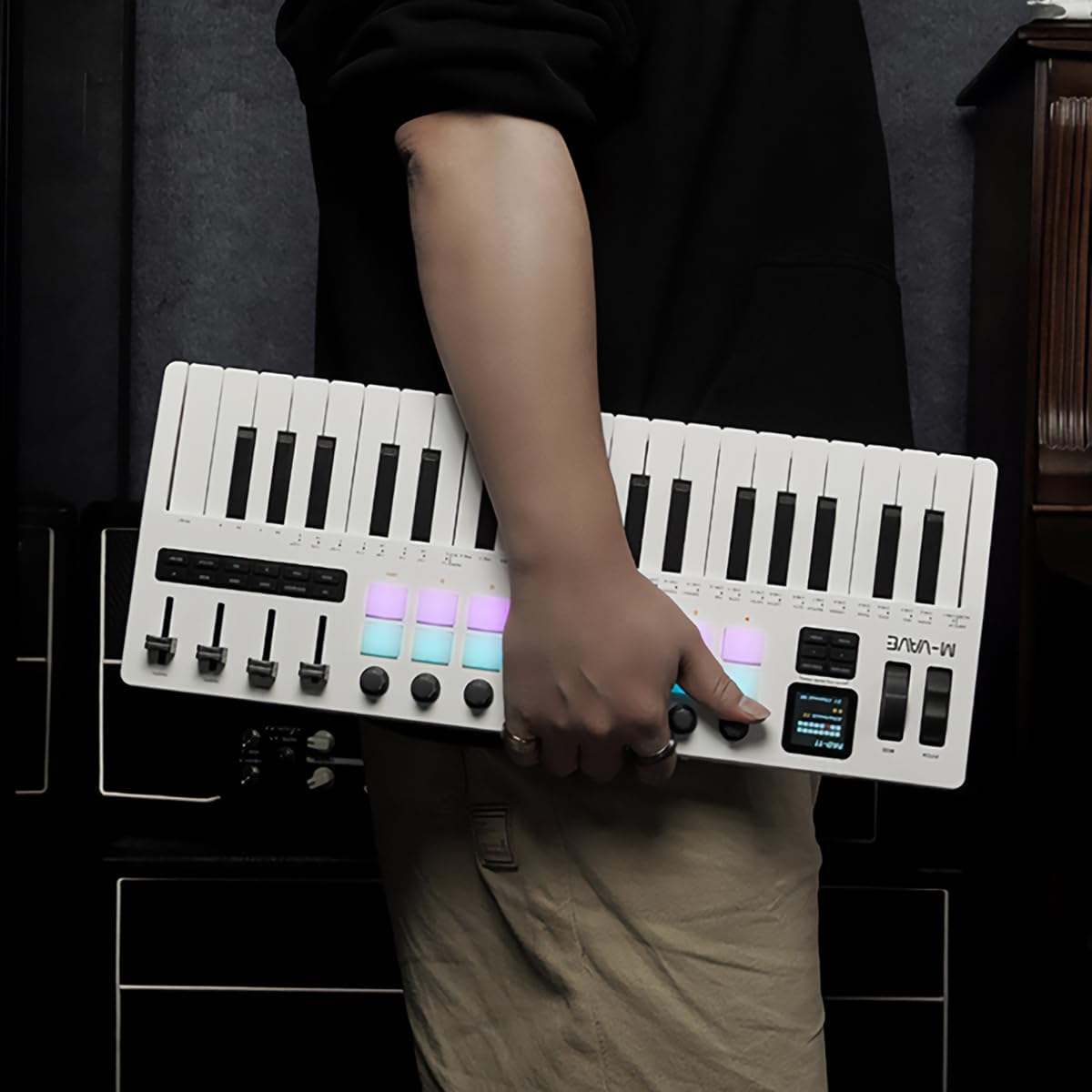
Figure 1.1: The M-Vave SMK-37 Pro is designed for portability, allowing musicians to create on the go.
2. สินค้าหมดview
The SMK-37 Pro is engineered to provide extensive control and sound generation capabilities. Below is an overview โดยพิจารณาจากคุณสมบัติและส่วนประกอบที่สำคัญ
2.1 คุณสมบัติหลัก
- 37 velocity-sensitive keys (3 octaves) for expressive play.
- Built-in FM synthesizer engine, inspired by the Yamaha DX7.
- 16 RGB illuminated drum pads for beat making and sampการกระตุ้น.
- 8 assignable rotary knobs and 4 assignable faders for real-time control.
- USB-C connectivity for power and data, alongside Bluetooth 5.0 and 2.4G wireless MIDI.
- Integrated 2000mAh rechargeable battery for up to 8 hours of portable use.
- 1.54-inch color display for clear parameter feedback.
- Pitch bend and modulation wheels for dynamic performance.
- Octave transform and Smart Chord functions.
2.2 การระบุส่วนประกอบ

รูปที่ 2.1 : ด้านหน้า view of the SMK-37 Pro, highlighting the keyboard, pads, and control surface.
- แป้นพิมพ์: 37 velocity-sensitive keys.
- แผ่น: 16 RGB illuminated drum pads.
- ลูกบิด: 8 assignable rotary encoders.
- เฟเดอร์: 4 assignable faders.
- แสดง: 1.54-inch color screen for parameter visualization.
- Pitch/Mod Wheels: For expressive control.

Figure 2.2: Rear panel of the SMK-37 Pro, showing connectivity options.
- พอร์ต USB-C: For charging and USB MIDI connection.
- ปุ่มเปิด/ปิด: เพื่อเปิด/ปิดอุปกรณ์
- เอาต์พุตเสียง: For monitoring the built-in FM synthesizer.
3. การตั้งค่า
Follow these steps to set up your M-Vave SMK-37 Pro.
3.1 การชาร์จอุปกรณ์
- Connect the included USB-C cable to the USB-C port on the rear of the SMK-37 Pro.
- ต่อปลายอีกด้านของสาย USB-C เข้ากับอะแดปเตอร์แปลงไฟ USB ที่ใช้งานร่วมกันได้ (ไม่ได้รวมอยู่ในชุด) หรือพอร์ต USB ของคอมพิวเตอร์
- The device will begin charging. A full charge provides up to 8 hours of operation.
3.2 การเปิด/ปิดเครื่อง
- To power on, press and hold the Power button on the rear panel until the display illuminates.
- To power off, press and hold the Power button until the display turns off.
3.3 ตัวเลือกการเชื่อมต่อ
The SMK-37 Pro offers multiple ways to connect to your devices.
3.3.1 การเชื่อมต่อ MIDI ผ่าน USB
- Connect the SMK-37 Pro to your computer using the USB-C cable.
- The device will be recognized as a standard MIDI input/output device by your operating system (Windows, macOS, iOS, Android).
- For Windows users, ensure you have Bluetooth 5.0 and an appropriate BLE MIDI driver installed for wireless functionality.
3.3.2 Wireless MIDI Connection (Bluetooth 5.0 / 2.4G)

Figure 3.1: Wireless connection guide for the SMK-37 Pro.
- Ensure the SMK-37 Pro is powered on.
- Activate Bluetooth on your Windows, macOS, iOS, or Android device.
- ค้นหา available Bluetooth devices and select "SMK-37 Pro" from the list.
- For 2.4G wireless MIDI, a compatible 2.4G receiver (sold separately) may be required. Refer to the receiver's instructions for pairing.
4. คู่มือการใช้งาน
This section details how to use the M-Vave SMK-37 Pro as both a MIDI controller and a standalone FM synthesizer.

Figure 4.1: The SMK-37 Pro in use, showcasing its interactive controls.
4.1 MIDI Controller Mode
The SMK-37 Pro functions as a universal MIDI controller, compatible with various Digital Audio Workstations (DAWs) and software instruments.
- Connecting to DAWs: Once connected via USB or wirelessly, select "SMK-37 Pro" as a MIDI input device in your DAW's preferences (e.g., Ableton Live, FL Studio, Logic Pro, GarageBand).
- การกำหนดปุ่มควบคุม: The 16 RGB pads, 8 knobs, and 4 faders can be assigned to control parameters within your DAW or VST instruments. Refer to your DAW's manual for MIDI mapping instructions.
- Keys and Wheels: The 37 velocity-sensitive keys, pitch bend, and modulation wheels transmit standard MIDI messages for expressive performance.
4.2 Built-in FM Synthesizer Mode
The SMK-37 Pro features an integrated FM synthesizer engine, allowing you to create and play sounds directly from the device without external software.

Figure 4.2: The SMK-37 Pro's internal sound source can be monitored via headphones or external speakers.
- Sound Generation: The FM synth engine is inspired by the legendary Yamaha DX7, supporting DX7 patches.
- การควบคุมพารามิเตอร์: Use the onboard knobs and faders to edit synthesizer parameters such as algorithms, filters, envelopes, and effects. The 1.54-inch color display provides visual feedback on parameter values.
- การจัดการแพตช์: Sounds can be played, edited, and stored directly on the device. Consult the on-screen menu for patch selection and saving procedures.
- เอาต์พุตเสียง: Connect headphones or external speakers to the audio output jack on the rear panel to monitor the synthesizer's sound.
4.3 การแสดงผลและการนำทาง

Figure 4.3: The 1.54-inch display provides clear feedback on settings and parameters.
The 1.54-inch color display is your primary interface for navigating menus, adjusting parameters, and viewing patch information. Use the dedicated navigation buttons and rotary encoders near the display to browse options and confirm selections.
4.4 ฟังก์ชั่นพิเศษ
- Octave Transform: Use the dedicated octave buttons to shift the keyboard's range up or down.
- ฟังก์ชัน Smart Chord: This feature assists in playing chords with single key presses. Refer to the on-screen menu for activation and configuration.
- อาร์เพจจิเอเตอร์: The built-in arpeggiator can generate rhythmic patterns from held notes. Settings for mode, octave, swing, tempo, and latch can be adjusted via the display.
5. การบำรุงรักษา
Proper care will ensure the longevity and optimal performance of your SMK-37 Pro.
- การทำความสะอาด: ใช้ผ้าแห้งนุ่มเช็ดทำความสะอาดพื้นผิวของอุปกรณ์ สำหรับคราบสกปรกฝังแน่น ให้ใช้ผ้าชุบน้ำหมาดๆ เช็ดเบาๆamp สามารถใช้ผ้าเช็ดทำความสะอาดได้ ตามด้วยผ้าแห้ง หลีกเลี่ยงน้ำยาทำความสะอาดที่มีฤทธิ์กัดกร่อนหรือตัวทำละลาย
- พื้นที่จัดเก็บ: เก็บอุปกรณ์ไว้ในที่แห้งและเย็น หลีกเลี่ยงแสงแดดโดยตรง อุณหภูมิที่สูงหรือต่ำเกินไป และความชื้นสูง
- การจัดการ: ควรหลีกเลี่ยงการทำอุปกรณ์ตกหรือกระแทกอย่างแรง และอย่าวางสิ่งของหนักทับอุปกรณ์
- การดูแลแบตเตอรี่ เพื่อให้แบตเตอรี่ใช้งานได้นานที่สุด ควรหลีกเลี่ยงการปล่อยให้แบตเตอรี่หมดจนเกลี้ยงบ่อยๆ หากเก็บรักษาไว้เป็นเวลานาน ควรชาร์จแบตเตอรี่ให้ได้ประมาณ 50% ทุกๆ สองสามเดือน
6 การแก้ไขปัญหา
If you encounter issues with your M-Vave SMK-37 Pro, refer to the following common solutions.
| ปัญหา | สาเหตุที่เป็นไปได้ | สารละลาย |
|---|---|---|
| อุปกรณ์ไม่เปิดเครื่อง | แบตเตอรี่เหลือน้อย หรือไม่ได้เสียบสายไฟ | Charge the device using the USB-C cable. Ensure the power button is pressed and held correctly. |
| No sound from the built-in synth. | Volume too low, headphones/speakers not connected, or incorrect patch selected. | Check the volume level on the device and connected audio equipment. Ensure headphones or speakers are properly connected to the audio output. Select a different patch. |
| MIDI not recognized by computer/DAW. | Incorrect connection, driver issues (Windows), or DAW settings. | Ensure USB-C cable is securely connected or Bluetooth is paired. For Windows, verify Bluetooth 5.0 and BLE MIDI driver installation. Check your DAW's MIDI input settings to ensure SMK-37 Pro is enabled. |
| การเชื่อมต่อไร้สายไม่เสถียร | สัญญาณรบกวน ระยะทาง หรือแบตเตอรี่เหลือน้อย | Move the device closer to your host device. Ensure no other wireless devices are causing interference. Charge the SMK-37 Pro. |
| Pads or keys are unresponsive. | Software issue or device malfunction. | Restart the device. If the issue persists, perform a factory reset (refer to advanced settings in the display menu). Contact support if the problem continues. |
7. ข้อมูลจำเพาะ
Detailed technical specifications for the M-Vave SMK-37 Pro.
- ชื่อรุ่น : M-Vave SMK-37 Midikeyboard w/built-in Synth
- หมายเลขรุ่น: MVA-SMK37 Pro
- คีย์: 37 velocity-sensitive keys (3 octaves)
- แผ่น: 16 RGB illuminated drum pads
- การควบคุม: 8 rotary knobs, 4 faders, Pitch bend, Modulation wheel
- แสดง: หน้าจอสี 1.54 นิ้ว
- การเชื่อมต่อ: USB-C, Bluetooth 5.0, 2.4G wireless MIDI
- แบตเตอรี่: แบตเตอรี่ชาร์จไฟในตัว 2000mAh
- อายุการใช้งานแบตเตอรี่: สูงสุด 8 ชั่วโมง (โดยประมาณ)
- เครื่องสังเคราะห์เสียง: Built-in FM synthesizer (DX7-based)
- ความเข้ากันได้: หน้าต่าง, macOS, iOS, Android
- ซอฟต์แวร์ที่รองรับ: Ableton Live, FL Studio, Logic Pro, GarageBand, Carl Martin Studio (and other DAWs)
- ส่วนประกอบที่รวมอยู่: สาย USB
- น้ำหนักสินค้า: 1 กิโลกรัม
8. การรับประกันและการสนับสนุน
For warranty information and technical support, please contact M-VAVE customer service through their official webเก็บใบเสร็จรับเงินไว้เป็นหลักฐานการซื้อ
- การสนับสนุนทางออนไลน์: เยี่ยมชมเว็บไซต์อย่างเป็นทางการของ M-VAVE webเว็บไซต์สำหรับคำถามที่พบบ่อย ดาวน์โหลดไดรเวอร์ และข้อมูลการติดต่อ
- การลงทะเบียนผลิตภัณฑ์: ลงทะเบียนผลิตภัณฑ์ของคุณทางออนไลน์เพื่อรับข้อมูลอัปเดตและการสนับสนุน


