
1. บทนำ
Thank you for choosing the DazzlingStage 60W 9LED RGBW Stage Wall Wash Bar Light. This manual provides essential information for the safe and effective operation of your lighting fixture. Please read it thoroughly before installation and use, and retain it for future reference.
นี่คือtage light bar features 9 high-power RGBW LEDs, offering a wide spectrum of colors and dynamic lighting effects suitable for various events and venues.

ภาพที่ 1.1: จบแล้วview of the DazzlingStage 60W 9LED RGBW Stage Wall Wash Bar Lights in various colors.
2. คำแนะนำด้านความปลอดภัย
- ความปลอดภัยทางไฟฟ้า: ตรวจสอบแหล่งจ่ายไฟ voltage matches the specifications of the fixture. Always disconnect power before cleaning, servicing, or moving the unit.
- การติดตั้ง: Install the fixture in a well-ventilated area, away from heat sources. Ensure secure mounting to prevent accidental falls.
- การดำเนินการ: Do not look directly into the light source when the fixture is operating, as it can cause eye damage. Avoid operating the unit in wet or damp เงื่อนไข.
- การซ่อมบำรุง: ควรส่งเครื่องให้ช่างผู้ชำนาญการเป็นผู้ดำเนินการซ่อมบำรุง ห้ามซ่อมแซมเครื่องด้วยตนเอง
- เด็ก: เก็บอุปกรณ์ให้พ้นจากมือเด็ก
3. เนื้อหาบรรจุภัณฑ์
เมื่อแกะกล่องแล้ว โปรดตรวจสอบว่าสินค้าทั้งหมดที่ระบุไว้ด้านล่างนี้มีอยู่ภายในและอยู่ในสภาพดี:
- DazzlingStage 60W 9LED RGBW Stage Wall Wash Bar Light (x1 per pack)
- Power Cord (x1 per pack)
- Remote Control (x1 per pack)
- Mounting Bracket (x1 per pack)
- Knobs (x2 per pack)
- Black Gaskets (x2 per pack)
- Instruction Manual (x1 per pack)

ภาพที่ 3.1: เนื้อหาที่รวมอยู่ในแพ็คเกจผลิตภัณฑ์
4. ส่วนประกอบผลิตภัณฑ์
Familiarize yourself with the main components of the light bar:
- แผงไฟ LED: 9 RGBW LEDs for color mixing.
- แผงควบคุม: Features a 4-digit LED display and control buttons (MENU, UP, DOWN, ENTER) for mode selection and parameter adjustment.
- พอร์ต DMX เข้า/ออก: For connecting to a DMX controller or linking multiple units.
- Power IN/OUT: For power connection and daisy-chaining power to other units.
- ตัวยึด: Adjustable bracket for floor standing or truss mounting.
- ฮีทซิงค์: Integrated cooling system to maintain optimal operating temperature.

Image 4.1: Key components and dimensions of the light bar.
5. การตั้งค่าและการติดตั้ง
The DazzlingStage Wall Wash Bar Light offers flexible installation options:
5.1 การติดตั้งขายึด
Attach the included mounting bracket to the light bar using the provided knobs and gaskets. Ensure the bracket is securely fastened.
5.2 ตัวเลือกการจัดวาง
- ชั้นยืน: The bracket allows the light bar to stand upright on a flat surface. Adjust the angle as needed.
- การติดตั้งมัด: ใช้ cl . ที่เหมาะสมamps (not included) to attach the bracket to a lighting truss. Ensure the truss and clamps can support the weight of the fixture.
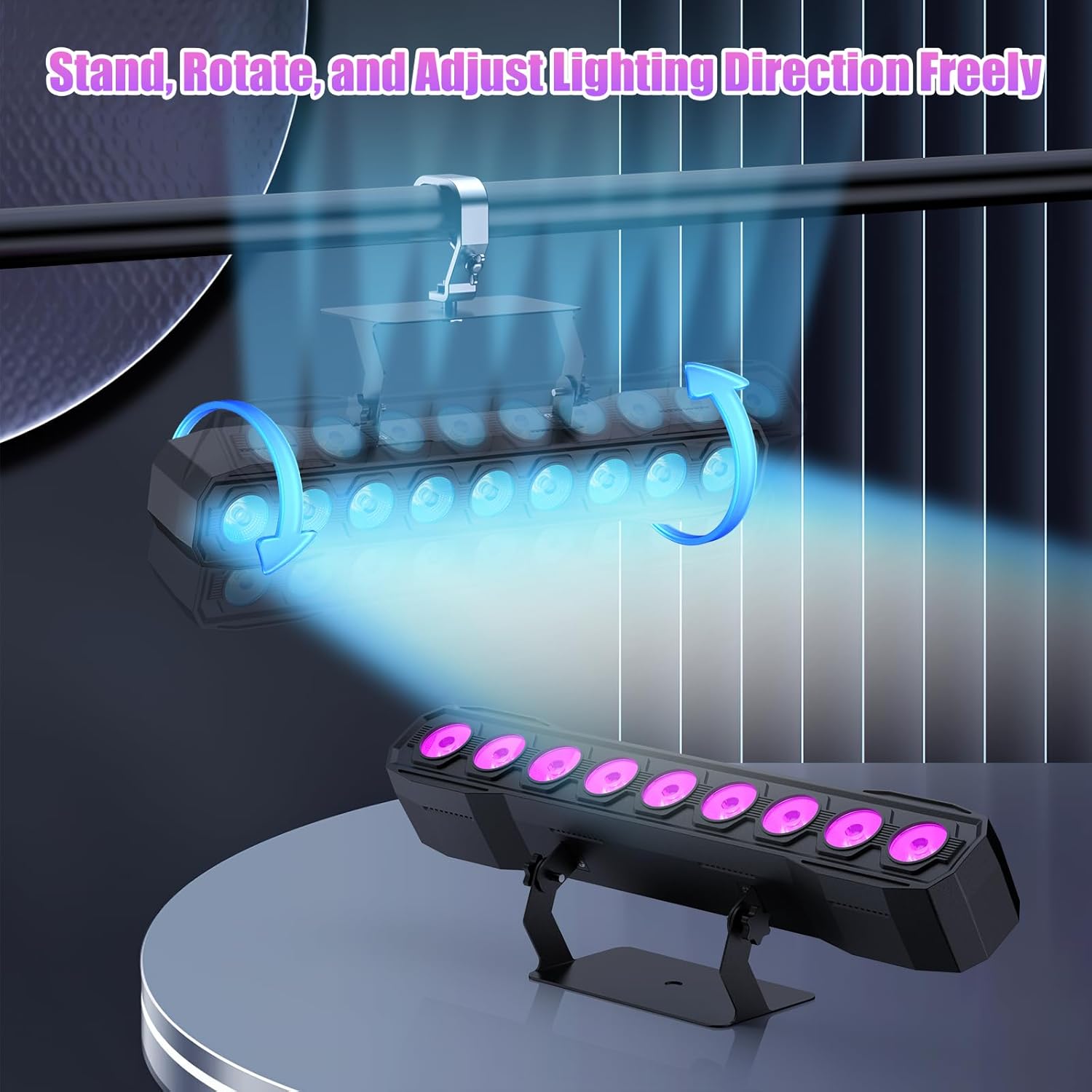
Image 5.1: Illustration of mounting and angle adjustment options.
5.3 การเชื่อมต่อสายไฟ
Connect the power cord to the Power IN port on the back of the fixture and then to a suitable power outlet. Multiple units can be daisy-chained using the Power OUT port to simplify wiring for larger setups.
6. โหมดการทำงาน
The DazzlingStage Wall Wash Bar Light supports several control modes:
- การควบคุม DMX512: สำหรับการควบคุมระดับมืออาชีพผ่านคอนโซล DMX
- โหมดอัตโนมัติ: Pre-programmed lighting sequences.
- Sound-Activated Control: Lights react to ambient sound.
- รีโมทคอนโทรล: Convenient wireless control using the included remote.
- โหมดมาสเตอร์-สเลฟ: Link multiple units where one acts as a master and others as slaves, synchronizing effects.
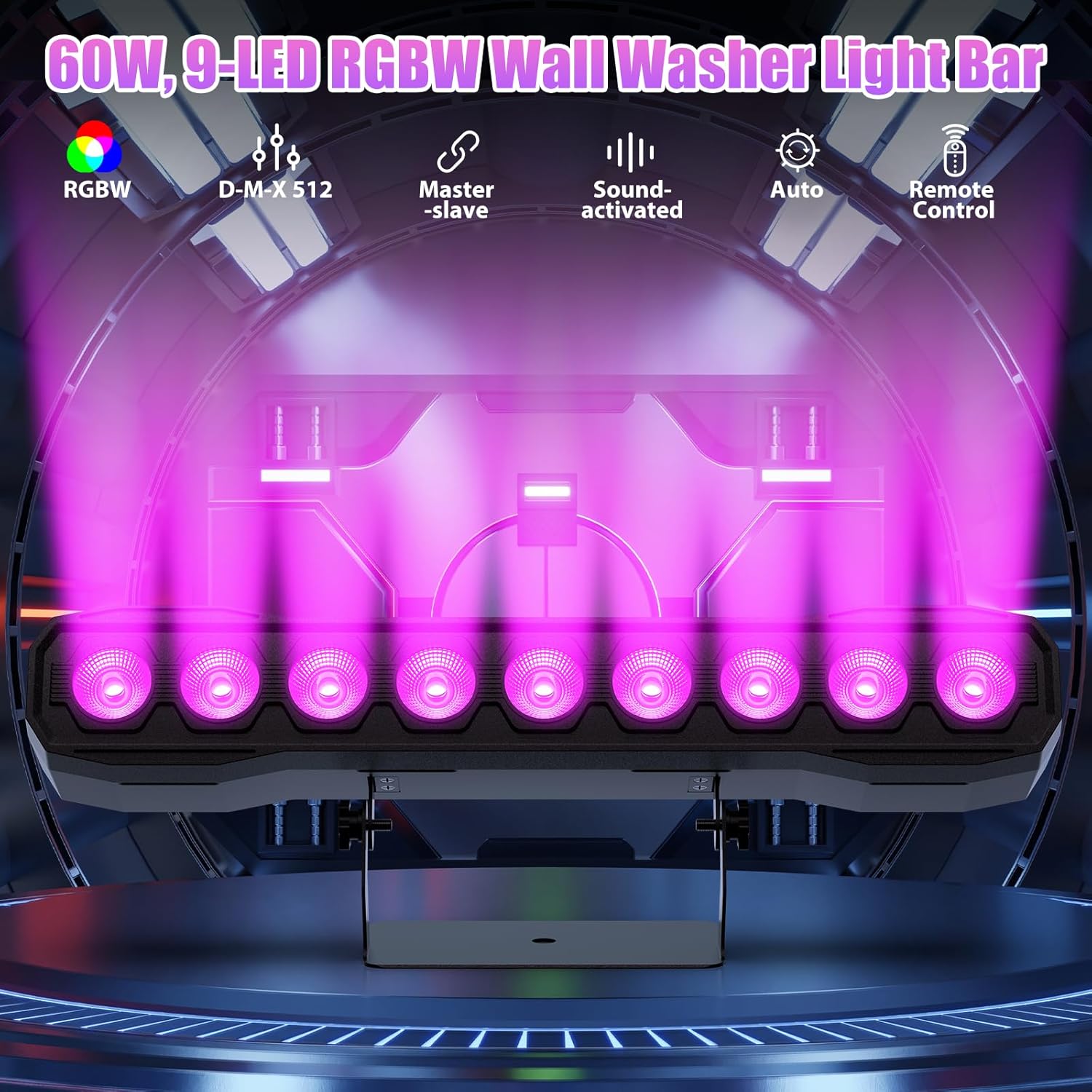
ภาพที่ 6.1: จบแล้วview of available control modes.
6.1 Display Panel Operation
Use the buttons on the back of the fixture to navigate the menu and select modes:
- เมนู: วนไปตามตัวเลือกเมนูหลัก
- ขึ้นลง: Adjusts values or navigates sub-menus.
- เข้า: ยืนยันการเลือก
6.2 เอฟเฟกต์แสง
The fixture supports various dynamic effects:
- การผสมสี: Over 16.7 million color combinations with 0-100% linear dimming.
- แฟลช: Flashing effect.
- กระโดด: Instant color changes.
- เลือนหายไป: Smooth transitions between colors.
- ชีพจร: Gradual changing effects.
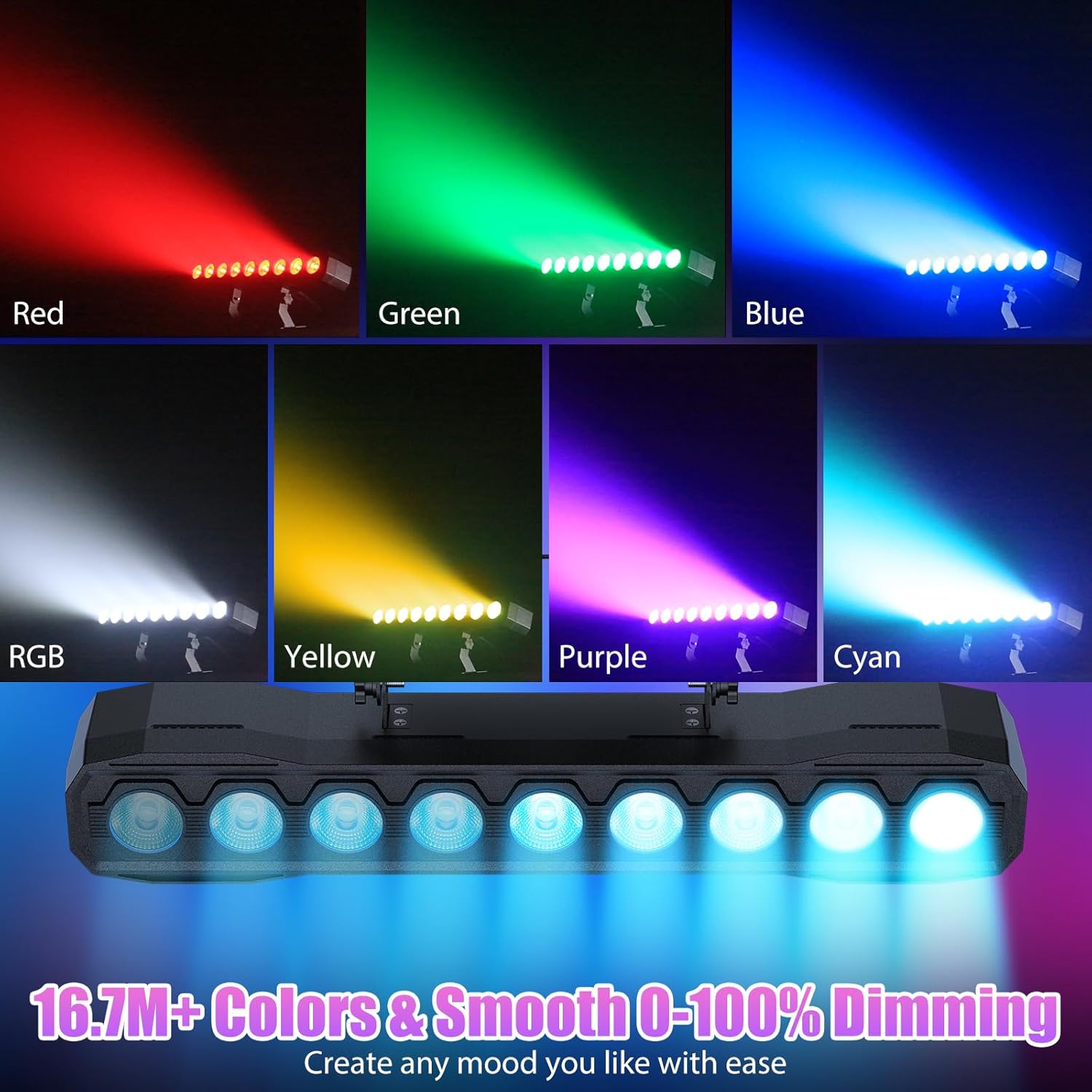
ภาพที่ 6.2: อดีตamples of color mixing and dimming capabilities.

Image 6.3: Visual representation of Strobe, Jump, Fade, and Pulse effects.
7. ฟังก์ชั่นการควบคุมระยะไกล
รีโมทคอนโทรลที่รวมอยู่ช่วยให้เข้าถึงฟังก์ชั่นต่างๆ ได้อย่างสะดวก:
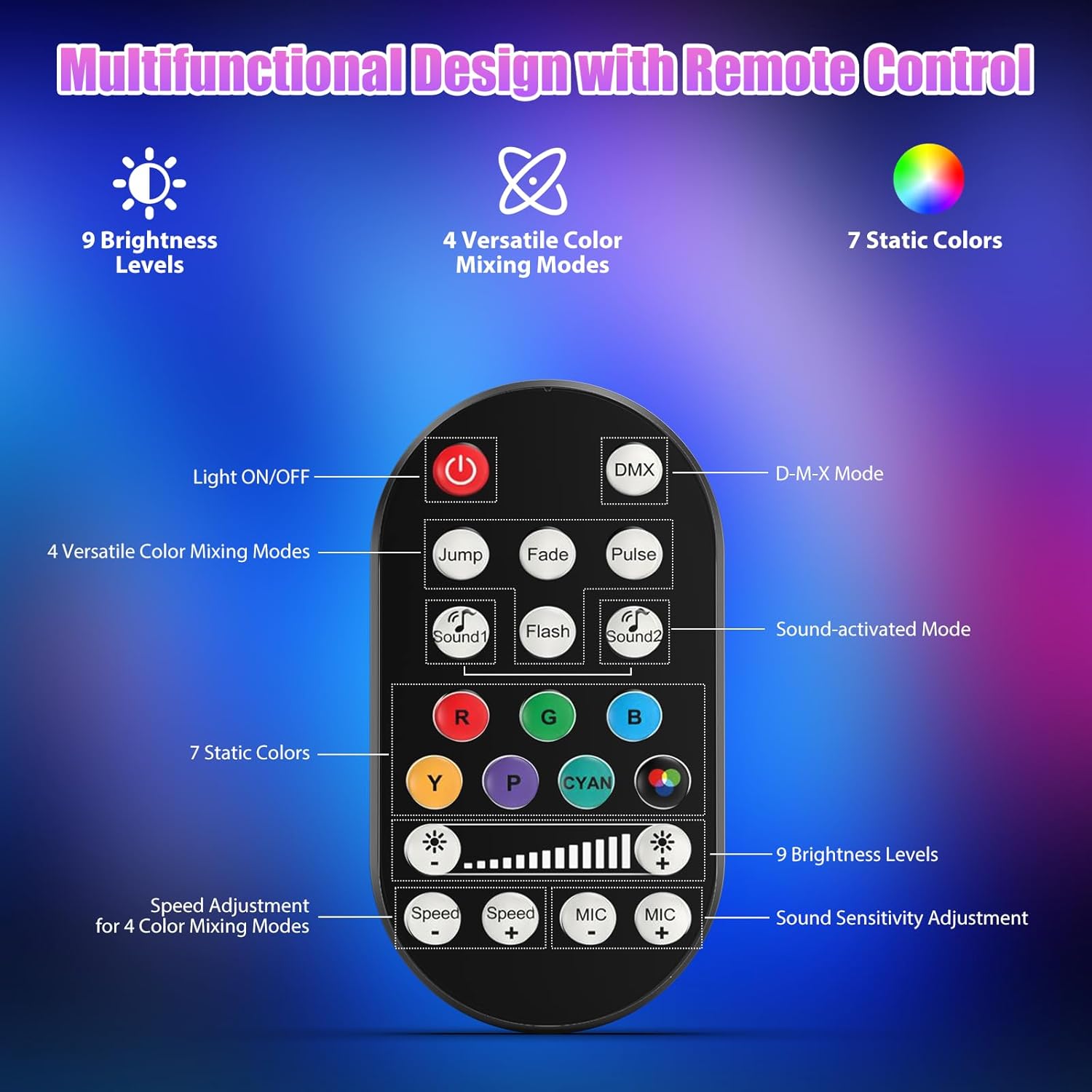
ภาพที่ 7.1: แผนผังและฟังก์ชันของรีโมทคอนโทรล
- เปิด/ปิดไฟ: เปิดหรือปิดเครื่อง
- ดีเอ็มเอ็กซ์: Activates DMX control mode.
- Jump, Fade, Pulse, Flash: Selects different color mixing modes.
- Sound1, Sound2: Activates sound-activated modes with different sensitivities.
- R, G, B, Y, P, Cyan, White: Selects static colors.
- ระดับความสว่าง: Adjusts the overall intensity of the light (9 levels).
- ความเร็ว +/-: ปรับความเร็วของเอฟเฟ็กต์แบบไดนามิก
- MIC +/-: Adjusts the sound sensitivity for sound-activated modes (15 levels).
8. การควบคุม DMX512
For advanced control, connect the fixture to a DMX512 controller. The light bar typically uses 4 or 8 DMX channels. Refer to the display panel for DMX address setting and channel assignments.
8.1 การตั้งค่าที่อยู่ DMX
Use the MENU, UP, DOWN, and ENTER buttons on the fixture's display panel to set the DMX starting address. The display will show 'AXXX' where XXX is the address (e.g., A001).
8.2 DMX Channel Functions (Example - 8 Channel Mode)
| ช่อง | การทำงาน | ช่วงค่า | คำอธิบาย |
|---|---|---|---|
| CH1 | มาสเตอร์ ดิมเมอร์ | 0-255 | ความสว่างโดยรวม (0% ถึง 100%) |
| CH2 | ความเข้มของสีแดง | 0-255 | Red LED brightness (0% to 100%) |
| CH3 | ความเข้มสีเขียว | 0-255 | Green LED brightness (0% to 100%) |
| CH4 | ความเข้มข้นของสีน้ำเงิน | 0-255 | Blue LED brightness (0% to 100%) |
| CH5 | ความเข้มของสีขาว | 0-255 | White LED brightness (0% to 100%) |
| CH6 | Strobe/Effect | 0-255 | 0-10: No function; 11-255: Strobe speed (slow to fast) |
| CH7 | โปรแกรมอัตโนมัติ | 0-255 | Selects and controls speed of built-in auto programs |
| CH8 | เสียงใช้งาน | 0-255 | Activates sound mode and adjusts sensitivity |
ตารางที่ 8.1: อดีตample DMX Channel Functions (may vary slightly by firmware version).
9. การบำรุงรักษา
การบำรุงรักษาอย่างสม่ำเสมอจะช่วยให้โคมไฟทำงานได้อย่างมีประสิทธิภาพสูงสุดและยืดอายุการใช้งาน
- การทำความสะอาด: Periodically clean the lens and housing with a soft, lint-free cloth. Do not use abrasive cleaners or solvents. Ensure the fixture is powered off and cool before cleaning.
- การตรวจสอบ: ตรวจสอบสายไฟ สาย DMX และอุปกรณ์ยึดติดตั้งอย่างสม่ำเสมอ เพื่อดูว่ามีร่องรอยการสึกหรอหรือความเสียหายหรือไม่ หากพบเห็นให้เปลี่ยนทันที
- พื้นที่จัดเก็บ: เมื่อไม่ได้ใช้งานเป็นเวลานาน ควรเก็บอุปกรณ์ไว้ในที่แห้งและปราศจากฝุ่น
10 การแก้ไขปัญหา
หากคุณพบปัญหา โปรดดูปัญหาทั่วไปและวิธีแก้ไขต่อไปนี้:
| ปัญหา | สาเหตุที่เป็นไปได้ | สารละลาย |
|---|---|---|
| ไม่มีไฟฟ้า | Power cable disconnected; No power from outlet; Blown fuse | Check power cable connection; Test outlet with another device; Replace fuse if necessary |
| ไม่มีแสงออก | Dimmer channel at 0%; Incorrect mode selected; DMX signal issue | Increase dimmer level; Select desired operating mode; Check DMX cable and address settings |
| Incorrect colors/effects | Incorrect DMX channel values; Remote control interference | Verify DMX channel settings; Ensure remote is pointed directly at the sensor; Check for other IR interference |
| โหมดเปิดใช้งานเสียงไม่ทำงาน | Microphone sensitivity too low; No sound input | Increase MIC sensitivity via remote or display; Ensure sufficient sound is present near the fixture |
| อุปกรณ์มีความร้อนสูงเกินไป | Poor ventilation; Blocked heat sink | Ensure adequate airflow around the unit; Clean any dust or debris from the heat sink fins |
11. ข้อมูลจำเพาะ
| คุณสมบัติ | รายละเอียด |
|---|---|
| ยี่ห้อ | DazzlingStage |
| หมายเลขรุ่น | ZQ06190 |
| แหล่งกำเนิดแสง | ไฟ LED RGBW 9 x 60W |
| การผสมสี | RGBW 4-in-1, 16.7 million colors |
| การหรี่แสง | การหรี่แสงอิเล็กทรอนิกส์เชิงเส้น 0-100% |
| มุมลำแสง | มุมกว้าง 35° |
| โหมดการควบคุม | DMX512, Auto, Sound-Activated, Remote Control, Master-Slave |
| ช่อง DMX | 4 or 8 Channels (selectable) |
| แสดง | จอแสดงผล LED 4 หลัก |
| วัสดุ | อะคริโลไนไตรล์ บิวทาไดอีน สไตรีน (ABS) |
| ขนาดสินค้า | 18.1 x 5.5 x 5.1 นิ้ว (46 x 14 x 13 ซม.) |
| น้ำหนักสินค้า | ประมาณ 1.98 ปอนด์ (0.9 กก.) |
| กำลังไฟเข้า | ไฟฟ้ากระแสสลับ 100-240 โวลต์, 50/60 เฮิรตซ์ |
| ผู้ผลิต | Shenzhen Zhuoqiong Technology Co., Ltd. |
12. การรับประกันและการสนับสนุน
DazzlingStage products are designed for reliability and performance. For warranty information, please refer to the terms and conditions provided at the time of purchase or contact your retailer.
If you require technical assistance or have questions not covered in this manual, please contact DazzlingStage customer support through the retailer's platform or the official brand website. Please have your model number (ZQ06190) and purchase details ready when contacting support.