
การแนะนำ
Thank you for choosing the Jectse Mini Stick Gaming Keyboard. This manual provides essential information for setting up, operating, and maintaining your device. Please read these instructions carefully before use to ensure proper functionality and to maximize your gaming experience.
เนื้อหาแพ็คเกจ
ก่อนดำเนินการติดตั้ง โปรดตรวจสอบให้แน่ใจว่ามีอุปกรณ์ทั้งหมดที่ระบุไว้ด้านล่างนี้อยู่ในแพ็คเกจของคุณ:
- 1 × Jectse Mini Stick Gaming Keyboard
- 1 × สาย USB Type-C
- 1 × Keycap Puller Tool
- 1 × Wrench
- 6 × Adhesive Feet
- 1 × คู่มือการใช้งาน (เอกสารนี้)

Image: The Jectse Mini Stick Gaming Keyboard shown with its included accessories: USB-C cable, keycap puller, wrench, and adhesive feet.
การตั้งค่า
- เชื่อมต่อสาย USB: Locate the USB Type-C port on the gaming keyboard. Connect one end of the provided USB Type-C cable to this port.
- เชื่อมต่อกับอุปกรณ์: Connect the other end of the USB cable to an available USB port on your PC, Steam Deck, MiSTerFPGA, or other compatible gaming device.
- การรับรู้เบื้องต้น: Your operating system or gaming device should automatically detect the keyboard. No additional drivers are typically required.
- Apply Feet (Optional): For enhanced stability, peel and apply the six adhesive feet to the bottom of the keyboard as desired.

ภาพ: ภาพระยะใกล้ view of the USB-C input port on the side of the gaming keyboard.
คำแนะนำการใช้งาน
The Jectse Mini Stick Gaming Keyboard is designed for responsive and versatile gameplay. Below are key operational aspects:
โหมดอินพุต
The keyboard supports multiple input modes to ensure compatibility with various games and platforms:
- โหมด XInput: Standard input mode for many modern PC games and consoles, recognized as a gamepad.
- โหมดแป้นพิมพ์: Functions as a standard keyboard, suitable for games that primarily use keyboard controls.
Refer to your device's specific instructions or the product's online resources for details on switching between input modes, if applicable.
SOCD Cleaning Modes
Simultaneous Opposing Cardinal Directions (SOCD) cleaning prevents conflicting directional inputs. The keyboard offers the following modes:
- เป็นกลาง: Both opposing inputs cancel each other out, resulting in no directional input.
- Up Priority: If Up and Down are pressed simultaneously, Up input is prioritized.
- Second Input Priority: The last directional input pressed is prioritized.
The specific method for selecting SOCD cleaning modes may involve key combinations or software settings. Consult the product's online documentation or support for detailed instructions.

Image: The gaming keyboard in use, connected to a console or PC setup, demonstrating its compact size and illuminated keys.
คุณสมบัติ
The Jectse Mini Stick Gaming Keyboard incorporates several features designed to enhance your gaming performance:
- เวลาแฝงต่ำมาก: Engineered with a processor-breaking polling rate, achieving a response time of less than 1 millisecond for precise and immediate input.
- ความเข้ากันได้ของอุปกรณ์กว้าง: Fully compatible with various platforms including PC, Steam Deck, and MiSTerFPGA, offering broad utility across your gaming ecosystem.
- Flexible Input Modes: Easily switch between XInput and Keyboard input modes to match game requirements and personal preferences.
- Multiple SOCD Cleaning Modes: Provides Neutral, Up Priority, and Second Input Priority SOCD cleaning options to ensure fair and consistent directional inputs in competitive play.
- Silent Cherry MX Red Mechanical Switches: Equipped with genuine Cherry MX Silent Red mechanical switches, providing a quiet yet highly responsive and tactile gaming experience without distracting click noises.
- จอแสดงผล OLED: Features a 128x64 single-color Organic Light Emitting Diode (OLED) display for displaying status information or settings.

ภาพ: ภายใน view of the gaming keyboard, emphasizing the Raspberry Pi RP2040 Master Chip, which contributes to its low latency performance.
การซ่อมบำรุง
Proper maintenance ensures the longevity and optimal performance of your gaming keyboard:
- การทำความสะอาด: ใช้ผ้าแห้งนุ่มเช็ดทำความสะอาดพื้นผิวแป้นพิมพ์ สำหรับคราบสกปรกที่ติดแน่น ให้ใช้ผ้าชุบน้ำหมาดๆ เช็ดเบาๆamp สามารถใช้ผ้าชุบสบู่เหลวอ่อนๆ เช็ดได้ โดยระวังอย่าให้ของเหลวเข้าไปในตัวเครื่อง
- การถอดคีย์แคป: Use the provided keycap puller tool to carefully remove keycaps for cleaning or replacement. Avoid using excessive force to prevent damage to the switches.
- พื้นที่จัดเก็บ: Store the keyboard in a cool, dry place away from direct sunlight and extreme temperatures when not in use.
- หลีกเลี่ยงของเหลว: Do not expose the keyboard to water or other liquids, as this can cause internal damage.
การแก้ไขปัญหา
If you encounter issues with your Jectse Mini Stick Gaming Keyboard, refer to the following common troubleshooting steps:
| ปัญหา | สาเหตุที่เป็นไปได้ | สารละลาย |
|---|---|---|
| ไม่รู้จักแป้นพิมพ์ | Loose USB connection, faulty cable, incompatible USB port. | Ensure the USB cable is securely connected to both the keyboard and the device. Try a different USB port or cable. Restart your device. |
| Inputs not registering correctly | Incorrect input mode, software conflict, dirty switches. | Verify the correct input mode (XInput/Keyboard) is selected. Check for conflicting software or drivers. Clean key switches if necessary. |
| จอแสดงผล OLED ไม่ทำงาน | Power issue, display settings. | Ensure the keyboard is powered on and connected. Check if there are any specific key combinations to activate/adjust the display. |
| คีย์รู้สึกเหนียวหรือไม่ตอบสนอง | Dirt or debris under keycaps. | Use the keycap puller to remove the keycap and clean the switch area. |
If the problem persists after attempting these solutions, please contact Jectse customer support for further assistance.
ข้อมูลจำเพาะ
Detailed technical specifications for the Jectse Mini Stick Gaming Keyboard:
- ประเภทสินค้า : Fighting Box Keyboard
- หมายเลขรุ่น: Jectse6gms3tvf4o
- วัสดุ: อะคริโลไนไตรล์ บิวทาไดอีน สไตรีน (ABS)
- ขนาด : Approximately 190 × 76 × 10.6 mm (7.5 × 3.0 × 0.4 inches)
- น้ำหนัก: น้ำหนักประมาณ 342 กรัม
- พอร์ตอินพุต: 1 × USB Type-C
- ความหน่วง: Less than 1 millisecond
- แสดง: 128x64 Single Color Organic Light Emitting Diode (OLED)
- Keycap Color: สีเทาโปร่งใส
- Selectable Input Modes: XInput, Keyboard
- SOCD Cleaning Modes: Neutral, Up Priority, Second Input Priority
- สวิตช์เชิงกล: Silent Cherry MX Red
- ความเข้ากันได้: PC, Steam Deck, MiSTerFPGA
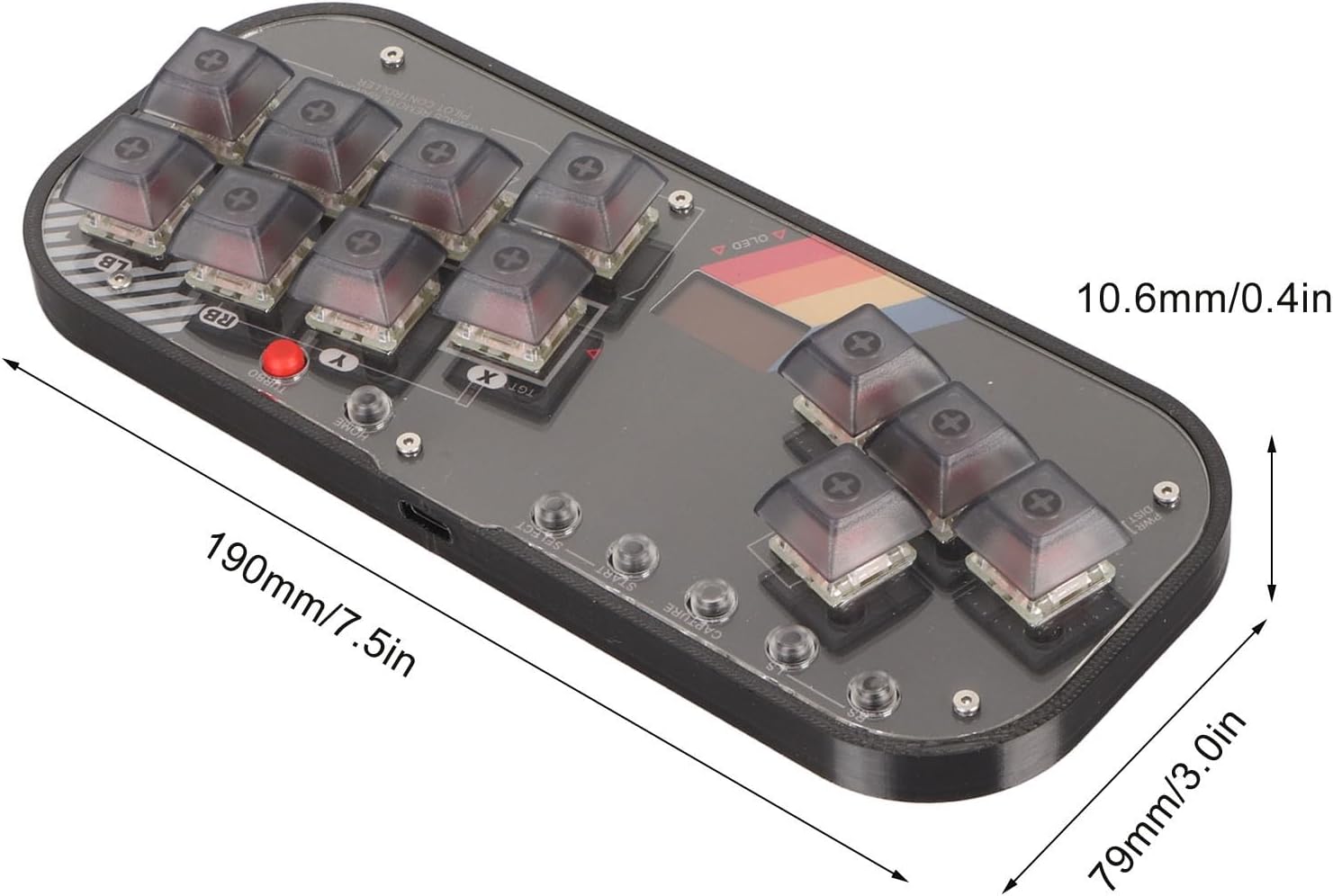
Image: A diagram illustrating the dimensions of the Jectse Mini Stick Gaming Keyboard, showing its length (190mm/7.5in) and width (79mm/3.0in), and thickness (10.6mm/0.4in).
Note: All data is measured manually, and there may be slight errors in measurement results.
การรับประกันและการสนับสนุน
This product is covered by a standard manufacturer's warranty. For specific warranty terms and conditions, please refer to the documentation provided with your purchase or contact Jectse customer support.
For technical support, troubleshooting assistance, or any inquiries regarding your Jectse Mini Stick Gaming Keyboard, please visit the official Jectse store or contact their customer service department. Contact information can typically be found on the product packaging or the brand's official webเว็บไซต์.
ร้านค้าออนไลน์: Jectse Amazon Store